

ChatGPT and Claude no longer compete on the same shape of product. ChatGPT has become the broader everything app; Claude stays focused on writing, reasoning, coding, and agentic work.
That makes the winner depend less on a benchmark and more on the job. Choose ChatGPT when one subscription must cover images, video, browsing, and general work. Choose Claude when the difficult work is mostly writing, code, or long-context reasoning.
-
#1 ClaudeBest for writing, coding & deep work
-
#2 ChatGPTBest all-rounder with broadest features
-
#3 Use BothFree tiers together cover nearly everything
Pay for the one that handles your hardest recurring task. Feature lists matter less than that default workflow.
ChatGPT — The Broader AI Workspace
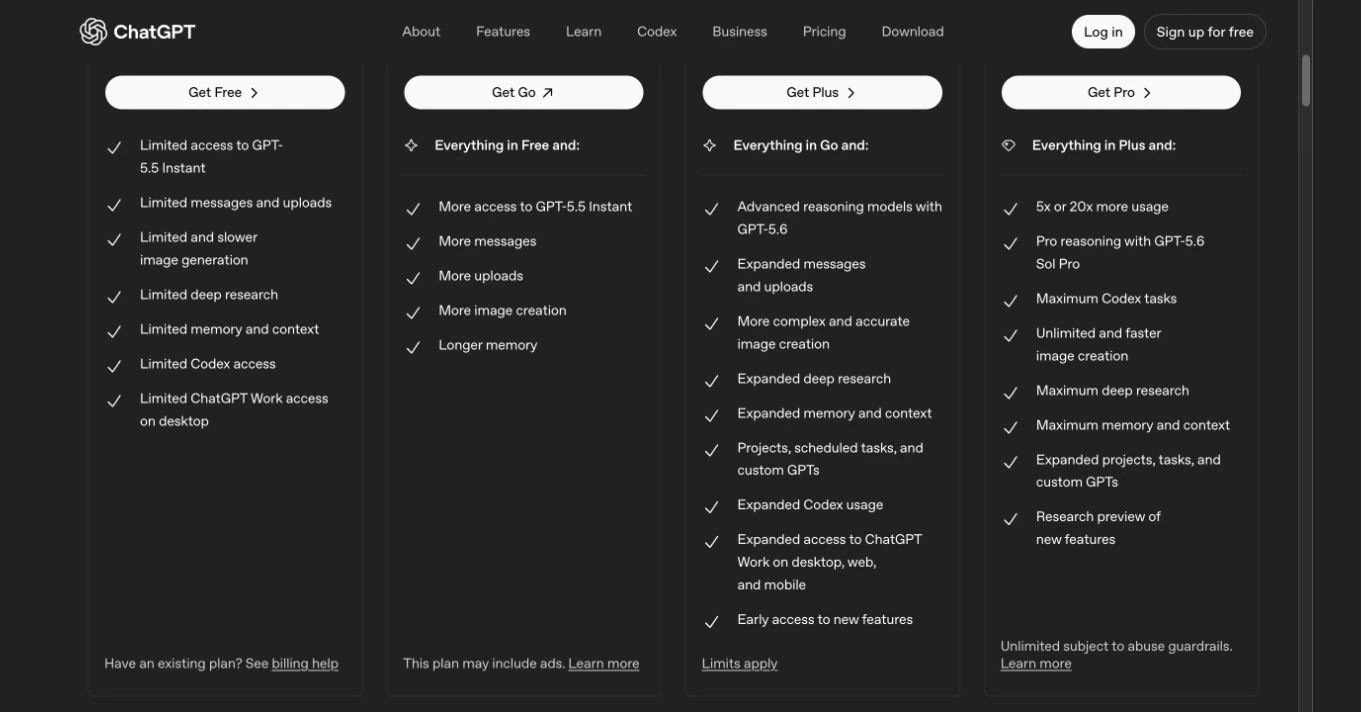
OpenAI's current plan page separates fast everyday access from higher reasoning tiers. The checked page showed GPT-5.5 Instant on Free and Go, while Plus added GPT-5.6 reasoning access and Pro expanded the high-usage tools. Web search, files, image creation, Deep Research, and Codex still have plan-specific limits rather than one universal allowance.
In U.S. pricing, Plus remains $20 per month. The Croatian page rendered Go at EUR 8, Plus at EUR 23, and Pro from EUR 103 when checked on July 29. That regional difference matters more than copying a U.S. price into every buyer's budget.
That breadth is the reason to buy ChatGPT. Images, files, custom GPTs, Deep Research, Codex, and connected work all live under one account. Our AI search comparison covers the dedicated search alternative, while Motion vs Reclaim covers scheduling work that should stay outside the chatbot.
The tradeoff is moving limits. OpenAI says Free and Plus allowances can vary by model and system conditions, so the pricing page and in-product usage screen matter more than an old fixed message count.
Files, images, web search, Deep Research, custom GPTs, and Codex share one subscription surface.
People who want a narrowly focused text-and-code workspace with simpler product boundaries.
ChatGPT ranks second for this reader because unmatched breadth comes with more moving limits and product surface than a focused text-and-code buyer needs.
- The broadest mix of chat, files, images, search, research, and custom GPTs
- Plus remains a clear $20 monthly step above Free in U.S. pricing
- Go provides a lower-cost middle tier with regional pricing
- Codex and advanced research tools sit inside the same account
- Free and paid usage limits can change by model and system conditions
- Separate feature limits make capacity harder to summarize in one number
- The broad product surface can feel cluttered for text-only work
- API usage is billed separately from ChatGPT subscriptions
Claude — The Focused Text and Code Workspace
Anthropic keeps Claude centered on writing, documents, research, reasoning, and code. Its consumer pricing page now makes the plan boundary more useful than a frozen model list: paid tiers add more model access and capacity, while the exact selected models can change by product and plan.
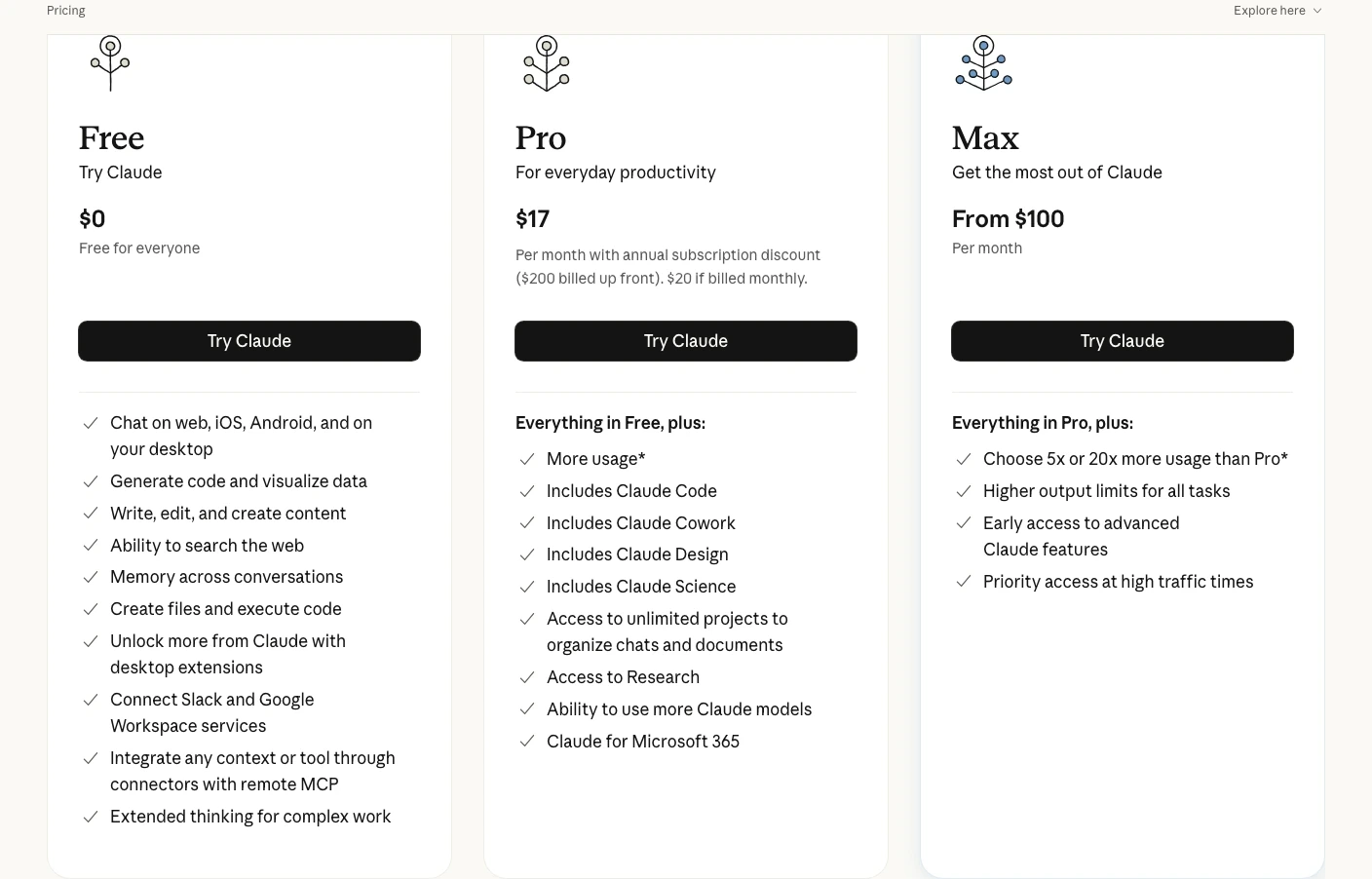
Claude Free includes web search, code generation, text and image analysis, and desktop extensions. In U.S. pricing, Pro costs $20 monthly or $17 per month with a $200 annual prepayment. The Croatian page rendered EUR 18 monthly or EUR 15 per month with EUR 180 prepaid annually. Pro adds Claude Code, unlimited Projects, Research, connected tools, and more usage.
Max starts at $100 monthly in the U.S. and EUR 90 in the checked Croatian view, with 5x and 20x Pro usage options. That creates a clean capacity ladder for text-and-code work, but it does not add ChatGPT's native media breadth.
Claude's agent story spans Claude Code and connected tools through MCP. Readers comparing dedicated agent products should use our AI agents guide; phone automation is a separate decision covered in the AI voice agents guide.
Pro combines Projects, Research, extended thinking, connected tools, and Claude Code in a focused text-and-code subscription.
Users who need image generation, video creation, or the broadest feature ecosystem.
Claude ranks first for this reader because its paid plan is more focused on sustained document, research, and coding work, while accepting less native media breadth.
- Focused text, document, research, reasoning, and code workflow
- Pro includes Claude Code, Projects, Research, and extended thinking
- $20 monthly or $17 monthly equivalent on annual Pro billing
- The consumer plan table showed a 200k context window on the checked pricing page
- No image generation or video creation — you'll need ChatGPT or a separate tool for that
- Free usage remains limited without one universal message number
- Model and context availability varies by surface and plan
- Team and Enterprise use separate Claude Code billing rules
Writing Workflow — Breadth vs Focus
A current evidence-led comparison cannot honestly promise that one model will always write better. Output changes with model selection, prompt design, context, and account limits, and this refresh did not run a controlled prose benchmark.
The product difference is still useful. ChatGPT combines drafting with search, files, images, custom GPTs, and broader connected work. Claude keeps the interface centered on text, documents, Projects, Research, Artifacts, and connected tools.
Choose ChatGPT when writing is one step inside a mixed-media workflow. Choose Claude when the writing project itself needs persistent documents, research context, or a cleaner text-first workspace.
Coding Tools — Codex vs Claude Code
Both vendors now sell agentic coding rather than simple snippet generation. ChatGPT Plus includes Codex access, while Claude Pro includes Claude Code directly in the terminal.
The right choice depends on surface and allowance. Claude Code fits a terminal-first workflow tied to Claude's plan limits. Codex fits developers who also want ChatGPT's broader research, file, and media tools under the same subscription. Neither inclusion guarantees that a generated patch is correct.
For IDE-native alternatives and current credit structures, use our Claude Code vs Cursor vs GitHub Copilot comparison. The broader AI coding tools roundup covers additional work surfaces.
The Upgrade Ladder
The U.S. entry comparison is still $20 versus $20, but regional checkout prices, annual commitments, and high-usage tiers change the real budget.
ChatGPT tiers
- Free: core chat plus limited access to search, files, analysis, images, GPTs, Codex, and Deep Research
- Go: more core chat and tool usage than Free; the Croatian page showed EUR 8 per month
- Plus: $20 per month in U.S. pricing and EUR 23 in the checked Croatian view, with GPT-5.6 reasoning access and expanded tools
- Pro: high-usage access shown from EUR 103 on the checked Croatian page; U.S. help material separates 5x and 20x capacity tiers
If the $100 versus $200 upgrade is the actual decision, I broke down ChatGPT Pro, Google AI Ultra, and Claude Max separately in our premium AI subscription plans guide. If the harder question is what happens to sensitive prompts rather than which model performs best, use the separate Venice AI vs Proton Lumo vs Duck.ai privacy comparison.
Claude tiers
- Free: limited chat, writing, code, image analysis, web search, and desktop extensions
- Pro: $20 monthly or $17 monthly equivalent with $200 annual prepayment in U.S. pricing; EUR 18 monthly or EUR 15 monthly equivalent with EUR 180 prepaid annually in the checked Croatian view
- Max: starts at $100 monthly in the U.S. or EUR 90 in the checked Croatian view, with 5x and 20x Pro usage options
For an individual buyer, $20 per month is still the clean comparison: ChatGPT Plus versus Claude Pro. Higher tiers make sense only after actual usage data shows that Plus or Pro is the constraint.
Developers should compare Claude Code and Codex allowances before paying. Buyers who need native images or the broadest tool set should start with ChatGPT Plus; text-and-code buyers should start with Claude Pro.
Features & Ecosystem
This is where the philosophical difference between OpenAI and Anthropic becomes obvious.
ChatGPT is the broader product: image generation, voice, files, data analysis, web search, Deep Research, custom GPTs, Codex, and connected apps. Buyers shopping specifically for campaign video should still use our AI video generators guide rather than treating one bundled feature as the full category.
Claude is more focused. Projects organize related chats and documents, Research supports deeper source work, Artifacts provide a side-by-side output surface, and Claude Code moves agentic work into the terminal.
The extension models differ too. ChatGPT uses custom GPTs and connected apps; Claude leans on MCP connections and desktop extensions. The GPT route is easier for a general user to discover, while MCP is designed around interoperable tool connections.
Artifacts and Canvas both separate an output from the main conversation. That interface difference is visible in the products, but this refresh does not claim a measured speed or quality winner.
Free Tier Face-Off
The ChatGPT vs Claude free tier question matters more than you'd think, because a huge number of people will never pay for either of these tools. So which free experience is better?
ChatGPT Free includes core chat plus limited search, files, data analysis, image creation, and GPT use. OpenAI says the default model and limits can change, and separate tools can have separate caps.
Claude Free includes limited writing, code, image analysis, web search, and desktop-extension access. Anthropic likewise describes usage as limited rather than promising one universal message count.
Neither free tier wins on a stable numeric allowance because both vendors can change limits. ChatGPT wins breadth; Claude wins focus.
Use both free tiers for one real workweek, then pay only when one product becomes the repeated default. That reveals more than a borrowed message-limit table.
What the Current Model Labels Do Not Settle
Model names are moving targets. The checked ChatGPT plan table showed GPT-5.5 Instant and GPT-5.6 reasoning tiers, while Claude's consumer pricing page described more model access by plan instead of promising one permanent model roster. Neither page guarantees that today's selected model will remain the default for the life of a subscription.
Context numbers are especially easy to misuse. Claude's checked consumer plan table listed 200k context, while API documentation can describe different windows. OpenAI likewise publishes different allowances across ChatGPT, Codex, and API products. Treat the selected plan and surface as the source of truth, not the largest number on a developer page. Production teams choosing metered models should use the separate GPT-5.6 vs Claude Sonnet 5 API comparison.
The same caution applies to coding and writing claims. Vendor benchmarks can show model capability, but they do not predict a specific repository, prompt, editorial style, or account limit. This guide ranks the products by purchasable workflow, not by pretending one benchmark settles every output.
How I Would Choose Between ChatGPT and Claude
- List the three recurring jobs. If images, files, custom assistants, and research share the list, ChatGPT has the cleaner consolidation case.
- Identify the work surface. A terminal-first developer should compare Claude Code with Codex allowances before comparing chatbot prose.
- Check the real limit screen. Free and paid caps can change, so record one normal week of usage before buying Max or Pro capacity.
- Price the first useful upgrade. Compare $20 ChatGPT Plus with $20 monthly Claude Pro; treat annual Claude pricing and higher usage tiers as separate commitments.
- Keep a countercase. Claude's focus is a benefit only when native images and broader connected tools are not part of the job.
Full Comparison
This table keeps to current official product and plan differences. It does not turn undocumented output judgments into stars.
| Feature | ChatGPT | Claude |
|---|---|---|
| Current Model Family | GPT-5.5 Instant; GPT-5.6 reasoning by plan | Plan-dependent model access |
| Free Access | Core chat + limited tools | Limited chat, search, code, and analysis |
| Free Limits | Dynamic by model and feature | Dynamic usage allowance |
| Research and Files | Search, files, analysis, Deep Research by plan | Web search, files, Research by plan |
| Native Images | Yes | No |
| Coding Tool | Codex | Claude Code |
| Customization | Custom GPTs + connected apps | Projects + MCP connections |
| Paid Individual Plan | $20/mo U.S.; EUR 23 checked Croatia | $20/mo U.S.; $17 annual equivalent |
| High-Usage Plan | Pro with 5x or 20x capacity | Max from $100 U.S.; 5x or 20x |
| Action | Try ChatGPT | Try Claude |
Who Should Pick What
The choice gets easier when it starts from the recurring job instead of a model leaderboard.
- Writers and content teams: Start with Claude when Projects, Research, and a focused document workflow matter. Start with ChatGPT when images, files, custom GPTs, and broader tools belong in the same job. Our free AI writing tools guide covers the specialist alternatives.
- Developers: Choose Claude Pro for a Claude Code and terminal-first workflow. Choose ChatGPT Plus when Codex should sit beside broader research and media tools. Compare current usage allowances before upgrading.
- Marketers and social teams: ChatGPT has the stronger all-in-one case because native image generation and custom GPTs reduce tool switching. Dedicated copy platforms remain a separate purchase decision.
- Students and researchers: Test both free tiers, verify every source, and keep the final argument in your own words. A separate knowledge base such as those in our Notion vs Obsidian comparison may matter more than the chatbot.
- Creative professionals: ChatGPT is the practical choice when native visual generation is required. Our AI headshot guide covers the dedicated category.
- People who want one tool: ChatGPT for breadth; Claude for focused text, research, and code work.
The Verdict
Claude wins this focused buyer decision. Pro maps cleanly to sustained text, research, document, and terminal-based coding work, and its annual option lowers the effective monthly price.
Avoid Claude Pro as the default if native images, custom assistants, or mixed-media work are weekly requirements; the risk is paying for a focused workspace and then adding a second subscription to cover the missing jobs.
ChatGPT remains the better all-round product. It covers more media, research, customization, and connected tasks without requiring a second subscription.
The strongest countercase is convenience: a buyer who needs images, custom GPTs, Codex, files, and Deep Research may get more practical value from ChatGPT Plus than from Claude's tighter focus. That is a workflow judgment, not a claim that one model is universally smarter.
I would still choose ChatGPT for a marketer, generalist, or small operator who moves between visuals, files, research, and custom assistants in the same week. Claude's cleaner surface stops being an advantage when the recurring work keeps leaving that surface.
Use both free tiers for a real week, then pay for the one that repeatedly handles the harder task. Continue with our AI tools reviews or review the VPN options for AI-heavy work when network privacy and CAPTCHA friction are part of the setup.
Frequently Asked Questions
Ready to check Claude?
Use the verified route if the trade-offs still fit. If not, jump back to the summary and compare the alternatives.
AI tools editor focused on public docs, changelogs, API limits, free-tier constraints, and developer community feedback. Turns fast-moving AI claims into buyer-focused recommendations without implying undocumented hands-on testing.
Anthony starts with the workload behind the demo, then ranks AI tools by documented model access, limits, implementation clarity, failure behavior, and the cost of an acceptable result.
Related Articles

Bardeen vs Zapier Agents vs Lindy: Best AI Coworker
AI coworkers compared by starting context, agent authority, usage economics, approval boundaries, and offboarding clarity
Compare Bardeen, Zapier Agents, and Lindy by workflow fit, approvals, credits, integrations, browser permissions, and cancellation terms.

GPT-5.6 vs Claude Sonnet 5 API: Which Tier Fits?
Production API model routing guide
GPT-5.6 Sol, Terra, and Luna compared with Claude Sonnet 5 on API price, long context, tokenization, migration risk, tools, and workload fit.