

-
#1 Reclaim AIBest for most people — free tier, habit tracking, syncs with your existing tools
-
#2 MotionBest for team PM — replaces Asana/Trello, Gantt charts, aggressive AI scheduling
I have a confession: I spent three weeks using an AI calendar that rearranged my entire schedule every time someone booked a 30-minute call. Three weeks of watching my task list shuffle like a deck of cards, deadlines bouncing around, and that low-grade anxiety of never knowing what my afternoon would look like until noon. The r/productivity community calls this "AI Calendar Anxiety," and honestly the name fits.
That was Motion.
Reclaim AI takes the exact opposite approach. It quietly blocks time for your tasks and protects it from meeting overrides, without touching anything else. No drama. No reshuffling.
I dug into both, tracking the same metrics I use for everything: time saved, clicks required, and whether users actually get more done or just feel busier. Here's what the research turned up.
The Core Difference: "All-in-One" vs "The Integrator"
Before we get into features and pricing, you need to understand the fundamental philosophy here. These two apps are solving the same problem ("I have too many tasks and not enough time") but they approach it from completely opposite directions.
Motion wants to eat your tech stack. It's a calendar, task manager, project management tool, and meeting scheduler rolled into one. The pitch is: cancel Asana, cancel Trello, cancel Calendly. Motion does all of it. The AI automatically schedules every task into your calendar based on deadlines, priorities, and available time slots. You don't decide when to work on things. Motion decides for you.
Reclaim wants to augment your tech stack. It connects to the tools you already use (Asana, Todoist, Linear, Jira, ClickUp) and handles one thing: finding time on your calendar for the work those tools assign you. It doesn't replace your task manager. It just makes sure your calendar reflects what you actually need to do.
This isn't a minor difference. It's the entire decision.
If you hate your current project management setup and want to burn it down, Motion is your match. If you like your tools and just want smarter time-blocking, Reclaim is it. (Not sure whether either belongs on your shortlist? The broader time blocking apps guide compares Reclaim and Motion against Akiflow, Sunsama, and TickTick. Not sure which PM tool to pair with Reclaim? Our project management tools roundup covers the full landscape.)
Motion vs Reclaim AI: Head-to-Head
| Feature | Reclaim AI | Motion |
|---|---|---|
| Best For | Individuals & developers | Teams & project managers |
| Starting Price | $0 (Free Lite plan) | $19/mo (annual billing) |
| Free Plan | ✓ 2 calendars, 3 habits | ✗ (7-day trial only) |
| Scheduling Style | Protective & flexible | Aggressive & deadline-driven |
| Replaces Asana/Jira? | ✗ (integrates with them) | ✓ (built-in PM tools) |
| Habit Tracking | Top-tier (dedicated) | Basic (recurring tasks only) |
| Task Integrations | Asana, Todoist, Linear, Jira, ClickUp | Limited (wants you in its system) |
| Gantt Charts | ✗ | ✓ with AI dependencies |
| Calendar Support | Google + Outlook (Aug 2025) | Google + Outlook |
| Support Channels | Live chat (<20 min avg) | Chat + email (24-48hr) |
| Mobile App | ✓ iOS & Android | ✓ iOS & Android |
| Action | Try Reclaim Free → | Try Motion Free → |
The Scheduling Algorithm & "Calendar Anxiety"
This is the section that'll decide which tool you pick. So pay attention.
Motion's AI is aggressive. You add a task, give it a deadline and estimated duration, and Motion drops it into your calendar wherever it fits. Sounds great in theory. In practice, here's what happens: your 10am meeting gets rescheduled to 11am by a coworker. Motion sees the conflict. It reshuffles your 10am task to 2pm. But that bumps your 2pm task to tomorrow. Which cascades into Wednesday. Which pushes Thursday's deadline into the red zone.
One meeting change. Four days reshuffled.
I counted. During one particularly meeting-heavy week (the same week I was testing AI meeting assistants, ironically), Motion rescheduled my task list 11 times in a single day. By 3pm I had no idea what I was supposed to be working on because the schedule had changed three times since lunch. Productivity communities on Reddit call this "AI Calendar Anxiety," and honestly? The name fits.
Reclaim takes the opposite approach. It blocks time on your calendar for tasks and habits, but it doesn't aggressively reshuffle everything when conflicts happen. Instead, it marks the blocked time as "flexible," meaning if someone books over it, Reclaim quietly finds another slot. No cascade. No panic. Your afternoon doesn't implode because someone moved a standup.
For people who like control (and that's most people I know), Reclaim's approach is healthier. Motion's approach is more powerful if you're willing to fully trust the AI. Most people aren't.
Habit Tracking & Routine Building
Not even close. Reclaim wins this one in about 5 seconds.
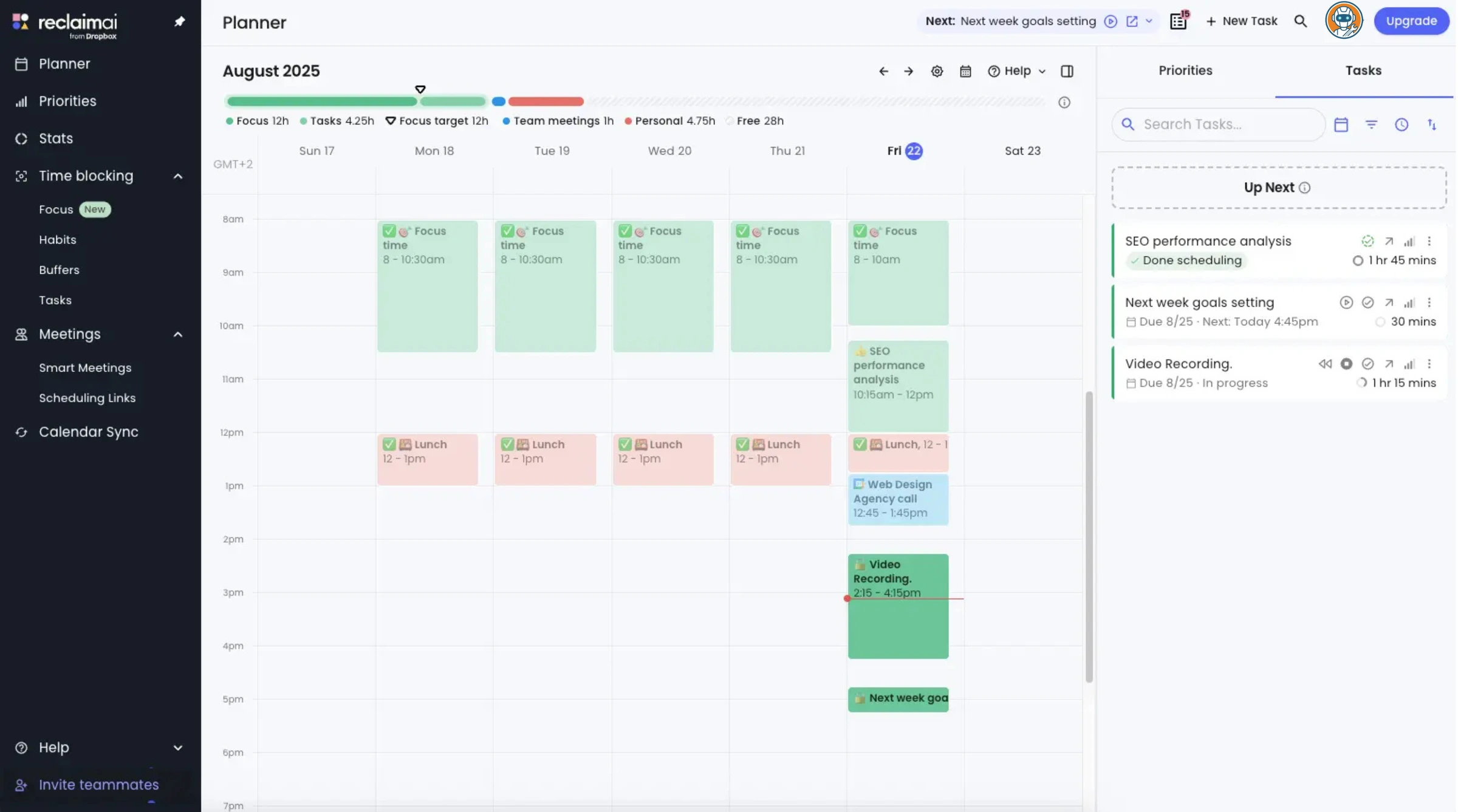
Reclaim has a dedicated habit system that lets you schedule recurring blocks — "30 minutes of exercise," "1 hour of deep coding," "lunch break," and it defends those blocks from meeting overrides. If someone tries to book over your focus time, Reclaim automatically moves the habit to another open slot. You can set frequency (daily, 3x/week), time windows (mornings only, after 2pm), and minimum durations.
I set up a "90 minutes of deep work" habit with a morning-only window. In 30 days, Reclaim defended it successfully 26 times out of 30. The four times it got overridden were back-to-back-to-back meetings that left literally zero open morning slots. Fair enough.
Motion handles routines through recurring tasks. You can set a task to repeat daily, but it gets treated like any other task in the AI's scheduling queue. No special protection. No defense logic. Reddit users consistently report their "daily planning" recurring tasks getting pushed to 4pm because the AI decided other deadlines were more urgent. A planning session at 4pm defeats the entire point.
Project Management & Team Features
Here's where Motion fights back.
If you manage a team of 5+ people and need Gantt charts, task dependencies, and project timelines, Motion is genuinely good at this. The Gantt view shows your entire project mapped out with dependencies between tasks. Move one milestone and the AI recalculates every downstream deadline automatically. For an agency or startup managing client projects, this replaces a $10-15/seat Asana subscription.
I set up a mock project with 15 tasks across 3 team members. Motion correctly identified the critical path, flagged two tasks that would miss their deadlines based on the current schedule, and suggested moving them up. Took about 4 clicks to accept the changes. Asana would've shown me the same insight buried in a report I'd never open.
Reclaim doesn't even try to compete here. No Gantt charts. No dependencies. No project views. It knows what it is: a time-blocking layer on top of your existing PM tools, not a replacement. If you need project management features, you keep Asana/Jira and let Reclaim handle the calendar side.
The question is whether you want one tool doing everything (Motion) or two tools each doing their thing well (Reclaim + your existing PM software).
Calendar Syncing: Google vs Microsoft
Quick update that most comparison articles from early 2025 get wrong. Reclaim now fully supports Outlook. They launched Microsoft 365 calendar integration in August 2025, including Teams conferencing, Focus Time, Habits, and Calendar Sync. There are minor quirks (event titles use hashtags instead of RSVP notes due to Microsoft API limitations), but it's close to full parity with Google Calendar.
Motion has supported both Google Calendar and Outlook from the start. No complaints on either integration.
Bottom line: calendar platform is no longer a deciding factor between these two. Pick based on features and pricing, not which calendar app you use.
Pricing Breakdown (The $228 Elephant in the Room)
Let's talk money. Because this is where the decision gets obvious for most people.
Reclaim AI pricing:
- Lite (Free): $0 forever. 1 personal calendar sync, 1 habit, 1 scheduling link, 1-week scheduling range.
- Starter: $10/user/month billed annually ($120/year), or $12 month-to-month. Unlimited habits, 4 calendars, task integrations.
- Business: $15/user/month billed annually. Priority support, advanced analytics, team features.
- Enterprise: $22/user/month billed annually. SSO, admin controls, custom onboarding.
Motion pricing:
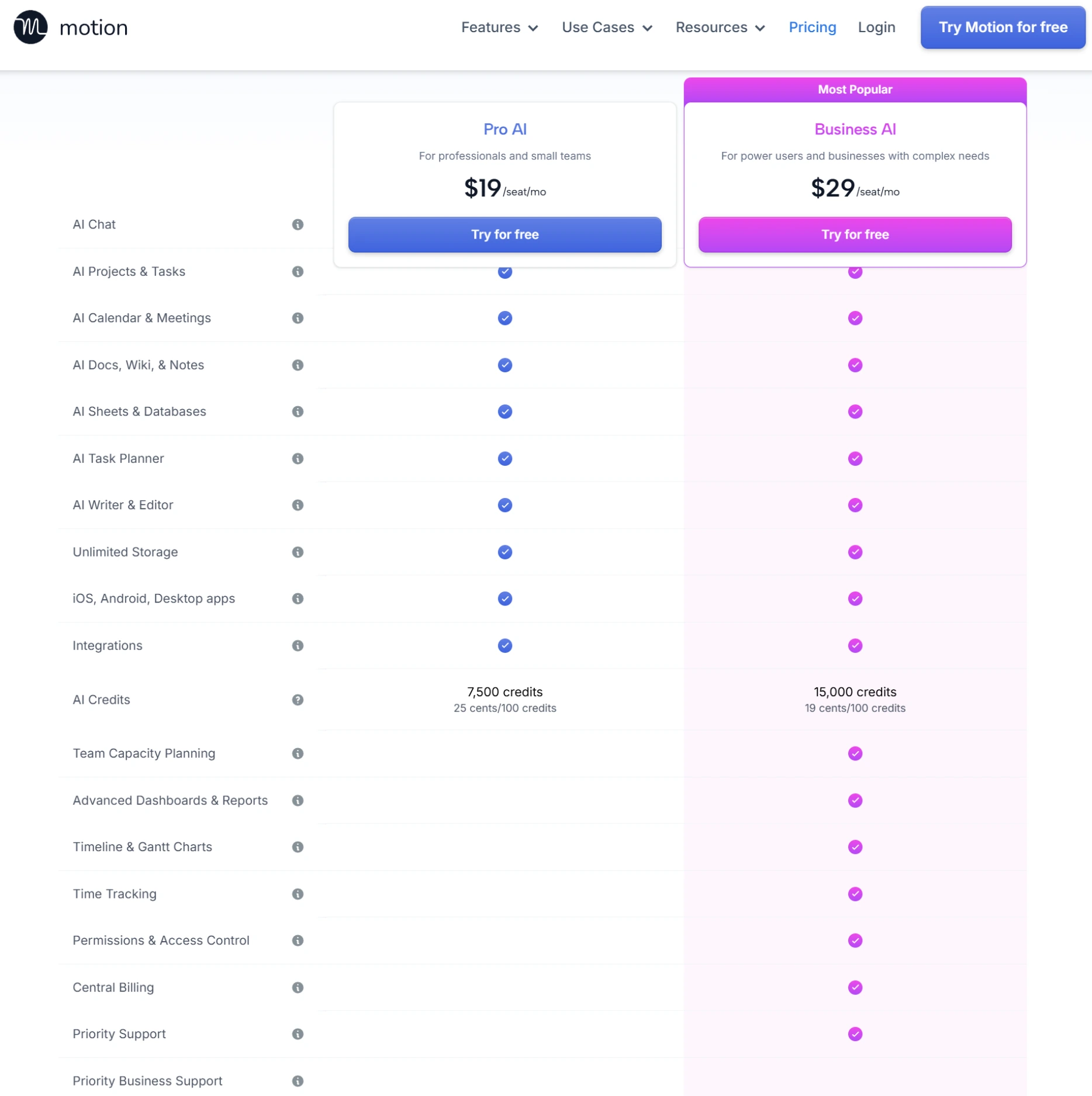
- Pro AI: $19/month billed annually ($228/year). Solo plan with all AI scheduling features.
- Team: $12/user/month billed annually. Adds team scheduling and project management.
- No free tier. 7-day trial requires credit card.
Do the math. A solo user on Reclaim Starter pays $120/year. The same user on Motion pays $228/year. That's a $108 difference for what is, for individuals, roughly the same outcome: tasks get scheduled on your calendar.
Motion's pricing makes sense exactly one way: if it genuinely replaces your PM subscription. If you're paying $10.99/seat/month for Asana Premium and $12.50/seat for Trello Premium, killing both and moving to Motion saves money at scale. For a team of 5, that math can work. For a solo freelancer? You're paying $228/year for a calendar that rearranges your to-do list. Reclaim does that for free.
Reclaim AI: The Full Picture
Habit tracking defended deep work blocks 26 out of 30 days without reshuffling the rest of the schedule.
Teams needing Gantt charts, task dependencies, or a full PM replacement, since Reclaim has zero project management features.
- Free tier is genuinely usable — not a 'sign up to see a paywall' situation
- Native integrations with Asana, Todoist, Linear, Jira, and ClickUp
- Habit tracking defended my deep work 26 out of 30 days
- Live chat support with under 20-minute average response time
- Full Outlook + Teams support since August 2025
- Free tier caps at 2 calendars and 3 habits — you'll hit it fast
- No project management features at all — needs a separate PM tool
- Analytics on free tier are basic (just shows time allocation)
- 3-week scheduling range on free tier means no long-term planning
Reclaim is the tool I kept using after the testing period ended. That says more than any score.
The thing that sold me is that I didn't have to change how I work. My tasks stayed in Todoist. My meetings stayed in Google Calendar. Reclaim just sat between them and made sure there was actually time blocked for the work. No learning curve. No "let me reorganize your entire workflow" onboarding wizard. I connected my accounts, set up one habit, and it was working within 10 minutes.
The free tier limitations are real though. One habit sounds fine until you want to protect your lunch, your morning planning, your exercise block, and your evening wind-down. That's four. You're upgrading to Starter before the first week is out. Which is fine at $10/month on annual billing, but know that the free tier is a foot-in-the-door, not a permanent solution.
Motion: The Full Picture
Gantt charts with AI-calculated dependencies and critical path detection are a legitimate PM replacement for small teams.
Solo freelancers, since $228/year for a calendar that rearranges your to-do list is hard to justify when Reclaim does it free.
- Gantt charts with AI-calculated dependencies — legitimate PM replacement
- Auto-scheduling is genuinely powerful when you trust it completely
- Meeting scheduler built in — no need for separate Calendly/Cal.com
- Critical path detection flagged deadline risks I would've missed
- $228/year for individuals is hard to justify vs Reclaim at $0-$96
- AI reshuffling caused genuine anxiety — 11 reschedules in one day
- 7-day trial with credit card required (no free tier at all)
- Wants you to abandon existing PM tools — migration friction is high
- Habit/routine management is basic compared to Reclaim's dedicated system
I wanted to like Motion more than I did. The tech is impressive. The scheduling AI is legitimately doing complex constraint solving in real time and the project management features are genuinely useful for teams. If I ran an agency with 10 people, I'd seriously consider it.
But here's the fundamental problem: Motion requires total commitment. You have to move all your tasks into Motion's system. You have to trust the AI with your schedule completely. And you have to be extremely disciplined about estimating task durations, because "garbage in, garbage out" is brutal here. I underestimated a writing task by 30 minutes once. The cascading effect pushed three other tasks across two days. Getting the estimates wrong isn't just annoying, it's destructive.
The productivity industry loves selling you on "automated scheduling" as if the AI magically knows what you should be doing. It doesn't. Motion is a scheduling optimizer, not a decision-maker. You still need to tell it exactly what to schedule, how long it'll take, and what matters most. If you're meticulous about that, Motion rewards you. If you're not (and most people aren't), it punishes you with calendar chaos.
Related: if you're using AI tools like ChatGPT or Claude to help draft those task descriptions and time estimates, that actually works pretty well. I fed Claude my project brief and asked it to break it into tasks with duration estimates, then pasted those into Motion. Saved about 20 minutes of setup per project.
Final Verdict: Stop Over-Optimizing Your Life
Here's my honest take after digging deep into both platforms.
Use Reclaim AI if: You're a solo worker, developer, freelancer, or anyone who already has a task management system they like. You want protected focus time, habit tracking, and smart calendar blocking without changing how you work. The free tier alone is worth trying. At $10/month for Starter on annual billing, it's still the best value in this category. Period.
Use Motion if: You manage a team of 3+ people, you need real project management features (Gantt charts, dependencies, critical path), and you're willing to migrate your entire workflow into Motion's ecosystem. The $19/month individual price only makes sense if you're killing at least one other PM subscription.
For the 80% of people reading this? Reclaim. It doesn't try to replace your tools. It doesn't reshuffle your week. It quietly defends your time and gets out of the way. That's what a productivity tool should do: save you time without demanding more of it.
And one more thing, and this is less about calendars and more about sanity: the entire premise of "AI will schedule your perfect day" is oversold. Nobody's day goes according to plan. The best scheduling tool isn't the one that creates the most optimal schedule. It's the one that adapts gracefully when everything goes sideways. By that measure, Reclaim wins by a mile.
If you're building apps with vibe coding tools, Reclaim's Linear and Jira integrations will protect your coding blocks. And if you need to stay focused while researching with AI, our Perplexity vs SearchGPT comparison covers which search AI actually saves research time. For managing all those notes and research, see our Notion vs Obsidian comparison — one of them is free and faster than you'd expect.
Frequently Asked Questions
Ready to check Reclaim AI?
Use the verified route if the trade-offs still fit. If not, jump back to the summary and compare the alternatives.
Crypto and productivity editor focused on cost, custody risk, setup friction, exports, fees, and workflow drag. Prioritizes verifiable numbers and clear skip criteria over hype.
Lucas starts with total operating cost, then ranks tools by setup and recurring friction, custody or export, reversibility, and whether the decision still makes sense when the exit path is included.
Related Articles

Paste vs Maccy vs Raycast: Which Mac Clipboard Manager Fits?
Mac clipboard managers compared by local history, Apple-device sync, privacy posture, launcher fit, setup burden, and subscription value
Paste, Maccy, and Raycast compared by clipboard history, Apple-device sync, local storage, privacy posture, pricing, and workflow fit.

Superlist MCP vs Todoist MCP vs Linear Agent
AI task-manager paths compared by native MCP access, capture depth, issue context, setup risk, pricing clarity, and local-control fallback
Superlist MCP, Todoist MCP, Linear Agent, and Super Productivity compared by AI task access, pricing, setup risk, workflow fit, and local-control fallback.