

-
#1 CursorChoose it when moving to an AI-native editor is acceptable and agent work is central
-
#2 GitHub CopilotChoose it when VS Code, JetBrains, Visual Studio, Xcode, or GitHub continuity matters most
This comparison comes down to one decision: keep your IDE or replace it. GitHub Copilot is an assistant that follows developers into the tools they already use. Cursor is an editor designed around AI from the start.
That distinction matters more than a long feature checklist. A JetBrains or Visual Studio team can adopt Copilot without reopening its editor standard. A VS Code developer who wants the agent, codebase context, cloud work, hooks, MCPs, and review loop in one surface has a stronger reason to try Cursor.
If your real concern is how GitHub AI Credits compare with Cursor on-demand spend, Claude shared limits, or Devin quotas, go straight to our coding-agent cost comparison. This page deliberately leaves that intent there.
I would choose between these products by reversibility. Installing Copilot in an approved IDE is usually a smaller organizational move than replacing the editor itself. Cursor can still be the better product for the work, but it has to earn the migration rather than win on a feature count.
The architecture creates a different failure mode on each side. Copilot can feel inconsistent when features or client versions differ across IDEs. Cursor can feel coherent while quietly asking a team to rebuild extensions, debugging, accessibility, security, and support practices around a new application. Neither cost appears in the monthly price.
That is why this is an IDE decision first.
The Copilot vs Cursor decision starts with your IDE
Copilot's structural advantage is reach. GitHub's current client table includes VS Code, Visual Studio, JetBrains IDEs, Eclipse, Xcode, and Copilot CLI. That does not mean every feature arrives identically in every client, but it does mean the product can fit an existing mixed-IDE organization.
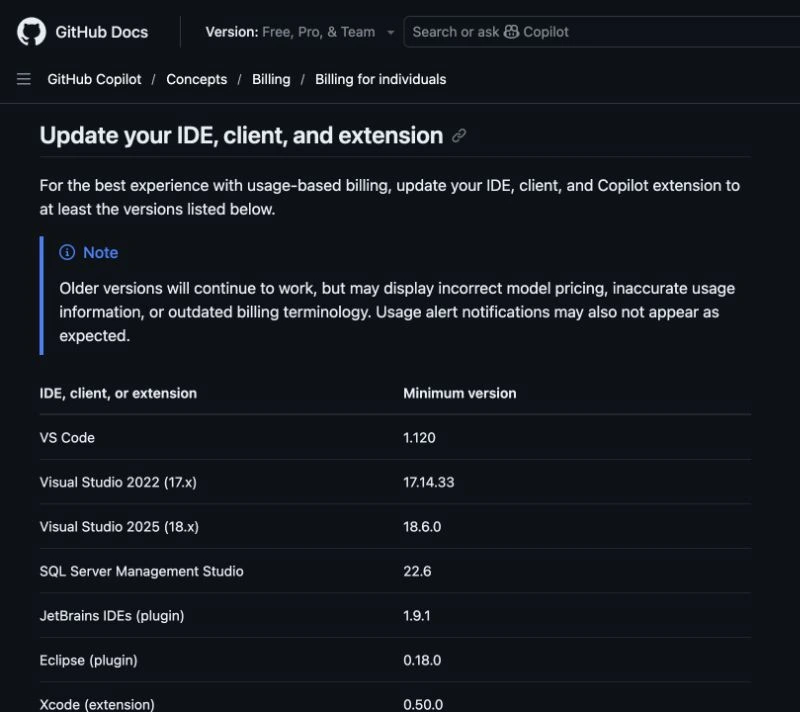
Cursor's structural advantage is control of the whole editing surface. It does not have to fit an agent into several unrelated IDEs. That gives it more freedom to make codebase context, multi-file changes, cloud agents, rules, hooks, and review feel like one workflow. The cost is clear: anyone who cannot leave their current editor should stop treating Cursor as the default.
The GitHub table is not proof that every client has perfect feature parity. It proves something narrower and more useful: GitHub is actively maintaining billing guidance for several clients, including minimum versions. The same page warns that older versions may show inaccurate model pricing, allowance information, billing terminology, or notifications. A team comparing Copilot should therefore inventory the exact IDE and extension versions it runs before assuming one successful trial represents everyone.
Cursor needs a different inventory. List the extensions that are mandatory, debugger and language-server dependencies, terminal profiles, remote-development requirements, keyboard accessibility, repository trust rules, proxy or certificate constraints, and any company approval tied to the current editor. I would not call the migration small until those items work in the proposed Cursor setup.
Editor preference can sound personal, but at team scale it becomes operating infrastructure. A product that saves time on code changes can still lose if it creates support work around the environment.
| Feature | Cursor | GitHub Copilot |
|---|---|---|
| Product shape | Standalone AI-native editor | Assistant across existing IDEs and GitHub |
| Best fit | Developers ready to center work on one agent-first surface | Mixed-IDE teams and GitHub-native organizations |
| Migration cost | Higher: editor, extensions, habits, and team standards may move | Lower: install or update the supported client |
| Agent workflow | Editor, Agent, cloud agents, MCPs, hooks, and Bugbot in one product | IDE agent/chat plus GitHub cloud agent and code review |
| Team fit | Strong when the team can standardize on Cursor | Strong when GitHub policies and current IDE standards already exist |
| Verified entry price | Hobby free; Individual Pro $20/mo | Free; Pro $10/mo |
| Skip if | JetBrains, Visual Studio, or Xcode must remain primary | You want one AI-native editor to run the complete session |
| Action | Compare Cursor | Compare Copilot |
The table deliberately avoids model leaderboards and old request quotas. Those details change faster than the underlying product shape. Copilot remains a cross-IDE and GitHub layer; Cursor remains the place where the AI-native editor itself is the product. That distinction is stable enough to guide the first trial.
It also explains why the score gap is only 0.1. Cursor wins the stated agent-first job, while Copilot wins the lower-risk adoption path. The right answer flips as soon as editor continuity becomes a hard requirement.
Cursor is better when the editor itself should be AI-native
Cursor is the better choice for a developer willing to change the work surface in exchange for tighter agent integration. Individual Pro starts at $20/mo and includes extended Agent limits, frontier models, MCPs, skills, hooks, and cloud agents. The recommendation is strongest for multi-file work where context and orchestration matter more than preserving an existing IDE setup.
The hard question is not whether Cursor has more agent-oriented features. It is whether those features justify the switch. Extensions, keyboard habits, debugger setup, terminal conventions, security review, and team support all carry migration cost. A personal trial can feel smooth while an organization rollout still fails.
I would give Cursor the first trial when a developer already works comfortably in a VS Code-style environment and spends meaningful time coordinating changes across several files. In that situation, a product that controls the editor, context, agent, hooks, and review loop has a clear opportunity to reduce friction.
The pilot should not begin with a blank sample app. Use a representative but non-sensitive repository with the same test commands, package manager, debugger, extension dependencies, repository rules, and review expectations as normal work. The question is not whether Cursor can produce a plausible diff. The question is whether the whole environment remains dependable while it does so.
Cursor is less persuasive for a developer who mostly wants completions, short explanations, or occasional edits. Paying more and changing editors for light assistance creates two costs without proving a distinct benefit. In that case Copilot's simpler adoption path is the disciplined choice.
Cursor controls the editor, agent, codebase context, hooks, cloud work, and review surface instead of adding them to several different IDEs.
Skip it if editor choice is fixed by language tooling, company policy, accessibility needs, or team standardization.
Cursor leads for an agent-first workflow, but the score keeps editor migration and organizational adoption risk visible.
- Purpose-built AI editor rather than an extension layer
- Agent, cloud agents, MCPs, hooks, and review share one surface
- Strong fit for multi-file and repository-level work
- Free tier makes an editor trial possible before paying
- Requires adopting the Cursor editor
- Weak fit for teams standardized on JetBrains, Visual Studio, or Xcode
- Migration cost can exceed the subscription difference
- Heavy agent work still needs allowance and spend monitoring
GitHub Copilot is better when the IDE should stay
Copilot is the practical default when developers already have a stable editor and GitHub workflow. Pro starts at $10/mo, and the product can extend from IDE completions and chat into agent work, cloud tasks, code review, and organization controls without requiring one editor for everyone.
Its compromise is fragmentation. VS Code, JetBrains, Visual Studio, Xcode, GitHub.com, and CLI are not one identical interface. Teams need current clients, clear policies, and a small pilot that reflects the editors they actually support. Still, that is usually less disruptive than moving an entire engineering group into a new editor.
I would start with Copilot when the organization already has GitHub governance, approved IDEs, and developers spread across different language ecosystems. The product can add assistance without turning editor choice into a new standardization project. That advantage grows when a Java team needs JetBrains while another group depends on Visual Studio or Xcode.
The pilot must still be client-specific. Test the workflows that matter in each supported environment, verify that allowance and alert information is current, and document where GitHub.com or CLI becomes part of the path. A feature visible in one client should not be promised to the whole team until it is confirmed in the clients they use.
Copilot also deserves a clearer limit: IDE continuity does not automatically mean a better agent. If the team repeatedly moves complex work out of its normal editor to get a more coherent repository-level loop elsewhere, the extension model may be preserving the wrong thing.
Copilot supports several established IDEs while connecting agent work, code review, and organization controls to GitHub.
Skip it if you want one opinionated AI-native editor rather than an assistant spread across IDE and GitHub surfaces.
Copilot wins IDE continuity and migration cost, but trails Cursor when one unified agent-first editing surface is the priority.
- Works across several major IDEs and GitHub surfaces
- Lower $10/mo Pro entry price
- Minimal disruption for existing GitHub teams
- Organization policy and review features fit established governance
- Experience and feature timing can vary by client
- Agent work is less unified than a purpose-built editor
- Current clients are important for accurate billing and alerts
- AI Credit limits matter once chat and agent sessions become heavy
When switching from Copilot to Cursor is worth it
Switch when the current IDE has become the constraint: repository context feels fragmented, multi-file agent work dominates the week, and the team is already comfortable with a VS Code-style editor. Run the trial on one representative project, recreate the required extensions and debugger setup, and measure correction work rather than demo speed.
Stay with Copilot when language tooling, accessibility, debugger support, security policy, or team consistency matters more than the tightest possible agent loop. The lower entry price is useful, but the lower migration cost is the stronger reason.
I would make the switch decision with a short migration worksheet. Mark every required extension as available, replaceable, or blocking. Confirm debugging and test commands. Check repository authentication, proxy behavior, remote development, accessibility, settings sync, and rollback. Then ask whether the agent advantage appears often enough to justify maintaining another editor standard.
Do not measure only how quickly the agent writes. Track how often its changes need correction, how much context must be repeated, whether developers leave the editor to finish the job, and whether review becomes easier or harder. Those observations do not create a universal benchmark, but they reveal which product fits the team's real process.
A reversible trial beats a permanent argument.
Three Copilot vs Cursor scenarios
A JetBrains team with established Java tooling
Choose Copilot first. Cursor's agent surface may look attractive, but replacing IntelliJ workflows, plugins, inspections, debugging, and team conventions is a separate project. The evidence threshold for switching should be much higher than a successful demo on one repository.
A small VS Code team doing multi-file product work
Trial Cursor first, with Copilot as the lower-disruption control. The editor transition is smaller because the environment is familiar, and Cursor has a better chance to prove that one agent-first surface improves repository-level work. Keep the original VS Code setup available so the trial can be reversed cleanly.
A mixed-IDE organization already governed through GitHub
Choose Copilot unless the organization is intentionally standardizing editors. One product across supported clients is easier to govern than introducing Cursor for one group and inventing exceptions for everyone else. A later Cursor pilot can target a specific repository workflow instead of becoming an organization-wide default.
There is also a case for neither paid plan: a developer who needs occasional completion or chat can begin with the free paths and wait for a repeatable bottleneck. The goal is not to collect AI subscriptions. It is to remove a recurring constraint with the smallest operational change.
Before any of these scenarios becomes a rollout, write down the baseline. Which IDEs are approved? Which extensions and debuggers are mandatory? How long does a normal change take to review? Where can an agent run commands, and who approves a cloud task? What repository data may leave the local machine? A vague pilot produces a vague winner because every participant values a different part of the experience.
The evaluation record does not need invented productivity percentages. It needs concrete observations: setup blockers, missing integrations, corrections requested during review, commands that required intervention, whether the diff stayed understandable, and whether returning to the old environment was simple. Those notes make the adoption decision defensible without pretending that one small repository predicts every engineering team.
Security and governance belong in that record too. Confirm organization policies, repository permissions, model controls, retention settings, extension approval, and the boundary between local and cloud work before inviting more developers. A technically strong agent is not production-ready for a team until its operating boundary is clear.
Where the current credit and quota comparison lives
Copilot Pro at $10 and Cursor Pro at $20 are only entry prices. GitHub now publishes monthly AI Credit allowances, while Cursor can add on-demand model spend after included capacity. Repeating that full calculation here would create two pages chasing the same query.
This separation is intentional SEO and editorial hygiene. A reader searching for credit burn should get the current allowance table, Claude shared limits, and Devin quotas in one place. A reader searching Copilot versus Cursor should get a direct answer about editor fit without wading through a second copy of volatile billing math.
It also creates a cleaner maintenance path. When GitHub changes credits or Cursor changes included capacity, the cost guide receives the detailed update. This page changes only when product shape, client support, migration requirements, or the IDE decision itself changes.
Use the Claude Code vs Cursor vs GitHub Copilot cost guide for current credit and quota math. Use the AI subscription plan guide when Codex or Claude access is bundled into a broader plan, and the vibe coding roundup when the job is building an app rather than choosing an IDE assistant.
Final verdict: keep the IDE or switch
Choose Cursor if the editor switch is acceptable and agent work is central. Choose Copilot if preserving the team's current tools is the smarter operational decision. Cursor wins this narrow comparison 8.2 to 8.1, but a JetBrains, Visual Studio, or Xcode team should treat Copilot as the default unless it has already approved an editor migration.
My rule would be strict: if I cannot name the recurring task that requires an AI-native editor, I would keep the existing IDE and start with Copilot. Cursor earns the switch only when that task is common, valuable, and hard to serve well through the extension model.
Try Cursor on one representative repository, or start with GitHub Copilot inside the IDE you already support. The better product is the one that improves the real workflow without creating a second migration project.
Frequently Asked Questions
Ready to check Cursor?
Use the verified route if the trade-offs still fit. If not, jump back to the summary and compare the alternatives.
AI tools editor focused on public docs, changelogs, API limits, free-tier constraints, and developer community feedback. Turns fast-moving AI claims into buyer-focused recommendations without implying undocumented hands-on testing.
Anthony starts with the workload behind the demo, then ranks AI tools by documented model access, limits, implementation clarity, failure behavior, and the cost of an acceptable result.
Related Articles

Bardeen vs Zapier Agents vs Lindy: Best AI Coworker
AI coworkers compared by starting context, agent authority, usage economics, approval boundaries, and offboarding clarity
Compare Bardeen, Zapier Agents, and Lindy by workflow fit, approvals, credits, integrations, browser permissions, and cancellation terms.

GPT-5.6 vs Claude Sonnet 5 API: Which Tier Fits?
Production API model routing guide
GPT-5.6 Sol, Terra, and Luna compared with Claude Sonnet 5 on API price, long context, tokenization, migration risk, tools, and workload fit.