

-
#1 ChatGPTBest overall — broadest free writing workflow
-
#2 ClaudeBest focused option — text, research, and code
-
#3 Google GeminiBest for Google-connected research workflows
These AI writing tools now differ less by underlying model than by limits, interface, export workflow, and how much cleanup the draft needs. That is where the decision lives.
An unpaid account is useful only when its documented allowance still covers the task you expect to repeat.
This guide compares seven tools across common writing jobs, then separates general-purpose writers from specialists such as Grammarly, QuillBot, and NotebookLM. The useful question isn't which logo has the smartest AI; it's which entry account stays out of the way for your work.
One boundary before we start: this guide is about writing tools, not SEO suites. If your real problem is keyword research, content briefs, internal-link planning, or rank tracking, start with our AI SEO tools comparison instead. If talking through ideas is faster than typing them, our AI dictation tools comparison covers the voice-to-text layer before the draft. If your script is ready and the next job is video production, use our Descript vs VEED vs InVideo comparison to choose the editor or generator.
1. ChatGPT — Best Overall
ChatGPT is the easiest default to recommend, even though it is not the cleanest fit for every writing job.
Its advantage is breadth rather than a proven prose-quality win. A blank page, current web sources, uploaded files, image creation, and data analysis can all sit inside the same account.
OpenAI's entry card lists limited GPT-5.5 Instant access, messages and uploads, image generation, deep research, memory and context, Codex, and ChatGPT Work. OpenAI does not publish one durable message allowance: capacity varies by feature and the product shows reset timing when a limit is reached.
The paid number is regional. The official Croatia/EEA render checked for this refresh showed entry access at €0, Go at €8, Plus at €23, and Pro from €103 per month. Those are localized amounts, not a universal USD promise.
Web browsing is the practical separator for research-led drafts: it can retrieve current sources inside the same conversation. Our Perplexity vs SearchGPT comparison covers how that search layer compares with dedicated AI search.
Canvas adds a dedicated editing surface, but it does not replace a full document system for every team. Writers still need to decide where comments, approvals, version history, and final publishing live.
The editorial risk is treating any first draft as finished copy. Source checks, a deliberate structure, and a human voice pass remain separate jobs regardless of which general model produced the draft.
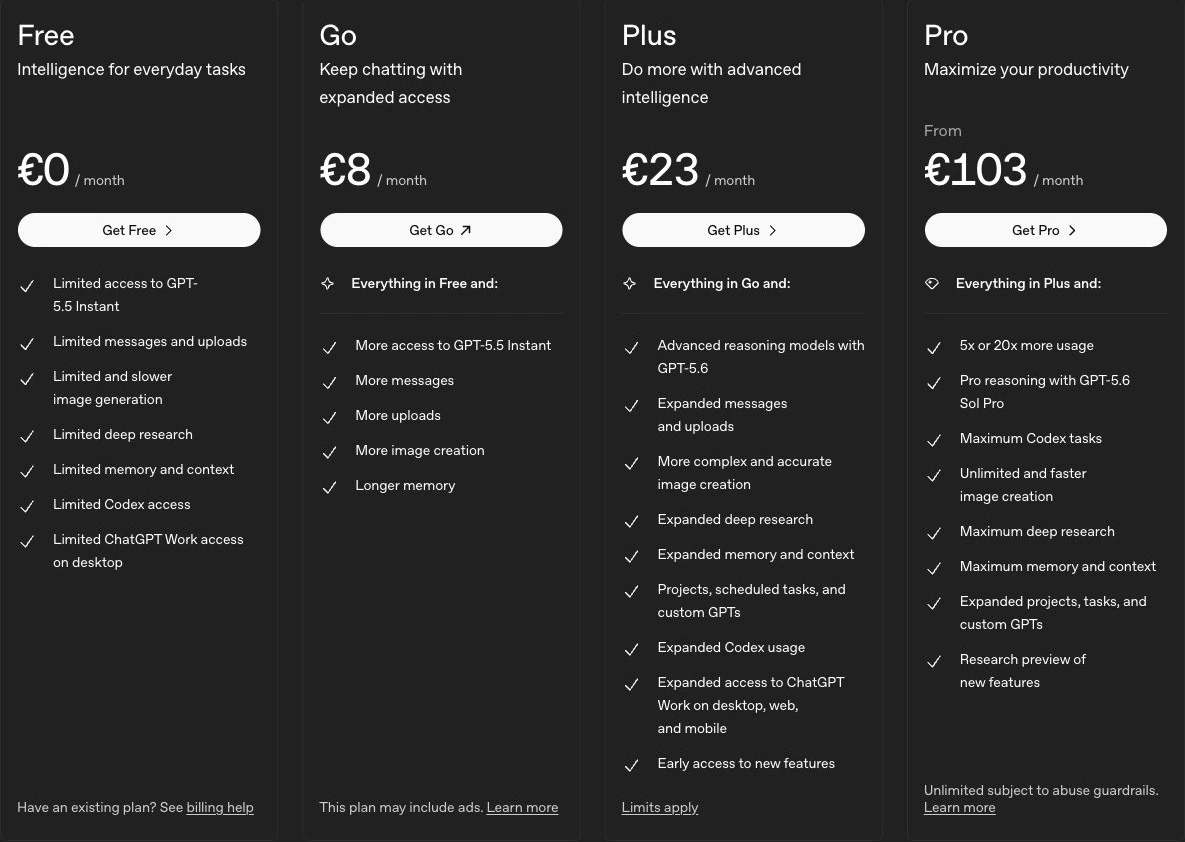
The free plan combines writing, web search, file analysis, image creation, and GPT access in one account.
Writers who want stable published limits or a narrowly focused writing workspace.
The strongest all-around free workflow in this group, held back by variable usage limits and less predictable capacity.
- Limited access to OpenAI's current default model on the free tier
- Web search, data analysis, files, images, and GPTs share one workspace
- The broadest general-purpose tool set in this guide
- Projects and shared projects are available on Free; paid plans expand models, usage, and custom GPT creation
- Free model and feature limits can change with demand
- Separate limits apply to data analysis, uploads, and image creation
- Broad feature coverage can make the writing workflow feel busy
- A first draft still needs fact-checking and a human voice pass
2. Claude — Best for Long-Form Writing
Claude is the cleaner alternative when the job stays inside text, research, documents, or code.
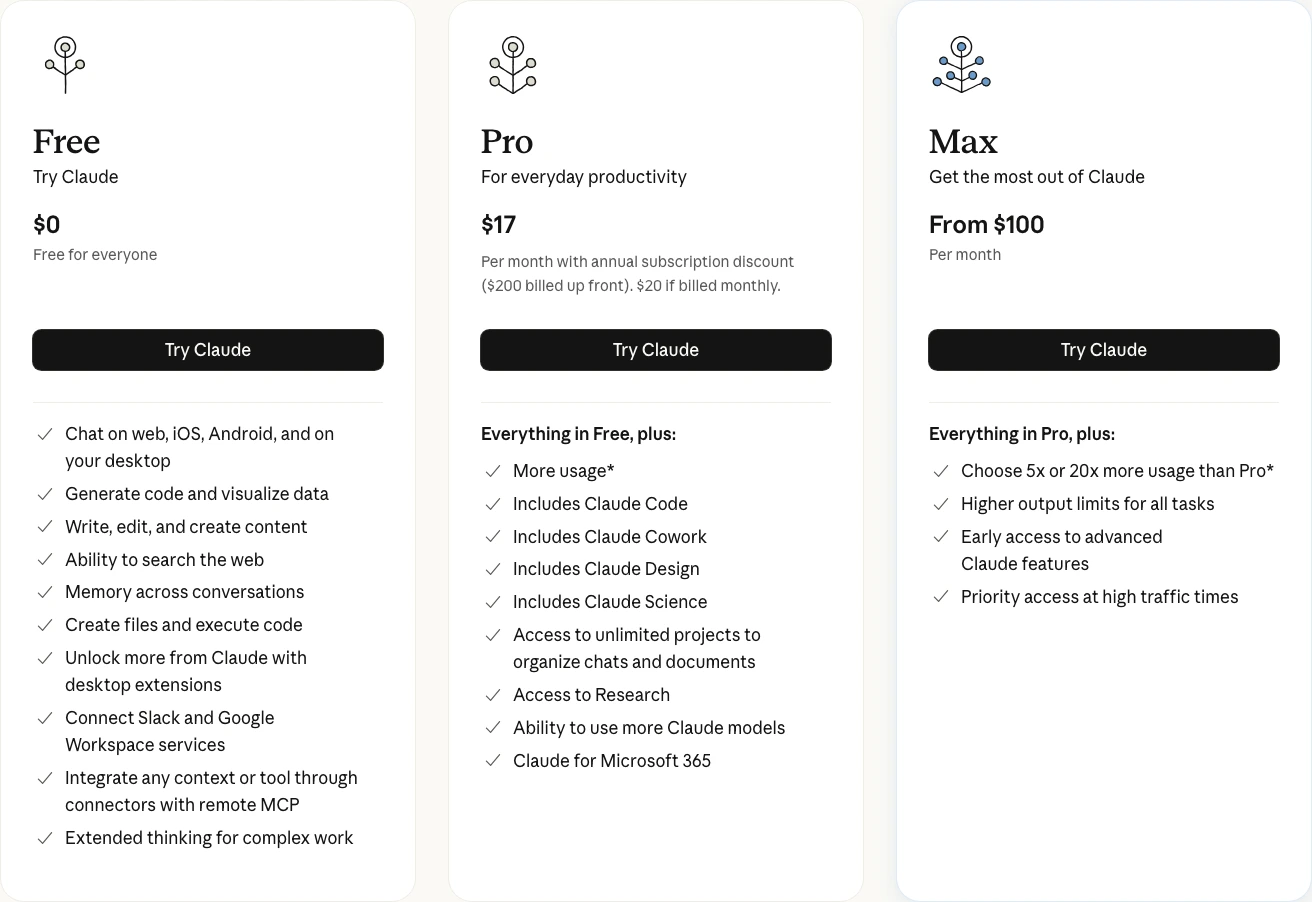
Anthropic's entry account includes writing, editing, code generation, image analysis, web search, and desktop extensions. Pro adds Projects, Research, extended thinking, tool connections, and Claude Code.
That product shape explains Claude's appeal better than a generic prose-quality claim. It is organized around sustained document and reasoning work.
The tradeoff is less media breadth. Claude does not bundle the same native image, video, and custom-assistant ecosystem as ChatGPT.
Capacity is still the practical constraint. Anthropic describes entry access as limited and does not promise one universal message number. Its official USD render lists Pro at $20 monthly or $17 per month with $200 billed up front; the localized Croatia/EEA render checked the same day showed €18 monthly or €15 per month with €180 billed up front.
For a deeper look at how Claude stacks up against ChatGPT, see our ChatGPT vs Claude head-to-head comparison.
The product stays focused on text, documents, research, reasoning, and code instead of competing on media breadth.
Anyone who needs native image or video creation in the same subscription.
Excellent for sustained text and document work, with a narrower tool set and only broadly described free-plan limits.
- Free writing, editing, code, image analysis, and web search
- Focused text-and-code workspace with fewer media distractions
- Paid Pro adds Projects, Research, extended thinking, and Claude Code
- Official pricing distinguishes monthly and annual Pro cost clearly
- Free usage is limited without one durable universal message cap
- Native image and video generation are not the product's focus
3. Google Gemini — Best for Google-Connected Research
Gemini's strongest entry-level argument is not a million-token context window anymore. Google currently lists 32K tokens without an AI subscription and gives unpaid users access to Gemini 3 Flash-Lite, Flash, and Pro under standard limits.
So why is it third on this list?
It still belongs near the top because Canvas, Gems, connected apps, Deep Research, audio overviews, and image generation are available without a paid Google AI subscription. Compute-heavy features can be restricted during high demand.
For research-heavy writing, that restraint can help. Gemini is better suited to dense explainers and source-led drafts than to opinionated copy; our crypto tax software comparison shows the kind of structured subject matter where that approach fits.
The Google integration is the other separator. Connected Apps can bring Gmail and Drive context into the same research workflow when the user enables those connections.
The limitation is subscription clarity. Google says limits may change with testing, capacity, and availability, so an unpaid workflow that depends on Pro or Deep Research needs a fallback.
Free access spans Gemini 3 models, Canvas, Gems, connected apps, Deep Research, and image generation.
Writers who need a large free context window or fixed published usage caps.
Broad Google-connected research tools make the free tier useful, but shifting capacity limits weaken planning certainty.
- Free access to Gemini 3 Flash-Lite, Flash, and Pro
- Canvas, Gems, connected apps, Deep Research, and image generation
- Useful fit for a Google-centered research workflow
- Google documents the 32K free context window explicitly
- Free context is 32K, not the 1M available on paid AI Pro and Ultra
- Usage limits can change with demand and experimentation
- Compute-heavy features may be restricted during high demand
- Google account required (not everyone wants deeper Google lock-in)
4. Grammarly — Best for Editing & Polishing
Grammarly solves a different problem from the general chatbots: it edits text inside the places where writing already happens.
Grammarly doesn't write for you. It fixes what you (or your AI tool) already wrote.
The entry account includes spelling and grammar correction, tone feedback, and 100 AI prompts for generation or rewriting. Its browser, desktop, and document integrations are the reason to choose it over another blank chat box.
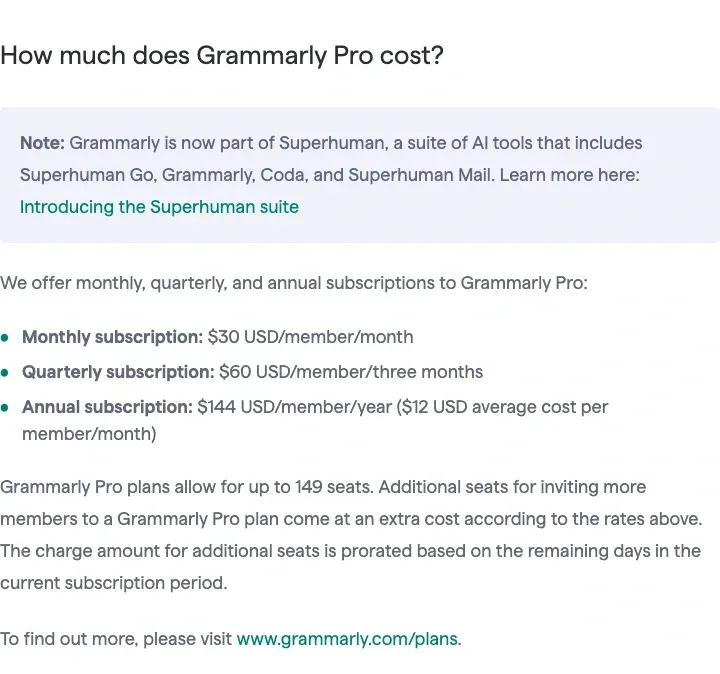
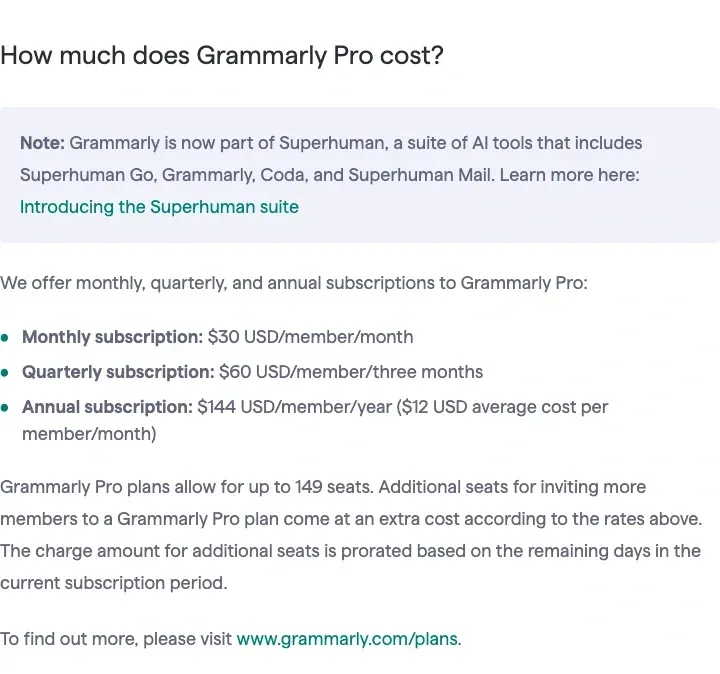
The 100-prompt allowance is the constraint. It is enough for occasional rewrites, not a high-volume generation workflow. Grammarly Pro averages $12 per month on annual billing; monthly billing is $30.
A practical no-cost stack is Grammarly beside Claude or ChatGPT: use the general assistant for structure and drafting, then keep correction inside the editor where the final copy already lives. That combination covers two different jobs without pretending either tool completes the editorial pass alone.
The free plan adds 100 AI prompts to always-on correction and tone feedback inside existing writing surfaces.
Anyone looking for a tool to generate content from scratch.
A clear, dependable editing layer with published limits, but it is intentionally less useful for original drafting.
- Works everywhere — browser, desktop, mobile, inside other apps
- Real-time spelling, grammar, and tone feedback on the free plan
- 100 AI prompts/month for rewrites, tone shifts, expansions
- Official plan page clearly separates Free, Pro, and Enterprise
- Not a content generator — won't write from scratch
- 100 AI prompts/month burns fast if you lean on them
- The free allowance is not designed for high-volume generation
- Annual Pro pricing requires a larger upfront commitment
5. Rytr — Best Budget AI Writer
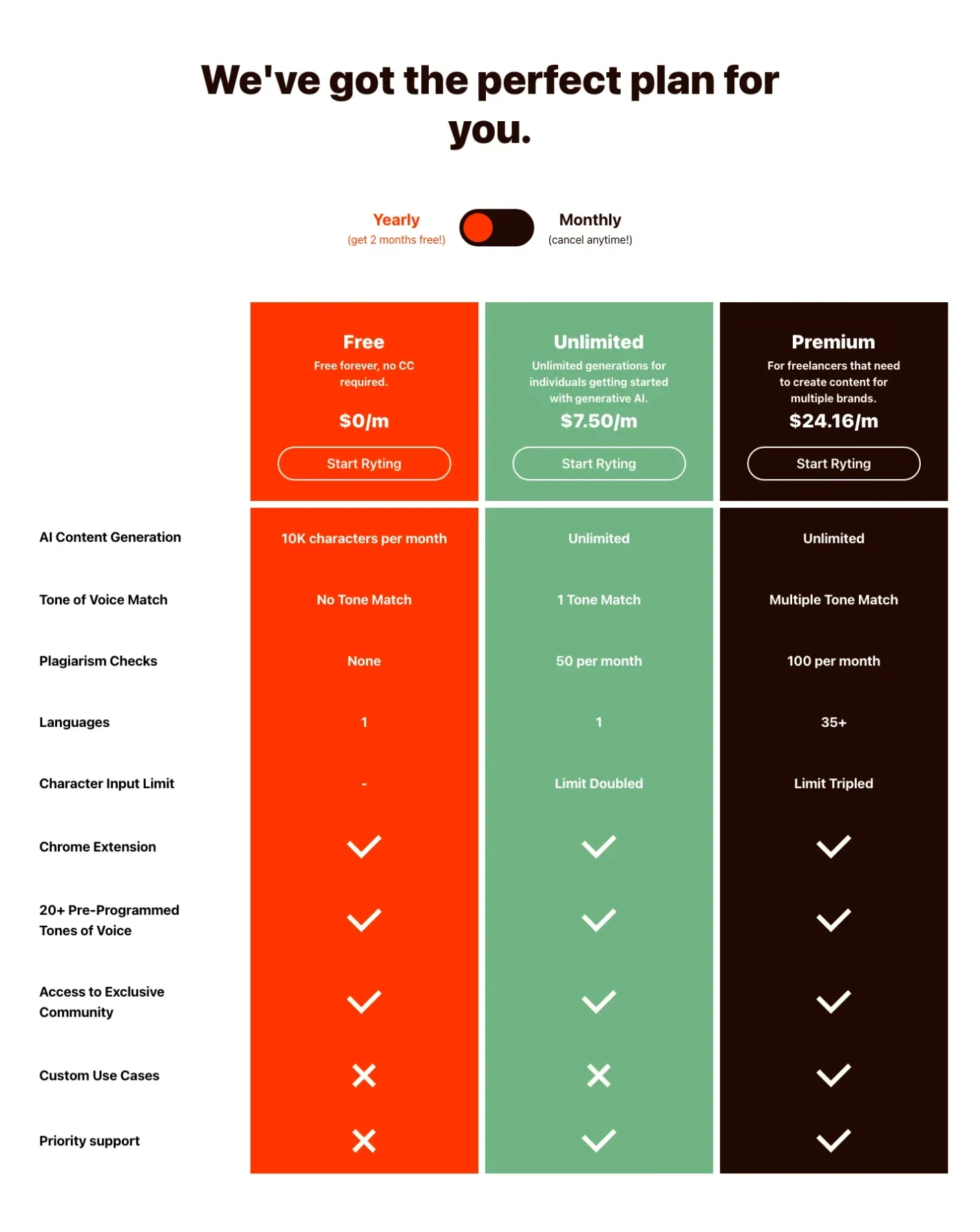
Rytr is the volume pick when 10,000 included characters are enough to cover short-form work. The current paid structure uses Unlimited and Premium subscriptions rather than the old Saver label.
The entry account includes 10,000 generated characters per cycle and more than 20 preset tones. Rytr's current comparison table does not include plagiarism checks at that level; those begin after upgrading.
The prebuilt use cases cover emails, review replies, paragraph content, captions, calls to action, and SEO metadata. That guided entry point is Rytr's practical advantage over an empty prompt box.
The limitation is scale. Ten thousand characters is enough for several short pieces, not a steady long-form publishing schedule, and the entry account does not include tone matching or plagiarism checks.
Use that account when templates are the bottleneck. Upgrade only after the character cap, tone matching, or plagiarism allowance becomes the actual constraint.
The free plan combines 10,000 monthly characters with guided use cases and more than 20 preset tones.
Anyone who needs sustained long-form volume, free plagiarism checks, or tone matching.
Useful guided templates and unusually clear limits suit short-form work, while the character cap restricts regular publishing.
- 10,000 generated characters per month
- Guided use cases reduce prompt setup
- 20+ preset tones are available on the free plan
- No credit card required for free plan
- 10,000 characters is tight for regular long-form work
- Tone matching begins on the Unlimited plan
- Free plan does not include plagiarism checks
- Paid prices depend on monthly versus annual billing
6. QuillBot — Best for Rewriting & Paraphrasing
QuillBot is not a general drafting assistant. It earns a place here because rewriting is the real bottleneck for many writers.
Unpaid users get Standard and Fluency modes, a 125-word input cap, a 1,200-word summarizer, extensions, and 20 AI Chat queries per day. That is a paragraph-level editing workflow, not whole-document automation.
125 words at a time. Yeah.
That is the obvious limitation. The workflow is paragraph by paragraph, not whole-document automation. It can still be useful because each change stays reviewable, but the cap becomes repetitive when the task is a long report rather than a difficult passage.
Premium removes the paraphrasing word cap and unlocks all modes. Current official pricing is $17.95 monthly, $11.32 per month billed quarterly, or $6.25 per month billed annually.
Do not choose it as the only drafting tool. AI Chat is limited to 20 unpaid queries per day, while the strongest entry-level value remains paraphrasing and summarization.
The free plan clearly separates paragraph rewriting from whole-document automation with a 125-word cap.
Anyone who needs original content generation rather than rewriting existing text.
The most transparent free rewriting workflow here, though narrow features and the 125-word cap limit broader writing use.
- Standard and Fluency modes are available free
- The 125-word cap encourages paragraph-level review
- Summarizer handles up to 1,200 words on free plan
- Browser extension and Word/Chrome integrations
- Official help center publishes the current limits clearly
- 125-word limit per use is clearly an upsell tactic
- Only 2 of 9 paraphrasing modes on free tier
- AI Chat is limited to 20 queries per day
- Not a content generator — editing and rewriting only
7. Google NotebookLM — Best for Research-to-Writing
NotebookLM is not a general writing tool. It is the strongest option here when the first job is organizing and interrogating a fixed source set.
The workflow starts with sources: PDFs, websites, YouTube URLs, audio, Google Docs, and other supported formats. NotebookLM answers from the selected material and provides inline citations, which makes it easier to trace a draft back to its inputs. It can still make mistakes; source grounding is not a guarantee of accuracy.
Standard access is free and currently includes 100 notebooks, up to 50 sources per notebook, up to 500,000 words per source, 50 chat queries per day, and 3 audio generations daily. Paid Google AI plans raise selected limits, so “free” describes the entry tier rather than the whole product.
Audio Overviews turn the selected material into a discussion format. They are useful for review and orientation, but the original sources remain the evidence.
The limitation is baked into the design: NotebookLM is organized around material you provide. That makes it a poor fit for open-ended creative drafting, but a useful constraint when a report must remain traceable to a defined source set.
NotebookLM is still a research stage rather than a full publishing environment. Plan on moving the result into a separate editor for final structure, attribution, and voice.
The free plan supports 100 notebooks, 50 sources per notebook, 50 daily chats, and inline citations to selected sources.
Creative writers or anyone without existing source material to upload.
A strong, clearly limited research companion, but its source-first design makes it the least general-purpose writer in this ranking.
- 100 notebooks and 50 sources per notebook on Standard access
- Inline citations connect responses to selected sources
- 50 daily chats and 3 Audio Overviews are documented clearly
- Handles PDFs, websites, YouTube URLs, audio, and Google files
- Not a general-purpose writer — useless without source material
- Source grounding does not eliminate factual mistakes
- A separate editor is still needed for final publishing
- 50 queries/day can feel limiting during heavy research sessions
Why Copy.ai Is No Longer Ranked
Copy.ai appeared in the earlier version of this guide, but its current self-serve page no longer lists an ongoing unpaid account. The entry product shown publicly is Chat at $29 monthly or $24 per month with yearly prepayment. Copy.ai still publishes isolated utilities and older references to a no-cost tier, but neither is clear enough to rank beside products with explicit ongoing allowances.
That does not make Copy.ai a bad product. It makes it a paid GTM and workflow decision, which belongs in our Jasper vs Copy.ai vs Writesonic comparison rather than this roundup.
Full Comparison
Every ranked tool has a current official entry point without payment. The table focuses on published limits, workflow role, and the first meaningful upgrade.
| Feature | ChatGPT | Claude | Gemini | Grammarly | Rytr | QuillBot | NotebookLM |
|---|---|---|---|---|---|---|---|
| Free Tier Limit | Dynamic model + tool limits | Limited; dynamic usage | Standard limits; 32K context | 100 AI prompts/mo | 10K chars/mo | 125 words/use | 50 queries/day |
| Current Model or Engine | Current ChatGPT default | Current Claude models | Gemini 3 family | Grammarly AI | Rytr generation engine | QuillBot paraphraser | Gemini-based grounding |
| Workflow Role | All-around drafting and research | Focused text, research, and code | Google-connected research | Editing and correction | Guided short-form templates | Paragraph rewriting | Source-grounded research |
| Web Access | ✓ | ✓ | ✓ | ✗ | ✗ | ✗ | Source-based |
| Works Everywhere | Web + Mobile | Web + Mobile | Web + Mobile + Docs | Everywhere (extensions) | Web only | Web + Extensions | Web only |
| Upgrade Price | Localized paid pricing | $20/mo USD; localized pricing varies | Google AI plan pricing varies | $12/mo (annual) | $7.50/mo annual (Unlimited) | $17.95/mo | Free (Plus via Google AI) |
| Action | Try Free | Try Free | Try Free | Try Free | Try Free | Try Free | Try Free |
How I Ranked These AI Writing Tools
This refresh uses official subscription pages, help documentation, and existing GDT interface captures. It does not claim a new controlled output-quality test. I ranked complete drafting workflows above specialist utilities, then reduced scores when a vendor did not publish a dependable allowance.
- Entry usefulness: what the account can do before payment and which limits are published clearly.
- Workflow breadth: whether the tool covers research, drafting, editing, files, and connected work surfaces.
- Limit clarity: whether caps are fixed, dynamic, or visible only inside the account.
- General writing fit: how well the product covers a complete research, drafting, and revision workflow rather than one specialist step.
We published our full ChatGPT vs Claude comparison for a deeper look at their writing, coding, and pricing workflows. For marketers turning those drafts into campaign assets, our AI video generators guide covers avatar presenters, B-roll tools, and localization workflows.
How to Choose the Right Writing Tool
I would start with ChatGPT when one account must handle several kinds of work. I would choose Claude instead when the workflow stays in text, documents, research, and code. Add a specialist only for a bottleneck the general assistant does not solve well.
- Freelance writers and bloggers: Claude or ChatGPT for drafts, then Grammarly for correction. Test the entry accounts before paying for volume.
- Students: ChatGPT for source discovery plus QuillBot for examining difficult passages. Do not submit generated output directly; verify the sources and write the final argument yourself.
- Marketers on a deadline: ChatGPT for broad drafting or Rytr when guided short-form templates remove more friction than an open prompt.
- Researchers and academics: NotebookLM when a fixed source set and inline citations matter, followed by a separate editor for final structure and verification.
- ESL writers: Grammarly for real-time corrections while you type, QuillBot for revising individual paragraphs. Both entry accounts are specifically good at this.
- People who just want one tool: ChatGPT when broad coverage matters more than a specialist workflow; Claude when the work is concentrated in text, research, documents, and code.
The Verdict
The decision is mostly about workflow and limits, not which vendor claims the smartest model. Dynamic caps favor occasional use; fixed character or prompt allowances are easier to plan around.
The wrong buyer for this list is a team that already needs approvals, governed brand language, or predictable shared capacity. An individual entry account can reveal the right workflow, but it is a risky substitute for the administrative controls that team publishing eventually requires.
ChatGPT remains the default recommendation because its entry account covers the widest set of writing-adjacent jobs. The tradeoff is variable limits and a busier interface.
Claude is the better focused choice when text, documents, research, and code are the center of the job. This evidence-led refresh does not claim a controlled prose-quality win.
Gemini makes sense inside a Google-centered workflow, but the 32K entry context window and dynamic usage rules matter more than old claims about unlimited capacity.
The specialists solve narrower problems: Grammarly edits inside existing apps, QuillBot rewrites paragraph by paragraph, Rytr supplies guided short-form templates, and NotebookLM keeps research tied to selected sources.
Start with one general assistant and add a specialist only when a real bottleneck appears. Related decisions include AI headshot generators, AI resume builders, and AI coding tools.
Frequently Asked Questions
Ready to check ChatGPT?
Use the verified route if the trade-offs still fit. If not, jump back to the summary and compare the alternatives.
AI tools editor focused on public docs, changelogs, API limits, free-tier constraints, and developer community feedback. Turns fast-moving AI claims into buyer-focused recommendations without implying undocumented hands-on testing.
Anthony starts with the workload behind the demo, then ranks AI tools by documented model access, limits, implementation clarity, failure behavior, and the cost of an acceptable result.
Related Articles

Bardeen vs Zapier Agents vs Lindy: Best AI Coworker
AI coworkers compared by starting context, agent authority, usage economics, approval boundaries, and offboarding clarity
Compare Bardeen, Zapier Agents, and Lindy by workflow fit, approvals, credits, integrations, browser permissions, and cancellation terms.

GPT-5.6 vs Claude Sonnet 5 API: Which Tier Fits?
Production API model routing guide
GPT-5.6 Sol, Terra, and Luna compared with Claude Sonnet 5 on API price, long context, tokenization, migration risk, tools, and workload fit.