

-
#1 KoinlyBest overall — superior DeFi handling, free tax preview, accepts crypto payment
-
#2 CoinLedgerBest for U.S. beginners — TurboTax partnership, clean UI, simpler setup
Tax season and crypto don't mix well. I've been filing crypto taxes since 2019, and every year the same thing happens. I stare at a spreadsheet of transactions that makes zero sense, try to figure out cost basis on tokens I don't even remember buying, and wonder if the IRS is going to send me a letter.
So I ran both CoinLedger and Koinly through the same scenario: a messy wallet. Not a clean one with 20 Coinbase purchases. The kind with staking rewards, DeFi swaps through Uniswap, bridged tokens to Arbitrum, and a handful of NFT trades that probably should've been skipped. About 500 transactions total, the kind of portfolio Reddit users are constantly asking about.
The goal was simple: which app catches more errors, wastes less of my time, and doesn't charge me more than it saves?
Here's what I found.
How We Tested (Not the Softball Version)
Most comparison articles just list features from each tool's marketing page. That's useless. I connected the same wallet and exchange accounts (Coinbase, Kraken, and a MetaMask wallet with DeFi activity) to both platforms. Same transactions. Same mess. Then I tracked three things:
- Import accuracy: how many transactions did each tool correctly classify on the first try?
- Error resolution: when something broke (and things always break), how long did it take to fix?
- Time to final report: from first API connection to downloadable tax form, how many minutes?
I also timed the clicks. Because if you're paying for a tool that's supposed to save you time, it better actually save you time.
Koinly vs CoinLedger: Head-to-Head
| Feature | Koinly | CoinLedger |
|---|---|---|
| Starting Price | $49/yr (100 txns) | $49/yr (100 txns) |
| Unlimited Transactions | Custom pricing for higher transaction counts | $199+/yr (3,000+ txns) |
| Free Tax Preview | ✓ Full capital gains | ✓ Capital gains preview |
| Supported Exchanges | 800+ | 500+ |
| DeFi Protocols | 7,200+ | Limited |
| TurboTax Integration | CSV export | ✓ Official partner |
| Pay with Crypto | ✓ BTC, ETH, USDC, DAI | ✗ |
| International Tax Support | ✓ 20+ countries | U.S. focused |
| Expert Help | Per-review pricing | $499 review / $300/hr |
| Mobile App | ✓ iOS & Android | ✓ iOS & Android |
| Action | Try Koinly Free → | Try CoinLedger Free → |
Supported Exchanges & Wallets
Koinly claims 800+ exchange integrations and over 7,200 DeFi protocols. CoinLedger sits around 500+ exchanges. In practice, both connected to Coinbase and Kraken without issues. Those are table stakes. The gap shows up when you get into smaller exchanges or niche wallets.
I tried connecting a Kucoin API to both. Koinly pulled it in without drama. CoinLedger needed a CSV import because their direct API integration for Kucoin kept timing out. Took an extra 8 minutes of downloading, formatting, and uploading.
Eight minutes isn't a dealbreaker. But multiply that by every exchange and wallet that doesn't have a clean API integration and you start to feel it.
Wallet coverage tells a similar story. Koinly natively supports MetaMask, Phantom, Ledger, Trezor, Trust Wallet, and dozens of others through direct address imports. CoinLedger covers the major hardware and software wallets too, but its Solana wallet support was noticeably behind. If you've been swapping on Jupiter or Raydium through Phantom, Koinly picked up those transactions automatically while CoinLedger required a manual CSV. Reddit users on r/CryptoTax have flagged this exact pain point with CoinLedger's Solana parsing going back to late 2024.
DeFi and NFT Handling
This is where the gap gets real.
I had about 40 DeFi transactions: some Uniswap swaps, a couple of liquidity pool entries, and tokens bridged from Ethereum to Arbitrum. Koinly auto-classified 34 of them correctly. Six needed manual review, mostly LP tokens where the cost basis looked off. Took about 12 minutes to clean up.
CoinLedger? It flagged 19 of those 40 transactions as "needs review." Nineteen. Almost half. The bridging transactions confused it completely. It treated the bridge as a sale on one side and a new purchase on the other, which would've created phantom taxable events if I hadn't caught it. Fixing those took closer to 35 minutes.
If you've never touched DeFi, this won't matter to you. If you have, it's the entire reason to pick Koinly.
Error Resolution & Missing Cost Basis
The #1 complaint on r/CryptoTax about crypto tax software (and I've read way too many of these threads) is the "missing purchase history" error. You see a sale but the tool can't find the original buy, so it flags it and sometimes assumes a $0 cost basis. Which means you'd owe taxes on the full sale amount.
Not great.
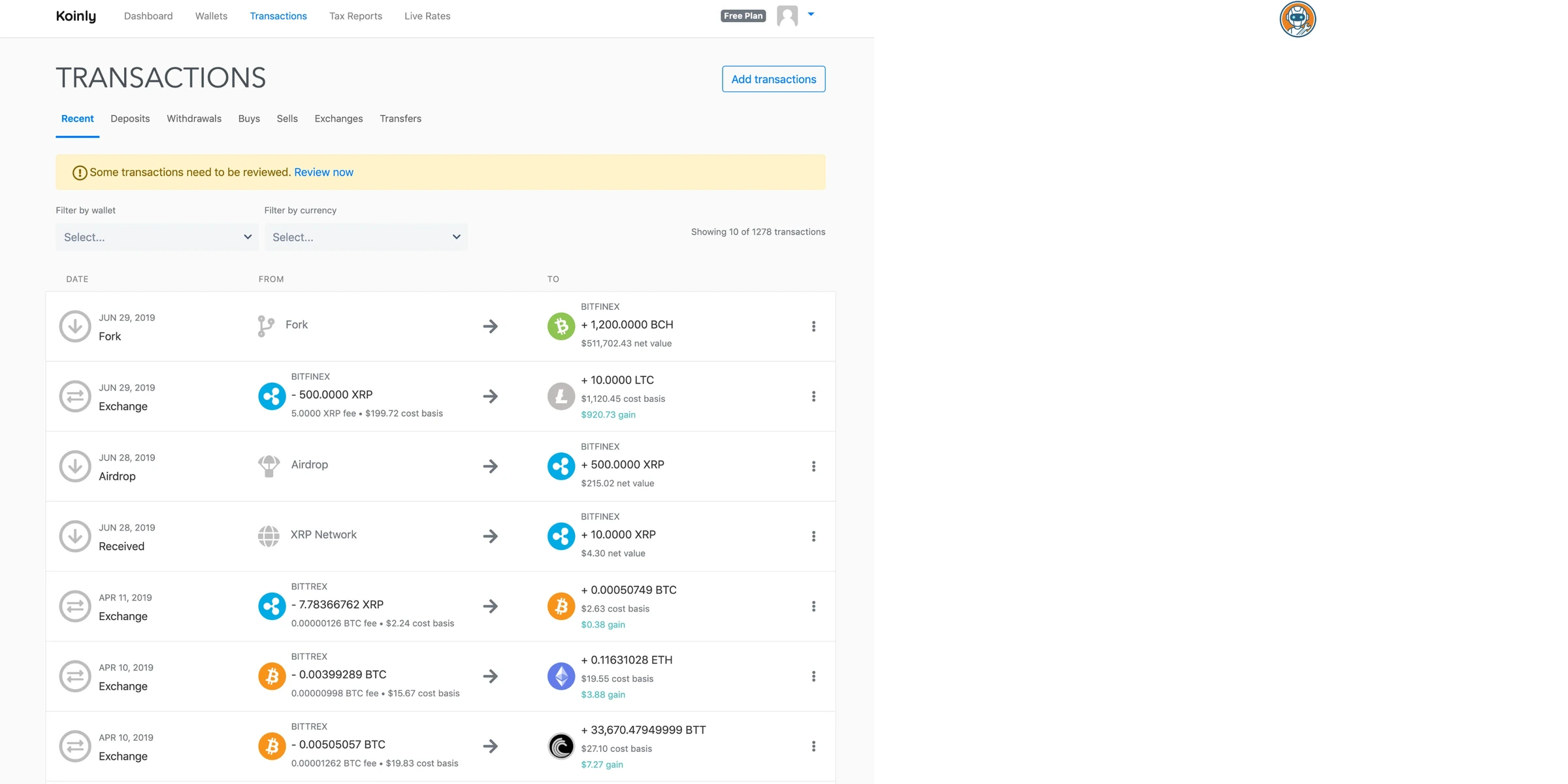
Both tools had this issue with a few of my older transactions. But the resolution experience was night and day. Koinly shows you the flagged transaction, suggests possible matches from your other wallets, and lets you manually link them in about 3 clicks. CoinLedger shows you the error but makes you dig through your transaction history to find the match yourself. I counted. It took 6 clicks and two page loads per transaction in CoinLedger versus 3 clicks in Koinly.
When you're fixing 15+ errors, that difference adds up to real time.
International Tax Support
Quick one: if you're outside the U.S., Koinly wins by default. It supports 20+ countries including Canada, UK, Australia, Germany, and Japan with country-specific tax calculations. CoinLedger is primarily built for U.S. tax forms: Form 8949, Schedule D, the IRS stuff. They do have some international support, but it's clearly not the focus.
If you're a U.S. taxpayer only, this doesn't matter. If you've ever lived abroad or hold accounts in multiple countries, Koinly is the only real option.
It's worth noting that Koinly doesn't just swap the currency label. Each country has different rules for things like cost basis methods (FIFO vs LIFO vs ACB in Canada), holding period discounts (Australia's 50% CGT discount after 12 months), and what counts as a taxable event. Koinly applies these automatically once you set your country. CoinLedger generates Form 8949 and Schedule D well, but if you need an SA100 for HMRC or a myTax report for the ATO, it won't produce those natively.
Pricing Breakdown (Read the Fine Print)
Both tools start at $49/year for 100 transactions. Identical entry point. But the tiers diverge fast:
Koinly's tiers:
- Free: $0 (10,000 imports, view capital gains, no report download)
- Newbie: $49 (100 transactions)
- Hodler: $99 (1,000 transactions)
- Trader: from $199 (3,000+ transactions; higher transaction counts are customized)
CoinLedger's tiers:
- Free: $0 (import + preview capital gains, no report download)
- Hobbyist: $49 (100 transactions)
- Investor: $99 (1,000 transactions)
- Pro: $199+ (3,000+ transactions, with additional tiers available in-app)
Here's the interesting part. Both tools now publish a similar $49 → $99 → $199+ ladder, but they explain the top tier differently. Koinly lists Trader from $199 for 3,000+ transactions and says higher transaction counts can be purchased in-app. CoinLedger lists Pro at $199+ for 3,000+ transactions and routes larger portfolios through additional pricing tiers. If you're running grid bots or doing high-frequency DeFi farming, your final bill depends on the transaction-count add-ons more than the headline plan. (If you're using trading bots specifically, check our best crypto trading bots guide and the focused Pionex vs Bitsgap comparison. The tax implications are brutal.)
The real winner on pricing, though? Both free tiers let you preview your capital gains before paying. Connect your wallets, see what you owe, then decide if you want to pay for the downloadable report. That's how it should work. I've been burned by tools that hide the numbers behind the paywall. At least neither of these do that. For year-round monitoring outside tax season, a dedicated portfolio tracker is better suited than either tax tool.
One more thing worth mentioning: Koinly lets you pay with crypto (BTC, ETH, USDC, and DAI through Coinbase Commerce). CoinLedger only takes credit cards via Stripe. It's a small thing but it tells you something about which team actually uses their own product.
Customer Support & Expert Help
Both have email support and help docs. Neither has live chat. Pretty standard for this category.
Where it gets expensive is expert review services. CoinLedger offers a one-time "Expert Review" for $499 where a CPA reviews your imported data. They also have a "Done For You" service at $300/hour where someone handles everything from imports to final reports. Koinly offers similar CPA services with per-review pricing that varies.
My take: if your crypto situation is complex enough to need a $499 expert review, you probably need an actual crypto-specialized CPA anyway, not a tax software add-on. The software should handle 90% of the work. If it doesn't, you picked the wrong tier or the wrong tool.
Koinly's Trustpilot sits at about 4.5 stars. CoinLedger is at 4.6. Both solid. Neither has the kind of horror stories I've seen with some of the sketchier crypto tax tools that shall not be named.
Response times are where things diverge. Based on user reports across r/CryptoTax and Trustpilot, Koinly typically replies within 24-48 hours during off-season, but support queues balloon in March and April. CoinLedger seems to maintain faster response times year-round, likely because of their smaller user base. Both companies have active help centers with walkthrough articles, though Koinly's documentation goes deeper on DeFi-specific edge cases like impermanent loss tracking, wrapped token accounting, and airdrop classification.
Koinly: The Full Picture
Auto-classified 34 of 40 DeFi transactions correctly and supports 100+ countries with localized tax rules.
Simple US filers who only use Coinbase — CoinLedger's TurboTax partnership is smoother for that workflow.
- 7,200+ DeFi protocols tracked automatically
- Free tier previews full capital gains (up to 10k transactions)
- 20+ country tax calculations — not just U.S.
- Accepts crypto payments (BTC, ETH, USDC, DAI)
- Error resolution takes fewer clicks and less time
- Caps at 10,000 transactions on Pro — need custom pricing beyond that
- No official TurboTax partnership (CSV export works, just extra step)
- UI can feel overwhelming with all the DeFi transaction categories
- Some community-maintained integrations break during high-traffic periods
Koinly is the tool I'd hand to anyone who's done anything beyond buying Bitcoin on Coinbase. The DeFi engine is genuinely impressive — it recognized wrapped ETH, liquidity pool positions, and cross-chain bridges with minimal hand-holding. The free tier is generous enough that I'd tell everyone to at least connect their wallets and see the numbers before paying anyone anything.
That said, the interface can be intimidating. There are so many transaction categories and classification options that a complete beginner might freeze up. If you know your way around a DEX, you'll feel at home. If you don't know what "liquidity provision" means, you might need 20 minutes just to understand the dashboard.
The feature nobody talks about: tax-loss harvesting insights. The dashboard flags unrealized losses in your portfolio, so you can see which positions to sell before year-end to offset gains. It won't execute the trades for you, but having that data in the same tool where you're already reconciling transactions saves a separate spreadsheet session. CoinLedger doesn't offer anything comparable. If you're sitting on underwater positions in altcoins and want to strategically harvest losses before December 31, Koinly surfaces that information without extra work.
Use Koinly if you've touched DeFi, hold tokens across multiple chains, or file taxes outside the U.S. Skip it if you only buy and hold on one exchange and want the simplest possible path to filing.
CoinLedger: The Full Picture
Official TurboTax partner with the cleanest UI — connect, review, and file in under 30 minutes.
DeFi users — CoinLedger flagged nearly half of test DeFi transactions as needing manual fixes.
- Official TurboTax partner — smoothest U.S. tax filing integration
- Clean, simple UI that doesn't overwhelm new users
- $199+ Pro tier scales beyond 3,000 transactions for bot traders
- 4.6 Trustpilot rating with solid user reviews
- Free preview of capital gains before you pay
- DeFi handling is weak — nearly half my swaps needed manual fixes
- No crypto payment option (credit card only via Stripe)
- U.S.-focused — limited international tax support
- Error resolution UI is clunky (6 clicks per fix vs Koinly's 3)
- Some exchange APIs time out, forcing CSV workarounds
Here's my contrarian take: CoinLedger markets itself as "beginner-friendly," and it is, if you bought ETH on Coinbase and never touched it again. But the moment you've staked a token, bridged to Arbitrum, or added liquidity to a pool, that simplicity becomes a liability. Because CoinLedger lacks the granular classification options that Koinly has, you end up doing more manual work to fix what the engine got wrong. "Easy to use" doesn't help when the engine underneath misclassifies half your DeFi transactions.
But I'll give credit where it's due. For someone who only uses Coinbase, Kraken, maybe Robinhood, and just wants to get their 8949 form into TurboTax with zero friction? CoinLedger nails that workflow. The TurboTax partnership means direct import. No CSVs, no formatting. Connect, review, file. Done in under 30 minutes.
That's a real use case, and CoinLedger serves it well.
Final Verdict: Which One Should You Use?
Use Koinly if: You've touched DeFi at all (swaps, staking, LPs, bridges, NFTs). Or if you're outside the U.S. Or if you want to see your full tax picture for free before paying. Or if paying with crypto matters to you. Koinly handles complexity better, and that's worth the slightly steeper learning curve.
Use CoinLedger if: You're a U.S. taxpayer who buys and holds on centralized exchanges, files with TurboTax, and wants the fastest path from "wallet connected" to "taxes filed." Also compare its $199+ Pro add-ons directly against Koinly if you have 10,000+ transactions from bot trading.
For 80% of crypto users I know? Koinly. The r/CryptoCurrency consensus backs this up. The DeFi engine and free tax preview alone make it worth trying first. Connect your wallets to the free tier, see what the numbers look like, and go from there.
And honestly, whichever you pick, just pick one. I've wasted more time comparing crypto tax software than actually doing my crypto taxes. Don't be me. The IRS doesn't care which app you used, they just care that you filed. If you want to see how CoinLedger and Koinly stack up against CoinTracker, TokenTax, and ZenLedger, we did a full best crypto tax software roundup.
One last thing: if you're serious about crypto privacy beyond just taxes, make sure you're not leaving your exchange activity exposed to your ISP. We covered the best VPNs for 2026, worth a look if you haven't locked that down yet. And if you're using AI tools to make sense of tax regulations (I do this more than I'd admit), our ChatGPT vs Claude comparison covers which one handles complex financial questions better.
Frequently Asked Questions
Ready to check Koinly?
Use the verified route if the trade-offs still fit. If not, jump back to the summary and compare the alternatives.
Crypto and productivity editor focused on cost, custody risk, setup friction, exports, fees, and workflow drag. Prioritizes verifiable numbers and clear skip criteria over hype.
Lucas starts with total operating cost, then ranks tools by setup and recurring friction, custody or export, reversibility, and whether the decision still makes sense when the exit path is included.
Related Articles

Best Tokenized Stock Platforms for EU Users
EU stock-token platforms compared by legal wrapper, total cost clarity, shareholder rights, trading hours, and self-custody exit
Kraken xStocks, Robinhood Classic Stock Tokens, and Crypto.com compared for EU users by ownership, fees, rights, market hours, and wallet withdrawal.

MiCA Deadline: Kraken vs Coinbase vs Crypto.com in EU
Post-deadline EEA exchange verification guide
Kraken, Coinbase, and Crypto.com compared for EEA users after the July 1 MiCA deadline: entities, restrictions, fees, and safe transfer checks.