

Too many AI video editor comparisons start with the wrong question: which tool has the largest AI feature list?
The better question is what you already have on your desk. If you have a recorded podcast, webinar, demo, or interview, Descript is the first tool to compare because transcript editing changes the whole editing motion. If you need a browser-based social editor with subtitles, resizing, cleanup, review, and team workflow, VEED is the cleaner fit. If you want a prompt to become a draft video with AI models, credits, stock, voice, and avatars, InVideo is the specialist.
That split matters because these three products are not interchangeable. Descript is an editor for recorded material. VEED is a cloud production workspace. InVideo is an AI generation and assembly engine. Buying the wrong one is how a creator ends up paying for 800 AI credits when the real job was cutting a 42-minute interview into five clips.
This is an evidence-led comparison. I checked official pricing and product pages on May 4, 2026, captured rendered screenshots, reviewed competitor pages and community friction threads, and verified the commercial routes. I did not create accounts, upload footage, edit a transcript, generate a video, download exports, or test support. For the broader category, our AI video generators guide covers HeyGen, Synthesia, Runway, and other adjacent tools.
-
#1 DescriptBest if you already have footage: transcript editing, cleanup, clips, Studio Sound, and creator pricing from $16/mo annual
-
#2 VEEDBest cloud editor for social teams: subtitles, resizing, AI cleanup, stock media, and review workflow in one browser workspace
-
#3 InVideo AIBest prompt-to-video engine: broad AI model access, avatars, stock, voice, and credit-based production
If your starting asset is a long recording, compare Descript first. If your starting asset is a messy calendar of social deliverables, compare VEED . If your starting asset is only a prompt or campaign idea, compare InVideo AI before you force Descript or VEED to do a generator's job.
The buying trap: editor, workspace, or generator?
The trap is treating "AI video editor" as one category. It is really three buying decisions hiding under one keyword.
Transcript editors start from recorded media. The product transcribes your footage, then lets you delete words, tighten filler, create clips, repair audio, and move through the recording without scrubbing a traditional timeline. That is Descript's home field.
Cloud editors start from browser workflow. The job includes cutting footage, making subtitles, resizing for platforms, cleaning audio, adding stock, inviting teammates, collecting comments, and exporting polished social files. That is where VEED makes more sense.
AI generators start from an idea. You type a prompt, choose models or workflows, spend credits, and get a draft video with generated or stock visuals, voice, subtitles, avatars, or music. That is InVideo's bet.
The wrong purchase usually happens when the buyer wants one tool to be all three. Descript can generate media, VEED can generate videos, and InVideo has editor pieces, but each product still has a center of gravity. Buy the center of gravity, not the feature list.
Descript vs VEED vs InVideo comparison
| Feature | Descript | VEED | InVideo AI |
|---|---|---|---|
| Best job | Editing recorded video by transcript | Cloud editing and social production | Prompt-to-video drafts and AI model access |
| Starting price verified | $16/mo annual Hobbyist; $24/mo monthly | - | - |
| Free plan/export | Free plan; paid removes watermark | 720p free exports include watermark | Paid plans advertise unlimited watermark-free exports |
| Core workflow | Import footage, edit text, clean audio, make clips | Edit, subtitle, resize, clean, review, export | Prompt, generate, revise, spend credits |
| AI limit to watch | Media hours and AI credits | Credits by plan and model use | Credits do not roll over; model prices can change |
| Export ceiling | 1080p Hobbyist; 4K Creator | 1080p Creator; 4K Pro and Studio | Depends on plan, model, workflow, and credits |
| Skip if | You need prompt-first video assembly | You mainly edit long transcripts | You need precise editing of recorded footage |
| Action | Try Descript | Try VEED | Try InVideo |
How I ranked the three tools
The comparison uses one rubric across all three tools instead of changing the scoring labels to flatter each product. Transcript Editing asks whether the tool makes recorded material faster to cut and repurpose. AI Creation asks how well the product supports prompt generation, avatars, voice, stock, effects, and automated cleanup. Export Control covers watermark rules, resolution, credit limits, and plan ceilings. Team Workflow covers browser collaboration, review, brand assets, and handoff. Value Clarity covers whether a buyer can understand what they get before entering a card.
Official pages mattered more than marketing claims from comparison sites. Descript's video editor page says its AI editor lets you edit by changing text, delete words from the transcript, remove filler words, use Studio Sound, and access Underlord. VEED's video editor page emphasizes web editing, subtitles, Auto Edits, text-based editing, cleanup, B-roll, exports, and browser support. InVideo's pricing page exposes the credit model that controls the purchase: Plus, Max, Generative, and Elite tiers with credits, model access, avatars, storage, iStock allowance, and no rollover.
Community research was useful, but only as friction evidence. Threads in r/podcasting, r/NewTubers, and r/VideoEditing repeatedly surfaced the same buyer questions: does transcript editing save enough time, does cloud editing lag, and do credit systems make generation feel unpredictable? I did not treat those threads as representative sentiment or product ratings. They shaped the caveats, not the scores.
Pricing reality: credits beat sticker price
The monthly number is the least interesting part of this purchase. A $16 editor with clear media hours can be easier to budget than a cheaper-looking tool where the useful work depends on model credits, export resolution, watermark rules, storage, seats, and whether the plan is annual-only. For a small team, that difference matters fast.
Descript is the easiest to read. You can look at the pricing page and understand the buyer tradeoff quickly: media hours, AI credits, export quality, team scale, and whether 4K matters. That does not mean Descript is always cheaper. It means the first month is less likely to surprise you.
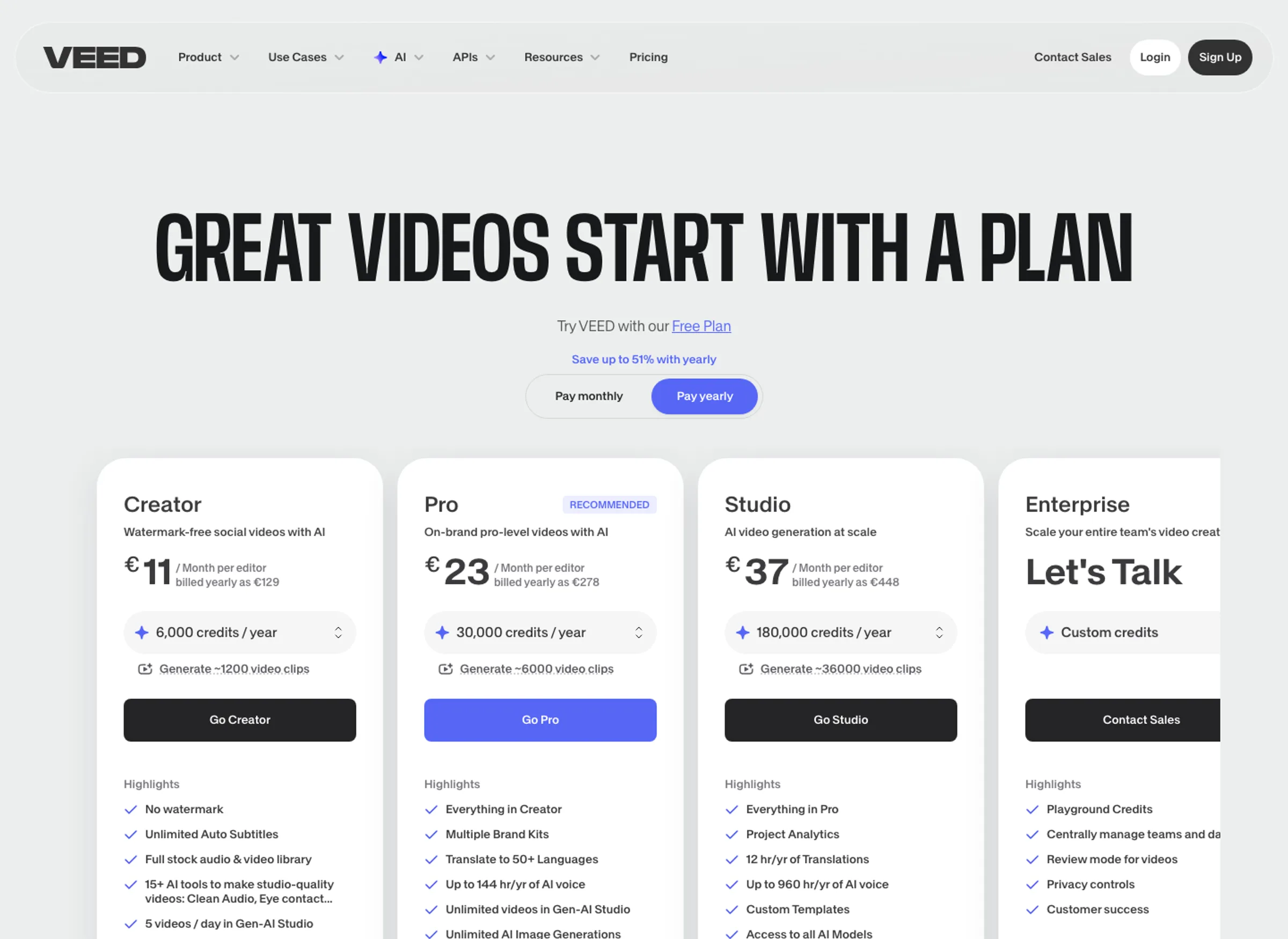
VEED sits in the middle. It has a useful free tier, but free exports include a watermark and 720p ceiling. Paid plans add credits and higher export quality, while regional pricing can change the displayed currency. The render I captured in Croatia showed EUR prices, so U.S. buyers should not copy those numbers into a budget without opening the live page.
InVideo is the one to treat like a production budget. Credits are not just a footnote. They are the meter. If a prompt needs four revisions, several scene regenerations, and a different model before the output is usable, the plan price no longer tells the whole story.
1. Descript: best when you already have raw footage
Descript wins this comparison because it answers the priciest editing problem: finding and shaping the good parts of recorded footage. A normal timeline editor asks you to scrub. Descript asks you to read. That difference sounds small until the input is a 45-minute interview with two useful moments buried inside it.
The official Descript video editing page describes the core workflow clearly: the app automatically transcribes footage, and changing or deleting words in the transcript updates the video. It also lists the AI extras that matter for creator editing: Studio Sound, Remove Filler Words, Eye Contact, Create Clips, Translation, Captions, Regenerate, and Underlord. The page does not make Descript a full professional NLE. It makes Descript a strong first-pass editor for spoken video.
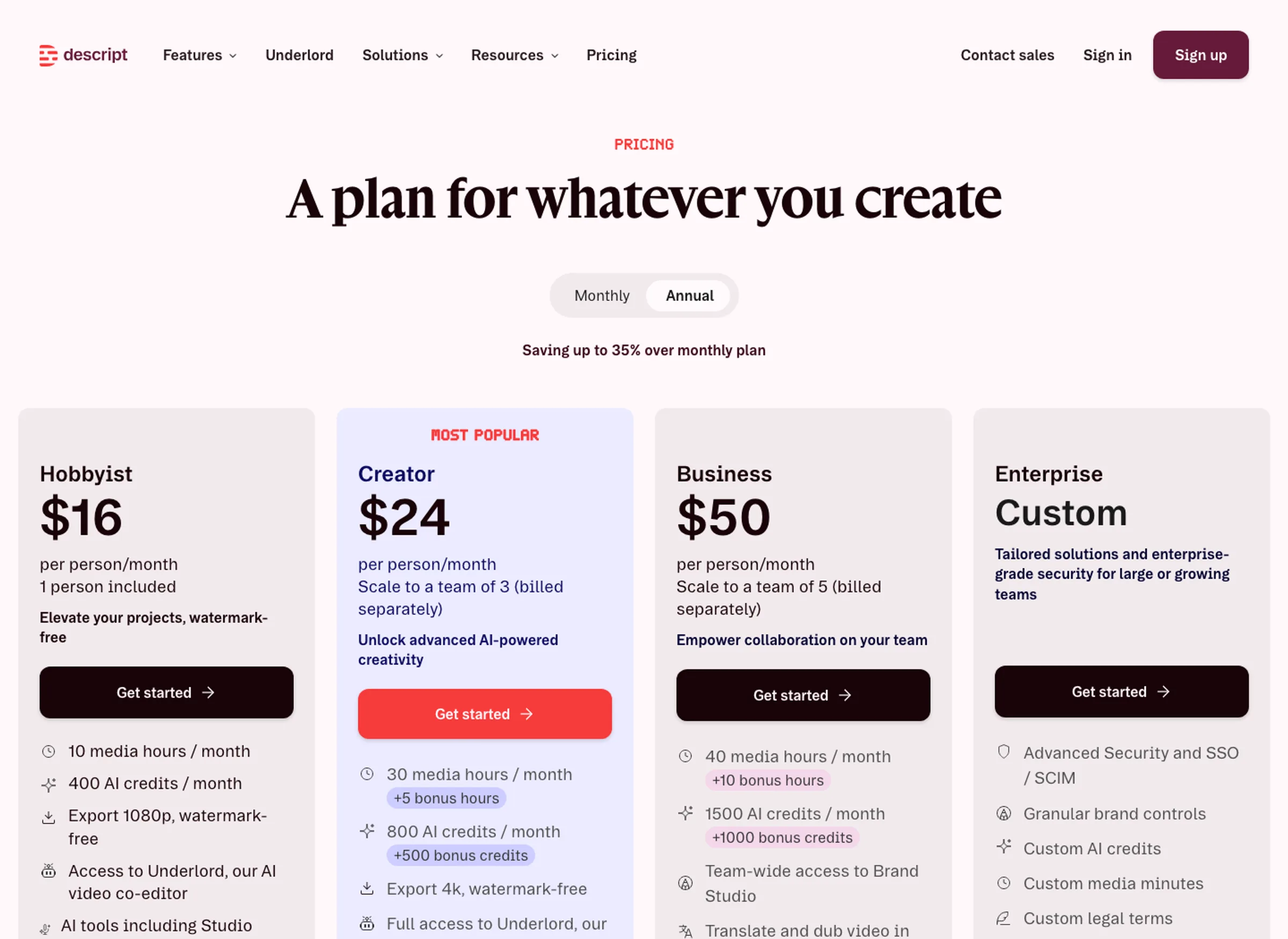
Pricing is also the easiest to reason about. In the May 4 pricing render, Hobbyist was $16 per person per month on annual billing, Creator was $24, and Business was $50. The same page showed monthly prices of $24, $35, and $65. The important limit is the quota behind the sticker price: Hobbyist includes 10 media hours and 400 AI credits per month, Creator includes 30 media hours and 800 AI credits, and Business includes 40 media hours and 1,500 AI credits.
The caveat: Descript is not the obvious pick if your starting point is only a prompt. It can generate video and media, but its buyer advantage is still editing recorded material. If you are building faceless videos from scratch, InVideo is more direct. If your team needs a browser workspace for subtitles, resizing, approval, and social exports, VEED is broader.
The transcript is the editing surface. For podcasts, webinars, interviews, demos, and talking-head clips, that removes more friction than another prompt box.
Creators who need the AI to assemble video from scratch, or teams that need a broad cloud review and social publishing workspace.
Descript leads because it has the clearest fit for recorded creator footage, transparent creator pricing, and the strongest transcript-editing thesis.
- Best transcript-editing fit for podcasts, webinars, interviews, demos, and talking-head repurposing
- Official pages support text-based editing, Studio Sound, filler-word removal, Eye Contact, Create Clips, Regenerate, captions, and Underlord
- Creator pricing is comparatively readable: $16/mo annual Hobbyist, $24/mo annual Creator, $50/mo annual Business
- Media hours and AI credits are visible on the pricing page instead of buried after signup
- Strongest choice when the expensive job is finding, tightening, and clipping existing footage
- Not the best prompt-to-video engine if you do not already have footage
- Media hours and AI credits can become the real constraint for heavy creators
- Advanced timeline finishing still belongs in a pro editor
- Evidence-led review only; no upload, transcript edit, export, or paid plan test was performed
2. VEED: best cloud editor for social production
VEED is the pick when the job is bigger than "cut this recording." It is "make this social-ready, captioned, cleaned, resized, reviewed, and exportable without opening a desktop editor."
The official VEED video editor page puts the product in that lane. It describes drag-and-drop editing, text-based editing, Auto Edits, subtitles, audio cleanup, B-roll insertion, AI video generation, background removal, translation, team comments, stock media, and browser support across major desktop platforms. That breadth is the reason VEED ranks above InVideo for teams that already have footage and need a repeatable social workflow.
Pricing needs a caveat. VEED still offers Free, Creator, Pro, Studio, and Enterprise paths, but the live page localizes the checkout amount. Collaborators are billed at the workspace plan rate, including pending invitations. That makes seat count part of the real price, so use the current checkout rather than an old search snippet or screenshot amount.
Evidence note: the screenshot below is our May 4, 2026 capture. It shows the plan structure we reviewed, not a current price quote.
The caveat is focus. VEED has transcript editing, but Descript still feels like the more natural transcript-first product. VEED has AI generation, but InVideo has the clearer prompt-and-model identity. VEED's strength is the middle: a practical web workspace that can take marketing footage from rough to shareable.
VEED is less about one killer feature and more about keeping subtitles, resizing, cleanup, stock, AI models, review, and export in one browser workspace.
Solo editors whose main job is cutting long spoken recordings by transcript, or prompt-first creators who want maximum AI model generation.
VEED ranks second because its workflow breadth is excellent, but its pricing is more regional and credit-aware than Descript's.
- Best all-around browser workspace for social video editing, captions, resizing, cleanup, and team review
- Official page supports text-based editing, Auto Edits, subtitles, background noise removal, B-roll, AI models, avatars, and translation
- Free plan exists, with 720p watermarked export according to the official FAQ
- Pro and Studio tiers unlock 4K in the rendered pricing table
- Stronger team and review fit than Descript or InVideo for recurring marketing output
- Checkout pricing is localized, so buyers need to verify currency, billing cadence, and collaborator count
- Credit and model limits are more complicated than a simple editor subscription
- Transcript editing is useful, but Descript is still the sharper spoken-video editor
- Evidence-led review only; no team workspace, export, AI model generation, or paid plan test was performed
3. InVideo AI: best when the prompt is the starting point
InVideo ranks third overall, but first for one buyer: the person who wants to generate or assemble videos from a prompt instead of editing a recording.
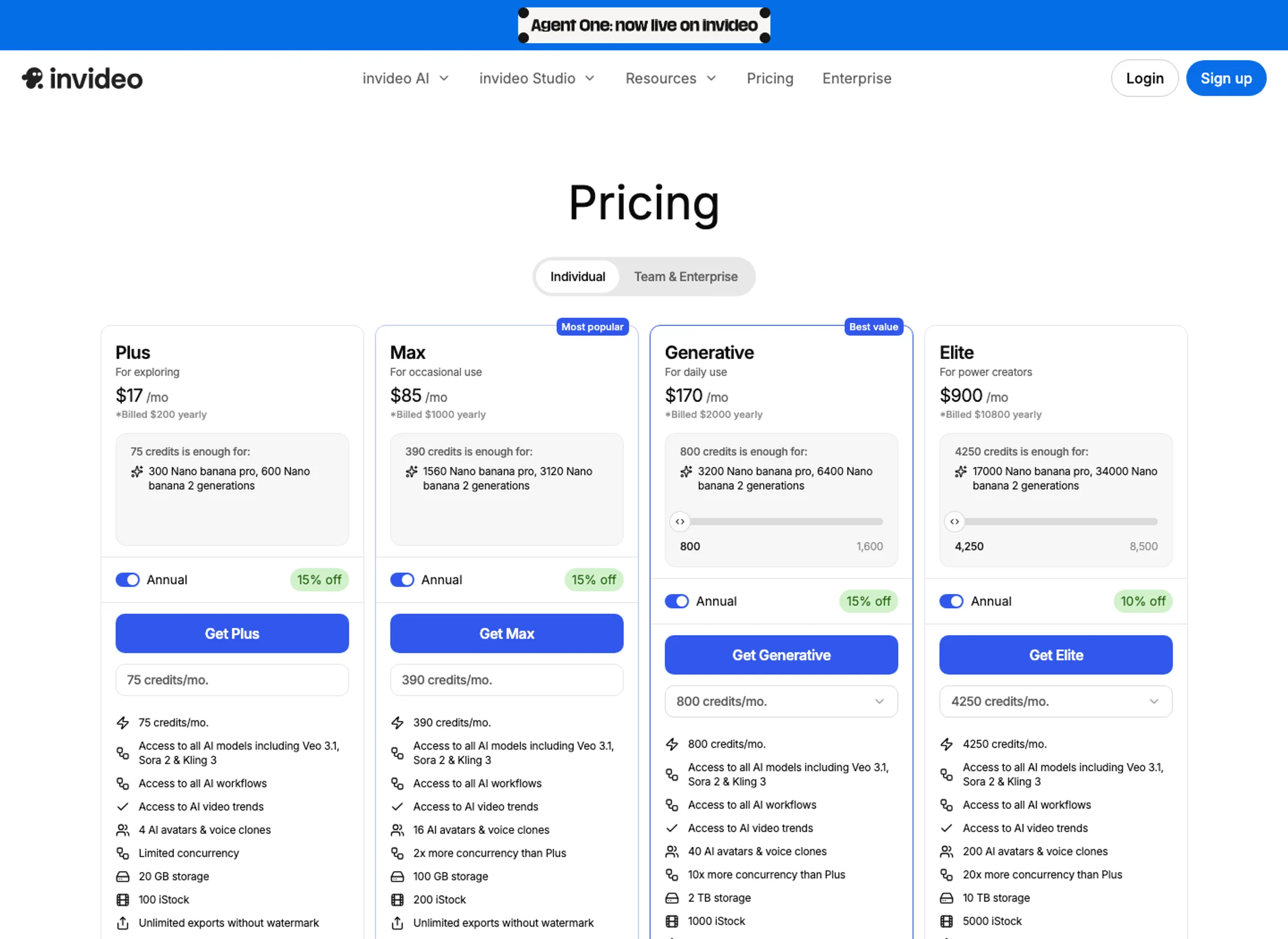
The official InVideo creator page frames the job clearly: turn an idea into a video with a prompt. The pricing page shows why the buying decision is different from Descript or VEED. InVideo is about access to AI models and monthly credits across Plus, Max, Generative, and Elite, with separate team and enterprise paths. The live page does not expose a stable public checkout amount in its crawlable text, so I would not anchor the recommendation to the older May plan prices.
The credit model is the risk. InVideo's pricing FAQ says credits are used across video creation, generative models, and other features; unused credits do not roll over; and model prices can change. That does not make InVideo bad. It means the buyer has to think like a producer, with a revision budget, not like a subscriber looking at one monthly sticker price. If your workflows burn credits on revisions, the plan price is only the opening bid.
InVideo is also the easiest product here to oversell. It can create drafts, provide model access, use avatars and voice clones, and pull stock resources. That does not mean every prompt becomes a publishable video. If quality depends on your prompt, model choice, stock fit, and revision loop, the better question is not "can it make a video?" It is "how many credits does it take before the video is usable?"
InVideo is the clearest prompt-first tool here: broad model access, avatars, stock, voice, workflows, and credit-based generation in one subscription.
Editors who already have footage and need precise cuts, transcript cleanup, or a predictable export workflow.
InVideo is powerful for prompt-first production, but the credit model and revision uncertainty make value harder to predict.
- Best fit when the starting point is a prompt, concept, ad idea, or faceless video workflow
- Pricing page lists access to models such as Veo 3.1, Sora 2, and Kling 3 in paid plans
- Paid plans advertise unlimited exports without watermark
- Paid options span Plus, Max, Generative, and Elite, with separate team and enterprise paths
- Higher tiers add more credits, avatars, voice clones, concurrency, storage, and iStock allowance
- Credits are the real constraint, and unused credits do not roll over according to the pricing FAQ
- Model and agent prices can change, so long-term cost is less predictable
- Not the natural choice for precise editing of existing long-form footage
- Evidence-led review only; no prompt generation, revision loop, credit spend, or export quality test was performed
Buying verdict: how to choose
Buy Descript if your content starts as speech: podcasts, webinars, courses, demos, interviews, livestreams, screen recordings, sales calls, or customer stories. The transcript is the asset. If you are also using tools from our AI meeting assistants guide, Descript is the logical next step when the recording becomes a clip, not just a meeting note.
Buy VEED if the job has many small production chores: captions, aspect ratios, quick trims, stock, brand elements, audio cleanup, feedback, export, and social platform formats. If you are drafting scripts in ChatGPT or Claude, our free AI writing tools guide can help upstream; VEED is where those scripts become publishable assets.
Buy InVideo if the main value is speed from idea to draft. It is the best fit for faceless channels, quick ad variants, prompt-led social videos, and AI model experimentation. It is also the one I would monitor with extra care because the credit system can make revision-heavy work feel more expensive than the plan price suggests.
My take: Descript is the default because the real drag in creator video is selection, not generation. Here's the thing: if the buyer already has a recording, every extra AI model is secondary to cutting the right 90 seconds. The hard part is avoiding a tool that makes the wrong work faster. That matters when a small team has one afternoon, not a production department. That is the avoidable cost.
Descript is the best default in this comparison because much of creator and marketer video pain starts with recorded material, not a blank prompt. VEED is the better cloud workspace. InVideo is the better prompt-first generator.
Try DescriptWhat competing comparisons miss
The lazy comparison says Descript is for editing, VEED is for editing, and InVideo is for creating. True enough, but too shallow to make a buying decision.
The real mistake is buying the interface that looks impressive instead of the bottleneck that keeps costing time. The trap with InVideo is not the headline price; it is revision cost. The trap with VEED is assuming every buyer needs a full cloud workspace. The trap with Descript is treating transcript editing as a generator substitute.
The deeper split is where the bottleneck sits. Descript removes selection friction: finding the useful words and cuts inside recorded material. VEED removes production friction: getting a social-ready video through subtitles, cleanup, resizing, review, and export. InVideo removes blank-page friction: getting from an idea to a video draft without building every scene manually.
A lot of comparison pages miss that because they flatten media hours, credits, exports, and collaboration into one feature grid. This is where the buyer has to be boring and specific. A podcast editor should not buy InVideo just because it has more model access. A social media team should not buy Descript if every deliverable needs resizing, comments, and brand assets. A prompt-first creator should not buy VEED and then complain it is not a generation lab. The best tool is the one that attacks the actual bottleneck.
Descript vs VEED vs InVideo FAQ
Ready to check Descript?
Use the verified route if the trade-offs still fit. If not, jump back to the summary and compare the alternatives.
AI tools editor focused on public docs, changelogs, API limits, free-tier constraints, and developer community feedback. Turns fast-moving AI claims into buyer-focused recommendations without implying undocumented hands-on testing.
Anthony starts with the workload behind the demo, then ranks AI tools by documented model access, limits, implementation clarity, failure behavior, and the cost of an acceptable result.
Related Articles

Bardeen vs Zapier Agents vs Lindy: Best AI Coworker
AI coworkers compared by starting context, agent authority, usage economics, approval boundaries, and offboarding clarity
Compare Bardeen, Zapier Agents, and Lindy by workflow fit, approvals, credits, integrations, browser permissions, and cancellation terms.

GPT-5.6 vs Claude Sonnet 5 API: Which Tier Fits?
Production API model routing guide
GPT-5.6 Sol, Terra, and Luna compared with Claude Sonnet 5 on API price, long context, tokenization, migration risk, tools, and workload fit.