

Most AI video roundups compare the wrong jobs. A localized avatar ad, a webinar cutdown, a training module, a stock-footage explainer, and a generated B-roll shot can all be called "AI video." They do not belong in the same production lane.
HeyGen is my default pick when a marketing team needs repeatable presenter videos from a blank page. Descript is the better purchase when the footage already exists and the expensive problem is editing it. Synthesia moves ahead for structured training, InVideo AI for rapid assembled drafts, Runway for generated source footage, and VEED for browser-based finishing.
This is an evidence-led buying guide. I compared current official plan pages, usage limits, workflow documentation, licensing terms, and the five proof captures shown below. I did not create paid accounts, render the same brief in all six tools, measure output quality, run a campaign, or calculate return on ad spend. The scores judge purchase fit from public evidence, not hands-on render performance.
If your actual purchase is between transcript editing, a cloud editor, and prompt-to-video assembly, use the narrower Descript vs VEED vs InVideo comparison. For still campaign assets, start with our AI image generator guide.
-
#1 HeyGenBest default for repeatable avatar and localized presenter video
-
#2 DescriptBest when the source footage already exists and editing is the bottleneck
-
#3 SynthesiaBest for structured training and B2B explainers
The shortlist in one table
Use the table as a routing map, not a universal leaderboard. Start with the asset you already have. Recorded interviews and webinars point toward transcript editing. A finished script that needs a repeatable presenter points toward an avatar workflow. A blank prompt that needs stock footage, narration, and captions points toward assembled video. A missing shot or visual concept points toward a generative footage tool. That first decision removes more bad options than any feature checklist.
Then price the unit that can stop production: transcription hours, finished-video allowance, generative credits, export quality, or team seats. Monthly plan names hide those constraints. A useful pilot recreates one normal deliverable, including revisions, caption cleanup, brand review, export, and any second editor needed to finish the job. The right subscription is the one whose limiting unit still fits after that full loop, not the one with the longest feature list.
| Feature | HeyGen | Descript | Synthesia | InVideo AI | Runway | VEED |
|---|---|---|---|---|---|---|
| Best job | Localized avatar and presenter videos | Editing and repurposing recorded footage | Training and structured B2B explainers | Fast stock-led social and explainer drafts | Generated B-roll and controlled source shots | Browser-based editing, captions, and resizing |
| Current paid entry | Creator $29/mo | Hobbyist $16/mo annually or $24 monthly | Starter $29/mo or $264/yr | Plus $35/mo | Standard $12/mo annually or $15 monthly | Free tier; paid price shown at checkout |
| Usage model | 600 credits on Creator; free plan allows 3 videos/mo | 10 transcription hours on Hobbyist | 10 video minutes/mo and 125+ avatars on Starter | 10 credits on Plus; model choice changes credit burn | 625 monthly credits on Standard | Plan and localized checkout limits apply |
| Strongest reason | Repeatable presenter format across 175+ languages | Edit video by changing the transcript | Governed presenter workflow in 160+ languages | Combines scripting, stock, voice, and assembly | Generates footage that does not exist in a stock library | One browser workspace for finishing and distribution formats |
| Main tradeoff | A presenter system, not a full timeline editor | Needs source footage; it is not the blank-page generator | Minutes become restrictive for longer libraries | Credit cost is variable and stock can feel generic | Credit use and repeatability need active supervision | The free-plan content licence needs a privacy check |
| Action | Check HeyGen | Check Descript | Check Synthesia | Check InVideo | Check Runway | Check VEED |
How I ranked the six AI video workflows
Every tool is scored on the same five axes: Workflow Fit, Output Control, Usage Clarity, Brand Repeatability, and Buyer Value. A generator does not earn points merely for producing attractive demos. It moves up when a team can understand the meter, repeat the format, preserve the brand, and hand the workflow to another person without rebuilding it.
The strongest counterargument to HeyGen is simple: many teams already have footage. In that case, buying another presenter generator solves the wrong problem and Descript should be first. The ranking assumes a marketer is choosing a system that can start a repeatable campaign format, not only clean up an existing recording.
What the monthly price misses
The six products expose four different kinds of capacity. HeyGen and InVideo AI lead with credits, Synthesia with video minutes, Descript with transcription hours, and Runway with generation credits. VEED is closer to a conventional editor subscription, but its paid checkout and plan limits still depend on locale. A $29 headline can therefore describe very different amounts of finished work.
The useful cost unit is not "subscription per month." It is approved deliverable per month. That total includes the first tool, any second editor, the generations that were rejected, human review, captions, localization, storage, and the time needed to correct the output. None of those six totals can be calculated honestly from a public pricing page alone, which is why this guide does not publish a made-up cost-per-video table.
There is also an unused-capacity problem. A training team may need 40 minutes during an onboarding launch and almost nothing the next month. A campaign team may burn through generative credits during one concept sprint. A podcast team may need a predictable block of transcription every week. Annual billing is only cheaper when the production rhythm actually uses the allowance.
Before choosing a tier, write down the input and the finished artifact. "We need AI video" is not a requirement. "We need four approved 60-second product explainers each month, in three languages, with the same presenter and a final vertical cut" is. That sentence tells you whether the meter should be credits, minutes, transcription hours, or an editor seat.
1. HeyGen: best default for repeatable presenter video
HeyGen wins because it turns the blank-page problem into a repeatable presenter workflow. Its current Creator plan is $29 per month, includes 600 credits, and supports 175+ languages and dialects. The free plan allows three videos per month, which is enough to inspect the workflow before committing, but not enough to mistake a trial for a production allowance.
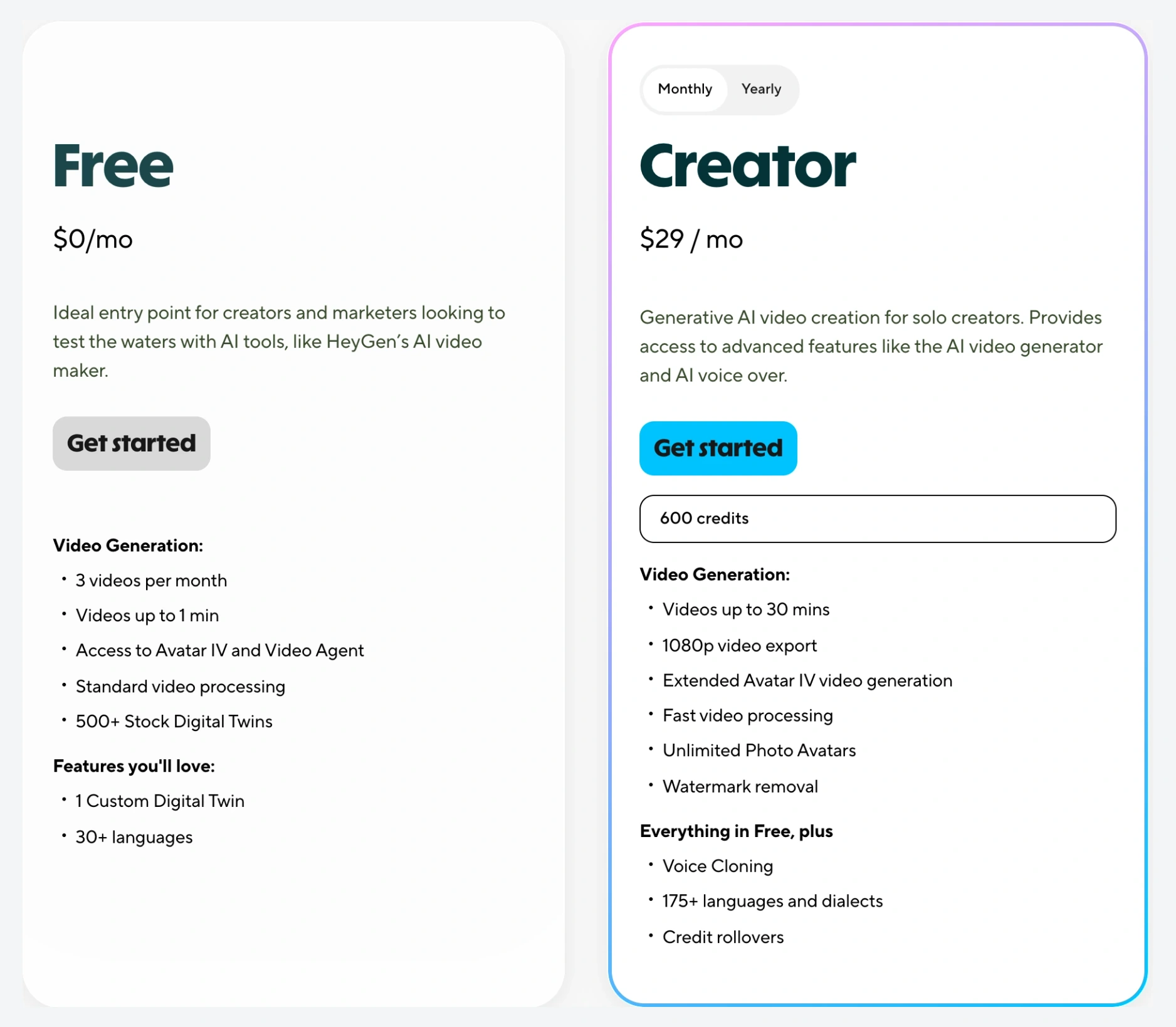
The practical advantage is not a claim that every avatar looks real. It is format stability. A marketing team can hold the presenter, layout, language process, and brand treatment steady while changing the script. That is more useful for onboarding, product education, and localized campaign variants than a beautiful clip that cannot be reproduced next week.
The limit is equally clear. HeyGen is not the best place to cut a long interview, manage a complex timeline, or create every piece of B-roll. Choose it when the presenter is the format. Pair it with an editor only if that second step is already part of the workflow.
The Creator plan combines a clear $29 monthly entry, 600 credits, and 175+ language coverage in one repeatable presenter workflow.
Teams whose real bottleneck is editing existing footage or building complex timelines.
HeyGen ranks first because it offers the strongest blank-page workflow, brand repeatability, and language coverage for this marketing buyer. The accepted tradeoff is needing a separate editor for deeper post-production.
- Clear fit for repeatable presenter, localization, and product-education formats
- Creator plan currently includes 600 credits and 175+ languages
- Free plan provides a bounded three-video evaluation path
- Keeps the presenter format steadier than a new generative clip for every campaign
- Not a replacement for a full timeline editor
- Credit consumption still depends on the features used
- A stock or generated presenter may be the wrong tone for personality-led brands
- Teams should validate consent, likeness, and brand-approval workflows before scale
2. Descript: best when footage already exists
Descript ranks second because it attacks a more common production cost than another generator: finding and changing the right moment in recorded footage. Its official workflow turns the transcript into the editing surface. Delete text and the corresponding video is removed; rearrange the transcript and the cut follows.
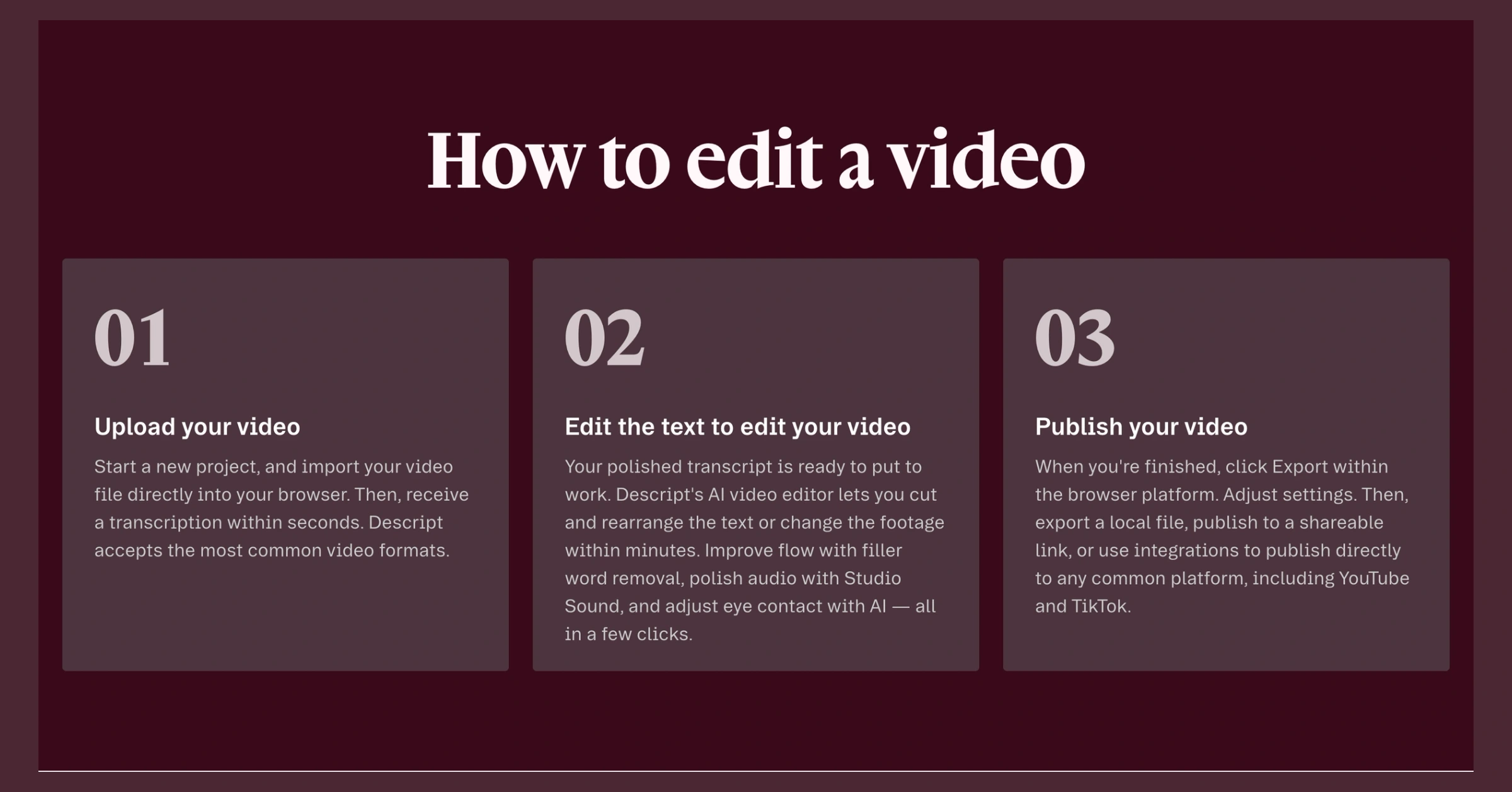
Hobbyist is currently $16 per month with annual billing or $24 month to month and includes 10 transcription hours. Creator is $24 per month annually or $35 monthly, with 30 transcription hours and 4K export. The right plan depends less on how many AI buttons exist and more on how much recorded material enters the edit each month.
Descript moves ahead of HeyGen for podcast, webinar, interview, testimonial, and talking-head teams that already record. It stays second overall because it cannot solve the blank-page presenter job without source material.
Choose Descript if recorded footage is already the team's weekly input. Skip it if the buyer needs a presenter-led video from a script without recording first.
Transcript editing makes long recorded material easier to cut, rearrange, and hand to a non-timeline editor.
Teams that need a presenter or generated scene before any footage exists.
Descript ranks second because its editing workflow is unusually clear and repeatable. It becomes the winner when source footage already exists, but loses the blank-page default.
- Transcript becomes the primary video editing surface
- Strong fit for webinars, podcasts, interviews, and customer stories
- Current paid plans expose transcription-hour allowances clearly
- Creator adds 4K export for teams that need a higher delivery ceiling
- Requires source footage for its strongest workflow
- Transcription hours can become the real monthly constraint
- Creator pricing is less attractive if the team only needs occasional cuts
- Generated corrections still need a human review for voice and visual continuity
3. Synthesia: best for governed training libraries
Synthesia is the strongest fit when consistency matters more than social spontaneity. The current Starter plan is $29 monthly or $264 annually, with 10 video minutes per month and 125+ avatars. Creator is $89 monthly or $804 annually, with 30 minutes and 180+ avatars. The platform supports 160+ languages.
That structure works for compliance modules, onboarding, product walkthroughs, and internal updates where the team wants one governed presenter format. It is less convincing for a constant flow of long videos because the minute allowance becomes the budget before editing complexity does.
Choose Synthesia over HeyGen when the organization values a structured training system and procurement-friendly workflow more than campaign variety. Choose HeyGen when localization and a broader marketing-presenter use case lead the decision.
Starter combines a governed presenter workflow, 10 monthly video minutes, 125+ avatars, and broad language coverage.
High-volume teams that will exhaust a monthly minute allowance or need a loose social-first style.
Synthesia ranks third because its repeatability and buyer fit are excellent for training, while the minute-based allowance and narrower tone reduce value for general marketing.
- Clear fit for training, onboarding, and structured B2B explainers
- Starter plan publishes a specific monthly minute allowance
- Broad avatar and language coverage supports repeatable libraries
- More governed than a prompt-only generative workflow
- Monthly video minutes can become expensive for long libraries
- The presenter style may feel too formal for social-first campaigns
- Creator is a substantial jump from Starter
- The best custom and enterprise controls require a larger buying motion
4. InVideo AI: best for fast assembled drafts
InVideo AI is the speed choice for a buyer who wants a prompt turned into a script, stock-led sequence, voiceover, and captions. The current Plus plan is $35 per month with 10 credits; Max is $60 with 25; Generative is $120 with 100. Those plan names are less important than the second meter: the official credit documentation says model and generation complexity can change the cost substantially.
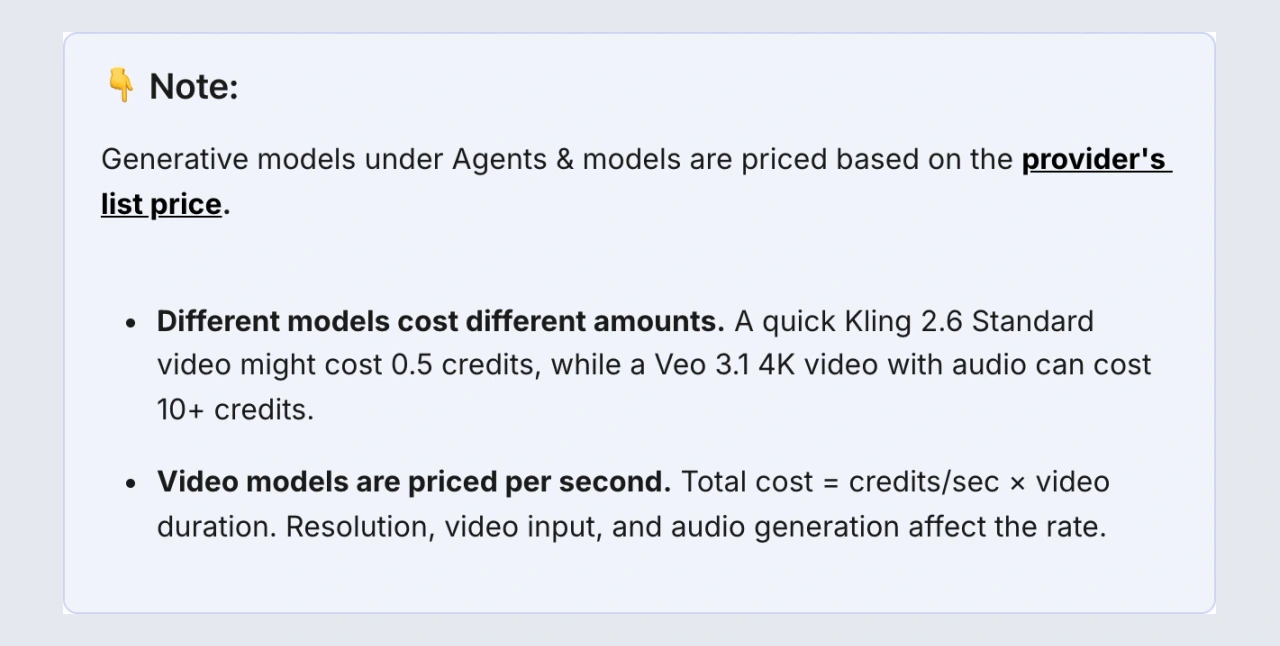
That variable meter is the reason InVideo ranks fourth. It can compress several assembly steps into one workflow, but the buyer should test a real weekly content brief before choosing a plan. A cheap plan is not cheap if one preferred model consumes the allowance too quickly.
InVideo is strongest for rapid explainers and social drafts where stock-led footage is acceptable. It is weaker when a brand needs unique source material, a stable human presenter, or exact frame-level direction.
One workflow can combine script, stock, voice, captions, and generation for a fast first draft.
Teams that need predictable credit cost, unique footage, or exact frame-level control.
InVideo ranks fourth because workflow speed is strong, but variable credit use and less distinctive stock-led output reduce usage clarity and repeatability.
- Combines several blank-page production steps in one workflow
- Useful for quick explainers, list videos, and social drafts
- Official documentation exposes the credit model instead of hiding it
- Multiple tiers let teams buy more generation only when the workflow proves useful
- Model choice and complexity can change credit consumption sharply
- Stock-led output can look familiar across competing channels
- Prompt convenience provides less frame-level control than an editor
- No credit rollover means unused allowance does not become a future buffer
5. Runway: best for generated source footage
Runway belongs in a marketing stack when the missing input is footage, not when the buyer wants one tool to finish the campaign. The current Standard plan is $12 per month with annual billing or $15 monthly and includes 625 credits. Pro is $28 annually or $35 monthly with 2,250 credits. The free plan includes 125 one-time credits.
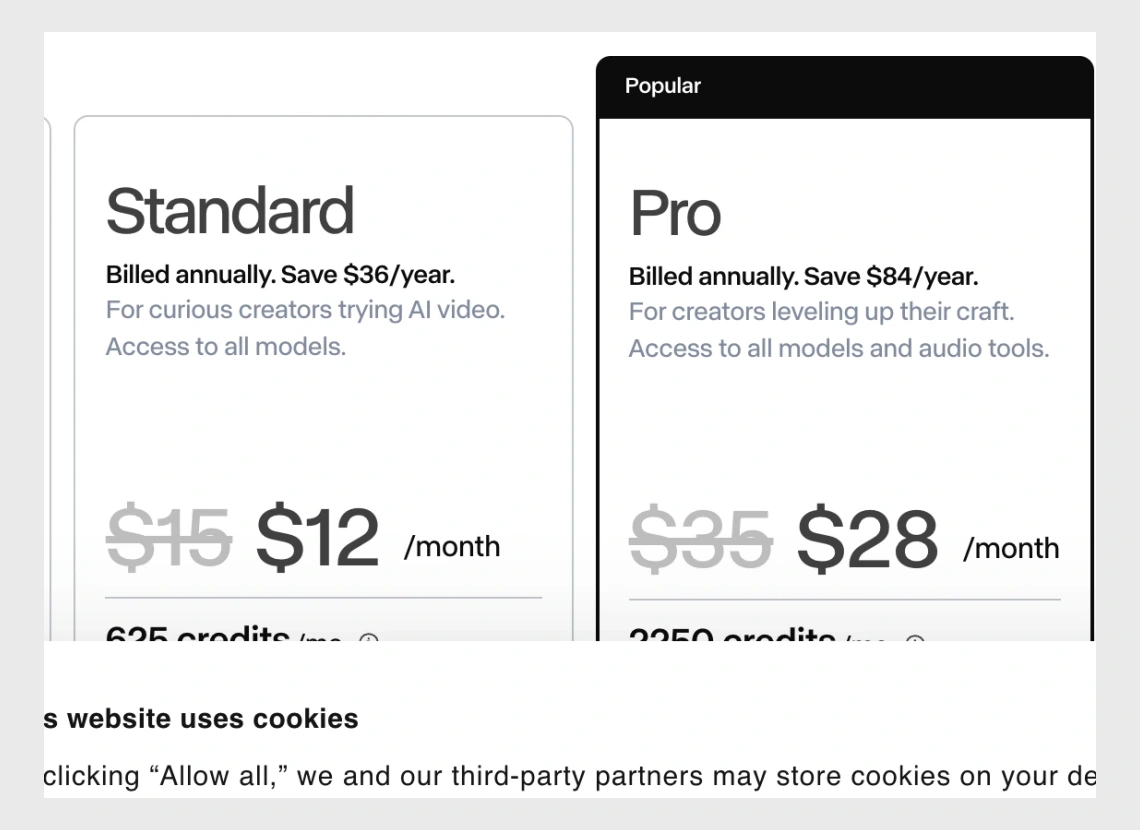
Runway can supply a transition, environment, product concept, or B-roll shot that a stock library does not have. That is a valuable supporting job. It ranks below the assembly tools because the output still needs selection, continuity review, brand approval, and usually an editor.
The buying discipline is to estimate clips, not projects. Credits are spent on generations and iterations, while a finished campaign may require several rejected attempts for every usable shot.
Runway can create source shots that do not exist in a stock library, with public credit allowances for planning.
Teams that need a repeatable presenter, a finished edit, or predictable output from the first generation.
Runway ranks fifth because output control and buyer value are useful for source footage, while repeatability and end-to-end workflow fit are weaker for the default marketing buyer.
- Useful for footage that a stock library cannot supply
- Public credit allocations make the basic meter inspectable
- Standard and Pro provide clear self-serve entry points
- Fits as a creative source layer beside a dedicated editor
- A generated clip is not a finished marketing workflow
- Iterations can consume credits before one shot is approved
- Character and product continuity need active review
- Teams still need editing, licensing, and brand-approval discipline
6. VEED: best browser-based finishing workflow
VEED is the practical browser editor in this group. It combines timeline editing, captions, format resizing, and AI-assisted cleanup in one web workspace. That makes it useful for a small team that wants fewer handoffs between recording and distribution.
The reason it sits sixth is not a missing feature. It is purchase clarity. The public pricing experience was localized and did not expose one stable self-serve figure that could be quoted safely in this refresh, so the current paid amount should be checked in the buyer's own checkout. There is also a privacy distinction worth seeing before a team uploads client material.
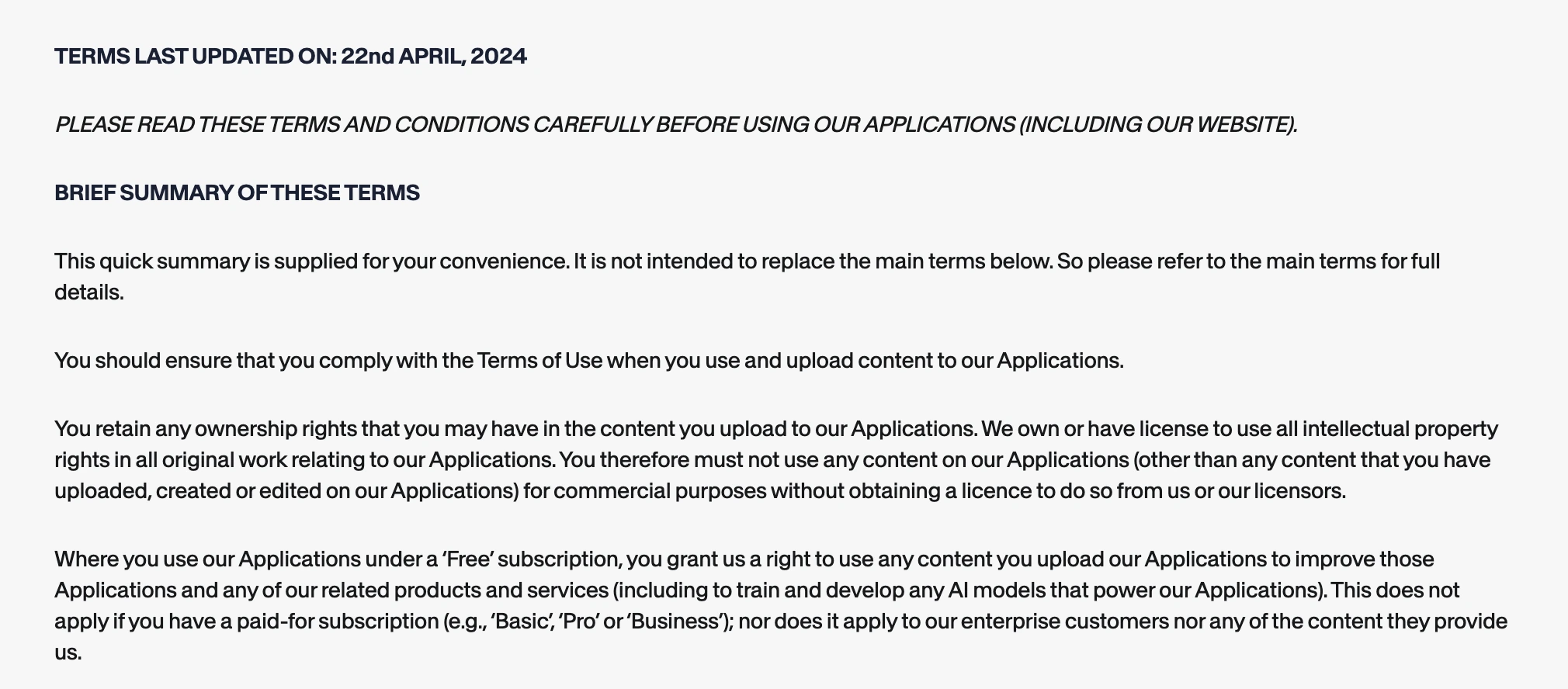
VEED's current terms say uploaded content on the free plan may be used to improve its applications and train AI models, while that clause does not apply to paid or enterprise content. That does not make the free plan unusable. It means a team handling unreleased campaigns, customer footage, or confidential client material should choose the plan and upload policy deliberately.
VEED keeps editing, captions, resizing, and distribution formats in one browser workflow.
Teams that need a blank-page presenter generator or cannot accept the free-plan content licence.
VEED ranks sixth because the browser workflow and control are useful, while current paid-price clarity and the free-plan content terms require more buyer diligence.
- One browser workspace for editing, captions, and format changes
- Good fit for small teams that already have footage
- Paid and enterprise content are excluded from the cited free-plan training clause
- A credible alternative to a heavier desktop editor for routine social production
- Current paid price needs confirmation in the buyer checkout
- Not the strongest blank-page generation workflow
- Free-plan content terms require care with client or confidential footage
- Browser convenience does not remove the need for final quality review
Also considered, but not ranked
Google Veo and OpenAI Sora are credible generative-video systems, but they were not ranked because this guide is about current self-serve marketing workflows with comparable public plan and production evidence. Adobe Firefly Video remains relevant for teams already buying the Adobe workflow, but it is a different ecosystem decision. Pika is useful for short creative generation, yet it did not displace Runway as the source-footage representative in this six-tool shortlist.
Exclusion is not a quality verdict. It keeps one rubric from pretending that a research-preview model, a full editor, an avatar platform, and an enterprise creative suite expose the same purchase.
Run one production pilot before annual billing
A fair pilot starts with a real deliverable, not the easiest vendor template. Pick one 60-to-90-second asset that represents the weekly work: a product explanation, webinar clip, training lesson, localized presenter update, social draft, or custom B-roll shot. Use material you are allowed to upload and define what an acceptable export must contain.
Keep the brief fixed across the shortlist. Record the required aspect ratios, brand elements, caption style, language, source assets, approval owner, and delivery format. Also define the failure conditions in advance: wrong product details, unusable pronunciation, inconsistent presenter, missing edit control, excessive credit consumption, or a second tool the team did not budget for.
During the pilot, track four numbers: allowance consumed, manual corrections, elapsed operator time, and paid tools required to reach approval. Those are internal operating measurements, not universal product benchmarks. They let your team compare its own workflow without pretending one test applies to every buyer.
Then hand the project to a second person. If the second operator cannot reproduce the approved format without reverse-engineering prompts, the workflow is not repeatable yet. This handoff test is where a stable avatar, transcript editor, governed training template, or familiar browser timeline can beat a more impressive first generation.
Finally, compare the approved export, not the first preview. The right product is the one that reaches the required output with an understandable meter and a correction path your team can sustain. That is the evidence needed for annual billing; a polished homepage reel is not.
How to choose the right AI video workflow
No footage and a repeatable presenter format: start with HeyGen . The failure to avoid is buying a cinematic generator when the campaign needs the same approved presenter every week.
Existing interviews, webinars, or podcasts: start with Descript . The failure to avoid is paying for generation while the expensive hours remain trapped in the edit.
Training and internal explainers: start with Synthesia . Price the full library in minutes before choosing a tier.
High draft volume: test one real week in InVideo AI . Record how many credits the preferred models consume instead of estimating from the headline plan.
Missing custom footage: use Runway as a source layer, then finish elsewhere. For broader campaign ideation before production, our ChatGPT vs Claude comparison separates the two research and drafting workflows.
Verdict: buy the repeatable format, not the best demo
HeyGen is the best default here because it gives a marketing team a repeatable presenter format, a clear self-serve entry, and broad localization coverage. Descript is the better answer for the large group of teams whose footage already exists. That is the countercase most roundups miss.
The rest of the ranking follows the production job. Synthesia owns governed training, InVideo AI compresses draft assembly, Runway supplies generated source footage, and VEED finishes work in the browser. None is the universal winner because "AI video" is not one workflow.
Before paying, run one representative project from brief to approved export. Record credits or minutes consumed, the number of manual corrections, the second tool required, and whether another team member can repeat it. That small ledger is more useful than any viral demo reel.
Frequently Asked Questions
Ready to check HeyGen?
Use the verified route if the trade-offs still fit. If not, jump back to the summary and compare the alternatives.
AI tools editor focused on public docs, changelogs, API limits, free-tier constraints, and developer community feedback. Turns fast-moving AI claims into buyer-focused recommendations without implying undocumented hands-on testing.
Anthony starts with the workload behind the demo, then ranks AI tools by documented model access, limits, implementation clarity, failure behavior, and the cost of an acceptable result.
Related Articles

Bardeen vs Zapier Agents vs Lindy: Best AI Coworker
AI coworkers compared by starting context, agent authority, usage economics, approval boundaries, and offboarding clarity
Compare Bardeen, Zapier Agents, and Lindy by workflow fit, approvals, credits, integrations, browser permissions, and cancellation terms.

GPT-5.6 vs Claude Sonnet 5 API: Which Tier Fits?
Production API model routing guide
GPT-5.6 Sol, Terra, and Luna compared with Claude Sonnet 5 on API price, long context, tokenization, migration risk, tools, and workload fit.