

The phrase “AI coworker” hides three different products. Bardeen starts with the page in your browser. Zapier Agents starts with the apps in your stack. Lindy starts with the messages, meetings, and routines that compete for your attention. Buying them as if they were interchangeable is the fastest way to pay for the wrong kind of autonomy.
Zapier Agents is the best overall choice. Its advantage is not that every agent run is smarter. It is that the agent can sit on top of a broad automation ecosystem, use live data sources, browse the web, and hand work into established app workflows. Bardeen is the sharper choice for browser-native research and structured extraction. Lindy is the better personal operations teammate when inbox, calendar, meetings, Slack, and follow-up are the actual job.
This is an evidence-led comparison, not a hands-on lab test. I checked current product, pricing, usage, permission, privacy, terms, and cancellation documentation; Bardeen's August 2026 research-agent release; the current Chrome Web Store listing; public competitor pages; and live route requirements. I did not create paid accounts, install extensions, connect inboxes, run production agents, measure accuracy, or test support and refunds.
This page owns the specific AI-coworker purchase decision. For a broader market map, use our best AI agents guide. If you need deterministic automations rather than agents, compare Zapier vs Make vs n8n. If the agent's authority begins and ends in a task system, use the task-agent comparison. Sales teams focused on contact data should begin with the AI sales prospecting comparison.
-
#1 Zapier AgentsBest overall for cross-app agent work and established automation handoffs
-
#2 BardeenBest for browser research, scraping, enrichment, and structured extraction
-
#3 LindyBest for inbox, meetings, calendar, Slack, and personal admin routines
The decision is where the work begins
Choose the product whose starting context matches the work. A browser researcher should not have to reconstruct a live webpage inside a general app agent. An operations team should not adopt a browser extension as its entire orchestration layer. An executive assistant workflow should not be judged by how well it scrapes a list.
| Feature | Zapier Agents | Bardeen | Lindy |
|---|---|---|---|
| Best starting context | Apps, live data sources, web browsing, and existing Zapier workflows | Current browser page, structured web data, lists, and GTM research | Inbox, calendar, meetings, Slack, routines, and personal workspace context |
| Entry price checked | Free; Pro $33.33/month billed $400 annually | Basic $10/month; Premium $50/month | Plus $29.99 per user per month |
| Usage unit | 400 activities/month Free; 1,500 Pro | Usually 1 credit/row; enrichment 3 credits/row | 2–250 credits for everyday asks; more for deeper work |
| Approval boundary | Per-run activity safeguards and input requests; design sensitive actions explicitly | Browser permissions and automation scope need deliberate review | Built-in approvals for actions with outside impact |
| Main risk | Agent activity pricing is separate from ordinary Zap task pricing | Credits expire; free plan is non-commercial under current terms | Variable credit cost makes complex-work forecasting harder |
| Skip if | The work is primarily page-level research or personal inbox administration | You need a broad team orchestration layer outside browser-centric work | Your core job is structured scraping or reusable cross-app automation architecture |
| Action | Try Zapier Agents | Try Bardeen | Try Lindy |
The counterintuitive result is that the newest product story does not produce the safest default. Bardeen's current research-agent direction is genuinely interesting, but browser context and extension authority are both its advantage and its governance cost. Zapier wins the general recommendation because more teams need a bridge across systems than a specialist extraction engine.
Why Bardeen is trending now
Bardeen published BardeenAgent on August 19, 2026, positioning it as a browser agent for structured research across complex websites. Its central idea is useful: learn the extraction pattern on one row, then replay a program across the dataset instead of asking a model to improvise every row. That is a narrower and more concrete promise than “an agent that can do anything.”
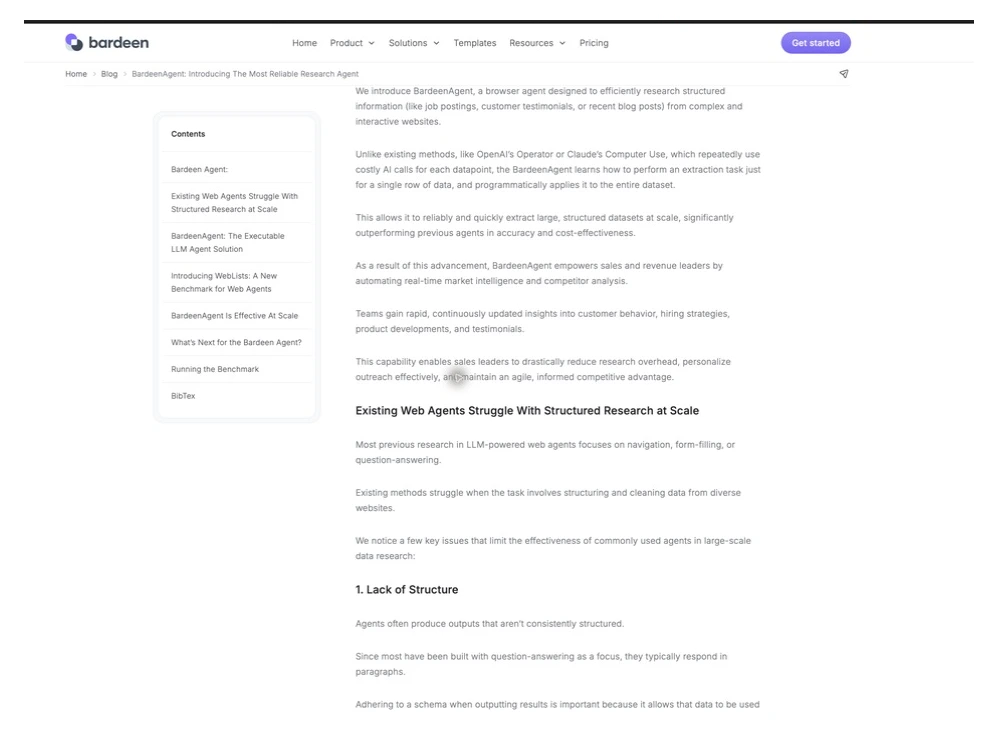
The marketplace signal supports the timing. The Chrome Web Store listed version 5.0.0, updated June 19, 2026, with 200,000 users and a 4.4 rating when checked. That does not prove reliability or business value. It does show an installed base large enough for the new agent direction to matter.
The limit is equally important. Structured extraction is strongest when a site has repeatable HTML and the output needs a schema. It is weaker when each page requires a different judgment, the site changes constantly, or the workflow depends on authenticated systems that should not inherit broad browser authority. Bardeen's approach can reduce repeated model calls; it cannot remove source quality, permission, or maintenance risk.
Credits are not comparable units
Zapier counts activities. Bardeen commonly counts created rows. Lindy counts work on a variable scale. A “credit” in one product is not a credit in another, so the useful forecast starts with a representative workflow, not a monthly headline.
For Zapier Agents, Free includes 400 activities per month and Pro includes 1,500 at $33.33 per month when billed annually. Free testing consumes quota; Pro testing does not. A run is capped at 10 activities on Free and 40 on Pro before the agent asks for input. That per-run safeguard is useful, but it also means a seemingly small behavior can consume several activities.
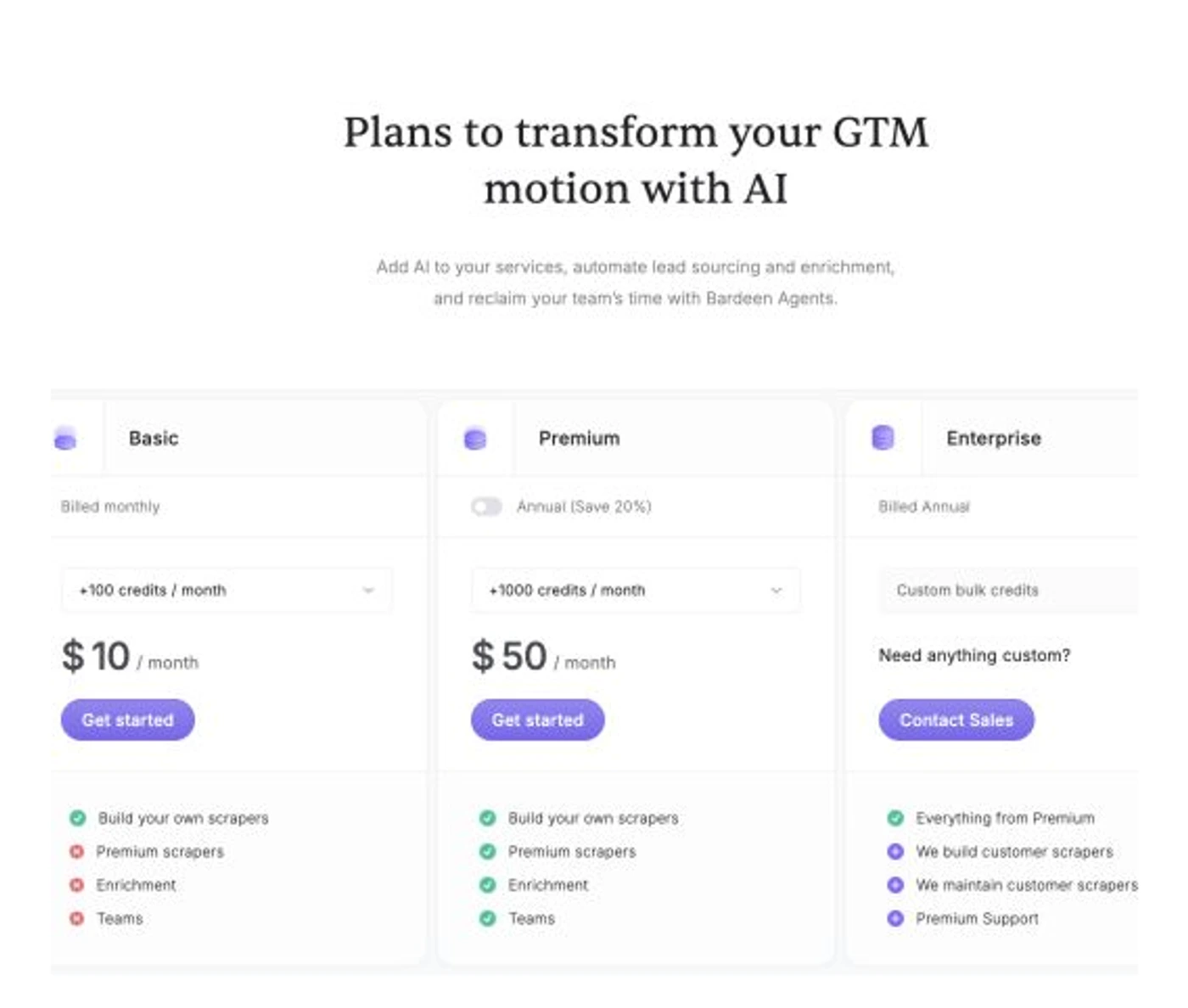
Bardeen Basic is $10 per month with 100 credits; Premium is $50 with 1,000 credits, or $480 per year with 12,000. Scraping, web search, and AI tools are generally one credit per row; enrichment is three. Utilities are free, and results can be downloaded as CSV without a credit charge. Unused credits expire at the end of the billing period.
Lindy Plus is $29.99 per user per month with 3,000 credits, Pro is $99.99 with 15,000, and Max is $199.99 with 35,000. Lindy describes everyday asks as roughly 2–250 credits, deep work as 250–1,000, and large builds as 1,000–2,500. Unused credits do not roll over, and credit-using actions pause when the pool runs out.
A practical pilot should price the same week three times: ten ordinary requests, one complex research task, and one failed or repeated run. That exposes the hidden denominator. Zapier is easiest to reason about when behaviors are short. Bardeen is easiest when row counts are known. Lindy is easiest when the work stays in the everyday-ask band.
How I ranked the three AI coworkers
The shared score weights Workflow Fit at 30%, Control & Approvals at 20%, Usage Predictability at 20%, Integration & Context Reach at 15%, and Exit & Admin Clarity at 15%. This is not a benchmark of model intelligence. It is a buyer score for handing recurring business work to an agent.
Zapier scores 8.4 because it is the broadest default and has relatively legible activity ceilings. Bardeen scores 7.9 because its browser research fit is excellent, while permissions, expiring credits, and commercial-plan terms narrow the safe audience. Lindy scores 7.6 because its assistant workflow and approvals are strong, but variable credit consumption makes deep work harder to forecast.
1. Zapier Agents: best overall
Zapier Agents is the best starting point when the desired outcome crosses CRM, forms, tables, email, project tools, and web research. Its advantage is the surrounding system: an agent can reason about a request, while deterministic Zapier automation can carry the repeatable handoff.
That combination creates a useful boundary. Let the agent interpret, classify, and request missing context. Let a reviewed automation perform the predictable write. Teams already using Zapier gain an easier audit conversation than teams introducing a separate browser-centric agent for every workflow.
Zapier Agents is best for an operations team that already has several systems and wants one reasoning layer above them. Skip it if the workflow is confined to the current webpage or a personal inbox: the extra orchestration reach becomes overhead rather than an advantage.
Zapier pairs agent behavior with live data, web browsing, and a mature cross-app automation layer.
Skip it when the job begins and ends inside the current webpage or when inbox and meeting assistance is the main purchase reason.
Zapier wins the general recommendation because it can connect agent judgment to the widest practical set of business workflows without making a browser extension the entire control plane.
- Broad app and automation ecosystem
- Free tier with 400 monthly activities
- Clear per-run activity safeguards
- Strong handoff from agent reasoning to deterministic workflows
- Agents pricing is separate from normal Zap task pricing
- Testing consumes quota on Free
- Complex behaviors can burn multiple activities quickly
- Browser-native extraction is not its specialist advantage
2. Bardeen: best for browser research
Bardeen is the tool I would choose for turning repeatable webpage structures into tables, enrichment flows, or GTM research. It has the clearest specialist job in this comparison. The browser is not merely another integration; it is the working surface.
That same proximity requires stricter governance. Bardeen's security documentation lists permissions involving tabs, active tabs, navigation, history, bookmarks, context menus, and host access, while explaining that history and bookmark matching happens locally. The Chrome Web Store also discloses handling of personally identifiable information, location, web history, and user activity. Those disclosures are not evidence of misuse. They are a reason to review the extension on the same terms as any tool that can see sensitive work surfaces.
The commercial boundary can surprise small teams. Bardeen's current terms describe the Free Plan as non-commercial and reserve the right to terminate or charge business pricing for commercial use. Payments are generally non-refundable, cancellation takes effect at the end of the current period, and partial-period refunds are not promised. Treat the free credits as evaluation capacity, not an assumed business tier.
BardeenAgent learns a structured extraction pattern and replays it across a dataset, giving the product a specific browser-research advantage.
Skip it when broad extension permissions are unacceptable, the workflow is not browser-centric, or you need a predictable non-row-based cost model.
Bardeen ranks second because it is the strongest specialist for browser research, but its permission surface, expiring credits, and commercial free-plan boundary make it a narrower default.
- Strong browser and structured-data context
- Concrete record-and-replay research approach
- Clear per-row credit examples
- CSV download does not consume credits
- Unused credits expire
- Enrichment costs three credits per row
- Free Plan terms restrict commercial use
- Extension permissions deserve formal review
3. Lindy: best for personal operations
Lindy is the closest of the three to an assistant that lives in the normal rhythm of knowledge work. Its current plan page emphasizes Slack threads, scheduled routines, persistent workspace context, meeting recording and follow-up, inbox management, up to five connected inboxes, computer use, integrations, MCP, and built-in approvals.
The approval story is its strongest differentiator. Lindy says actions with outside impact require approval. That is the right default for messages, calendar changes, and other actions that affect people. The weakness is economic observability: a reply draft and a multi-source research report can sit orders of magnitude apart in credit use.
If inbox, calendar, calls, and executive follow-up are the entire purchase job, compare Hey Noah, Lindy, and Fyxer as AI executive assistants. That narrower guide makes the draft-versus-approval-versus-automatic-action boundary the main decision.
Lindy is best for a solo professional or small team whose recurring work is communication-heavy. It ranks third because variable credit bands make deep work harder to forecast, not because the assistant context is weak. Skip it if structured extraction or shared automation architecture is the real bottleneck; that tradeoff will surface as duplicated tools and a less predictable bill.
Lindy combines a personal-work context with built-in approvals for actions that affect the outside world.
Skip it when you need deterministic per-row scraping economics or a mature automation backbone for many internal systems.
Lindy ranks third overall because its assistant workflow is strong, while variable credit consumption and a per-user entry price make complex work harder to forecast.
- Strong inbox, calendar, meeting, and Slack fit
- Built-in approvals for outside-impact actions
- Persistent workspace context and scheduled routines
- Broad skill, integration, and MCP positioning
- No free plan shown on the current pricing page
- Deep work can consume 250–1,000 credits
- Unused credits do not roll over
- Credit-using actions pause when the pool is exhausted
How to choose the right AI coworker
Choose Zapier Agents when the output must move across systems. A useful test is to draw the workflow without naming the agent. If the drawing begins with a form, CRM record, table, help-desk ticket, or scheduled trigger and ends in another app, Zapier is the stronger choice. The agent can interpret the messy middle while established automations handle repeatable writes. I would choose this route for lead triage, internal request routing, account research that updates a CRM, or operations work that already depends on Zapier.
Choose Bardeen when the browser page is the source of truth. It fits work such as collecting a defined set of fields from company pages, monitoring job posts, turning testimonial pages into structured research, or enriching a known list. I would not choose it merely because the extension can see the page. The workflow should benefit from repeatable structure, and the team should be comfortable reviewing browser permissions, excluding sensitive sites, and budgeting by rows.
Choose Lindy when communication is the work surface. It is the better match for preparing meetings, summarizing calls, drafting follow-ups, handling inbox routines, scheduling, and responding inside Slack. The critical design choice is where approval remains mandatory. Drafting a reply is lower risk than sending it. Preparing a proposed meeting time is lower risk than moving a calendar event that affects five people. Preserve that distinction even when the product can automate both.
Team shape matters too. A solo consultant may get more immediate value from Lindy's personal context. A revenue researcher may justify Bardeen with one recurring dataset. An operations team usually benefits from Zapier's shared automation foundation. A highly technical team that wants to build and deploy custom agent systems may outgrow all three and prefer an agent platform such as Relevance AI; that is a different purchase job from selecting a front-line coworker.
Use a simple elimination rule before scoring features. Remove Bardeen if browser-extension authority is unacceptable. Remove Lindy if the team cannot tolerate variable credit use for deep work. Remove Zapier Agents if the job does not need cross-app context or downstream automation. If two remain, estimate the same weekly workflow in each product's own unit and compare corrections, approvals, and systems touched—not the nominal number of credits or activities.
Do the security review at the workflow level, not once for the entire product. A public-web research lane may be acceptable while payroll, banking, medical, legal, or customer-admin pages remain excluded. Likewise, an inbox assistant can draft routine follow-ups while messages involving contracts, payments, hiring, or account access always stop for a person. Narrow permissions and approval rules are part of the configuration, not paperwork to finish after launch.
A seven-day pilot that will expose the wrong choice
Do not begin by connecting everything. Pick one reversible workflow with a known input and output. For Bardeen, use a public list and a fixed schema. For Zapier Agents, use a low-risk internal triage flow with one reviewed write step. For Lindy, use a meeting-to-draft workflow where the final message still needs approval.
Record five things for every run: the starting context, number of agent actions or credits, corrections required, external systems touched, and whether a human approval arrived at the right moment. Then test one failure: change a source page, remove a required field, or give an ambiguous instruction. The winner is not the agent that produces the prettiest successful demo. It is the one that fails in a way your team can see, stop, and afford.
Finally, test the exit before scaling. Export Bardeen results to CSV. Document every Zapier data source and downstream automation. For Lindy, list connected inboxes, calendars, meeting libraries, and workspace files. An AI coworker is operational infrastructure once people depend on it; the offboarding map belongs in the purchase decision.
Final verdict
Choose Zapier Agents for the broadest business default. Choose Bardeen when structured research begins in the browser and row-level output matters more than general orchestration. Choose Lindy when the job is personal operations and human approval around communication matters most.
The wrong buyer will feel each product's main risk quickly: Zapier can become unnecessary orchestration, Bardeen can grant more browser authority than the job deserves, and Lindy can make deep-work credits difficult to forecast. Treat that tradeoff as a selection rule, not a problem to discover after rollout.
The decisive question is not “Which AI coworker is smartest?” It is “Where does the work begin, what can the agent touch, and how does the meter move when it gets stuck?” Answer those three questions before granting access, and the ranking becomes much easier.
Frequently Asked Questions
Ready to check Zapier Agents?
Use the verified route if the trade-offs still fit. If not, jump back to the summary and compare the alternatives.
AI tools editor focused on public docs, changelogs, API limits, free-tier constraints, and developer community feedback. Turns fast-moving AI claims into buyer-focused recommendations without implying undocumented hands-on testing.
Anthony starts with the workload behind the demo, then ranks AI tools by documented model access, limits, implementation clarity, failure behavior, and the cost of an acceptable result.
Related Articles

GPT-5.6 vs Claude Sonnet 5 API: Which Tier Fits?
Production API model routing guide
GPT-5.6 Sol, Terra, and Luna compared with Claude Sonnet 5 on API price, long context, tokenization, migration risk, tools, and workload fit.
Claude Code vs Cursor vs GitHub Copilot: The Coding Agent Cost Trap
4 AI coding-agent paths compared by official pricing, AI credits, quota risk, agent depth, IDE fit, usage visibility, and team controls
Claude Code, Cursor, GitHub Copilot, and Devin Desktop compared by official pricing, AI credits, quotas, IDE fit, agent depth, and billing-risk.