

Tell one of these assistants, “Move Thursday’s investor call,” and you are making three different purchases. Fyxer can prepare the email but says it never sends on your behalf. Lindy says actions with outside impact wait for approval. Noah can handle quick scheduling, calendar updates, and auto-replies automatically when your preferences allow it.
Lindy is the best overall choice for most founders and small teams. It combines inbox, calendar, meetings, Slack, routines, and broad integrations with an approval boundary that is easier to defend. Fyxer is the safer draft-first choice for teams that want inbox relief without delegated sending. Hey Noah is the proactive specialist for people who want an assistant reachable by text and phone, including calls to make reservations or appointments.
This is an evidence-led comparison, not a hands-on account test. I checked current official product, pricing, permission, security, cancellation, and deletion information; the August 2026 Product Hunt signal; public competitor coverage; focused evidence frames; and commercial route requirements on August 24, 2026. I did not connect an inbox or calendar, place a call, send a message, run a paid workflow, measure accuracy, or test support and refunds.
This page owns the executive-assistant decision where external action and reversibility matter. Use our AI email assistant guide if inbox triage is the whole job, the AI coworker comparison if browser research or cross-app orchestration is the bottleneck, and Motion vs Reclaim if you need calendar optimization rather than delegated communication. For meeting capture alone, start with the AI meeting assistant guide.
-
#1 LindyBest overall for broad assistant work with outside-impact approvals
-
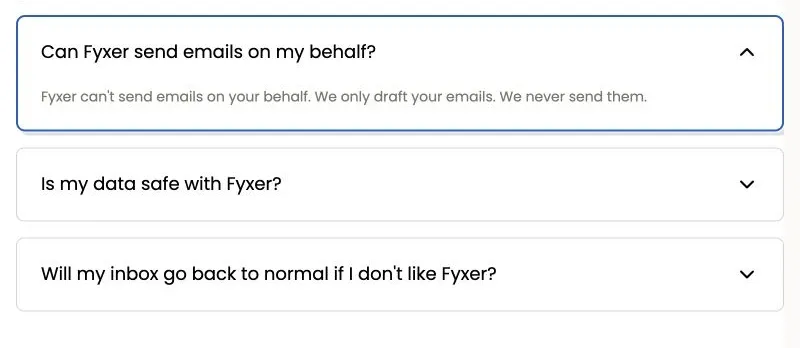
#2 FyxerSafest draft-first option because it never sends email for you
-
#3 Hey NoahBest proactive phone-first assistant for scheduling, follow-up, and calls
One setting decides whether this feels helpful or reckless
The feature list is not the first decision. The first decision is what happens after the assistant has enough context to act. A draft that waits in your inbox is reversible. A proposed calendar move is reversible. A sent message, changed meeting, or phone call reaches another person and creates an expectation.
That boundary separates the three products more cleanly than generic claims about intelligence. Fyxer stops at drafts. Lindy places an approval step in front of outside-impact actions. Noah lets the user preview messages or permit direct sending, and its FAQ says quick scheduling, calendar updates, and auto-replies can run automatically while complex multi-party emails use a human-in-the-loop process.
Use that boundary as an elimination test before comparing integrations. If policy says every external message needs a person, remove automatic action from the shortlist. If the final review queue is already the problem, a draft-only assistant cannot be the complete answer.
| Feature | Lindy | Fyxer | Hey Noah |
|---|---|---|---|
| Best fit | Inbox, calendar, meetings, Slack, routines, and cross-app assistant work | Email sorting, reply drafts, meeting notes, and scheduling assistance | Phone-first scheduling, relationship context, travel coordination, reminders, and calls |
| Entry price checked | Plus $29.99/user/month with 3,000 credits | Starter $22.50/user/month billed annually; $30 monthly | $49/month for the first early-adopter cohort; pricing may change |
| External action boundary | Outside-impact actions wait for approval | Drafts only; Fyxer says it never sends email | Preview is available, but permitted quick actions may run automatically |
| Context reach | Up to five inboxes, workspace context, 40+ skills, integrations, MCP, and computer use | One inbox/calendar on Starter; multiple on Professional | Google Calendar, CC’d email threads, contacts, text, notes, meeting prep, and voice calls |
| Main tradeoff | Complex work can consume credits unpredictably | Safer boundary also means less delegated execution | Young product with compliance programs still in progress |
| Skip if | You need a fixed-cost draft assistant or want calls handled for you | You want the assistant to call, message, or complete broad cross-app work | Your policy requires every external action to wait for explicit approval |
| Action | Try Lindy | Try Fyxer | Try Hey Noah |
The hard recommendation follows from that table: most buyers should start with Lindy, but only after keeping approval mandatory for every external write. Fyxer is the better default in legal, finance, hiring, and other communication-heavy work where a sent email is the risk. Noah becomes more attractive when the value comes from delegated action rather than another review queue.
Why Hey Noah is trending now
Hey Noah led Product Hunt’s August 2026 monthly leaderboard when checked, with 594 votes. The official site also displayed number-one product-of-the-day and product-of-the-week badges. That is a meaningful launch signal, not proof of durable retention, accuracy, or support quality.
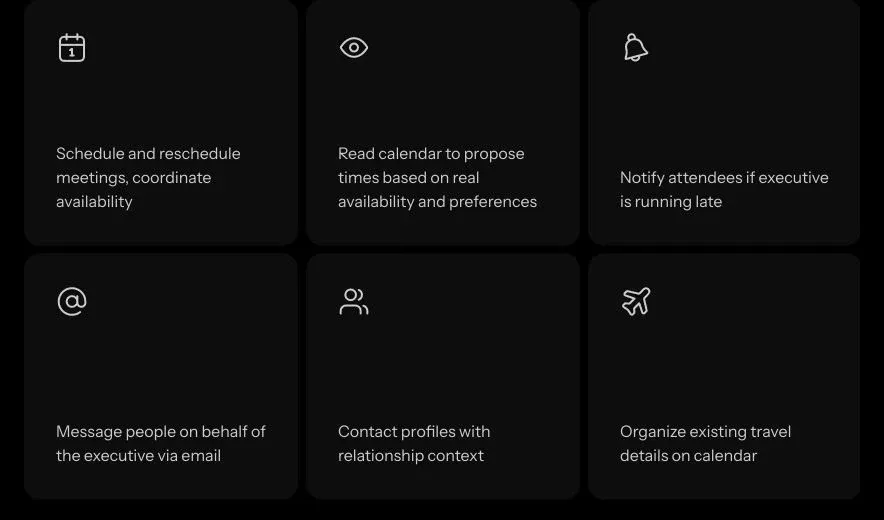
The product is timely because it revives a familiar job instead of selling another empty agent canvas. Noah is reached by text or phone, can schedule and reschedule meetings, read calendar availability, notify attendees, send reminders, maintain relationship context, organize travel details, prepare meeting briefs, and make phone calls for reservations or appointments.
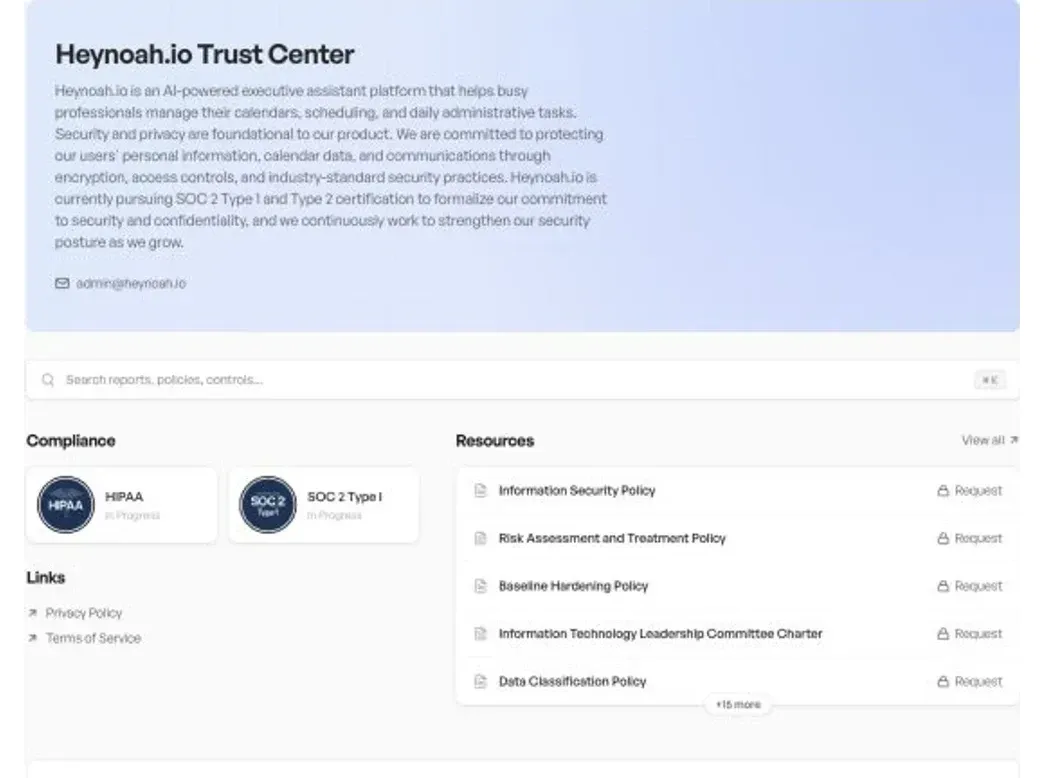
The maturity caveat matters. Noah’s public trust center says the company is pursuing SOC 2 Type 1 and Type 2 certification. Its compliance cards showed HIPAA and SOC 2 Type I as “In Progress.” That is not the same as certification. A team with a formal procurement requirement should treat the current status as a blocker until documentation is complete and reviewable.
How I ranked the three assistants
The shared score weights Assistant Workflow Fit at 30%, Action Control & Reversibility at 25%, Cost Predictability at 20%, Context & Integration Reach at 15%, and Trust & Admin Readiness at 10%. This is a buyer score for delegated work, not a benchmark of model intelligence or a claim about measured accuracy.
Lindy scores 8.6 because it covers the broadest assistant job while keeping outside-impact actions behind approval. Fyxer scores 8.4 because its draft-only boundary and fixed per-seat plans are easy to explain, but it completes less work. Hey Noah scores 7.6 because its proactive model is compelling, while automatic quick actions, early-cohort pricing, and in-progress compliance make it a narrower default.
1. Lindy: best overall
Lindy is the strongest general recommendation because it spans the daily assistant surface: inbox, calendar, meetings, Slack threads, scheduled routines, persistent workspace context, follow-up, integrations, MCP, and computer use. The product can reach farther than an email copilot without asking the buyer to permit silent external action.
Its approval model is the decisive advantage. Lindy’s public pricing FAQ says actions with outside impact—such as sending an email, updating a ticket, posting to a channel, or publishing a document—wait for approval. Read-only lookups against approved sources do not. That is a useful default split between preparation and consequence.
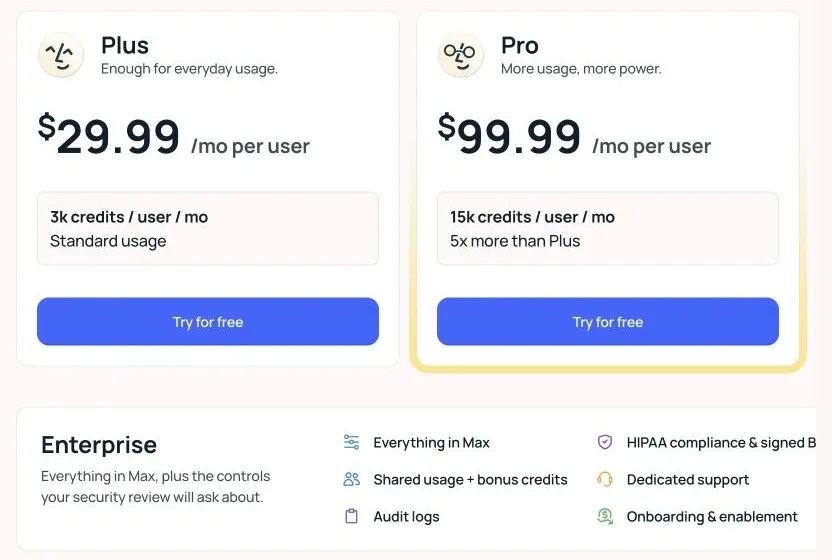
The economic weakness is credit variance. Plus costs $29.99 per user each month with 3,000 credits, Pro is $99.99 with 15,000, and Max is $199.99 with 35,000. Lindy describes everyday work as roughly 2–250 credits, deep work as 250–1,000, and large builds as 1,000–2,500. The pool pauses when it runs low, but one month of simple follow-up and one month of research-heavy work can have very different value.
Lindy is best for a founder, chief of staff, or small team that wants one assistant layer across several communication systems and is willing to review outbound actions. Skip it if every request must have a fixed marginal cost or if the only need is inbox drafting. In that narrower job, Fyxer’s constraint is a feature.
Lindy combines wide assistant context with an approval gate before actions that affect people or external systems.
Skip it when the workload requires fixed-cost forecasting or when a draft-only email assistant covers the whole job.
Lindy wins because it covers the broadest assistant job while preserving a defensible approval boundary; variable credit use is the main cost of that reach.
- Outside-impact actions wait for approval
- Strong inbox, calendar, meeting, Slack, and routine coverage
- Broad skills, integrations, MCP, and computer-use positioning
- Credit-using work pauses when the pool runs low
- Variable credit bands complicate monthly forecasting
- No permanent free plan shown on the pricing page
- Deep work can consume 250–1,000 credits
- Broad context still requires careful source and permission design
2. Fyxer: safest draft-first choice
Fyxer is the cleanest recommendation when email is the center of gravity and the organization wants a hard send boundary. It categorizes the inbox, drafts replies in the user’s voice, joins admitted meetings as a notetaker, prepares follow-up drafts, and adds scheduling support. Starter covers one inbox and calendar; Professional expands to multiple inboxes and calendars, cross-team and time-zone scheduling, chat, HubSpot, files, and onboarding.
The pricing is easier to budget than Lindy’s credit model. Starter is $22.50 per user per month when billed annually, with a $30 monthly reference price. Professional is $37.50 annually, with a $50 monthly reference price. Both advertise a seven-day trial. The tradeoff is not hidden: the product saves preparation time, but the person still owns the consequential click.
Fyxer’s current pricing FAQ also lists SOC 2 Type II, ISO 27001, GDPR, and an enterprise HIPAA option, and says customer content is not used to train outside models. Those are stronger public procurement signals than Noah’s in-progress status. They do not replace a security review, data-processing terms, or a test of deletion in the buyer’s own tenant.
Choose Fyxer for lawyers, recruiters, investors, sales leaders, or operators who want a calmer inbox without delegating voice or authority. Skip it when the real need is an executive assistant who calls vendors, moves meetings, or completes work across several apps. Fyxer’s safety comes from stopping sooner.
Fyxer turns the inability to send email into a clear control boundary, while keeping inbox and meeting support inside predictable per-seat plans.
Skip it when you want phone calls, direct outbound action, or a broad cross-app executive assistant.
Fyxer ranks a close second because the draft-only model and public security posture are easy to govern, but the product completes less work than Lindy.
- Never sends email on the user’s behalf
- Predictable per-seat Starter and Professional plans
- Inbox triage, reply drafts, meeting notes, and follow-up in one product
- Public SOC 2 Type II and ISO 27001 claims support procurement review
- Draft-only model leaves the final action with the user
- Starter supports only one inbox and calendar
- Meeting bot must be admitted by the host
- Less suitable for calls or broad cross-app delegation
3. Hey Noah: most proactive specialist
Hey Noah has the clearest “real assistant” shape. You can text it, call it, CC it on scheduling emails, ask it to keep relationship context, prepare a briefing, organize travel details on the calendar, and place calls for reservations, appointments, or follow-up. There is no separate app to learn; the communication channels are the interface.
Its data scope is narrower than the phrase “executive intelligence” might suggest. The FAQ says Noah accesses Google Calendar, emails where it is CC’d, and contacts. It says Noah does not read the whole inbox or files and photos unless they are shared, and access can be disconnected. That boundary is useful, but the buyer still needs to decide which threads deserve inclusion.
The authority model demands more attention. Noah can send from its own account on the user’s behalf. The user can request review before sending or permit direct sending based on preferences. The FAQ also distinguishes complex multi-party emails, which use human-in-the-loop review, from quick scheduling, calendar updates, and auto-replies that may be handled automatically. That is efficient for routine coordination and the wrong default for teams that require explicit approval for every external action.
Price is currently simple but not durable: $49 per month for the first cohort of early adopters, with a warning that pricing may change. The FAQ says users can cancel anytime without long contracts or cancellation fees. I would treat this as pilot pricing, not a stable three-year budget input.
The tradeoff is direct: Noah removes more coordination work only by accepting more external-action risk. I recommend it when calls and routine scheduling are the bottleneck, previews remain on during the pilot, and the buyer can wait for completed compliance evidence if procurement requires it.
Noah uses familiar communication channels and can complete assistant-shaped work, including phone calls, rather than stopping at drafts.
Skip it when every outside action must wait for explicit approval or when completed compliance certifications are a procurement requirement.
Noah is the most proactive specialist, but early-cohort pricing, optional direct sending, and in-progress compliance narrow the safe default audience.
- Phone and text are the primary interface
- Can schedule, reschedule, remind, organize travel, and make calls
- Email scope is limited to CC’d threads rather than the whole inbox
- Cancel-anytime policy without long contracts or cancellation fees
- Early-adopter price may change
- Permitted quick actions can occur automatically
- SOC 2 and HIPAA status was still in progress when checked
- Public evidence is newer and thinner than the alternatives
How to choose without creating a new approval bottleneck
Choose Lindy when preparation and execution both matter. It is the best fit when the assistant must gather context across several work systems, but the person still needs a clear checkpoint before a message, ticket, post, or document changes the outside world. Start with approval required everywhere. Remove an approval only after the action is routine, reversible, and low impact.
Choose Fyxer when review is already part of the job. An attorney checking wording, a recruiter checking candidate context, or an investor protecting relationship tone may prefer a full draft queue. The product is not failing because it does not send. It is preserving the human signature as the control.
Choose Noah when the review queue is the bottleneck. If missed calls, slow scheduling, reservations, and routine coordination are costing more than the risk of delegated action, Noah’s model is more ambitious. Begin with previews enabled. Permit automatic action only for a short list such as internal reminders or one-person rescheduling, never as a blanket setting.
Use a seven-day permission pilot. Day one is read-only context and drafts. Day two adds one internal calendar workflow. Day three adds an external action that always needs approval. Day four introduces an ambiguous request. Day five removes a contact or event to test recovery. Day six reviews every external touch. Day seven disconnects the service and documents what remains.
Track accepted drafts, corrections, external actions, missed approvals, minutes to recovery, and cost per accepted outcome. A tool that saves 30 minutes but creates one relationship mistake is not more productive. The safest assistant is the one whose failure arrives before the consequence.
Set an escalation list before the first connection. Contracts, payments, hiring decisions, medical details, legal advice, account access, and messages to investors should always stop for a person. Routine internal reminders, first-party calendar holds, and low-risk meeting preparation may graduate later. The list should describe the consequence, not the app: “anything that commits money” is clearer than “approve Stripe actions.”
Also separate confidence from authority. A polished draft can still contain the wrong date or relationship context. A hesitant assistant may be exactly the one applying the safer rule. Require the tool to expose the source thread, calendar event, contact, or note behind consequential work. If a reviewer cannot reconstruct why an action was proposed in under a minute, the assistant has not reduced operational load; it has moved the load into an opaque review queue.
What I also considered
Motion and Reclaim are better calendar optimizers than executive assistants, so they belong in a different comparison. Superhuman is an email client with strong productivity features, not a delegated assistant across calls and scheduling. Human EA services such as Athena, BELAY, and Time Etc. can own judgment-heavy work, but their staffing, service, and pricing model is not comparable to these three software products.
Final verdict
Choose Lindy as the best overall AI executive assistant. It reaches enough of the working day to replace several narrow helpers, while the outside-impact approval rule gives most teams a defensible starting posture. Choose Fyxer when “never send” is the feature you need. Choose Hey Noah when calls and proactive coordination create more value than a conservative draft queue.
The strongest counterargument is that Noah behaves most like the job title. That is true. It also means the buyer must be more deliberate about preferences, automatic quick actions, and compliance requirements. The product that does the most before asking is not automatically the safest default.
Lindy wins because it covers the broadest assistant workflow while placing outside-impact actions behind approval. Fyxer is safer for draft-only email work; Noah is more proactive for calls and coordination.
Try LindyThe counterintuitive lesson is simple: do not buy the assistant with the longest action list. Buy the one whose stopping rule matches the cost of being wrong.
Hey Noah vs Lindy vs Fyxer FAQ
Ready to check Lindy?
Use the verified route if the trade-offs still fit. If not, jump back to the summary and compare the alternatives.
Crypto and productivity editor focused on cost, custody risk, setup friction, exports, fees, and workflow drag. Prioritizes verifiable numbers and clear skip criteria over hype.
Lucas starts with total operating cost, then ranks tools by setup and recurring friction, custody or export, reversibility, and whether the decision still makes sense when the exit path is included.
Related Articles

Paste vs Maccy vs Raycast: Which Mac Clipboard Manager Fits?
Mac clipboard managers compared by local history, Apple-device sync, privacy posture, launcher fit, setup burden, and subscription value
Paste, Maccy, and Raycast compared by clipboard history, Apple-device sync, local storage, privacy posture, pricing, and workflow fit.

Superlist MCP vs Todoist MCP vs Linear Agent
AI task-manager paths compared by native MCP access, capture depth, issue context, setup risk, pricing clarity, and local-control fallback
Superlist MCP, Todoist MCP, Linear Agent, and Super Productivity compared by AI task access, pricing, setup risk, workflow fit, and local-control fallback.