

Your inbox is not a task list. It is a private database with human names attached.
That is why choosing an AI email assistant is more dangerous than choosing another calendar app. A bad calendar block wastes an hour. A bad email draft can go to a client, a lawyer, a customer, or your boss with the wrong context and your name on it.
So the question is not "which tool writes the prettiest reply?" The better question is: how much inbox context and action authority should you give the tool?
My default answer is Shortwave for Gmail-heavy buyers who want AI search, summaries, filters, attachment analysis, and visible quota limits without immediately jumping to the highest-priced plan. Superhuman is the better pick if speed and keyboard flow are the real bottleneck. Fyxer is the one to watch if you want assistant-style drafting, meeting notes, and calendar help without replacing Gmail or Outlook.
Does it actually save time or just look cool? That is still the filter.
This is an evidence-led comparison. I checked official pricing pages, feature/security pages, rendered screenshots, current SERP competitors, and concrete Reddit buyer-friction examples. I did not connect an inbox, generate reply drafts, send emails, test mobile apps, run support workflows, or measure exact time saved.
If your problem is outbound campaigns rather than personal inbox work, start with our email marketing tools guide. If your inbox is really a support queue, the AI customer support tools comparison is the better frame. And if meetings are what create the email pile, check the AI meeting assistant roundup before buying another inbox layer.
-
#1 ShortwaveBest default: AI search, summaries, attachment analysis, filters, and clear plan limits for Gmail-heavy inboxes
-
#2 SuperhumanBest speed pick: keyboard-first email with Business-tier Auto Drafts, Ask AI, MCP, and CRM hooks
-
#3 FyxerBest assistant layer: inbox organization, reply drafts, meeting notes, scheduling, and explicit human send approval
If you want the safest starting point for AI email search and triage, start with Shortwave . If the problem is sheer email speed, compare Superhuman . If you want the tool to prepare drafts and help with scheduling while you keep final approval, look at Fyxer .
How I ranked the AI email assistants
The ranking uses five criteria: AI Context Depth, Workflow Fit, Action Boundary, Pricing Clarity, and Trust Proof. AI Context Depth asks whether the tool can work across old threads, attachments, labels, and searches without making the user restate everything. Workflow Fit asks whether you are replacing your email client, layering AI over Gmail, or adding an assistant next to Gmail/Outlook. Action Boundary asks a simple question: can the AI act, or does it stop at drafts and suggestions? Pricing Clarity asks whether the plan tells you what AI usage actually means. Trust Proof asks whether security and data-use claims are visible enough to evaluate.
That rubric punishes tools that sound magical but hide the real cost or authority model. It also punishes tools that say "AI inbox" when they mostly mean "faster autocomplete."
Bad trade.
The failure mode is not a funny typo in a draft. The failure mode is a confident message built from stale context, sent after a hidden billing upgrade, with a customer or client reading it like it came from you. That risk is why I weight action boundaries and pricing clarity so heavily. Cheap AI email is not cheap if every reply creates another review task.
Most buyers overvalue reply writing because it demos well. The expensive mistake is different: paying for an assistant that cannot find the old thread, cannot reason over the attachment, cannot tell you why a message matters, or makes every reply sound confident enough that you almost send it without reading. That last part is where email AI gets dangerous.
The AI email assistant trap: reply drafts are not the whole job
The first split is not Superhuman versus Shortwave versus Fyxer. It is speed client, AI search layer, or assistant layer.
Superhuman is a speed client first. It helps you move through email with keyboard muscle memory, team workflow, and AI layered into a premium app. Shortwave is closer to an AI-native Gmail workspace: ask questions across history, summarize, filter, analyze attachments, and use web/integration context. Fyxer is more like a draft-and-ops assistant: it organizes the inbox, drafts in your voice, joins meetings, takes notes, and helps schedule.
None of those jobs is automatically better. They are just different.
If you hate your current inbox app, a new client can help. If Gmail is fine but search and context are the bottleneck, an AI layer makes more sense. If you are drowning in follow-ups and meeting admin, a draft-and-calendar assistant is the more honest purchase.
The hidden cost is switching too much at once. Replace the inbox, add a meeting bot, turn on auto labels, connect the calendar, and suddenly the buyer has five new failure points instead of one. That is why this guide treats "skip if" as seriously as "best for." The wrong AI email assistant does not just waste money. It makes the inbox harder to trust.
AI email assistant comparison: Superhuman vs Shortwave vs Fyxer
| Feature | Shortwave | Superhuman | Fyxer |
|---|---|---|---|
| Best job | AI search and triage for Gmail-heavy work | Fast premium email workflow for teams | Drafts, inbox organization, meetings, and scheduling support |
| Starting price verified | Business $30/seat/mo; Premier $45; Max $120 | Starter $25/member/mo annual; Business $33 | Starter $22.50/user/mo annual; Professional $37.50 |
| Advanced AI threshold | Plan limits expose AI usage, search history, threads, filters, and context | Business shows advanced AI, Auto Drafts, Ask AI, MCP, custom AI labels | Professional adds multiple inboxes, scheduling, chat, and integrations |
| Main AI strength | AI search, summaries, attachment analysis, filters, MCP/integrations, web browsing | Speed workflow plus Business-tier AI and CRM hooks | Drafts in your voice, meeting notes, calendar and inbox assistant workflow |
| Action boundary | Assistant workflow inside email; buyer still reviews and acts | Email client with AI assistance; not a human EA replacement | Fyxer says every email requires review before it goes anywhere |
| Skip if | You want the fastest keyboard-first paid email client | You mainly want AI search and transparent quota tiers | You want a full replacement email client |
| Action | Try Shortwave | Try Superhuman | Try Fyxer |
1. Shortwave: best default AI email assistant
Shortwave wins because its limits are visible. That sounds boring until you compare this category for an hour and realize half the market sells "AI inbox" without telling you what the assistant can actually search, how much history it sees, or when you hit the ceiling.
The official pricing page now shows a 14-day free trial and Business at $30 per seat/month. The checked view does not label that figure as annual billing. Business includes full standard search history, standard intelligence, 5 years of AI search history, max 50 threads per AI search, 3 AI-powered filters, AI integrations and web browsing, AI autocomplete, summaries, and attachment analysis. Premier is $45 per seat/month with 2x more AI usage, unlimited AI search history, max 100 threads per AI search, 10 AI-powered filters, and 2x context tokens. Max is $120 per seat/month with 6x more AI usage, max 150 threads per AI search, 50 filters, and 3x context tokens.
Those numbers matter. If you have a normal inbox and just want AI summaries plus search, Business may be enough. If your work depends on older threads, client history, attachments, and lots of saved filters, Premier becomes the realistic comparison.
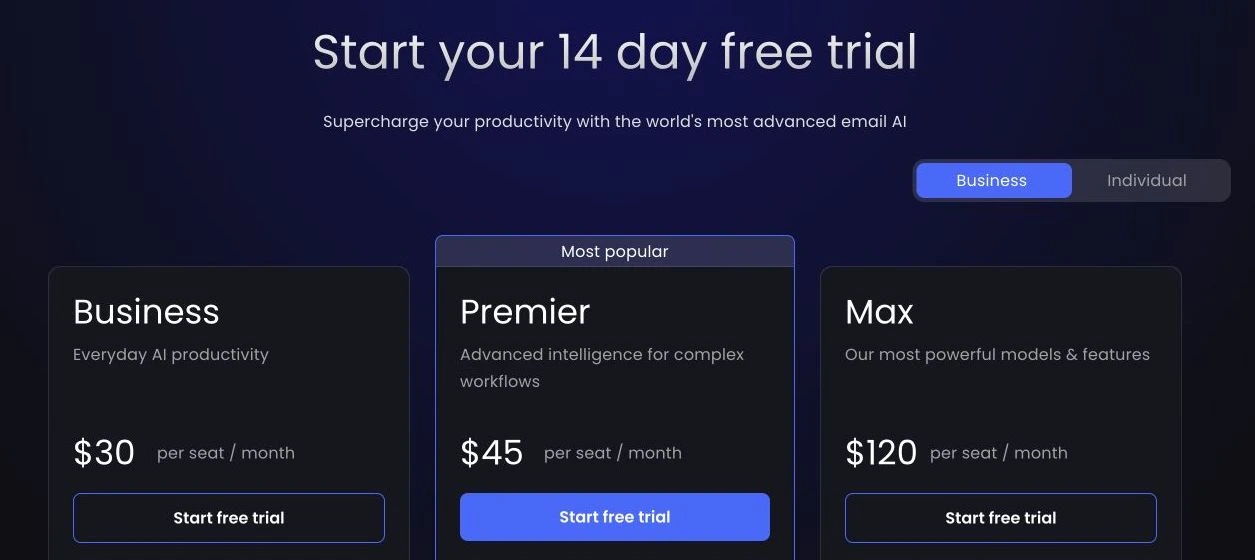
The reason I put Shortwave first is not that it has the flashiest positioning. It is that the buyer can understand the tradeoff before paying: how much AI usage, how much search history, how many threads, how many filters, and how much context. For an AI email assistant, that is the product.
The caveat: Shortwave is still a Gmail-first workflow. If your team is already standardized on Outlook or you are buying mainly for keyboard speed, Superhuman or Fyxer may fit better.
Shortwave exposes the plan limits that matter for AI email work: search history, threads per AI search, filters, usage, and context.
Skip it if your workflow is Outlook-native or if you mainly want a premium keyboard-first email client.
Shortwave ranks first because it makes AI email capacity concrete, even though it is not the best fit for Outlook-heavy teams.
- Business plan shows 5 years of AI search history, max 50 threads per AI search, and 3 AI-powered filters
- Premier and Max publish clear jumps in AI usage, search history, threads, filters, and context
- Includes AI summaries, autocomplete, attachment analysis, integrations, MCP, and web browsing on the pricing page
- Good default for Gmail-heavy buyers who want AI search and triage without buying the highest-priced plan first
- Not the right default if the team is Outlook-first
- $120/seat/month Max tier gets expensive fast if heavy AI usage is required
- Buyers who mainly want speed and keyboard flow may prefer Superhuman
- The current pricing view does not label the $30, $45, and $120 figures as annual billing
2. Superhuman: best when email speed matters more than AI depth
If your real bottleneck is moving through email, Superhuman is the serious option. It is not trying to be a cheap Gmail add-on. It is a premium email client with a strong productivity religion: keyboard-first triage, team workflow, snippets, reminders, split inboxes, calendar, and now AI.
The pricing page shows annual Starter at $25 per member/month and annual Business at $33 per member/month, with a 15% team discount marked for groups of five or more. Starter includes email productivity, Superhuman AI, team collaboration, calendar and scheduling, and unified admin and billing. Business is the more honest AI-email comparison because it adds the company's most advanced AI, Auto Drafts, Ask AI, Superhuman Mail MCP, custom Auto Labels, and CRM integrations. Enterprise adds admin security and controls, single sign-on, a customer success manager, team analytics, and priority support.
The $8/member/month annual jump from Starter to Business is the whole Superhuman decision. If you want Superhuman because you live in email and want faster movement, Starter may make sense. If you are comparing AI assistants, price the Business tier first.
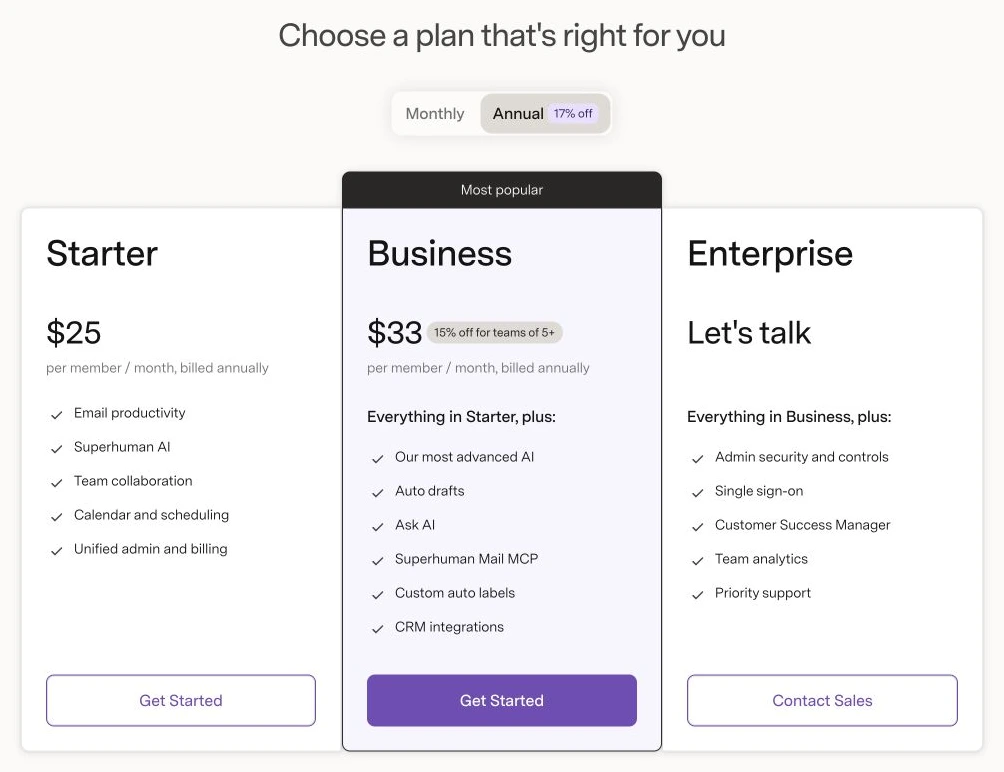
Here is the contrarian take: Superhuman may be the better productivity purchase even if Shortwave is the better AI email assistant. If the user already knows what to write and just needs to process 80 messages without friction, speed beats chatbot depth. But if the problem is "find the old context, summarize this attachment, classify these threads, and help me reason over the inbox," Shortwave has the cleaner default fit.
Use Superhuman when email is your work surface. Do not buy it because you saw one AI draft demo.
Business puts advanced AI, Auto Drafts, Ask AI, MCP, custom AI labels, and CRM integrations in one fast email workflow.
Skip it if AI search over inbox history matters more than keyboard speed and premium email-client polish.
Superhuman ranks second because its speed workflow is excellent, but AI-first buyers should budget for Business rather than Starter.
- Starter is $25/member/month annually; Business is $33/member/month annually
- Business lists Auto Drafts, Ask AI, MCP, custom AI labels, and CRM integrations
- Stronger fit for people who live in email all day and care about keyboard workflow
- Security matrix lists SOC II Type II and more advanced controls by plan
- Most assistant-like AI features are on Business, not the cheaper Starter tier
- Not the clearest default if your main need is AI search across old email history
- Premium per-seat email client pricing can be overkill for casual inbox cleanup
- Annual billing is required for the displayed $25 and $33 per-member rates
3. Fyxer: best if you want assistant-style drafts without send autopilot
Fyxer is the one I would choose when the buyer says, "I do not want a new email client. I want the mess handled."
That is a different job. Fyxer positions itself around inbox organization, reply drafts in your voice, meeting notes, scheduling, and chat over inbox and meeting notes. The official pricing page showed annual Starter at $22.50/user/month, with $30 as the monthly reference price, for 1 inbox and calendar, drafted replies, and meeting notes. Professional showed $37.50/user/month annual, with $50 as the monthly reference price, and adds multiple inboxes and calendars, scheduling across teams and time zones, Fyxer Chat, and HubSpot integration.
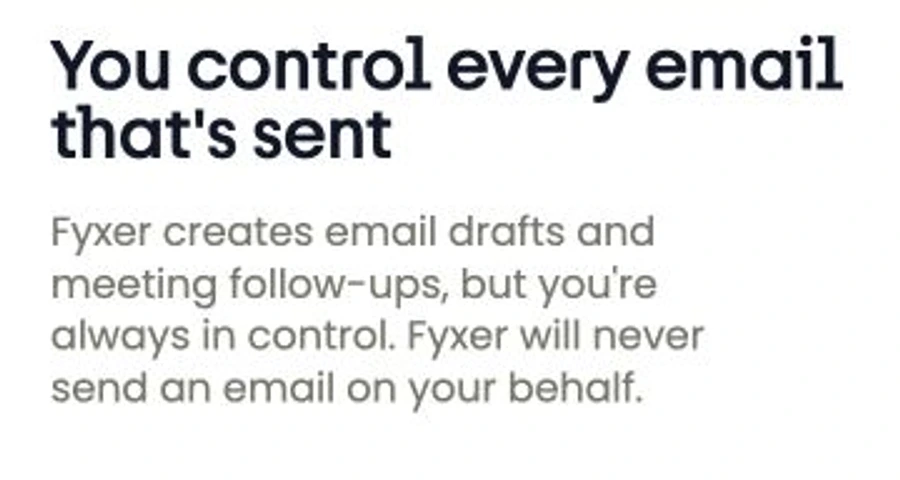
The important part is the action boundary. Fyxer's security page says it cannot send emails on your behalf. It creates drafts and meeting follow-ups, but you remain in control of what gets sent.
If you need more than inbox help, the Hey Noah vs Lindy vs Fyxer comparison shows how Fyxer's hard send boundary differs from an approval-gated coworker and a more proactive phone-first executive assistant.
That is not a weakness. That is the feature.
Fyxer also publishes security claims that matter for this category: SOC 2 Type 2, ISO 27001, GDPR, HIPAA compliance, encryption, least-privilege access, and a statement that user data is not used to train third-party models. I still would not treat that as a complete security review. But for an evidence-led shortlist, it is more concrete than "trust us, we use AI responsibly."
Where Fyxer loses the default slot is product shape. If you want an AI-native Gmail workspace, Shortwave is more direct. If you want speed and a premium email client, Superhuman is more direct. Fyxer is the assistant layer for people who want drafts, organization, notes, and scheduling around the inbox they already use.
Fyxer is explicit that it drafts emails for review but does not send on your behalf.
Skip it if you want a full replacement email client or deep AI search workspace rather than draft-and-ops help.
Fyxer ranks third because its human-approval boundary is strong, but it is more assistant layer than full email workspace.
- Starter showed $22.50/user/month annual with 1 inbox and calendar
- Professional adds multiple inboxes/calendars, scheduling, Fyxer Chat, and HubSpot integration
- Security FAQ says Fyxer cannot send emails on your behalf and every email requires review
- Public security page references SOC 2 Type 2, ISO 27001, GDPR, HIPAA, encryption, and no third-party model training
- Not the right pick if you want a replacement email client
- Professional pricing is the realistic tier for multiple inboxes and deeper assistant workflow
- Meeting notes and scheduling may be unnecessary if you already use a dedicated meeting assistant
- The 7-day free trial is shorter than Shortwave's 14-day trial
Also considered for AI email assistants
Gemini in Gmail belongs on the longlist if your team already pays for Google Workspace AI features. I did not rank it here because this guide is about dedicated paid email-assistant tools with public plan pages and clear product positioning. If you want a broader Google workspace decision, this is a different article.
Spark + AI and Missive are worth a look for buyers who care more about collaborative email and team inbox workflow than assistant depth. I left them out because the current comparison needed a tight three-way decision: fastest premium email client, AI-native Gmail workspace, or assistant layer.
Perplexity Email Assistant is interesting, but I did not rank it without a current official page I could verify cleanly during this pass. I am not going to build a recommendation off a news writeup when the article's whole point is trust.
How to choose an AI email assistant
Start with the failure mode.
If email takes too long because every action is slow, choose Superhuman. The product is built around speed first, AI second, and that is exactly right for people who live in their inbox. If email takes too long because you cannot find context, summarize threads, analyze attachments, or turn old messages into usable answers, choose Shortwave. If email takes too long because someone needs to prepare replies, organize priority messages, summarize meetings, and help schedule, choose Fyxer.
The wrong move is buying the assistant that matches your fantasy job title. You probably do not need a full AI executive assistant if the real problem is that Gmail search is bad. You probably do not need a premium email client if the real problem is that nobody drafts follow-ups. And you definitely do not need AI sending emails without a clear human review point.
My rule is simple: the tool should remove low-value email decisions, not hide high-stakes ones. If it makes you read every draft twice because you do not trust it, the assistant has not saved time. It has moved the work to QA.
AI email assistant FAQ
Final verdict: Shortwave first, unless speed or draft delegation is the job
Start with Shortwave if you use Gmail and want an AI email assistant that makes inbox context easier to search, summarize, filter, and use. The pricing page still makes the plan ladder and AI limits unusually concrete, but the current checked view does not label its $30, $45, and $120 figures as annual billing. That cadence caveat belongs in the purchase decision.
Choose Superhuman if speed is the pain. It is the better product for people who already know how they want to process email and need a faster, cleaner work surface with Business-tier AI layered in.
Choose Fyxer if you want assistant-style drafts, meeting notes, calendar help, and inbox organization without replacing your email client. The no-send-without-review rule is the reason I trust its positioning more, not less.
The wrong-buyer warning is blunt. Avoid Shortwave if you are Outlook-first. Avoid Superhuman if the only thing you liked was one AI draft demo. Avoid Fyxer if you expect magic autopilot. The risk is buying confidence theater when the actual job is safer context and cleaner review.
The uncomfortable truth: most people do not need an AI that writes more email. They need an AI that helps them send fewer dumb ones.
Shortwave is the best default AI email assistant for Gmail-heavy buyers because it makes AI search, summaries, filters, attachment analysis, and plan limits concrete. Superhuman is the speed pick, and Fyxer is the assistant layer for draft-and-scheduling support.
See pricingReady to check Shortwave?
Use the verified route if the trade-offs still fit. If not, jump back to the summary and compare the alternatives.
Crypto and productivity editor focused on cost, custody risk, setup friction, exports, fees, and workflow drag. Prioritizes verifiable numbers and clear skip criteria over hype.
Lucas starts with total operating cost, then ranks tools by setup and recurring friction, custody or export, reversibility, and whether the decision still makes sense when the exit path is included.
Related Articles

Hey Noah vs Lindy vs Fyxer: Best AI Executive Assistant
AI executive assistants compared by action authority, reversibility, workflow fit, cost predictability, context reach, and trust readiness
Compare Hey Noah, Lindy, and Fyxer by approvals, email sending, scheduling, calls, integrations, security, and current entry prices.

Paste vs Maccy vs Raycast: Which Mac Clipboard Manager Fits?
Mac clipboard managers compared by local history, Apple-device sync, privacy posture, launcher fit, setup burden, and subscription value
Paste, Maccy, and Raycast compared by clipboard history, Apple-device sync, local storage, privacy posture, pricing, and workflow fit.