

Most Mac clipboard-manager advice skips the buyer decision that matters: do you need a bigger clipboard, a private local history, or a command launcher that happens to remember what you copied?
My default pick is Maccy for most Mac users. It is free, local, open source, keyboard-first, and narrow enough that it does not become another system to maintain. Paste is the better paid choice when Mac, iPhone, and iPad sync are the point. Raycast is the right answer only if you already want Raycast as your command layer.
That distinction matters because clipboard managers sit near sensitive work: passwords, client notes, code snippets, URLs, screenshots, and half-written drafts. Paying for the prettiest clip library is a waste if your real requirement is "keep copied text searchable on this Mac and do not make me think about it."
This is an evidence-led comparison. I checked official Paste pricing, the official Maccy site and GitHub project, Raycast's official clipboard-history page and pricing table, Apple's current App Store clipboard-manager story, a concrete r/macapps clipboard thread, current SERP competitors, GDT operator data, and D1-backed /go routes. I did not install the apps, sync devices, test paste latency, import clipboard histories, or inspect private app storage.
-
#1 MaccyBest default for local Mac clipboard history: free, open source, keyboard-first, and stored on your computer
-
#2 PasteBest paid clip library when Mac, iPhone, and iPad sync matter more than lowest cost
-
#3 RaycastBest if you already use Raycast as a launcher and clipboard history is one command among many
Start with Maccy if you only need a fast local history. Pay for Paste when you want a visual library across Apple devices. Use Raycast if clipboard history is part of a wider command-palette workflow, not the whole purchase.
How I ranked Paste, Maccy, and Raycast
The scoring uses five criteria: Clipboard Fit, Sync Scope, Privacy Control, Setup Simplicity, and Price Clarity. Clipboard Fit asks whether the product solves the copy-history job directly instead of dragging the buyer into a larger platform. Sync Scope rewards useful cross-device history only when that is the actual workflow. Privacy Control matters because a clipboard tool sees the messy middle of your day.
The trap is buying the storage model you admire instead of the one you will trust.
Paste is the most polished clip library here. Maccy is the cleanest local utility. Raycast is the best "already installed" answer for people who live in Raycast. That is why Maccy wins the default slot: the safest first step is a narrow local tool, not a subscription or another command system.
There is a strong countercase. If you copy across Mac, iPhone, and iPad all day, Maccy's Mac-only simplicity becomes the limitation. Paste is built for that wider Apple-device footprint, and Apple's own App Store story frames Paste around pinboards, previews, iCloud sync, and sharing. In that scenario, paying is not irrational. It is buying the missing workflow.
Paste vs Maccy vs Raycast comparison
| Feature | Maccy | Paste | Raycast |
|---|---|---|---|
| Best job | Fast local clipboard history for Mac users who want less product, not more platform | Visual clipboard library across Mac, iPhone, and iPad with pinboards and sync | Clipboard history inside a larger command palette with launch, snippets, windows, extensions, and AI |
| Official price checked | Official site says Maccy is free and open source | $2.49/month annual view; $29.99 billed annually; free 7-day trial | Free includes core extensions; Pro is $8/month annually or $10 monthly |
| Storage and sync model | Stored on your computer; no cross-device clip library positioned | Personal plan covers all personal Apple devices; Paste says there is no device limit | Free clipboard history keeps three months; Pro unlocks unlimited clipboard history |
| Privacy/control signal | Official page says Maccy respects password-manager clipboard clearing and stores everything locally | Best evaluated as a synced library, not the local-only privacy pick | Official clipboard page says copied content stays on your computer and is encrypted locally |
| Main risk | Too minimal if you need visual libraries, collaboration, or Apple-device sync | Paying every year for a job a free local utility may solve | Wrong buy if you wanted a dedicated visual clipboard manager |
| Skip if | You want Mac, iPhone, and iPad clipboard continuity inside one paid product | You only need searchable local history on one Mac | You do not want Raycast as your daily launcher |
| Action | Get Maccy | Try Paste | Try Raycast |
The macOS baseline: Spotlight may already be enough
Apple's current App Store clipboard-manager story is useful because it starts with the baseline: macOS Tahoe's Spotlight clipboard history can save clips for eight hours by default, with settings for 30 minutes or seven days. That is not a full replacement for a dedicated app, but it changes the first purchase question.
If your problem is "I copied the wrong thing five minutes ago," use the built-in path first. If your problem is "I reuse snippets, code fragments, screenshots, URLs, and research notes across the day," then a dedicated manager starts making sense.
That baseline also keeps the budget honest. A clipboard manager is not like a project-management app where the whole team has to agree. You can trial the simplest local answer, notice what still breaks, and only then pay for sync or move the habit into a launcher.
This is similar to the launcher decision in our Raycast vs Alfred vs BetterTouchTool comparison: the default Mac tool is not embarrassing. It is just narrower. You buy third-party software when the repeated action is costing enough time, attention, or cleanup to justify another utility.
Retention, sync, and privacy are the real clipboard-manager tradeoffs
Do not rank clipboard managers by the longest feature list. Rank them by what happens to the thing you copied. Raycast's public pricing table says Free keeps three months of clipboard history while Pro unlocks unlimited history. Paste's public pricing page frames the product around all-device access on Mac, iPhone, and iPad. Maccy's official page says everything is stored on your computer.
Those are not minor differences. A designer who moves image snippets between an iPad and Mac may regret choosing the local-only tool. A developer copying secrets, customer URLs, terminal fragments, and private notes may prefer the smallest local surface that works. A Raycast user may care less about a dedicated clip library because search, snippets, quicklinks, window commands, and clipboard history already share one keyboard interface.
Retention is the sneaky one. More history sounds automatically better until the clipboard contains material you would rather not keep forever. A three-month default can be a reasonable ceiling for a launcher. Unlimited history is useful only if you also trust your cleanup habits. That is why I do not treat Raycast Pro's unlimited clipboard history as an automatic win over Maccy or Paste. It is a stronger capability for the right person and a larger attic for everyone else.
My threshold is simple: pay for Paste when you can name the second device or shared pinboard that justifies it. Use Raycast when you can name the other Raycast commands that make the launcher worthwhile. Use Maccy when the answer is "I need my copied text back, fast, on this Mac."
1. Maccy: best free local clipboard manager for Mac
Maccy wins because it is the least expensive wrong choice and the easiest correct one. The official site says Maccy does one job: keep copy history at hand. It also says Maccy is lightweight, open source, keyboard-first, requires macOS Sonoma 14 or higher, and stores everything on your computer.
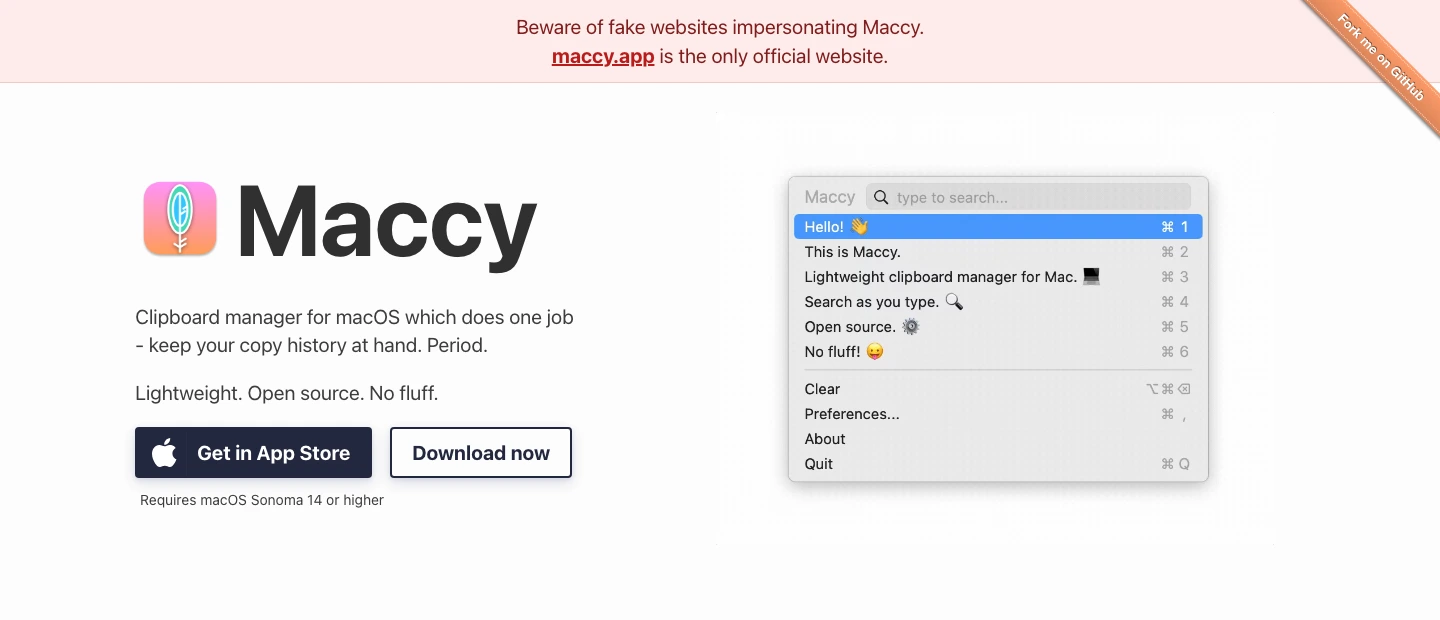
The privacy detail is the part that moves the ranking. Maccy says everything is stored on your computer and that if a password manager removes a copied password from the clipboard, Maccy will too. That does not prove every private-storage implementation detail, but it is the right product posture for a clipboard tool: local first, narrow by design, and not trying to turn copied text into a cloud library.
The limitation is just as clear. Maccy is not trying to be Paste. No big visual pinboard, no iPhone/iPad sync story, no paid team library. If you want to collect clips like assets, Maccy will feel too plain. If you want to stop losing the thing you copied three minutes ago, plain is the point.
Maccy keeps the clipboard job narrow: free, open source, keyboard-first, and stored on your Mac.
Skip it if you need a visual clip library synced across Mac, iPhone, and iPad.
Maccy ranks first because local control, zero subscription cost, and low setup burden beat extra library features for most single-Mac users.
- Official site says Maccy is free and open source under the MIT license
- Stores clipboard history on your computer instead of positioning itself as a cloud library
- Keyboard-first design fits the fast copy-paste recovery job
- Official site warns about fake Maccy websites, which gives buyers a clear safety check
- Requires macOS Sonoma 14 or higher on the official download path
- No cross-device Apple clipboard library positioned like Paste
- Minimal design means less visual organization for images, collections, and shared clipboards
- No hands-on paste-speed, storage, or password-manager clearing test was performed here
2. Paste: best paid clipboard library for Apple devices
Paste is the product I would pay for when the clipboard becomes a library instead of a recovery tool. Its official pricing page says the Personal plan covers Mac, iPhone, and iPad, supports subscription or lifetime purchase, starts with a free 7-day trial, and lists $2.49/month on the annual view with $29.99 billed annually.
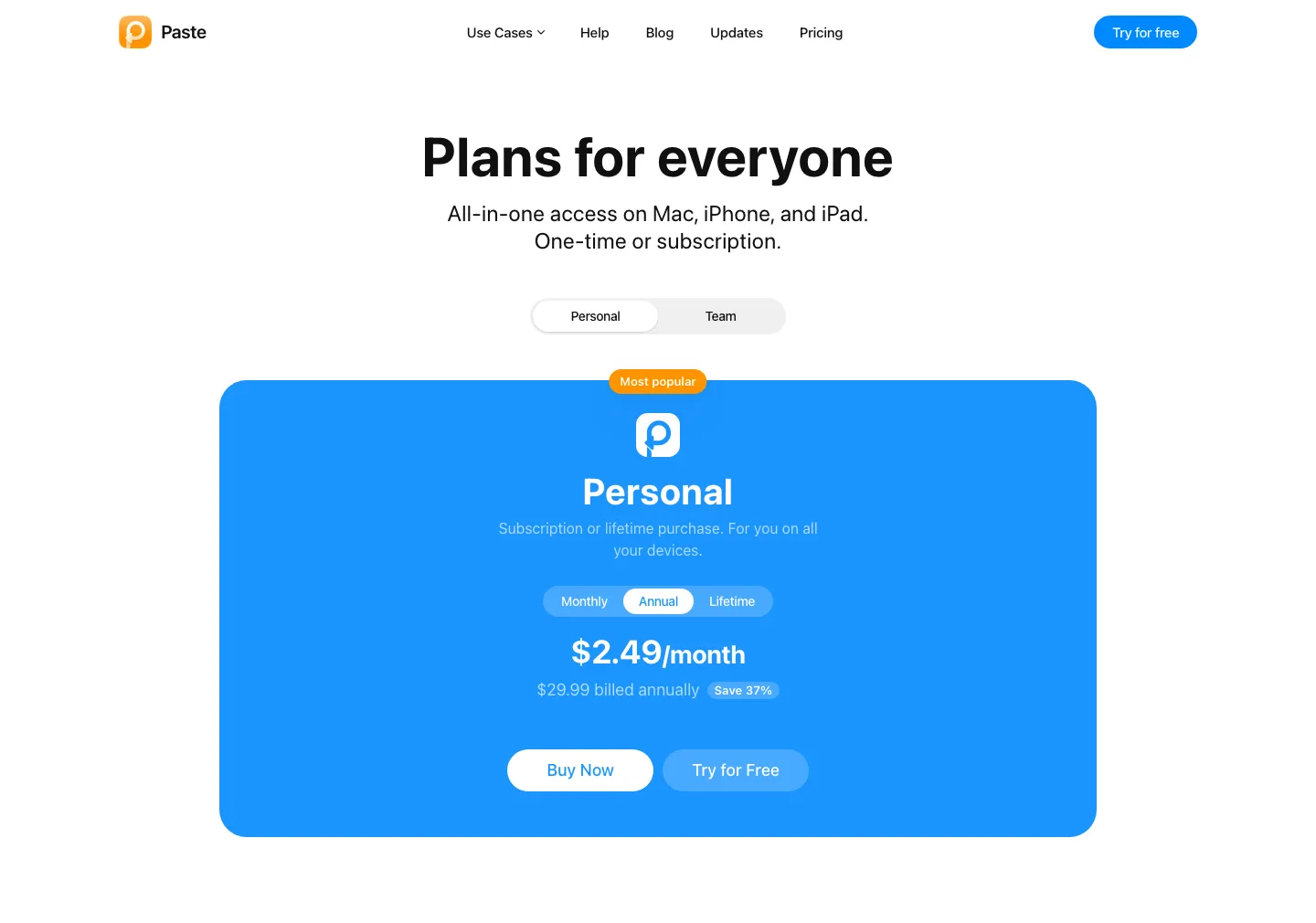
The honest case for Paste is not "clipboard managers should be pretty." It is that a synced visual pinboard can be worth money if your copied material moves across devices. Apple's App Store story describes Paste around a resizable pinboard, color-coded cards, editing/pinning, multiple pinboards, iCloud sync, iPhone/iPad access, and sharing. Those are real workflow differences from Maccy.
The cost risk is also real. A clipboard utility that starts at $29.99 per year is hard to recommend to someone who only needs local search. If you already pay for Setapp , check its Paste listing before buying Paste separately. If you do not, make the annual bill pass a simple test: are you using cross-device clip access, pinboards, or sharing often enough to notice when they disappear?
Paste is the strongest library when copied material needs to follow you across Mac, iPhone, and iPad.
Skip it if your clipboard history never needs to leave one Mac.
Paste stays close because it solves the cross-device library job better than Maccy, but the recurring price hurts the default recommendation.
- Official pricing page lists Mac, iPhone, and iPad access under the Personal plan
- Annual pricing is explicit at $2.49/month with $29.99 billed annually, excluding taxes and regional variation
- Apple App Store story highlights pinboards, visual cards, iCloud sync, iPhone/iPad access, and sharing
- Best fit when clips are reusable assets rather than temporary history
- Recurring annual cost is hard to justify for simple local clipboard recall
- A synced library is not the same privacy posture as a narrow local-only utility
- Lifetime pricing exists, but the public pricing page did not expose the amount in the captured view
- No authenticated sync, sharing, cancellation, or lifetime-purchase checkout was tested here
3. Raycast: best clipboard history if Raycast is already your launcher
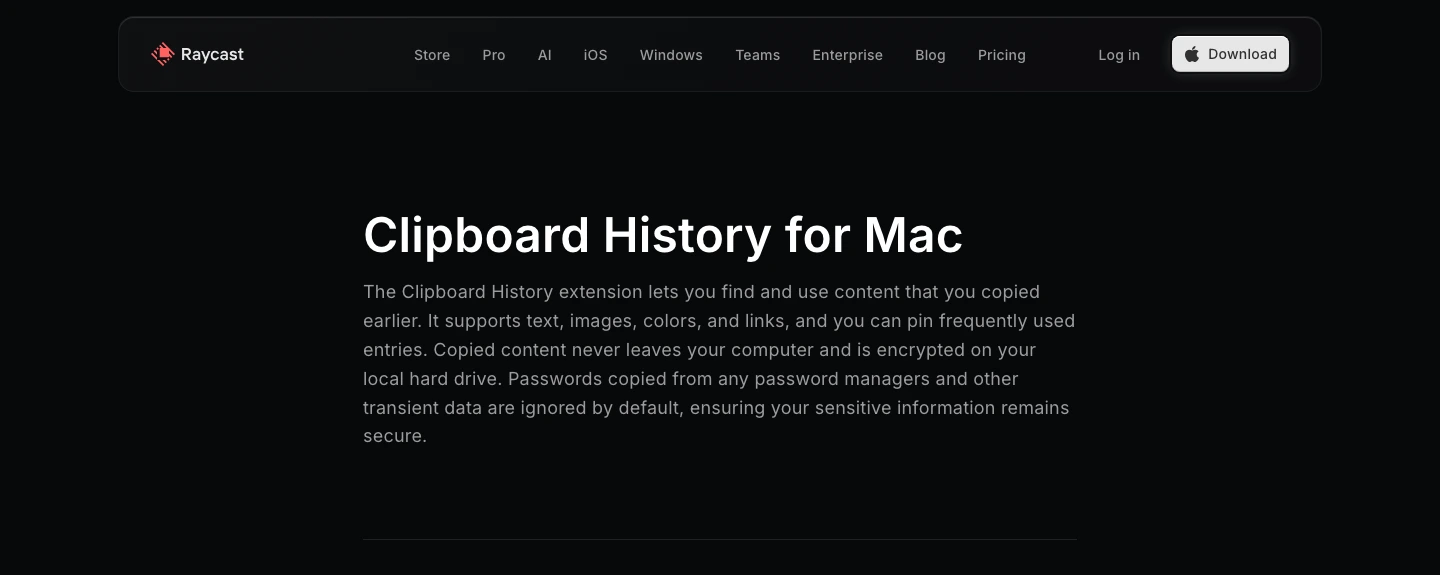
Raycast should not be judged as a dedicated clipboard app first. It is a launcher and command layer with clipboard history included. Its official clipboard page says the extension supports text, images, colors, and links; lets you pin often-used entries; keeps copied content on your computer; encrypts it on the local hard drive; and ignores passwords from password managers and other transient data by default.
The free plan is better than many buyers realize. Raycast says the individual free plan covers built-in extensions such as Clipboard History, Calendar, and Window Management plus public community extensions. Its pricing table lists three months of clipboard history on Free and unlimited clipboard history on Pro, with Pro at $8/month annually or $10 monthly.
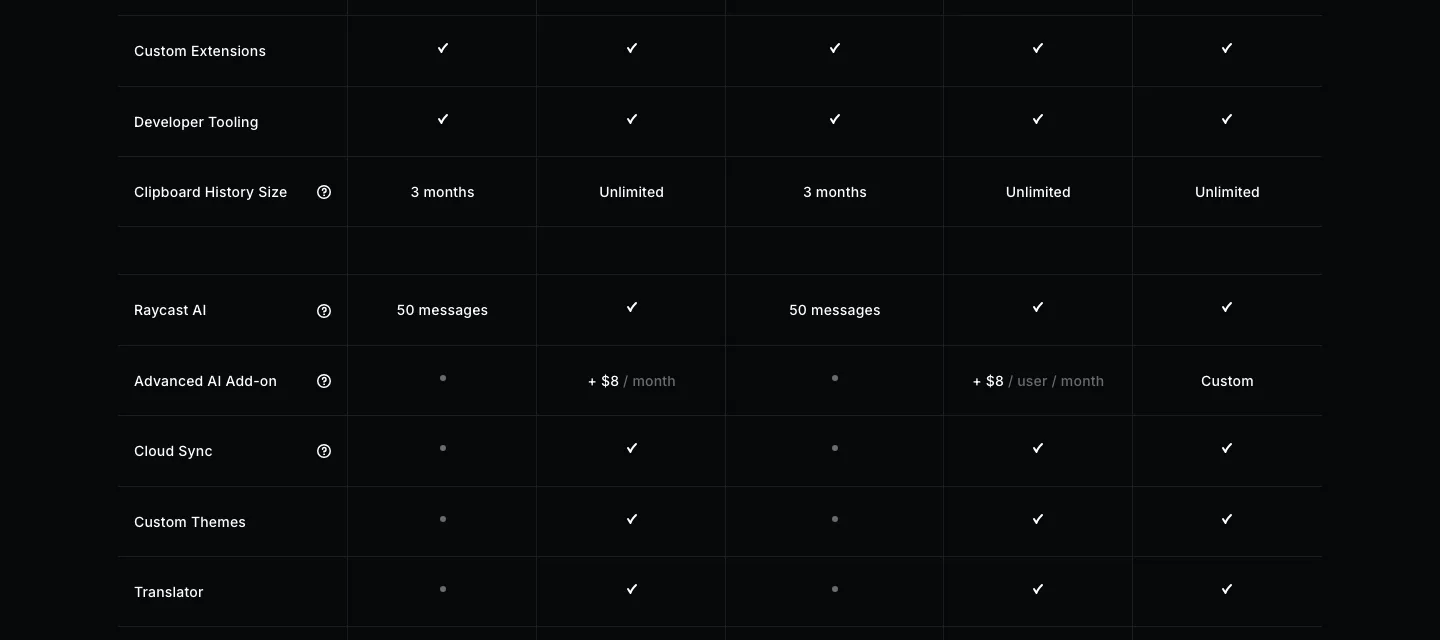
That makes Raycast a clean answer for one group: people who already want Raycast for launch, windows, snippets, quicklinks, calculator, extensions, and maybe AI. If clipboard history is one row in that bigger workflow, great. If you are installing Raycast only because you need a clipboard manager, I would start with Maccy first. A launcher can become the kind of productivity layer you now have to keep organized.
Raycast includes credible clipboard history inside a much broader command palette.
Skip it if you do not want Raycast to become your daily launcher.
Raycast ranks third for this specific purchase job because its clipboard feature is useful, but the product's real value is the broader launcher layer.
- Free individual plan includes core extensions such as Clipboard History
- Official clipboard page says entries stay on the computer and are encrypted locally
- Supports text, images, colors, links, and pinned entries
- Best value when Raycast already replaces several Mac utilities
- Not a dedicated visual clipboard library like Paste
- Unlimited clipboard history is tied to Pro in the current pricing table
- Can pull a simple clipboard need into a larger launcher setup
- No installed-app workflow, local storage inspection, sync, AI, or extension test was performed here
Also considered: PastePal, Pastebot, Copy 'Em, Alfred, and macOS Spotlight
I kept the ranked comparison to Paste, Maccy, and Raycast because those three answer the selected buyer dilemma cleanly: paid Apple-device library, free local utility, or launcher-bundled history. A bigger "best clipboard managers" list would be easier to pad and less useful.
PastePal deserves a look if you want a visual library but do not like Paste's approach. Apple's App Store story describes PastePal around an unobtrusive clipping list, previews, editing, basic text transformations, collections, and iCloud sync across Mac, iPhone, and iPad. I left it out of the ranked cards because the operator-selected purchase job was explicitly Paste vs Maccy vs Raycast, and adding a second visual-library product would blur the article's main decision.
Pastebot and Copy 'Em are also credible. Apple's same App Store story frames Pastebot as the power-user option for filters, collections, keyboard shortcuts, and sequential copy/paste, while Copy 'Em is positioned around custom clipboard lists, filters by application or content type, and favorites. Those are real use cases, especially for people who process copied text rather than just recover it. They are not the right defaults for this article because the main tradeoff here is sync versus local privacy versus launcher fit.
Alfred belongs in the conversation only if clipboard history is one part of a bigger launcher/workflow system. That intent is already covered in our Raycast, Alfred, and BetterTouchTool comparison. Spotlight belongs at the opposite end: try macOS clipboard history first if you only need short-window recovery and you are already on a version that supports it. The moment you need longer retention, stronger search, pins, sync, or a dedicated keyboard workflow, move to one of the three ranked options above.
How to choose a Mac clipboard manager
Start with the failure you are trying to prevent. If you lose recent text on one Mac, pick Maccy. If copied material needs to move across Mac, iPhone, and iPad, pick Paste. If clipboard history is one piece of a command-palette setup you already want, use Raycast.
Do not pay for sync just because it sounds modern. Sync is valuable when it removes a real handoff. It is extra risk and extra cost when your copied material should stay local. The r/macapps thread I checked was useful for exactly that reason: the buyer question quickly became "is Raycast clipboard free?" and "does Maccy handle sequential paste well enough?" Those are practical concerns, not abstract feature checklists.
For heavier Mac automation, read the Raycast vs Alfred vs BetterTouchTool guide. For planning the actual work those snippets feed into, the time blocking apps roundup and Todoist vs TickTick comparison are better next reads. Clipboard history should reduce friction around the work, not become the work.
Final verdict: Maccy first, Paste when sync is the job, Raycast when it is already home
For most Mac users, I would install Maccy first and stop there until it fails a real workflow. It is free, local, open source, and focused. That combination is hard to beat for software that sits this close to sensitive copied material.
Paste is the strongest alternative when the clipboard is a reusable library across Apple devices. The annual price is defensible if pinboards, iCloud sync, iPhone/iPad access, and shared clip collections are part of your day. It is not defensible if you mostly re-copy text you lost five minutes ago.
Raycast is the wrong product to buy only as a clipboard manager and the right product to use if Raycast is already your keyboard home. That is the counter-intuitive bit: the best-looking workflow is not always the cleanest one. Clipboard history should be boring enough that you trust it.
Maccy wins the default recommendation because a free local clipboard history is the safest first step before paying for sync or adopting a larger launcher workflow.
Get MaccyPaste vs Maccy vs Raycast FAQ
Ready to check Maccy?
Use the verified route if the trade-offs still fit. If not, jump back to the summary and compare the alternatives.
Crypto and productivity editor focused on cost, custody risk, setup friction, exports, fees, and workflow drag. Prioritizes verifiable numbers and clear skip criteria over hype.
Lucas starts with total operating cost, then ranks tools by setup and recurring friction, custody or export, reversibility, and whether the decision still makes sense when the exit path is included.
Related Articles

Hey Noah vs Lindy vs Fyxer: Best AI Executive Assistant
AI executive assistants compared by action authority, reversibility, workflow fit, cost predictability, context reach, and trust readiness
Compare Hey Noah, Lindy, and Fyxer by approvals, email sending, scheduling, calls, integrations, security, and current entry prices.

Superlist MCP vs Todoist MCP vs Linear Agent
AI task-manager paths compared by native MCP access, capture depth, issue context, setup risk, pricing clarity, and local-control fallback
Superlist MCP, Todoist MCP, Linear Agent, and Super Productivity compared by AI task access, pricing, setup risk, workflow fit, and local-control fallback.