
The best password manager is the one your household will keep using after the import is finished. Security architecture matters, but so do recovery, sharing, export, device support, and the amount charged at renewal. A vault can look excellent on a feature grid and still be the wrong place for the accounts that hold the rest of your digital life together.
1Password is my best overall pick for buyers who want the cleanest paid family experience. Bitwarden is the smarter value choice and the easiest default to recommend when a free plan or lower annual cost matters. Proton Pass is the strongest free privacy-stack alternative. NordPass and Keeper can fit narrower buyers, but neither displaces those three.
This is an evidence-led buying guide, not a hands-on vault migration. I did not create accounts, import a live password archive, test autofill across websites, contact support, buy a plan, cancel a subscription, or perform account recovery. I rechecked official pricing and support pages, inspected current plan evidence, reviewed public security documentation, and compared the failure modes that matter before a buyer moves hundreds of credentials.
If your next decision is specifically about passkeys, use the focused passkey storage comparison. For phishing-resistant protection on email, banking, developer, or crypto accounts, compare hardware security keys. If you prefer TOTP outside the main vault, our authenticator app guide covers that layer.
-
#1 1PasswordBest overall paid pick: polished sharing, family recovery, Travel Mode, and clear renewal math
-
#2 BitwardenBest value: a real free plan, $19.80/year Premium, open source, and a clearer exit path
-
#3 Proton PassBest free privacy-stack pick: unlimited logins and devices, passkeys, and 10 aliases
If I were moving a family today, I would compare 1Password first and keep Bitwarden open in the next tab. The first question is not which logo feels safer. It is whether the household needs guided recovery and sharing badly enough to pay more for them.
How I ranked the best password managers
Most password-manager comparisons start with encryption and end with a price table. That misses the awkward middle. A buyer has to import a vault, remove old copies, teach another person how sharing works, decide where TOTP codes live, and document what happens when the phone, master password, or account owner disappears.
For that reason, I weighted five criteria across every ranked product: vault security, recovery and sharing, device fit, price clarity, and exit portability. The score is a buyer-fit judgment based on public evidence. It is not a penetration test or a promise that any software cannot be breached.
The winner changes by household. A solo technical buyer can reasonably put Bitwarden first. A Proton Mail and VPN user may prefer one account and one privacy ecosystem. A family that needs a less technical recovery path may save more time with 1Password than the price difference costs. The point of the ranking is to expose that pivot, not to pretend everyone has the same threat model.
I also treated concentration risk as a ranking constraint. Autofill, TOTP, passkeys, secure notes, and recovery details can all live in one vault, but convenience is not always the right answer for a primary email account, domain registrar, cloud administrator, or crypto exchange. A good manager should make everyday security easier while leaving room for a separate hardware key or offline recovery record where the account risk justifies it.
| Feature | 1Password | Bitwarden | Proton Pass | NordPass | Keeper |
|---|---|---|---|---|---|
| Best fit | Families and buyers who value polished recovery and sharing | Value buyers, technical users, and open-source preference | Existing Proton users and free privacy-focused setups | Buyers who want a simple UI and accept a long promotional term | Buyers who want strong family controls and do not mind paying more |
| Price checked | $3.99/mo annual list; $2.99/mo first-year offer observed | Free; Premium $1.65/mo billed $19.80/yr | Free confirmed; Croatia/EU render showed €2.99/mo annual Pass Plus | Free; €1.39/mo Premium for first 27 months observed | Personal $53.74/yr; Family $114.99/yr |
| Recovery and sharing | Family organizer recovery and shared vault controls | Emergency Access on Premium; free sharing with one user | Paid plans add sharing, integrated 2FA, and Emergency Access | Premium adds Emergency Access and secure item sharing | Family includes five users, sharing controls, and Emergency Access |
| Exit signal | Official support says data remains exportable after cancellation | Encrypted export and self-host options are documented | Easy import is documented; verify destination support before moving | Standard import/export path, but confirm format before moving | Plan fit is clear; migration should be verified before a large move |
| Main caveat | No permanent free plan; first-year offer is not the renewal price | Less guided and less polished for a nontechnical household | Paid prices localize and the standalone product has a shorter track record | Free allows one active device session; offer and renewal vary by region | Highest visible annual cost in this ranked group |
| Action | Compare 1Password | Compare Bitwarden | Compare Proton Pass | Compare NordPass | Compare Keeper |
1. 1Password: best overall for a household
1Password wins because it solves the family problem without making the security model feel like a side project. The official product page highlights shared vaults, alerts for compromised credentials, cross-device access, and a Secret Key that strengthens the account password. Its family support also lets an organizer help recover another family member who loses an account password or Secret Key.
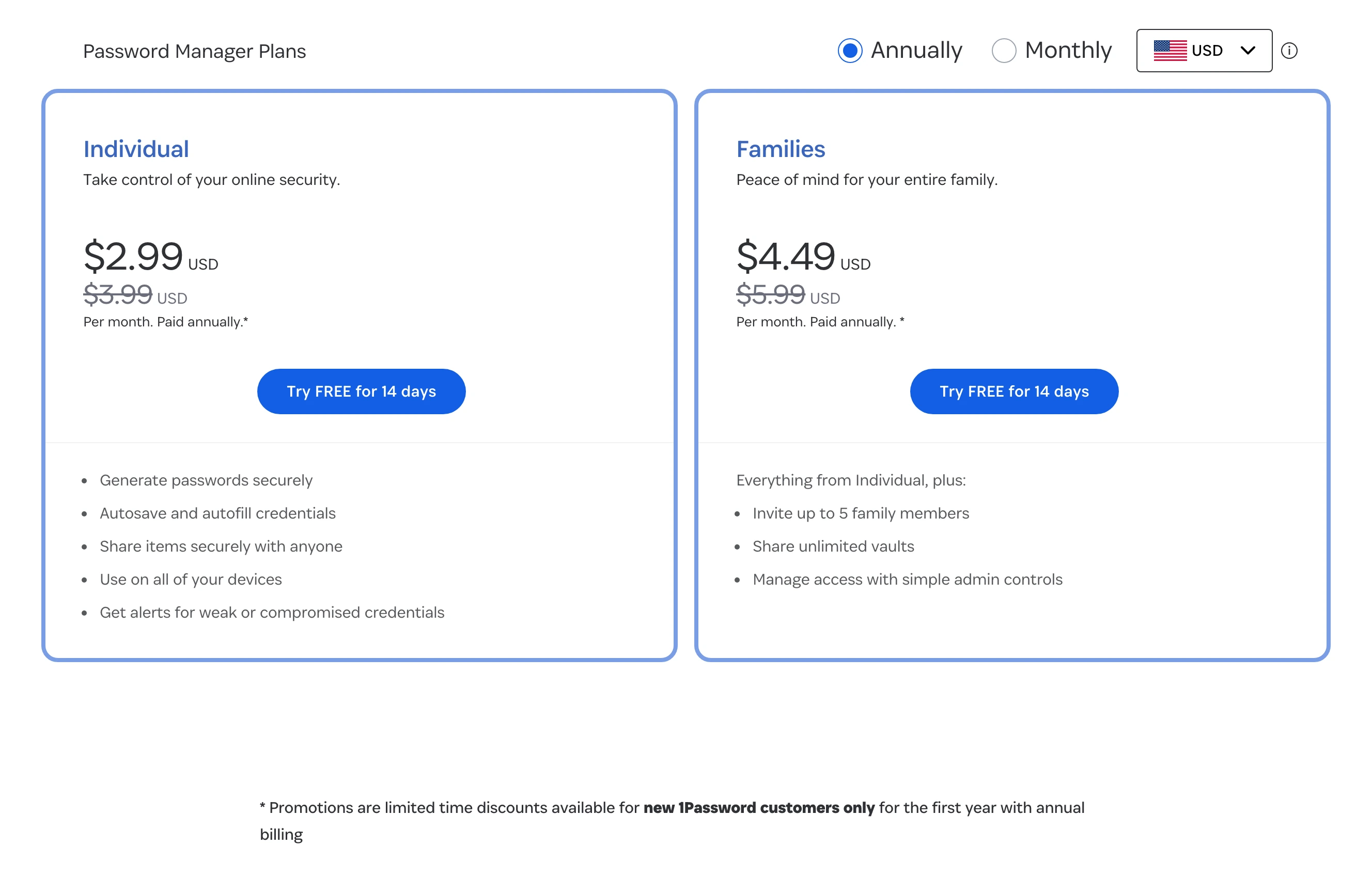
The price needs a careful read. The official page showed Individual at a $3.99-per-month annual list price and Families at $5.99 per month. It also showed first-year offers of $2.99 and $4.49. Those larger promotional numbers are not the normal annual list price, so buyers should budget from the crossed-out figure rather than the welcome offer.
Travel Mode is still a useful differentiator for people who cross borders with sensitive work or financial vaults. Watchtower is valuable because it turns weak, reused, or exposed credentials into a maintenance list. Neither feature replaces a good recovery plan, but both make the vault easier to operate after setup.
The tradeoff is price and dependency. There is no permanent free tier, and a polished family account becomes part of the household infrastructure. Before importing, write down who can recover whom, where the Emergency Kit lives, which vaults are shared, and how exports will be handled if the family leaves.
The strongest combination of family recovery, sharing, cross-device polish, Watchtower, and a clearly explained Secret Key model.
Skip it if a permanent free plan or the lowest annual cost matters more than guided family recovery.
1Password takes the top slot because a family is more likely to operate its recovery and sharing model correctly, despite the higher recurring cost.
- Family organizer recovery and shared vault controls address real household failure modes
- Secret Key adds a second account secret beyond the account password
- Travel Mode and Watchtower solve useful security-maintenance jobs
- Cross-device and browser support is broad
- No permanent free plan
- First-year offers make the visible entry price lower than the annual list price
- A family should document Emergency Kits and exports before the vault becomes critical infrastructure
2. Bitwarden: best value and the strongest free default
Bitwarden is the product I would choose for a solo buyer who wants the most defensible cost-to-control ratio. The core plan includes unlimited passwords and devices, passkey management, encrypted export, browser and mobile apps, and sharing with another user. The codebase is open source, which does not make it automatically secure but does make the implementation more inspectable than a closed product.
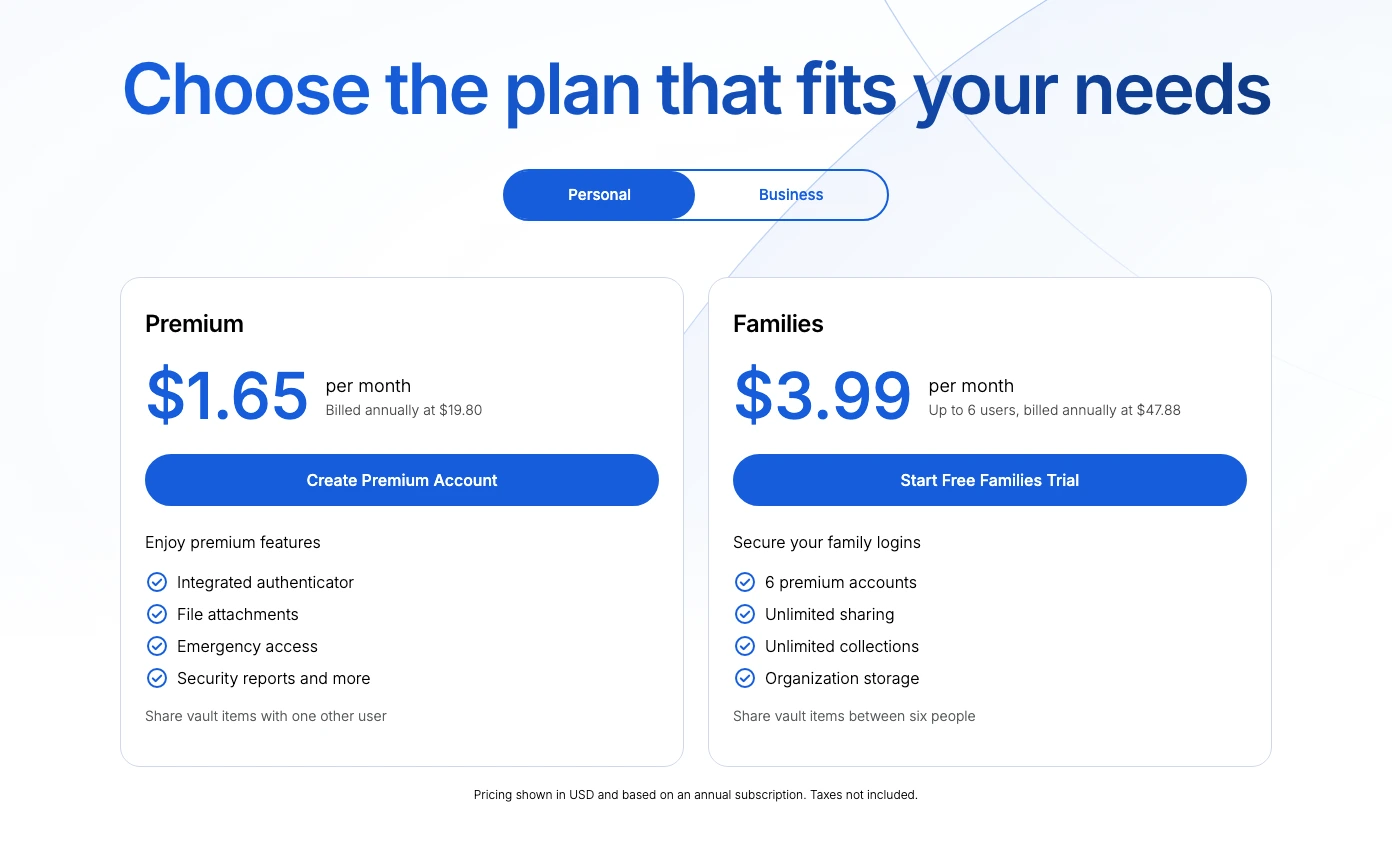
The current official pricing is unusually easy to explain: the base password manager remains free, Premium is $1.65 per month billed annually at $19.80, and Families is $3.99 per month for up to six users billed annually at $47.88. The page also shows Emergency Access, an integrated authenticator, attachments, and security reports on Premium.
Bitwarden loses the top slot on household fit, not on value. A technical reader may prefer its export and self-host options. A less technical family may need more explanation around organizations, collections, recovery, and which paid features belong to a personal account versus a family organization.
That is the decision pivot: if one person will administer the vault and can document the setup, Bitwarden is hard to beat. If several people need a calmer recovery experience with less terminology, 1Password earns some of its price difference.
A genuinely useful free tier, low Premium price, documented encrypted export, and an open-source posture.
Skip it if the household needs the most guided family setup and recovery experience.
Bitwarden nearly wins overall and is the better value; it ranks second only because its family model asks more of the person administering it.
- Free plan covers unlimited passwords and devices
- Premium costs $19.80 per year and adds Emergency Access and stronger account controls
- Open-source implementation and documented encrypted export improve inspectability
- Self-hosting remains available for buyers who understand the operational burden
- Organizations and collections add terminology for family administrators
- Some advanced recovery and authentication controls require Premium
- Self-hosting is not a shortcut and transfers maintenance risk to the buyer
3. Proton Pass: best free privacy-stack choice
Proton Pass is the easiest recommendation for someone already paying for or actively choosing Proton Mail, Proton VPN, or Proton Drive. The free plan includes unlimited logins, notes, credit cards, devices, browser/mobile/desktop apps, 10 hide-my-email aliases, passkeys, and easy password import. Proton also says every field, including usernames and web addresses, is end-to-end encrypted.
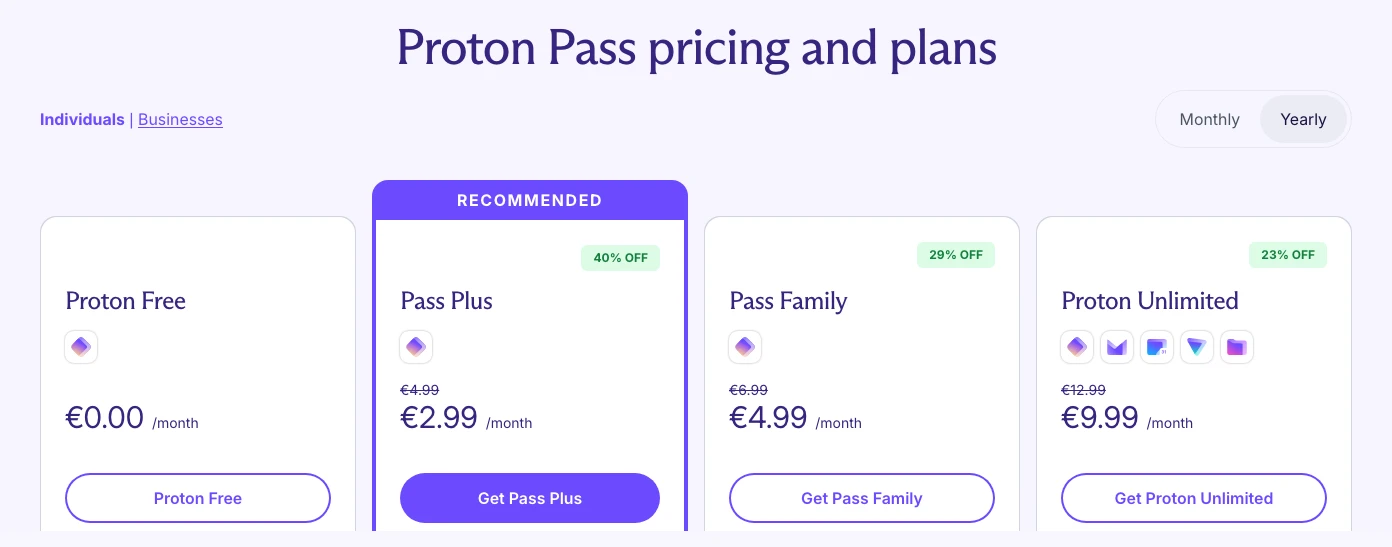
Pricing is regional. The official Croatia/EU page rendered Proton Free at €0, Pass Plus at €2.99 per month on annual billing, Pass Family at €4.99, and Proton Unlimited at €9.99. That is useful evidence for this check, not a universal dollar quote. Readers should verify their own currency, billing term, and checkout total.
Proton ranks below Bitwarden because the standalone password-manager product has a shorter operating history and the paid pricing is less globally comparable. It still has a strong reason to exist: aliases and credential storage are complementary privacy controls, and the free plan is good enough to discover whether that workflow fits before paying.
I would not choose Proton merely because "Swiss" sounds safer. I would choose it because the buyer already wants the Proton account, values encrypted aliases, and accepts a newer product in exchange for a broad free tier. That is a concrete buyer fit, not a jurisdiction slogan.
A strong free plan combines unlimited credentials and devices with passkeys and 10 hide-my-email aliases.
Skip it if you want the longest standalone password-manager track record or globally uniform paid pricing.
Proton Pass earns third through free-plan depth and privacy integration, but it remains a newer standalone vault with localized paid pricing.
- Free plan includes unlimited logins and devices
- Passkeys and 10 hide-my-email aliases are included without payment
- Useful fit for existing Proton Mail, VPN, or Drive users
- Official page states that all fields receive end-to-end encryption
- Paid prices vary by region and billing term
- Shorter standalone password-manager history than 1Password or Bitwarden
- Paid sharing and recovery features can overlap with a broader Proton subscription decision
4. NordPass: simple, but read the promotional term
NordPass is the easiest fourth-place option to understand. The free plan stores credentials and supports many devices, but official support says it allows one active session on one device. Premium removes that session limit and adds features such as Password Health, Data Breach Scanner, secure item sharing, attachments, and Emergency Access.
The captured Croatia/EU offer showed Free at €0, Premium at €1.39 per month, and Family at €2.49 per month on a two-year selection. The page also made the real commitment visible: the promotional total covered the first 27 months. That is not a normal month-to-month price, so the term and renewal need to be saved before checkout.
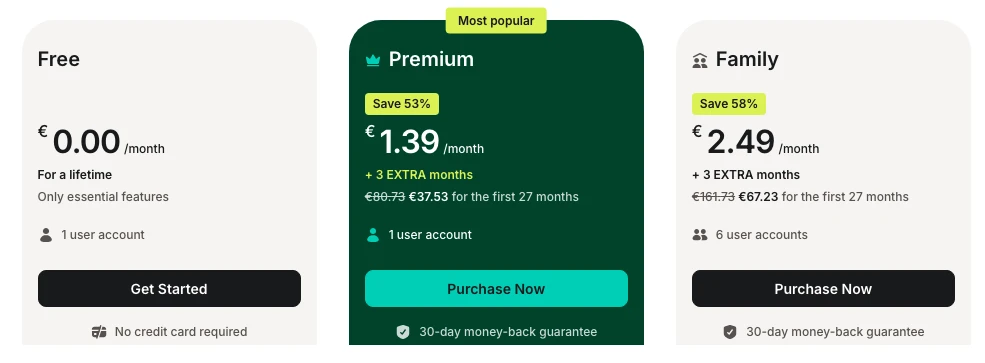
NordPass is reasonable for a buyer who wants a simple consumer product and already understands Nord's long-term promotional model. It is less compelling when Bitwarden is cheaper to explain and Proton has a stronger free privacy angle.
A simple plan ladder and a clearly visible regional discount for buyers willing to accept a long first term.
Skip it if you dislike long promotional terms, renewal uncertainty, or the one-active-session limit on Free.
NordPass is capable, but the promotional term and free-session restriction weaken its value against Bitwarden and Proton Pass.
- Free, Premium, and six-account Family paths are easy to distinguish
- Premium adds Emergency Access, sharing, breach scanning, and password health
- Regional offer can be inexpensive for buyers who accept the commitment
- Free plan allows only one active device session
- Headline monthly price is tied to a long promotional term
- Renewal and regional checkout can change the apparent value
5. Keeper: strong controls at the highest visible price
Keeper makes the most sense when family controls and support matter more than price. The official page lists unlimited password storage, unlimited device sync, sharing, biometric login, web and browser apps, and 24/7 support on Personal. Family adds five users, shared folders and permissions, 10 GB of secure file storage, and Emergency Access for estate planning.
The cost is the blocker. The current page showed Personal at $4.48 per month billed $53.74 annually and Family at $9.58 per month billed $114.99 annually. Those are direct annual amounts, not the cheapest promotional figure in the roundup.
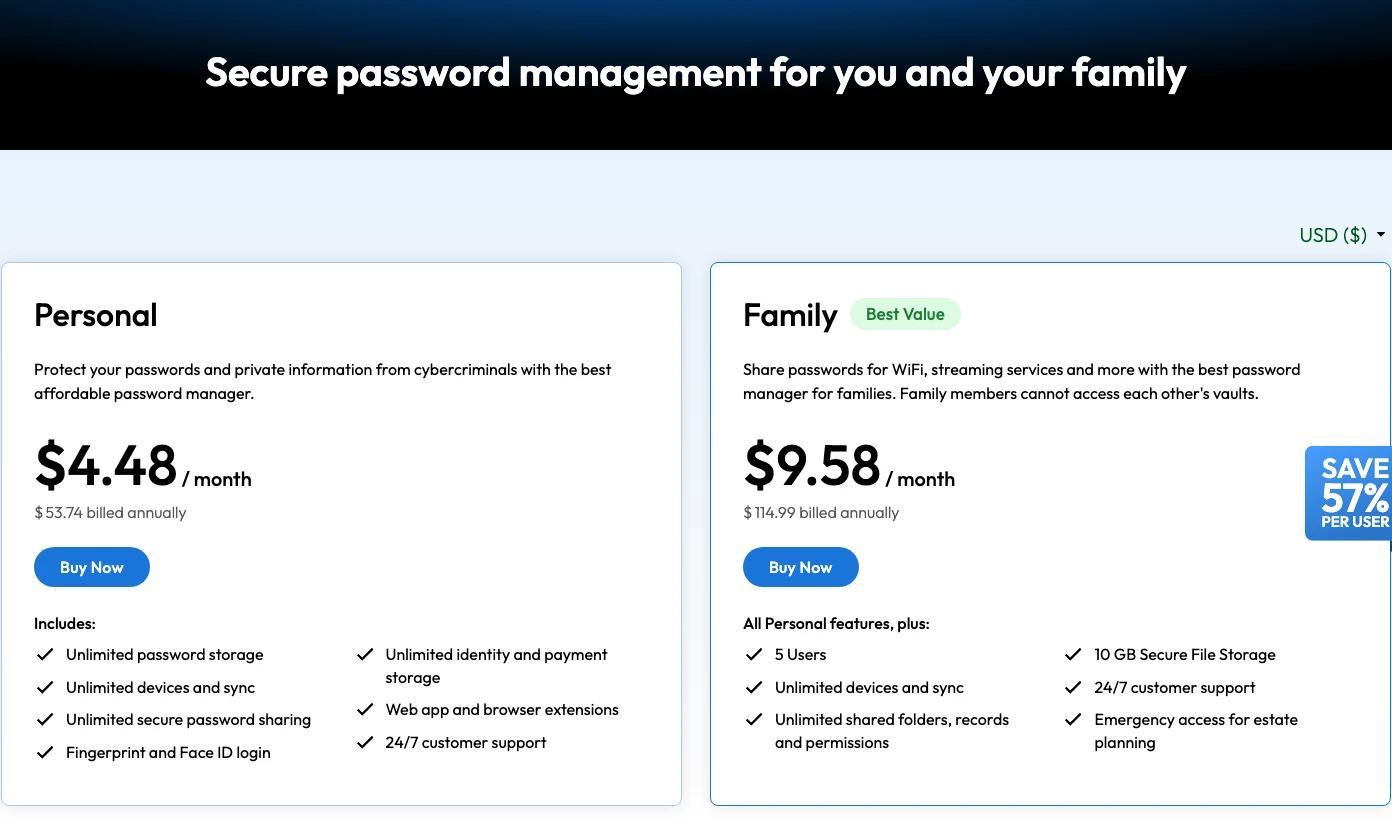
Keeper is not a bad fifth-place product. It is a harder value argument. The buyer should be able to name the specific family, support, storage, or permissions feature that justifies paying more than the top three. If that reason is vague, it is probably not the right shortlist.
The Family plan combines five users, sharing permissions, Emergency Access, secure file storage, and round-the-clock support.
Skip it if you cannot identify a Keeper-specific control that justifies its higher annual price.
Keeper has a serious control set, but its visible annual price is too high to outrank the clearer value of the top four.
- Family plan includes five users and shared-folder permissions
- Emergency Access and secure file storage support estate and household workflows
- Unlimited devices and 24/7 support are clearly stated
- Highest visible annual family price in the ranked group
- Personal plan also costs more than 1Password and Bitwarden
- Buyers should verify export and migration fit before moving a large vault
How to choose the right password manager for your setup
For one person who is comfortable with security settings, start with Bitwarden. It gives you enough room to learn the workflow without making the first decision permanent. The important work is not feature discovery. It is importing carefully, removing duplicate browser storage, enabling a strong second factor, and writing down a recovery path that does not point back into the locked vault.
For a household with mixed technical confidence, start with 1Password. The extra polish matters when one person has to explain shared vaults, personal vaults, organizer recovery, and Emergency Kits to everyone else. The right family setup is not one giant shared folder. Each person should keep private credentials private, while streaming, utilities, travel, insurance, and household services can live in intentionally shared vaults.
For an existing Proton household, compare Proton Pass before adding another provider. One account across mail, aliases, VPN, storage, and credentials can reduce setup friction. It also increases the importance of protecting that Proton account with a strong recovery method and a separate phishing-resistant factor for high-value access. Ecosystem convenience is useful only when the root account receives more protection, not less.
For travel or sensitive client work, document what stays on the device. A polished vault does not remove border, theft, shared-computer, or device-repair risk. Decide which vaults sync to travel devices, which accounts use hardware-bound passkeys, and which emergency instructions remain offline. 1Password's Travel Mode is relevant here, but the operating rule matters more than the product label.
For an older vault with years of clutter, plan the cleanup before the move. Delete obsolete credentials, identify duplicate domains, separate work and personal items, and list the accounts that can reset everything else. Importing a messy archive into a new manager preserves the mess and makes recovery harder to reason about. A smaller, verified vault is easier to maintain than a perfect-looking import report.
For a small team, stop at the consumer boundary. This guide does not rank enterprise policy, SSO, SCIM, audit logs, offboarding, secrets management, or administrator recovery at scale. Once employees and company-owned credentials enter the picture, evaluate the business edition as a separate procurement decision. A strong personal product is not automatically the right organizational control plane.
Why LastPass and Dashlane are not ranked
LastPass is not a new-vault recommendation. Its own December 2022 incident notice says an attacker copied a backup containing encrypted vault fields and unencrypted data such as website URLs, along with customer metadata. That is enough to change the buyer decision without inventing a cryptocurrency-loss total or pretending every current account has been compromised. Existing users should review LastPass's current guidance, rotate critical credentials where appropriate, and plan a careful migration rather than exporting a vault and leaving plaintext files behind.
Dashlane is a credible product with a weaker buying case here. Its July 2026 support page says the Free plan has been discontinued, personal plans are Premium and Friends & Family, and monthly subscriptions are no longer offered. The public pricing render did not expose a stable amount during this review, so I will not invent one. Dashlane belongs on a shortlist only when its scam protection, VPN bundle, or ten-account family structure solves a specific problem that the five ranked products do not.
Apple Passwords, Google Password Manager, and browser storage were also considered. They are better than password reuse and can be a reasonable ecosystem-native option. They are not ranked here because this guide is for buyers choosing a dedicated cross-platform vault, recovery model, and paid or free plan.
What should stay outside the main vault?
A password manager reduces password reuse, but it also concentrates access. I would not automatically store every recovery factor in the same place. The account password, the password-manager login, the recovery code for the password manager, and the key that unlocks the primary email account should not collapse into one circular dependency.
For most accounts, keeping passwords and TOTP codes together is a reasonable convenience tradeoff. For the few accounts that can reset everything else - primary email, domain registrar, cloud admin, source control, banking, or crypto exchange - a separate hardware security key or dedicated authenticator can reduce concentration risk. Keep recovery codes offline or in a second controlled location that a trusted person can find.
Attachments deserve the same discipline. A vault can store passports, tax files, seed-phrase photos, and identity documents, but the ability to store something is not the same as a reason to do it. Ask what happens if the vault account is locked, compromised, inherited, or unavailable during travel. The safer setup is the one with an intentional answer, not the one with the longest feature list.
A safer password-manager migration checklist
- Choose the recovery owner first. Decide who can recover whom and where emergency instructions will live.
- Export once, then protect the file. Treat CSV and JSON exports as sensitive plaintext unless the provider explicitly says the format is encrypted.
- Import and spot-check critical accounts. Verify email, banking, domains, cloud storage, developer accounts, and crypto-related logins before deleting the old vault.
- Separate the strongest second factor where needed. High-value accounts may deserve a hardware security key or a dedicated authenticator app rather than every secret in one vault.
- Remove duplicate browser copies. Once the new vault is stable, disable competing autofill and clean up old browser-saved passwords.
- Test recovery before an emergency. Confirm the family or emergency-access workflow without waiting for a lost phone or forgotten account password.
- Record renewal and export dates. Save the normal price, not only the first-year promotion, and schedule a yearly vault export review.
Final verdict: start with 1Password and Bitwarden
Choose 1Password when the vault will serve a family and the recovery/sharing experience matters enough to justify $47.88 per year at the normal Individual list price. Choose Bitwarden when value, open-source inspectability, encrypted export, or a permanent free path matters more. The difference between them is smaller than the difference between either one and password reuse.
Choose Proton Pass when aliases and the Proton ecosystem are already part of the plan. Choose NordPass only after writing down the full promotional term and renewal. Choose Keeper when its family permissions, support, or storage solve a named requirement rather than a general desire for "more security."
The final test is simple: can another trusted person explain how the vault is recovered, shared, exported, and paid for? If not, the setup is not finished, no matter how high the product ranks.
Frequently Asked Questions
Ready to check 1Password?
Use the verified route if the trade-offs still fit. If not, jump back to the summary and compare the alternatives.
Security and privacy editor focused on evidence-led buying guides. Reads official documentation, audit notes, privacy policies, recovery limits, and support pages before turning security claims into practical recommendations.
Sarah starts by locating the evidence boundary, then ranks security and privacy tools by audit and policy scope, recovery design, trust boundaries, residual risk, and what a cautious buyer can verify.
Related Articles

Venice AI vs Proton Lumo vs Duck.ai: Which Private AI Chat Fits?
Private AI chat decision guide
Venice AI, Proton Lumo, and Duck.ai compared by privacy architecture, saved-history protection, provider exposure, plan limits, model access, and price.
Malwarebytes vs Bitdefender vs Norton
Paid antivirus decision guide
Malwarebytes, Bitdefender, Norton, and Microsoft Defender compared by paid antivirus value, real-time protection, renewal risk, bundle scope, and lab evidence.