

The parental control app that sees the most is not automatically the safest choice.
That is the uncomfortable part of this category. A parent may start with a normal goal - less midnight scrolling, fewer adult sites, better location visibility, or a warning before a problem gets serious - and end up buying a tool that turns every family disagreement into a data feed. More monitoring can help. It can also make a teenager hide better.
Here is what most reviews will not tell you: the best parental-control purchase is a family operating system, not a surveillance scoreboard.
My short version: Qustodio is the default I would compare first because it has the cleanest balance of web filtering, app blocking, schedules, location, device coverage, and plan structure. Bark is the stronger alert-monitoring pick for teen risk signals. Aura makes the most sense when parental controls are part of a broader family security bundle. Norton Family is the straightforward budget option. Mobicip is the practical schedule-and-app-control pick for larger device counts.
If the risk is broader than screen time, use the full security stack. Our identity theft protection guide covers family identity recovery, password managers protect shared household accounts, security keys protect the parent login, and our VPN guide covers network privacy. A parental-control app is not a password manager, fraud recovery service, or substitute for talking about the rules.
-
#1 QustodioBest default - app blocking, web filtering, schedules, location, activity reporting, and a clear Basic/Complete plan split
-
#2 BarkBest alert monitoring - texts, email, YouTube, 30+ apps/platforms, screen-time controls, and location tools
-
#3 AuraBest family security bundle - parental controls plus identity, VPN, password manager, antivirus, and family recovery tools
If you need one clean starting point, compare Qustodio first. If your main worry is teen messaging, social platforms, self-harm signals, bullying, or a softer alert model, compare Bark before you buy a stricter control dashboard.
The parental control app trap: monitoring is not trust
The category trap is simple: parents shop for the app that can see the most. That sounds rational until the child is older, the phone is personal, and the family rule was never explained. Then the app becomes the argument.
A good parental-control app should answer three questions before it collects more data. What boundary are we trying to enforce? Which device and platform actually allow that boundary? What will the child know about the monitoring? If those questions are not clear, a bigger dashboard only makes the mistake faster.
Not every family needs Bark or Qustodio. Apple Screen Time, Google Family Link, Microsoft Family Safety, console controls, router rules, and app-level controls can be enough for many younger kids. The FTC's parental-control guidance makes the same practical point: controls help with time, content, activity visibility, communication limits, and purchases, but they work best when paired with family expectations.
The paid apps become worth comparing when the household is cross-platform, the built-in tools are too scattered, or the family needs a single parent dashboard for web filtering, app blocking, schedules, location, social risk alerts, and reports. The paid apps also become risky when they collect more than the family is prepared to explain.
That tension shaped the ranking.
How I ranked Bark, Qustodio, Aura, Norton Family, and Mobicip
The ranking uses one shared rubric for all five products: control depth, platform fit, trust clarity, setup friction, and value clarity. I did not change the score labels per product because that makes the ranking look retrofitted. If Bark gets credit for teen alert monitoring, it still has to take the same platform-fit and setup-friction exam as Qustodio.
Control depth measures whether the app can actually shape device behavior: app blocking, website filtering, screen-time schedules, internet pause, activity reports, location, and social/message visibility where supported. Platform fit asks whether the claims survive iPhone, Android, Windows, Chromebook, and mixed-device households. Trust clarity is about how easy it is for a parent to understand what is collected and what should be disclosed to the child. Setup friction covers desktop sync requirements, device limits, permissions, and platform caveats. Value clarity covers price, annual billing, trials, family/device limits, and whether a cheaper built-in option might be enough.
This is an evidence-led guide, not a hands-on family test. I checked official product pages, current pricing pages, support documentation, platform limits, rendered screenshots, the FTC guide, and published privacy research. I did not create parent or child accounts, install apps, enroll a phone, read messages, trigger geofence alerts, or test cancellation. Real-world performance still depends on the exact phone, OS version, browser, app store, permissions, and family setup.
I also treated privacy as a buying criterion, not a footnote. The 2020 paper Betrayed by the Guardian is older than this ranking, but its central warning still matters: parental-control tools can introduce security and privacy risk because they sit in privileged positions and process sensitive family data. That does not mean "never use them." It means the least intrusive product that solves the family job is often the better product.
The buyer mistake is predictable. A nervous parent buys the strictest app, adds every account, turns on every alert, and then discovers the real failure is not missing data. The failure is that nobody agreed what the data was for. The right buyer uses the app to enforce a specific account, device, or safety rule. The wrong buyer uses it to avoid a hard conversation. The careful user secures the parent account first, writes the account rule down, and chooses the smallest user-visible control that can enforce it.
The result is not "the app with the most features wins." Qustodio wins the default slot because it is broad and structured. Bark wins a different job because alert monitoring is the point. Aura is not the deepest parental-control app, but it is a strong family-security bundle. Norton Family and Mobicip are useful when price, device count, and simpler controls matter more than social-risk intelligence.
Bark vs Qustodio vs Aura parental control app comparison
| Feature | Qustodio | Bark | Aura | Norton Family | Mobicip |
|---|---|---|---|---|---|
| Starting price | EUR 46.95/yr Basic in our regional check | $5/mo Jr; app $14 Android / $20 iOS | $10/mo Kids annual | $49.99/yr first year | $2.99/mo Lite annual |
| Best for | Default controls | Teen alert monitoring | Family security bundle | Basic budget controls | Device-count value |
| Device coverage | Plan and region dependent | Unlimited kids and devices | Unlimited kids/devices on Kids plan | Windows, Android, iOS; platform limits | 5, 10, or 20 devices by plan |
| Monitoring angle | Activity, location, YouTube, calls/messages caveats | Texts, email, YouTube, 30+ apps/platforms | Safe gaming, wellbeing, online risk alerts | Search, web, video, location | Activity, social, location |
| Control angle | Web, app, time, routines, pause internet | Screen time, web/app blocks, location | Filtering, schedules, pause internet | Rules, web blocks, screen limits | App blocker, schedules, website blocker |
| Main caveat | iOS messages setup is involved | Deep iOS monitoring needs extra setup | Parental controls are one bundle layer | No Mac child-device support | Confirm monitoring depth by platform |
| Action | See plans | See plans | See plans | See pricing | See pricing |
How to choose a parental control app without over-monitoring
Start with the child's device mix. iPhone is the hard mode. Android and Windows usually allow deeper controls. Chromebook and school-managed devices can add another layer of restrictions. If a vendor says it monitors social, messages, calls, app use, or location, read the platform notes before you buy. "Works with iPhone" and "can monitor every iPhone message automatically" are not the same claim.
Then write the family rule before you choose the app. "No phone after 9 p.m." is a screen-time problem. "No adult sites" is a filtering problem. "Tell me if an adult contacts you in a risky app" is an alert-monitoring problem. "I want to read everything because I am anxious" is a trust problem, and software will not fix that cleanly.
The strongest paid tool is usually the wrong first step for a young child with one iPad. Built-in Apple or Google controls may be enough. Paid apps become more useful when devices multiply, platforms split, the child has social accounts, or the parent needs consistent rules across phones, tablets, computers, and web browsers.
For teens, I would be more careful. Bark's alert model can be less invasive than reading a full feed, but it is still monitoring. Qustodio's controls can be useful, but strict downtime and message visibility can become a daily fight. The safer editorial rule is this: buy the least invasive tool that handles the specific risk, and be explicit about what it collects.
Simple. Hard to do.
The 5 parental control apps I would compare first
1. Qustodio - best default parental control app
Qustodio wins the default slot because it is built like a control system first. In our Croatia/EU regional check on July 29, the official pricing page showed Basic at EUR 46.95/year and Complete at EUR 79.95/year. Qustodio can localize currency and plan details, so the checkout shown to your household is the price that matters. The visible comparison covered web filtering, app blocking, routines, location, calls and messages, social alerts, and broader customization on Complete.
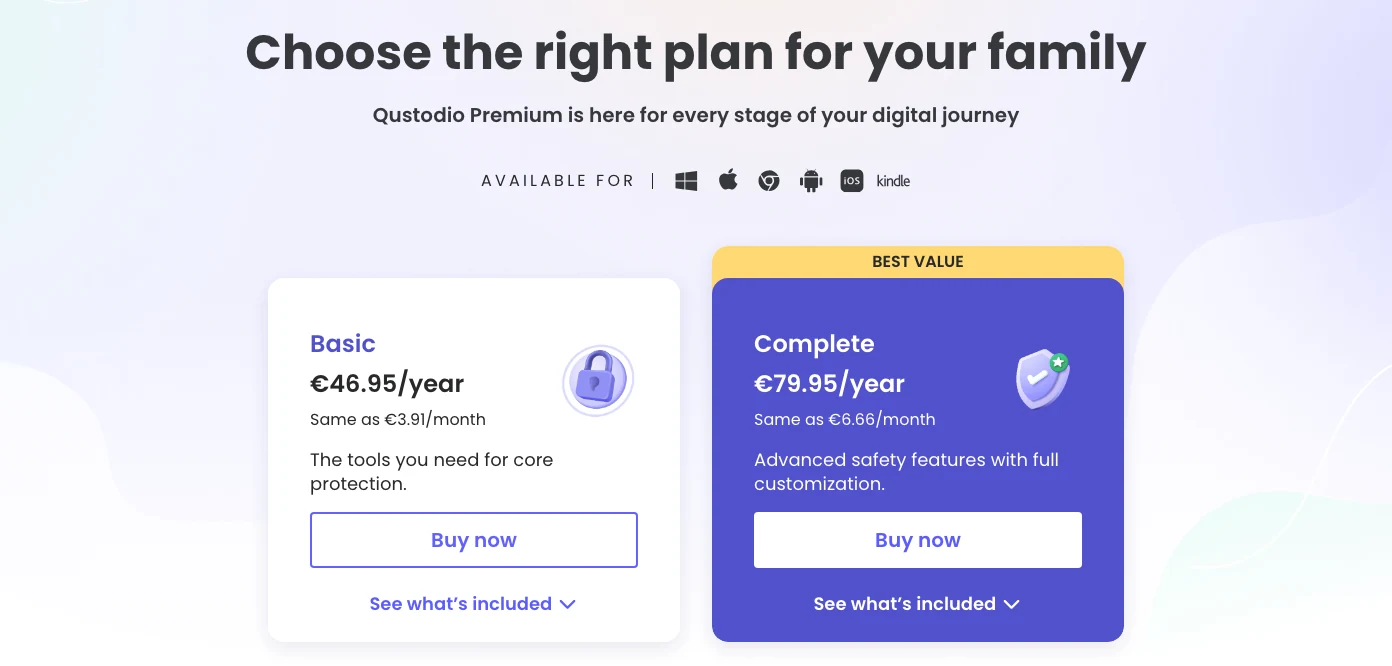
The reason Qustodio ranks above Bark is not that it is more humane or less intrusive. It is that the product shape is easier to map to normal household rules: block a site, limit an app, pause internet, create routines, check activity, and keep location visible. If a parent wants a practical control dashboard before a social-risk alert engine, Qustodio is the better first comparison.
The caveat is iOS. Qustodio's own setup guide says calls and messages monitoring for iOS requires a Mac or Windows computer, an initial cable connection, Wi-Fi access, and the Calls & Messages app running on the computer for syncing to continue. That is not a tiny setup note. It changes the buyer fit for iPhone-heavy households.
The product pages make the control job concrete: web filtering, app blocking, time limits, internet pause, location, reports, and device limits are all visible before checkout.
Skip Qustodio if you mainly want teen-risk alerts from messages and social platforms, or if your household is iPhone-only and you do not want the desktop sync setup for deeper message visibility.
Qustodio scores highest because it uses the shared rubric well: broad control depth, clear plan structure, and strong family-dashboard fit outweigh its iOS setup friction.
- Strong mix of app blocking, web filtering, schedules, location, and activity reporting
- Basic and Complete plan split is clearer than many family-safety bundles
- Regional annual pricing is visible before checkout
- Best fit when the buyer wants controls first, alerts second
- iOS calls and messages setup requires a computer, cable, Wi-Fi, and sync workflow
- Can feel too strict if the family has not agreed on what is monitored
- Buyers should confirm local currency, taxes, plan limits, and checkout terms before paying
- Not a substitute for device-level Apple, Google, or school restrictions
2. Bark - best alert monitoring for teens
Bark is the better pick when the job is alerts, not micromanagement. Bark's official support page listed Premium at $14 plus tax monthly or $99 plus tax annually, and Bark Jr at $5 plus tax monthly or $49 plus tax annually when checked July 29. Bark's public product pricing page adds an important device qualifier: the full app is $20/month or $148/year for iOS because Bark Sync is included, versus $14/month or $99/year for Android. A single app subscription covers every child and device.
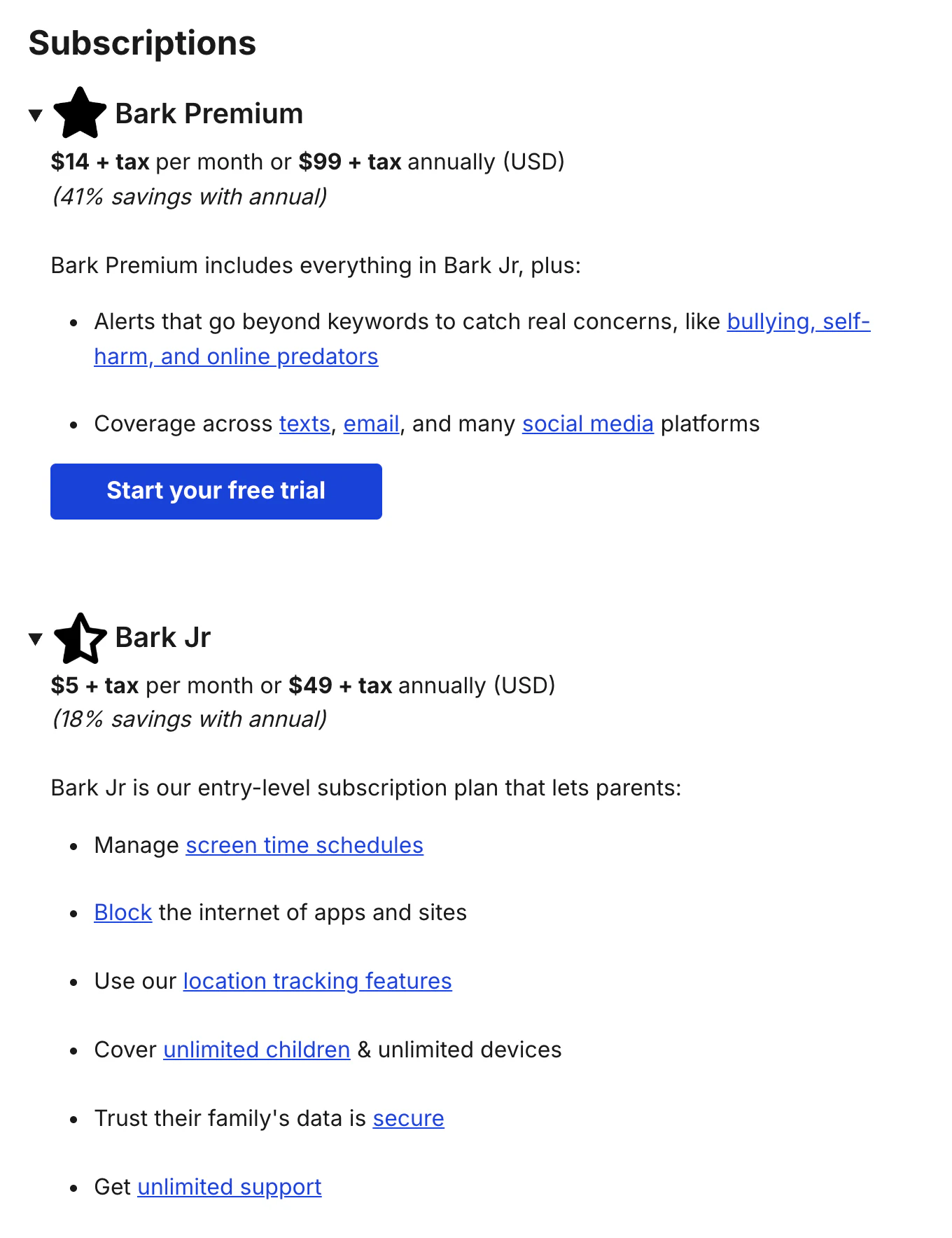
Bark's strongest claim is monitoring breadth. The page and support docs reference texts, email, YouTube, 30+ apps and platforms, web searches, saved photos and videos, screen time, website/app blocking, location alerts, and check-ins. That makes Bark feel more like a safety-alert layer than a classic screen-time dashboard.
That is useful for a specific family type. If the parent does not want to read every conversation but wants a prompt when something looks risky, Bark's model is easier to justify. It also means the buyer needs to understand platform caveats. Bark says iOS text/photo/video monitoring requires a Windows or Mac computer, or Bark Home for some setups. The monitoring promise is not friction-free.
The tradeoff is buyer fit: Bark wins when risk alerts are the reason to pay, and loses when the buyer needs a calmer routine-control system for app limits, bedtime schedules, and web rules.
Bark is category-native because it does not only block and schedule; it tries to surface risk signals that a parent can talk about.
Skip Bark if your household mainly needs strict app limits, school-night routines, and web rules. Qustodio, Mobicip, or built-in controls may be cleaner.
Bark ranks second because its alert-monitoring fit is excellent, but the control dashboard and iOS setup friction make it less universal than Qustodio.
- Strong alert-monitoring story across texts, email, YouTube, and 30+ apps/platforms
- Unlimited kids and devices keeps the family pricing simple
- Bark Jr gives a cheaper control-only path for younger kids
- Better fit than strict dashboards when the parent wants conversation prompts
- Deep iOS monitoring can require a desktop or Bark Home setup
- The alert model is less useful if the family wants precise app-by-app control first
- Monitoring sensitive content can create trust problems if expectations are not explicit
- Bark Phone and hardware add-ons can complicate the buying decision
3. Aura - best family security bundle
Aura is not the deepest standalone parental-control app here. It is the best bundle. The official page showed Kids at $10/month with annual billing or $13 monthly, and Family at $32/month with annual billing or $50 monthly when checked July 29. Kids includes unlimited kids and devices. Family adds identity protection, credit monitoring, antivirus, VPN, password manager, spam call protection, data broker removal, and fraud remediation layers. If spam calls are the only problem, use our dedicated spam call blocker app guide before paying for a full family security bundle.
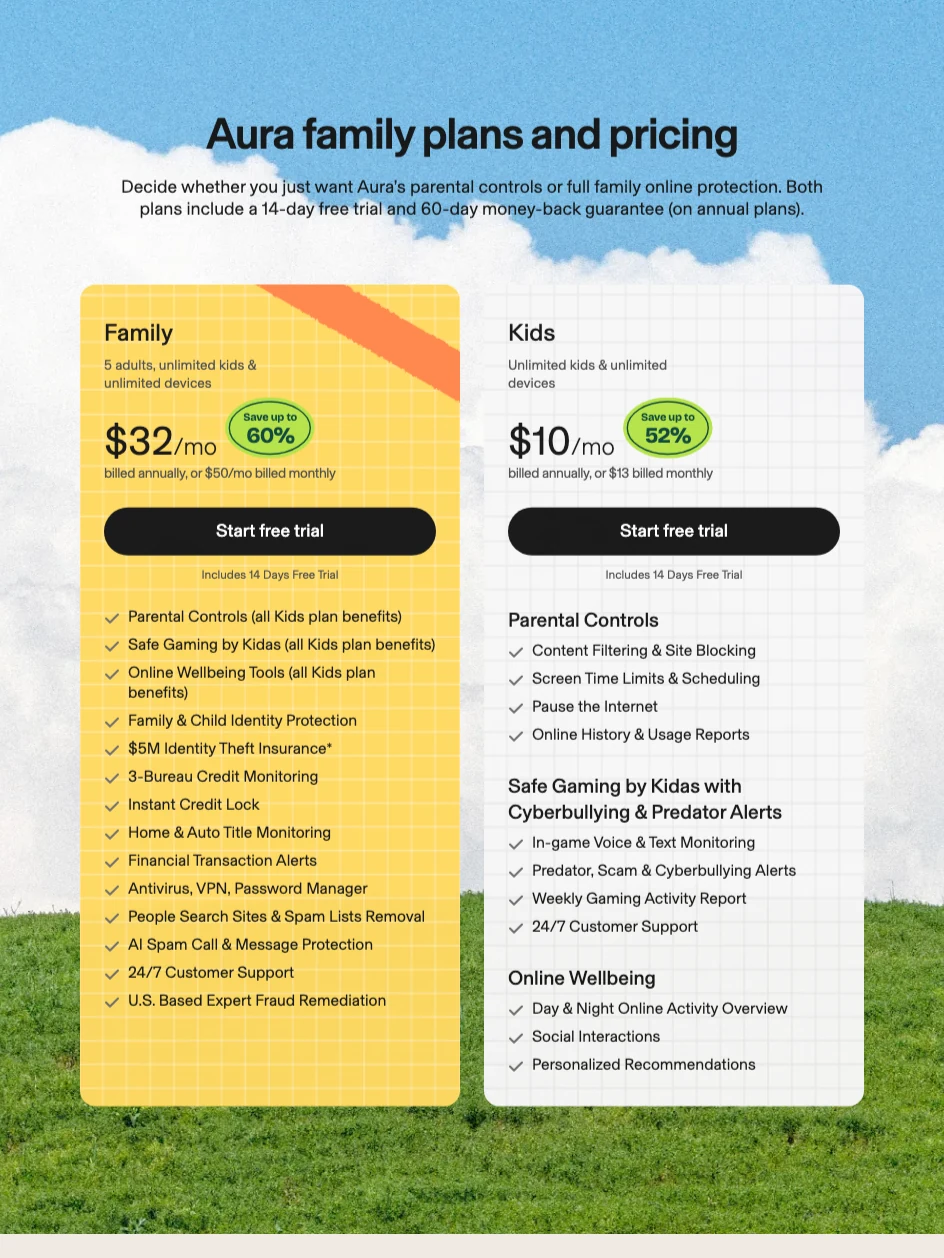
That changes the buyer. If the household already needs identity theft protection, family VPN, antivirus, password manager, and parental controls, Aura deserves a look because the incremental parental-control decision is part of a bigger protection bundle. If all you need is screen-time schedules for one child, Aura is probably overbuilt.
The product page also makes a specific parental-control promise: content filtering, site blocking, screen time limits, schedules, internet pause, online history, safe gaming alerts, and online wellbeing tools. The gaming layer is interesting, but it does not replace the control depth of a dedicated app like Qustodio.
Aura makes the most sense when parental controls are part of identity, privacy, antivirus, VPN, and recovery coverage for the whole household.
Skip Aura if you only need app limits, bedtime schedules, and web filtering. A dedicated parental-control app or built-in tool will usually be simpler.
Aura ranks third because the bundle value is strong, but the parental-control layer is not as focused as Qustodio or as alert-native as Bark.
- Kids plan covers unlimited kids and devices at a clear annual price
- Family plan bundles parental controls with broader identity and device protection
- Good fit when parents want one vendor for family digital security
- Safe gaming and wellbeing tools add a different lens than simple app blocking
- Not as focused as Qustodio for granular parental-control workflow
- Family plan can be expensive if parental controls are the only need
- Bundle breadth can make it harder to tell which feature solves which problem
- Gaming and wellbeing claims should be matched to the child device before buying
4. Norton Family - best simple budget pick
Norton Family is the practical budget option for households that want basics from a familiar security brand. The official page displayed $49.99 for the first year and $49.99/year thereafter when checked July 29. The same page describes search terms, viewed videos, age-appropriate content monitoring, screen limits, web supervision, app supervision, location supervision, and mobile parent access.
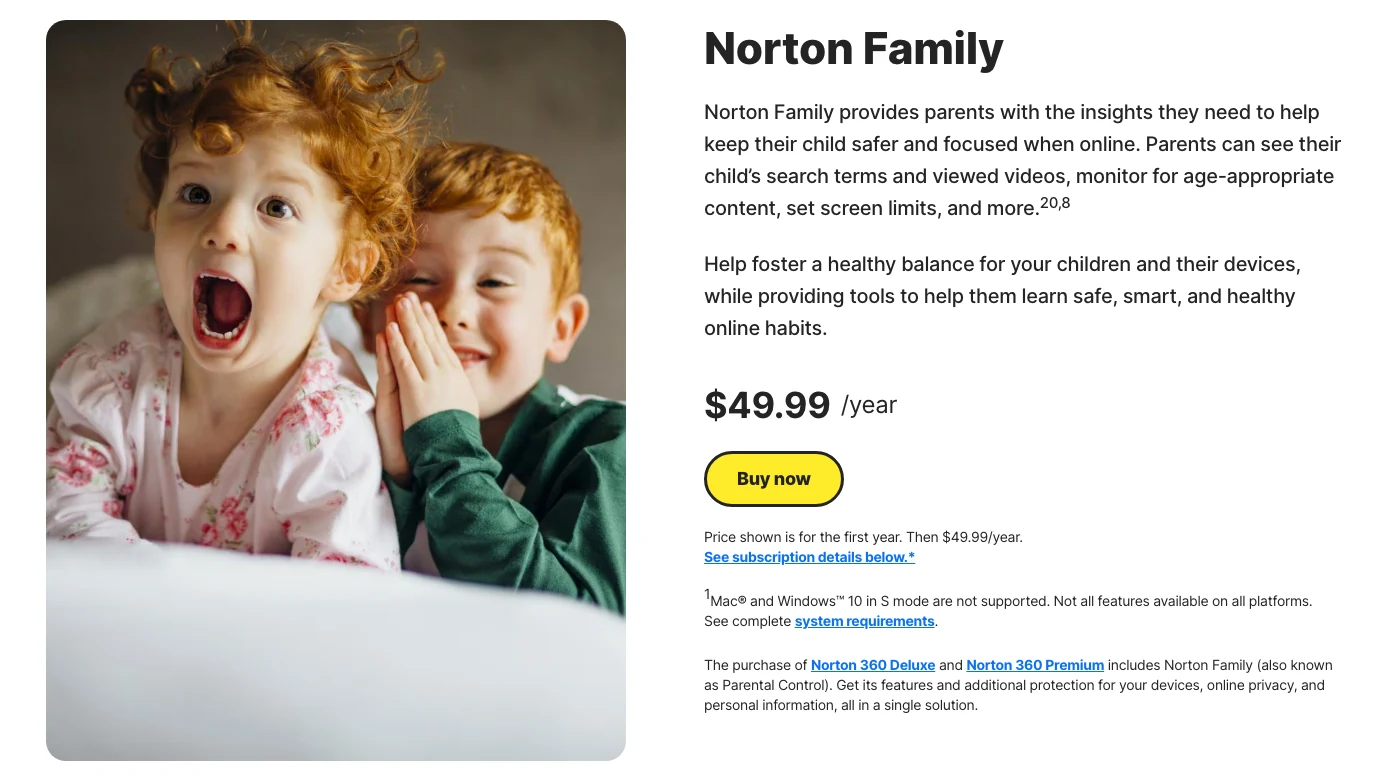
The good version of Norton Family is boring. A parent buys it, sets rules, reviews searches and videos, manages screen time, and gets a familiar portal. That is enough for many households. It does not need to beat Bark at social-risk alerts or Qustodio at structured control depth to be useful.
The caveat is platform fine print. Norton states that not all features are available on all platforms, Mac child devices are not supported for Norton Family/Parental Control, and Windows 10 in S mode is not supported. That keeps it below the top three even though the current pricing is clear.
Norton Family is strongest when the buyer wants a recognizable security vendor and a basic controls package without a complex social-monitoring thesis.
Skip it if the child uses a Mac as the main managed device, or if you need teen social-risk alerts rather than classic web/search/time controls.
Norton Family ranks fourth because the value is clear, but its platform limits keep it behind the more capable top picks.
- Clear first-year price on the official page
- Covers core jobs: web supervision, screen limits, search/video visibility, and location
- Works well as part of a Norton household security stack
- Less overwhelming than monitoring-first products for basic needs
- Future pricing can change even though the current first-year and ongoing figures match
- Not all features work on all platforms
- Mac child-device support is not the same as Windows/Android/iOS coverage
- Less differentiated if the buyer already uses built-in Apple or Google controls
5. Mobicip - best device-count value
Mobicip is the sensible pick when the household wants many controls and several device-count tiers. The official pricing page showed Lite at $2.99/month billed annually for up to 5 devices, Standard at $4.99/month billed annually for up to 10 devices, and Premium at $7.99/month billed annually for up to 20 devices when checked July 29.
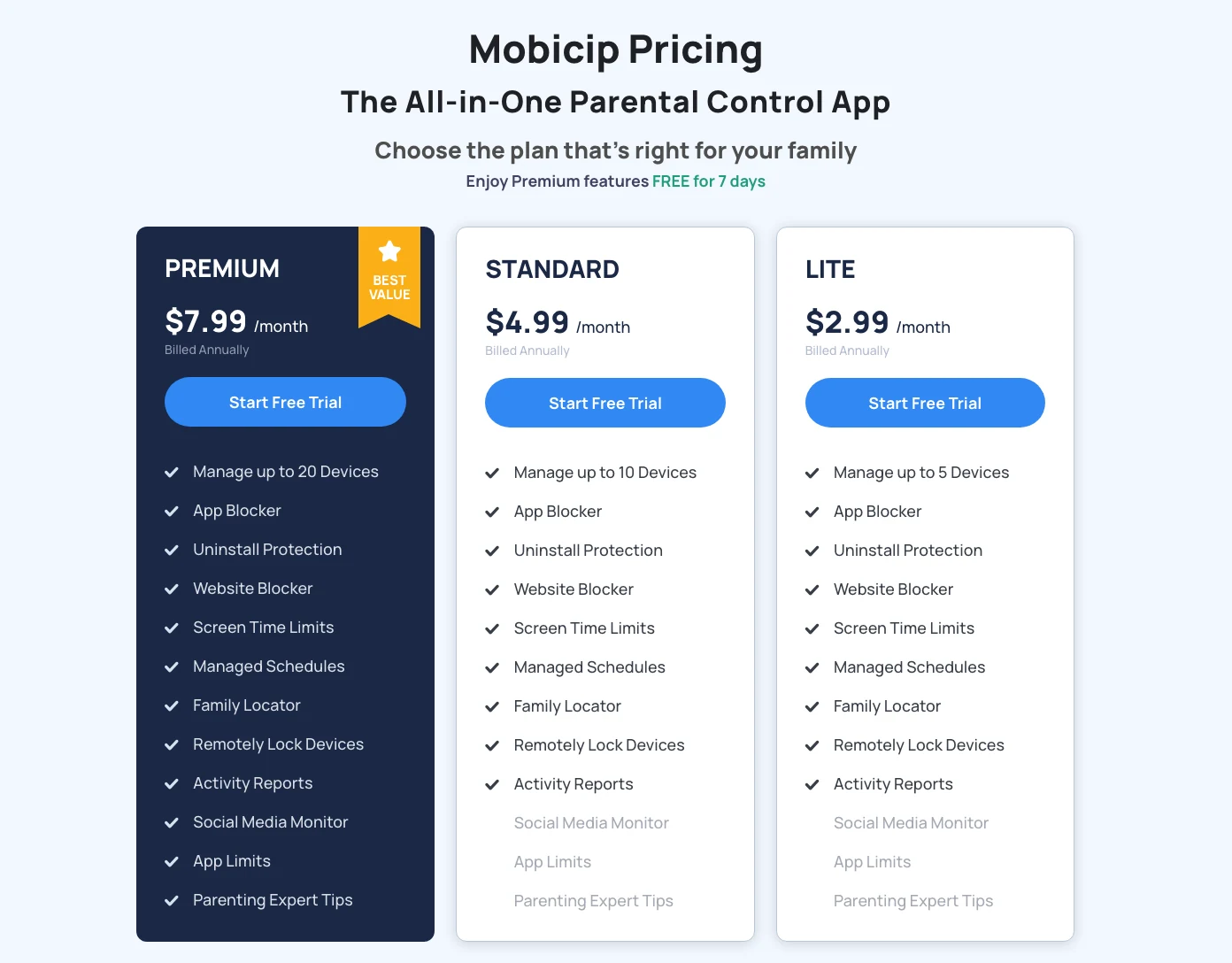
The page lists the right core feature set: app blocker, uninstall protection, website blocker, screen time limits, managed schedules, family locator, remote lock, activity reports, social media monitor, and app timers. That is a lot of practical control for the price if the device-count tiers match the household.
Mobicip lands fifth because its public documentation gives less product-specific clarity about how monitoring depth changes by platform than the leaders. It is not filler. It is a value and schedule-control pick for families that want broad controls without paying bundle prices.
Mobicip's pricing page makes device-count planning easy, which matters for families managing several phones, tablets, and computers.
Skip Mobicip if you want the most established default, a bigger family security bundle, or teen-risk alert monitoring as the lead feature.
Mobicip ranks fifth because its value and device tiers are strong, but platform-specific monitoring clarity is weaker than the higher-ranked choices.
- Clear Lite, Standard, and Premium tiers by device count
- Strong core feature list for app blocking, website blocking, schedules, and location
- Premium covers up to 20 devices at a comparatively low annual monthly equivalent
- Good fit for households that want rules more than alert intelligence
- Public monitoring documentation is less differentiated than the top picks
- Social-monitoring depth still needs verification against the exact child platforms
- Annual billing makes the low monthly equivalent less flexible
- Not the best choice if family identity protection or deep teen alerts are the main job
Also considered
Apple Screen Time and Google Family Link belong in the decision even though they are not affiliate picks. They are often the right first controls for younger kids inside one ecosystem. I did not rank them against the paid apps because the buyer job is different: built-in OS controls versus paid cross-platform parental-control software.
Microsoft Family Safety is also relevant for Windows, Xbox, and Microsoft-account households. It did not make the top five because this article focuses on third-party apps with broad parent-dashboard positioning.
Net Nanny and Life360 also appeared in the current market review. Net Nanny remains a familiar parental-control brand, and Life360 is a location/family-safety product more than a direct Bark/Qustodio control dashboard. They are worth a future update if pricing evidence, affiliate routing, and screenshot proof line up cleanly.
Final verdict: start with the family rule, then pick the app
For most buyers comparing paid parental-control apps, I would start with Qustodio, then Bark. Qustodio is the cleaner default because it maps to ordinary household controls: websites, apps, time, routines, location, and reports. Bark is the stronger pick when the family wants alerts around risky communication and social activity without turning every minute into a control rule.
Aura is the best answer if the parental-control decision is part of family identity, privacy, and device-security coverage. Norton Family is the basic budget path from a familiar security brand. Mobicip is the practical device-count value pick.
The real answer is smaller than the market wants it to be: use the least invasive tool that solves the actual family boundary, explain what it collects, and revisit the rules as the child gets older.
Wrong-buyer warning: skip the whole category if the parent account is not secured, the family rule is vague, the child will not be told what is monitored, or the real risk is identity theft, weak passwords, or a school-managed device the app cannot control.
Frequently Asked Questions
Ready to check Qustodio?
Use the verified route if the trade-offs still fit. If not, jump back to the summary and compare the alternatives.
Security and privacy editor focused on evidence-led buying guides. Reads official documentation, audit notes, privacy policies, recovery limits, and support pages before turning security claims into practical recommendations.
Sarah starts by locating the evidence boundary, then ranks security and privacy tools by audit and policy scope, recovery design, trust boundaries, residual risk, and what a cautious buyer can verify.
Related Articles

Venice AI vs Proton Lumo vs Duck.ai: Which Private AI Chat Fits?
Private AI chat decision guide
Venice AI, Proton Lumo, and Duck.ai compared by privacy architecture, saved-history protection, provider exposure, plan limits, model access, and price.
Malwarebytes vs Bitdefender vs Norton
Paid antivirus decision guide
Malwarebytes, Bitdefender, Norton, and Microsoft Defender compared by paid antivirus value, real-time protection, renewal risk, bundle scope, and lab evidence.