
The expensive mistake is not buying the wrong security key. It is buying one key, adding it to your most important account, and then realizing the backup plan is a sticky note, a lost recovery code, or a phone that no longer works.
Security keys and device-bound passkeys solve a real problem: phishing. A fake login page can trick you into typing a password and a six-digit code. It cannot easily make your hardware key sign in to the wrong domain. That is the point. But the purchase is still practical, not magical. Connector choice matters. NFC matters. Passkey storage matters. Recovery matters more than the marketing page usually admits.
That is where most security-key shopping advice gets too neat.
My short version: YubiKey 5C NFC is the default I would compare first, Yubico Security Key C NFC is the better low-cost pick, Google Titan is the cleanest Google-account option, Token2 is the capacity-heavy budget specialist, and Nitrokey is the open-source privacy pick with an availability caveat.
If your shortlist is already down to the two mainstream names, use the focused YubiKey vs Google Titan comparison before you buy. This broader guide is better when you still want to compare budget, high-capacity, and open-source alternatives.
If your login foundation is still weak, start with our password manager comparison and authenticator app guide. If you are not sure whether everyday passkeys belong in 1Password, Bitwarden, Proton Pass, or a hardware key, the focused passkey storage comparison is the better bridge before buying hardware. A hardware key is a high-value layer, but it should sit on top of unique passwords, clean recovery codes, and a documented account-access plan. If the problem has already become fraud or identity recovery, use our identity theft protection services comparison instead.
If the account controls crypto, separate the jobs. A security key protects exchange, email, domain, and password-manager logins; a hardware wallet protects the private keys, and a metal seed phrase backup protects the recovery layer if the wallet is lost or broken. And if your worry is hostile Wi-Fi or IP exposure, our VPN guide covers that layer. Do not ask one tool to solve all three problems.
-
#1 YubiKey 5C NFCBest default — USB-C, NFC, 100-passkey firmware generation, and broad Yubico protocol support
-
#2 Security Key C NFCBest value — cheaper FIDO-only Yubico key for passkeys and WebAuthn login
-
#3 Google Titan Security KeyBest Google-first pick — simple USB-C/NFC or USB-A/NFC options and Advanced Protection fit
If you want one clean starting point, compare YubiKey 5C NFC first. If the price feels high and you only need FIDO2/passkeys, compare Security Key C NFC before you pay for features you will not use.
The spare key is not optional.
The security key buying trap: one key is not a backup plan
The trap is shopping for the strongest key instead of the most recoverable setup. A single premium key can still leave you worse off than two boring keys registered everywhere important. The right first question is not which model has the most features. It is whether the model you buy can be used on your laptop, your phone, your backup account, and your recovery day.
How I ranked YubiKey, Titan, Token2, and Nitrokey
I ranked these keys by the purchase decision, not by brand familiarity. The default winner had to work across modern laptops and phones, support the login standards most people actually need, leave enough headroom for passkeys, and make backup-key buying realistic. A key that is impressive on paper but painful to explain to a family member does not win the default slot.
The score rubric uses the same five criteria for every product: connector fit, passkey headroom, protocol flexibility, mainstream recovery fit, and buyer clarity. That matters because a product can look strong on a custom scorecard and still be the wrong default. Token2, for example, has more stated passkey capacity than YubiKey 5C NFC, but that does not automatically make it the better first recommendation.
This is an evidence-led buying guide, not a lab test. I checked official product pages, documentation, evidence screenshots, pricing, and buyer-pattern discussions. I did not order the keys, enroll them into live accounts, simulate account recovery, or test durability. That limitation matters in a security category, so the ranking favors what can be verified publicly and what a normal buyer can recover from if setup goes wrong.
The main tradeoff is recovery risk. A high-capacity key can still be the wrong buyer choice if regional shipping delays the spare, the support path is confusing, or a family member cannot replace the key during a lockout. That is why the scorecard weighs mainstream recovery fit alongside technical depth.
Reddit threads in r/yubikey, r/Passkeys, and r/selfhosted were useful because the questions were not abstract. People were asking whether to store passkeys on the key, how many backup keys to buy, whether a cheaper Security Key model is enough, and why phone detection sometimes fails. That is the right buyer lens. The practical failure is usually not cryptography. It is enrollment, connector mismatch, lost recovery codes, or not registering the spare key before the emergency.
I also checked Yubico's firmware documentation because passkey capacity changed the buying math. Current Yubico product pages now show firmware 5.8 labels, while Yubico's firmware-specific documentation still points buyers to the 100-passkey generation rather than the older 25-resident-credential advice. Older advice is not wrong historically, but it can be stale for the current product page.
What a security key does not fix
A hardware key does not fix a weak email recovery path. If your email account can be reset through a phone number you no longer control, a trusted contact you never reviewed, or a recovery email with a reused password, the key only protects one door while another one stays open.
It also does not replace a password manager. Some sites support passwordless passkeys cleanly, but many still keep passwords, recovery codes, app passwords, and fallback 2FA paths. The practical setup is usually a password manager for unique credentials, a hardware key for the highest-risk accounts, and an authenticator app for the services that still lag behind.
The other thing it does not solve is household usability. A key that you understand but your spouse, parent, cofounder, or assistant cannot use is not a resilient access plan. For shared business risk, the second key and the recovery note matter as much as the first key.
YubiKey vs Titan vs Token2 security key comparison
| Feature | YubiKey 5C NFC | Security Key C NFC | Google Titan | Token2 PIN+ Dual | Nitrokey 3C NFC |
|---|---|---|---|---|---|
| Starting price | $58 | $29 | From $30 | EUR26 | 65.00 EUR |
| Best for | Default security key | Low-cost FIDO/passkeys | Google accounts | High-capacity budget key | Open-source privacy buyers |
| Connector | USB-C + NFC | USB-C + NFC | USB-A or USB-C + NFC | USB-A + USB-C + NFC | USB-C + NFC |
| Protocol depth | Multi-protocol | FIDO-only | FIDO2 | FIDO2/PIV/OpenPGP/OTP | FIDO2/OTP/OpenPGP |
| Passkey headroom | 100 on current Yubico firmware generation | 100 on current Yubico firmware generation | Not specified in store copy | Up to 300 claimed | Capacity not publicly documented |
| Main caveat | Costs twice the FIDO-only key | No OATH/PIV/OpenPGP | Less flexible for advanced workflows | Capacity rarely matters for normal buyers | May be unavailable at checkout |
| Action | Check price | Check price | Check price | Check price | Check stock |
How to choose a security key for iPhone, Google, crypto, and password managers
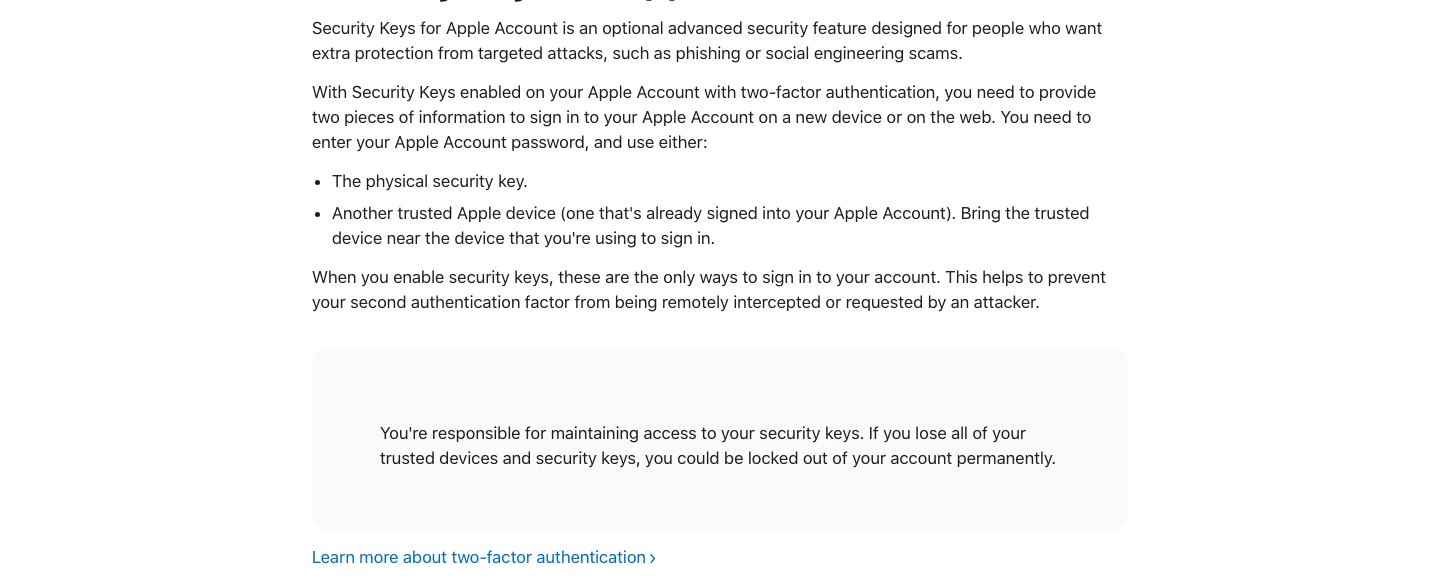
Start with the accounts, not the brand. If the key is mainly for email, a password manager, GitHub, banking, crypto, Google, Microsoft, Apple ID, or cloud admin access, buy two keys and register both. If a service only lets you register one key, read the recovery path before you depend on it.
Then choose the connector. In 2026, USB-C plus NFC is the cleanest default because it covers modern laptops, many tablets, Android phones, and iPhones through NFC. USB-A still matters for old desktops and office hardware, which is why Titan's USB-A option and Token2's dual-port design are useful. But if you are buying your first key and you do not know what to pick, USB-C/NFC is the least regrettable shape.
Protocol depth is the next fork. If you only need passkeys and WebAuthn/FIDO2 login, a cheaper FIDO-only key can be enough. If you want OATH codes inside Yubico Authenticator, PIV smart-card workflows, OpenPGP, SSH signing, or enterprise enrollment flexibility, pay for the multi-protocol key and understand what you bought.
Finally, do not confuse a portable hardware passkey with a recovery plan. A device-bound passkey is intentionally hard to copy. That is the security benefit. It also means you need a second key, offline recovery codes, and a note in your password manager that says which accounts have which keys registered. The discipline is boring. That is why it works.
The setup order I would follow is deliberately dull. Buy two matching keys when possible. Register both keys on the password manager and primary email account before touching lower-risk services. Save recovery codes offline. Then add the same two keys to banking, GitHub, domain registrar, cloud admin, crypto, and any account that can reset another account.
Developers should treat GitHub as a high-risk account too, especially when it sits underneath an AI coding workflow. Our GitHub Copilot vs Cursor comparison is about workflow, not account security; this is the layer that protects the code account itself.
Do not start with every account you own. Start with the accounts that can hurt you.
The 5 FIDO2 security keys I would compare first
1. YubiKey 5C NFC - best default security key
YubiKey 5C NFC is the default because it avoids the two most common regrets: wrong connector and missing advanced support. The official U.S. product page showed $58 for the 5C NFC on July 28, 2026, with USB-C, NFC, firmware 5.8, and the multi-protocol badge visible on the same page.
The important part is not the yellow logo. It is the combination. USB-C covers modern laptops and tablets. NFC covers phones. Yubico's current product page shows the newer 5.8 firmware label, and Yubico's firmware-specific documentation supports the same 100-passkey generation, plus OATH and PIV headroom that a FIDO-only key does not provide. That makes the 5C NFC a good first comparison point for buyers who do not yet know whether they will stay in simple passkey land or grow into more advanced authentication workflows.
The reason it does not get a higher score is price. A $58 key becomes a $116 purchase when you do this correctly and buy two. If all you need is a FIDO2/WebAuthn key for a password manager, Google, GitHub, and a few bank accounts, the cheaper Security Key C NFC may be the smarter purchase.
My take: start here if you want the least confusing long-term answer. Step down to the Security Key C NFC only when you are confident that FIDO-only is enough.
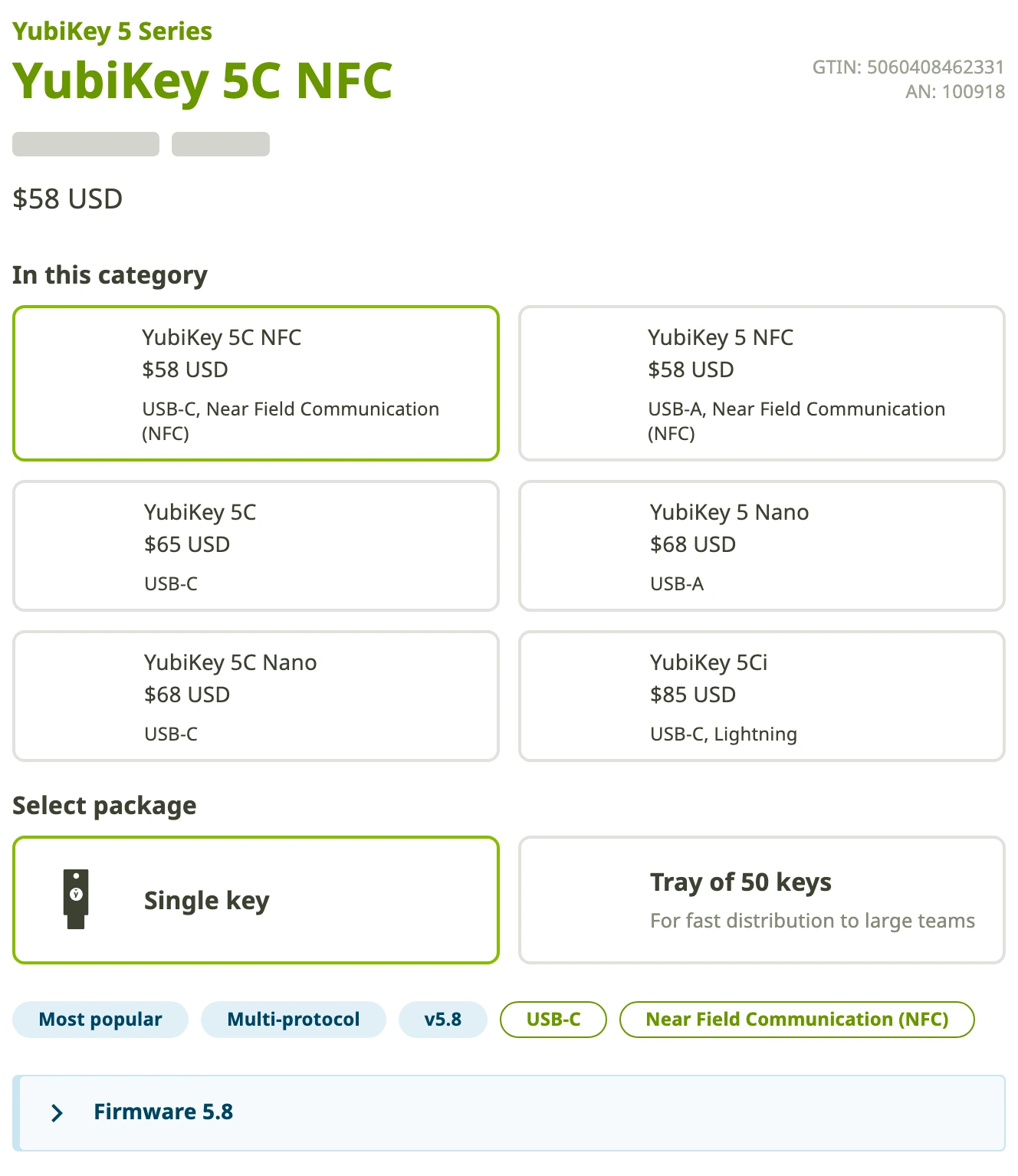
It combines USB-C, NFC, current 5.8 product labeling, 100-passkey-generation support, and Yubico's broader multi-protocol stack in one widely supported key.
Buyers who only need FIDO2/passkeys and want a cheaper two-key setup should compare Security Key C NFC first.
On the shared rubric, YubiKey 5C NFC wins because it combines USB-C, NFC, documented 100-passkey support, broad protocols, and the easiest mainstream ecosystem, with price as the main drag.
- USB-C and NFC cover the cleanest modern laptop and phone setup
- Current Yubico pages show firmware 5.8 while the firmware-specific docs keep the 100-passkey generation claim current
- Multi-protocol support gives room for OATH, PIV, OpenPGP, and advanced workflows
- Yubico has the strongest ecosystem familiarity in this category
- A proper two-key setup costs about $116 before tax or shipping
- Overkill if you only need FIDO2/WebAuthn login
- The YubiKey model lineup can confuse first-time buyers
- Still requires careful backup-code and spare-key planning
2. Yubico Security Key C NFC - best value for FIDO/passkeys
Security Key C NFC is the value pick because it keeps the parts most people need and drops the parts many people will never touch. The official product page showed $29, USB-C, NFC, firmware 5.8, and a visible FIDO-only label on July 28, 2026. It also says it does not generate codes, which is the important limitation.
This is the key I would compare for someone who uses a password manager, wants phishing-resistant login on a handful of important accounts, and does not care about PIV, OpenPGP, Yubico OTP, or storing OATH codes in Yubico Authenticator. Buy two of these and the total is still the same neighborhood as one YubiKey 5C NFC.
The tradeoff is ceiling. FIDO-only is not a flaw when that is the job. It becomes a flaw when the buyer later expects it to behave like a YubiKey 5. That is why the product page's "does not generate codes" line matters. This is a focused login key, not a small hardware security toolkit.
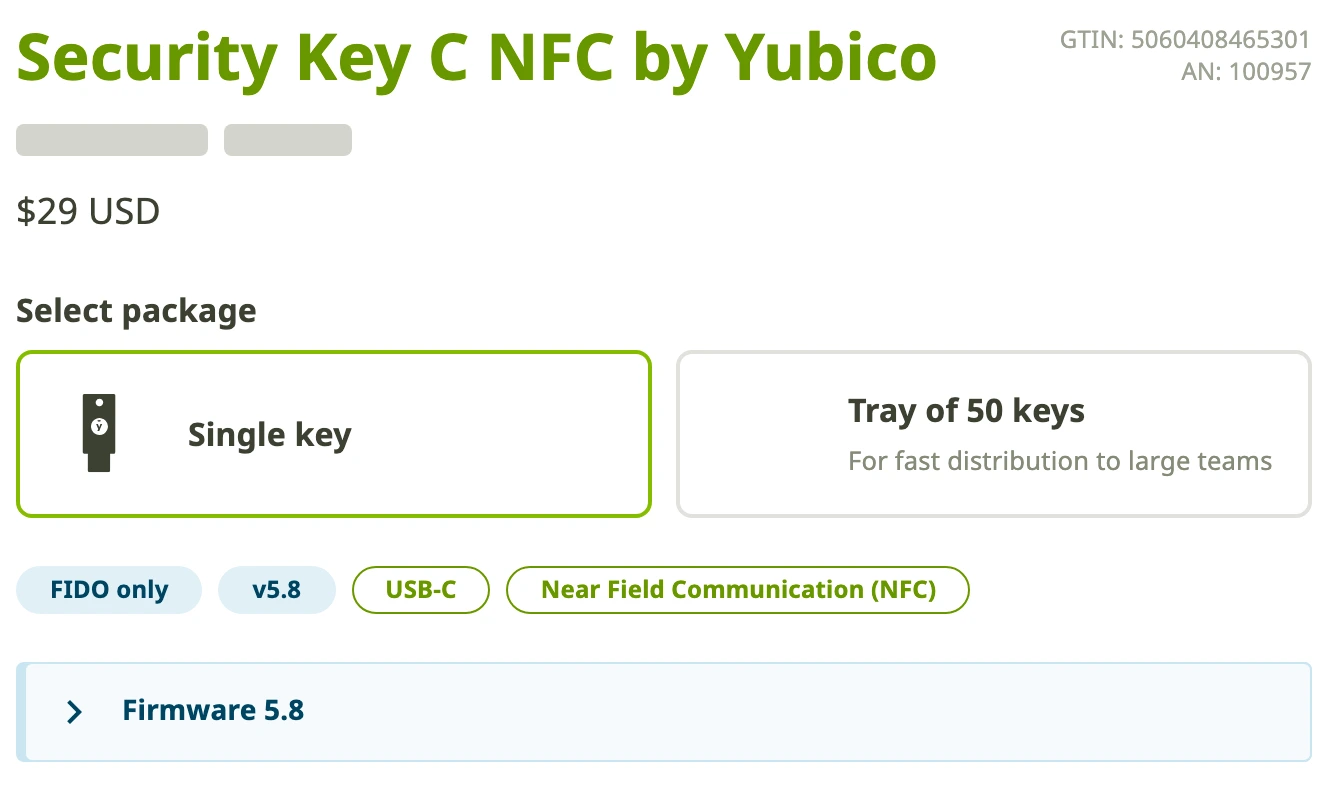
It keeps the modern connector story and FIDO2/WebAuthn login while cutting the price in half versus YubiKey 5C NFC.
Skip it if you need OATH codes, PIV smart-card features, OpenPGP, or the broader Yubico Authenticator workflow.
On the shared rubric, Security Key C NFC is the value winner: connector fit and buyer clarity are strong, but protocol flexibility drops because it is intentionally FIDO-only.
- Much cheaper than YubiKey 5C NFC
- USB-C and NFC are still the right default connector pair
- FIDO-only scope is easier to explain to normal buyers
- A two-key backup setup is financially easier to justify
- Does not generate codes for Yubico Authenticator workflows
- No PIV, OpenPGP, or advanced multi-protocol flexibility
- Can be the wrong buy for developers, admins, and compliance-heavy teams
- Still needs a spare key and account recovery discipline
3. Google Titan Security Key - best Google-first pick
Google Titan is the least confusing pick if the main account is Google. The Google Store page payload showed Titan Security Key from $30 on July 28, 2026, with USB-A/NFC and USB-C/NFC choices exposed in the product configurator. The page also ties Titan to phishing prevention and Google's Advanced Protection Program, which is exactly the buyer story.
This is not the key I would pick for someone comparing advanced protocols. It is the key I would hand to a Google Workspace-heavy user, a Gmail-dependent small business owner, or someone joining Advanced Protection who wants the official Google path and fewer model decisions.
The weakness is flexibility. Titan is clean because Google narrowed the story. That is good for Google accounts and ordinary FIDO2 use. It is less appealing if you want a broad hardware key ecosystem, clearer passkey-capacity documentation, or smart-card/OpenPGP workflows. For that buyer, YubiKey or Nitrokey makes more sense.
Titan is easy to understand for Gmail, Google Workspace, and Advanced Protection buyers who want the official Google security-key path.
Skip it if you want Yubico-style multi-protocol depth, detailed passkey-capacity documentation, or non-Google ecosystem flexibility.
On the shared rubric, Titan ranks well for mainstream Google buyers because it is simple and clear, but it falls behind YubiKey on protocol flexibility and documented passkey headroom.
- Official Google Store path with from-$30 pricing
- Strong fit for Gmail, Google Workspace, and Advanced Protection users
- Simple product story for non-technical buyers
- USB-C/NFC option covers the modern default setup
- Not as broad as YubiKey 5C NFC for advanced protocols
- Less useful as a general-purpose hardware security toolkit
- Google-first positioning is a feature only if Google is your account center
- Still requires a second key or strong fallback access
4. Token2 PIN+ Dual Release3.3 - best high-capacity budget key
Token2 is the interesting budget outlier. The PIN+ Dual Release3.3 product page showed EUR26, both USB-A and USB-C ports, NFC, FIDO2.1, PIV, OpenPGP, OTP, and a claim of up to 300 passkeys on a single device. That is a lot of hardware-key coverage for the price.
The 300-passkey number is real enough to matter as a product-page claim, but it is not a normal-buyer problem. Most people will not store 100 device-bound passkeys on one hardware key, let alone 300. The better reason to care is headroom for a technical user who deliberately wants capacity, dual connectors, and multi-protocol coverage in a budget key.
The reason it does not rank higher is the same reason its score is lower than the spec sheet suggests: this guide is ranking the safest first-key purchase for most readers, not the most aggressive feature-per-euro device. Yubico and Google give a normal buyer clearer model choices, more familiar setup paths, and easier replacement confidence. Token2 reads more like a technical buyer's product: impressive, specific, and capable, but less forgiving if you want polished hand-holding.
I would shortlist Token2 for someone who understands the tradeoff and wants capacity, dual-port convenience, and a low price. I would not make it the default recommendation for a nervous first-time buyer securing a password manager and Gmail.
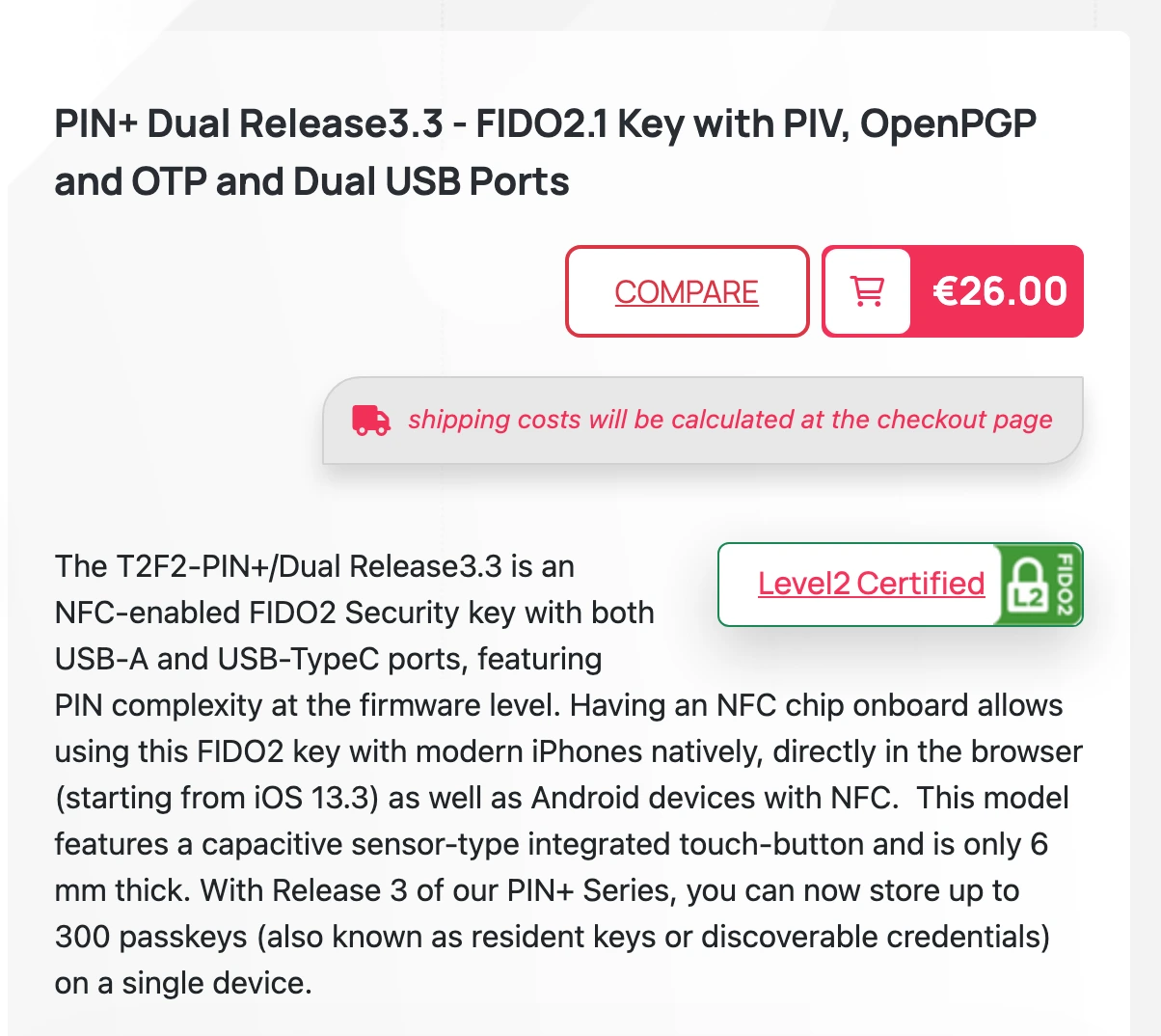
Token2's page combines a low price with dual USB-A/USB-C ports, NFC, FIDO2.1, and a stated 300-passkey capacity.
Skip it if you want the most mainstream support ecosystem, simpler onboarding, or a product your family can understand without explanation.
On the shared rubric, Token2 is the strongest spec-value specialist, but weak mainstream recovery fit and buyer clarity pull its visible score below the simpler Yubico and Google defaults.
- Official page lists up to 300 passkeys
- Dual USB-A and USB-C design reduces connector regret
- NFC, FIDO2.1, PIV, OpenPGP, and OTP are all present in the product story
- EUR26 starting price is aggressive for the feature list
- Less mainstream than Yubico or Google for ordinary buyers
- Support and onboarding may feel more technical
- Shipping and regional pricing can change the real cost
- Not the safest first recommendation for a non-technical household
5. Nitrokey 3C NFC - best open-source privacy pick
Nitrokey 3C NFC is the pick for a specific reader: someone who cares about open-source security hardware, European manufacturing posture, and privacy credibility more than mass-market polish. The shop page showed 65.00 EUR, USB-C, NFC, worldwide delivery language, and a product section that names Rust, Common Criteria EAL 6+, FIDO2, OTP, OpenPGP smart card, and firmware updates.
That makes Nitrokey more interesting than a simple fifth-place filler. It has a point of view. The reason it lands fifth is availability and default-buyer fit. During the July 28 recheck, the rendered shop page showed 65.00 EUR and worldwide delivery, but it also showed the product as currently sold out with expected September availability. Treat that as a hard availability warning: do not choose Nitrokey for an urgent rollout unless checkout confirms stock. For most U.S. buyers, Yubico or Google is simply easier to buy, explain, and replace.
Choose Nitrokey if open source and European privacy posture are real buying criteria. Do not choose it because you want the lowest-friction first security key for a parent, spouse, or coworker.
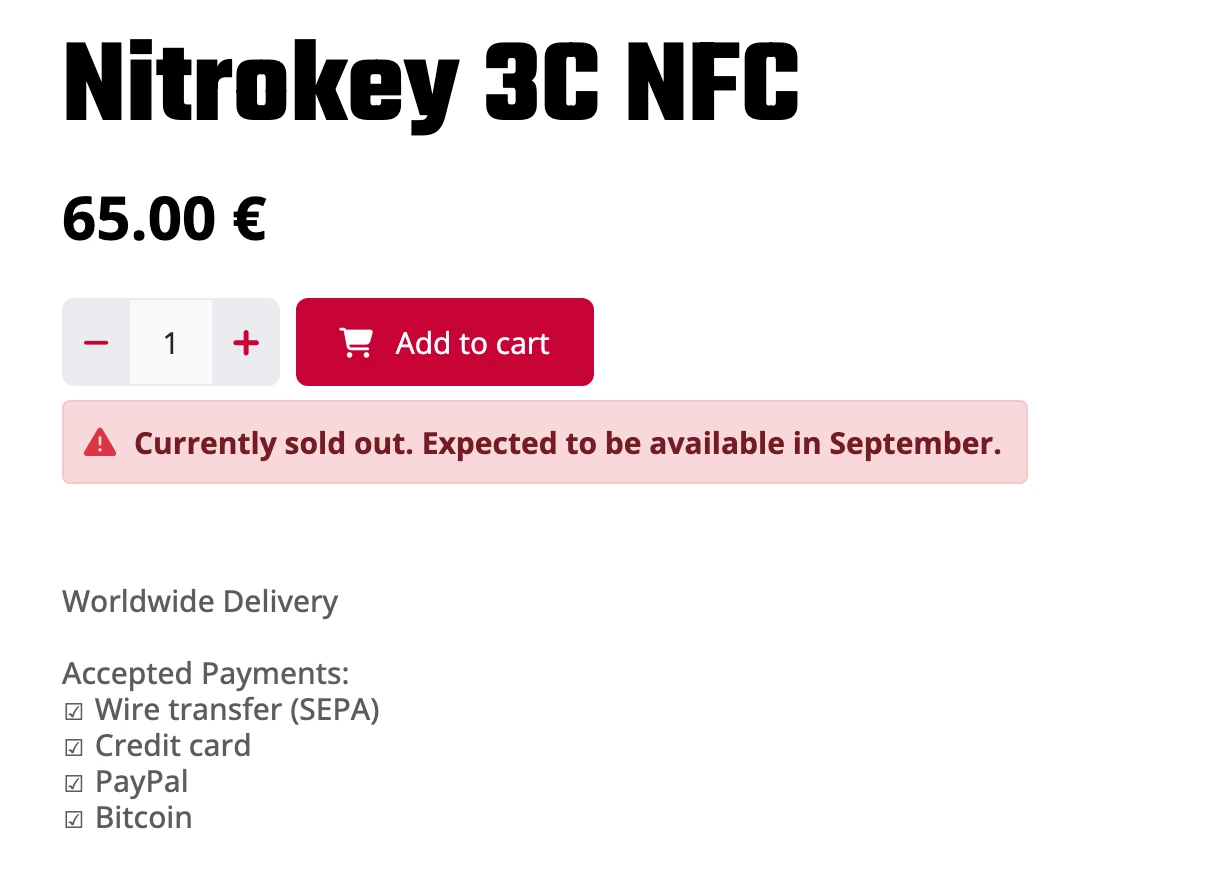
Nitrokey is the strongest alternative when open source, European privacy posture, and a security-element story matter more than mainstream familiarity, but the July 28 shop page showed it as sold out.
Skip it if you want the easiest U.S. purchase, the most familiar support ecosystem, or a simple first key for non-technical users.
On the shared rubric, Nitrokey has real protocol and privacy appeal, but weaker mainstream recovery fit, purchase friction, and availability caveats keep it behind the easier defaults.
- Open-source positioning is stronger than most hardware-key competitors
- USB-C and NFC match the modern connector default
- Product page lists FIDO2, OTP, OpenPGP smart card, firmware updates, and EAL 6+ secure element language
- Official page explains the open-source and secure-element story better than most generic FIDO keys
- Not as mainstream or easy to explain as Yubico or Google
- Official shop showed the 3C NFC as currently sold out during the July 28 recheck
- EUR pricing and international ordering add friction for many U.S. buyers
- Not the best beginner recommendation for a simple two-key setup
Also considered: other FIDO2 security keys
Feitian ePass K40 belongs in the research set because the official U.S. product page lists USB-C, NFC, FIDO U2F/FIDO2 support, a $48 price, and 26 maximum resident credentials. I left it outside the top five because the current Yubico and Google picks are easier first recommendations, while Token2 has the more unusual high-capacity budget story.
Thetis PRO FIDO2 Security Key is a credible spec competitor on paper: the product page lists USB-A, USB-C, NFC, FIDO2/U2F, TOTP/HOTP support, 200 passkey slots, 50 OATH slots, and a $32.99 price. It missed the top five because I would want stronger buyer-confidence evidence before ranking it above the Yubico value key or Token2's more clearly differentiated 300-passkey claim.
Kensington VeriMark Guard USB-C is the one I would revisit for a biometric-key guide, not as the default hardware-key pick here. Kensington's page lists FIDO2/U2F support, up to 10 fingerprints, USB-C, and cross-platform browser support, but it also warns that some services may require setup on a Windows computer for biometric authentication. That extra compatibility fork makes it a specialist pick rather than a clean first recommendation.
Security key setup checklist before you buy
First, choose the accounts that deserve hardware-key protection: primary email, password manager, banking, brokerage, crypto exchange, domain registrar, GitHub, cloud admin, and anything with recovery power over other accounts. Register two keys on each one before changing your daily login habits.
Second, write down the recovery path. Where are backup codes stored? Which key is spare? Which accounts have both keys registered? Which accounts still depend on a phone number? If the answer is scattered across memory, you do not have a recovery plan.
Third, keep the old authenticator app until the new setup has settled. Security keys are stronger where supported, but many services still fall back to TOTP. Our authenticator app guide covers the safer options for that remaining layer, and our encrypted cloud storage roundup is a better place for sensitive recovery documents than a random screenshots folder.
Finally, do not chase the most technical key unless the technical features solve a real problem. A simple FIDO-only key registered correctly beats a powerful multi-protocol key sitting unregistered in a drawer.
YubiKey 5C NFC is the best default security key because it combines USB-C, NFC, current 5.8 product labeling, 100-passkey-generation support, and multi-protocol room to grow. Security Key C NFC is the smarter buy if you only need FIDO2/passkeys and want an easier two-key setup.
See pricingFinal verdict: the best security key for most people
If I were choosing a first hardware key for a normal security-conscious reader, I would buy two USB-C/NFC keys before buying one expensive key with no spare. The clean default is YubiKey 5C NFC because it leaves the fewest doors closed. The value answer is Security Key C NFC because most people do not need every YubiKey 5 protocol.
Google Titan is the easy answer for Google-first buyers. Token2 is the interesting high-capacity budget option if you are comfortable with a more technical product. Nitrokey is the open-source privacy pick, but I would check stock and shipping before making it part of an account recovery plan.
The wrong purchase is not the fifth-place key. The wrong purchase is buying any key without registering a backup, saving recovery codes, and checking that the key works on both your laptop and phone. Security keys are at their best when the boring recovery details are finished before anything goes wrong.
Frequently Asked Questions
Ready to check YubiKey 5C NFC?
Use the verified route if the trade-offs still fit. If not, jump back to the summary and compare the alternatives.
Security and privacy editor focused on evidence-led buying guides. Reads official documentation, audit notes, privacy policies, recovery limits, and support pages before turning security claims into practical recommendations.
Sarah starts by locating the evidence boundary, then ranks security and privacy tools by audit and policy scope, recovery design, trust boundaries, residual risk, and what a cautious buyer can verify.
Related Articles
Venice AI vs Proton Lumo vs Duck.ai: Which Private AI Chat Fits?
Private AI chat decision guide
Venice AI, Proton Lumo, and Duck.ai compared by privacy architecture, saved-history protection, provider exposure, plan limits, model access, and price.
Malwarebytes vs Bitdefender vs Norton
Paid antivirus decision guide
Malwarebytes, Bitdefender, Norton, and Microsoft Defender compared by paid antivirus value, real-time protection, renewal risk, bundle scope, and lab evidence.