
Every cloud storage provider claims encryption. Google Drive has it. Dropbox has it. iCloud has it. So what's the difference?
The difference is who holds the keys.
With Google Drive and Dropbox, they encrypt your files on their servers. They also hold the decryption keys. Which means Google can scan your files for their AI training, Dropbox can hand them over to law enforcement, and any breach exposes your actual data. The encryption protects them, not you.
Zero-knowledge encryption flips that. Your files get encrypted on your device before they leave it. The provider never sees the key. Even if their servers get breached (and as we saw with LastPass, breaches happen to security companies too), the attackers get encrypted blobs they can't decrypt.
But here's the problem: "zero-knowledge" has become a marketing buzzword. I checked the fine print on every service in this roundup, and one of the most popular "encrypted" cloud storage providers doesn't even include zero-knowledge encryption by default. It's a paid add-on. Most review sites don't mention that.
I read the audit reports, verified the encryption claims, checked the jurisdictions, and dug through r/privacy threads to see what actual users report. Six services made the cut. Here's what's real and what's marketing.
-
#1 TresoritMost secure overall — Swiss, zero-knowledge everything, only one to survive ETH Zurich audit
-
#2 Proton DriveBest free option — 5 GB encrypted, part of the Proton ecosystem
-
#3 NordLockerBest value for existing Nord users — 3 GB free, clean interface, solid encryption
The trust question: who actually shows their work?
Before getting into individual reviews, this matters more than features or pricing. Encrypted cloud storage is a trust product. If the encryption is broken, misconfigured, or the company is in a jurisdiction that can compel decryption, nothing else matters.
Here's what I found when I checked the receipts:
But first, one study that changes everything. In October 2024, ETH Zurich researchers tested the encryption implementations of five major encrypted cloud storage providers: Sync.com, pCloud, Icedrive, Seafile, and Tresorit. Only Tresorit passed without vulnerabilities. The other four had exploitable flaws, including pCloud, where a malicious server could force the client to encrypt files with attacker-controlled keys. That's not a theoretical attack. That's "your encrypted files aren't actually protected" territory.
Tresorit has the strongest paper trail. The only provider to survive the ETH Zurich study unscathed. ISO 27001 certification (TÜV Rheinland), annual independent pentests, and what the ETH researchers called "thoughtful design and cryptographic choices." Swiss jurisdiction (not EU, not Five Eyes). They're owned by Swiss Post, which is literally the Swiss postal service, not a VC-funded startup that might pivot or fold.
Proton Drive benefits from Proton AG's institutional credibility. Four consecutive Securitum audits of the Proton ecosystem (covering Mail, VPN, Drive, and Pass). SOC 2 compliance as of July 2025. Swiss jurisdiction. Open-source clients. The same infrastructure I trust for ProtonVPN and Proton Mail.
NordLocker inherits Nord Security's audit track record: six Deloitte no-log audits for NordVPN. But those audits cover NordVPN, not NordLocker specifically, and our NordVPN vs Surfshark comparison explains the broader VPN buyer trade-off. I couldn't find a published third-party security audit of NordLocker's encryption implementation. The encryption specs look solid (AES-256-GCM, Argon2, XChaCha20-Poly1305 for key derivation), but "trust us" isn't the same as "here's the audit report."
pCloud has been operating since 2013, which is a data point in itself. Legally registered in Switzerland, though the team and operations are based in Sofia, Bulgaria. Worth knowing. The ETH Zurich study found pCloud vulnerable to file injection and metadata tampering attacks. pCloud did not respond to the researchers' disclosure. And in February 2026, multiple users reported seeing other people's files in their accounts. pCloud attributed it to a "synchronization anomaly." On top of that, zero-knowledge encryption is a paid add-on, not the default. If privacy is your product, why gate the most important privacy feature behind a paywall?
Internxt claims an independent audit by Securitum and publishes its code as open source. The Securitum audit is public. But Internxt is a young company (founded 2020, based in Spain), and its introductory annual-plan pricing is more complicated than the headline amount suggests. Reddit's r/privacy is mixed, and some users report being banned from the Internxt subreddit for posting complaints about removed features. That's a red flag for transparency.
Filen is open source, which is good. Based in Germany. But the company is small, and the audit situation is thin. A proper audit has been postponed until after their API 4.0 release, expected sometime in 2026. The encryption architecture looks sound on paper. Whether the implementation matches the spec is harder to verify until that audit actually happens.
Tresorit — the one I'd trust with medical records
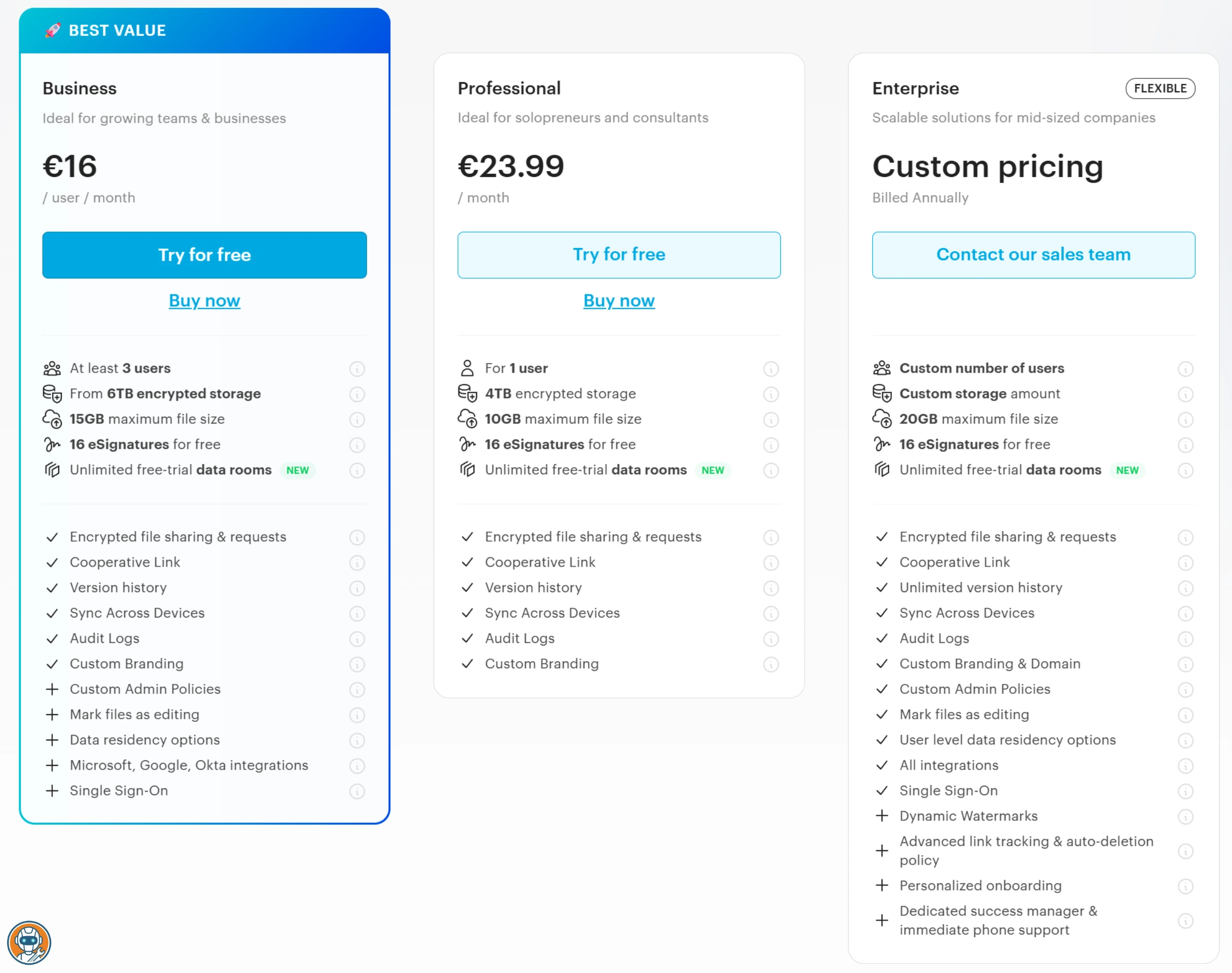
Tresorit is expensive. Let me get that out of the way. Its current personal lineup starts with a 3 GB Basic plan, then moves through 50 GB Lite, 1 TB Essential, and 4 TB Pro tiers. The official checkout localizes paid pricing, so compare the annual total shown for your region rather than relying on an old universal monthly figure.
Still here? Good. Because what Tresorit does, it does better than anyone else on this list.
Every file is encrypted client-side with AES-256 before it leaves your device. Zero-knowledge by default, not as an add-on, not as a premium feature. The encryption key never touches Tresorit's servers. This is how encrypted storage should work, and it's baffling that competitors charge extra for it.
The Swiss Post ownership is an underrated detail. Swiss Post is a government-owned corporation that's been around since 1849. They're not going to pivot to crypto or run out of runway. For a trust product, knowing the parent company isn't going anywhere matters. Reddit's r/privacy community generally recommends Tresorit for anyone handling genuinely sensitive data: legal documents, medical records, financial information.
The desktop sync works well. Fast, reliable, doesn't eat CPU like some encrypted sync clients do. File sharing with end-to-end encryption, expiring links, password protection, download limits. The mobile apps are clean. The admin console for teams is solid, with HIPAA and GDPR compliance built in rather than bolted on.
The downsides are real: no lifetime plan option, so you're paying monthly or annually forever. And there's no native Linux desktop client, just CLI tools and a web app. For r/privacy users, that's often a dealbreaker.
The only encrypted storage provider that survived the ETH Zurich cryptographic study without vulnerabilities.
Budget-conscious users who need a lifetime plan or Linux GUI sync — Tresorit offers neither.
- Zero-knowledge encryption by default on everything — not gated behind a paywall
- SOC 2 Type 2, ISO 27001, and published Cure53 audit. The most verified encryption on this list
- Swiss Post ownership means long-term stability. This company isn't going to disappear
- HIPAA and GDPR compliant out of the box — real compliance, not marketing claims
- Paid pricing is localized in checkout, so the annual total is less transparent than a single public list price
- No native Linux desktop client. Web app and CLI tools only — no GUI sync on Linux
- No lifetime plan. Monthly or annual billing forever
- The 3 GB free plan is useful for evaluation, not a primary storage library
Proton Drive — the ecosystem play that's quietly getting good
If you already use Proton Mail or ProtonVPN, you already have Proton Drive. It's bundled into the Proton ecosystem, and the free tier gives you 5 GB of end-to-end encrypted storage with zero setup.
That's the pitch, and it's a strong one. Same Swiss jurisdiction. Same zero-knowledge architecture. Same team that's passed four consecutive Securitum audits. The encryption is real: AES-256-GCM with elliptic curve cryptography for key exchange. Files are encrypted on your device, and Proton can't decrypt them. Period.
The desktop sync client shipped in 2024 and it's... fine. It works. Auto-syncs folders, handles conflicts reasonably well, doesn't break when you rename things. But it's still young compared to Tresorit or even Dropbox. Power users on Reddit report occasional sync delays with large file batches. Nothing catastrophic, but noticeable.
Where Proton Drive actually shines is the ecosystem integration. Proton Unlimited bundles Drive with Mail, VPN, Calendar, and Pass, although the price and included storage shown at checkout can vary by region and billing cycle. That's a privacy stack, not just cloud storage. For someone who's serious about privacy across all their tools, the bundle can work out better than buying everything separately.
The free tier is legitimately useful. 5 GB, no credit card, no trial expiration. Upload sensitive documents you need accessible across devices. Tax returns, passport scans, insurance paperwork, even encrypted exports or backup codes from one of the authenticator apps worth trusting. It's not enough for a full photo library, but it's enough for the files that actually matter.
And one more thing. Proton recently launched Proton Docs and Proton Sheets, encrypted alternatives to Google Docs and Sheets with real-time collaboration. They're basic compared to Google's offering, but they exist. That's more than any other provider on this list can say.
Weak spots: the free tier's 5 GB fills up fast, upload speeds are consistently criticized (Reddit reports range from sluggish to painful for large batches), and the mobile app is functional but not polished. File previews are limited compared to mainstream providers.
5 GB of genuinely zero-knowledge encrypted storage for free, backed by four Securitum audits and Swiss jurisdiction.
Users who need fast bulk uploads or a full Google Workspace replacement with real-time collaboration.
- End-to-end encrypted by default. Zero-knowledge architecture backed by four Securitum audits
- Free 5 GB tier with no credit card or trial limits. Enough for essential documents
- Part of the Proton ecosystem — bundle with Mail, VPN, Calendar, Pass for one price
- Open-source clients. Swiss jurisdiction. The privacy credentials are as strong as it gets
- 5 GB free tier is small compared to MEGA's 20 GB or Filen's 10 GB
- Upload speeds consistently criticized — Reddit reports range from sluggish to unusable for large batches
- Proton Docs/Sheets exist but are basic. This isn't a Google Workspace replacement yet
- Photo library management is basic — no smart albums, no face recognition, limited previews
NordLocker — solid encryption, missing the audit receipts
NordLocker comes from Nord Security, the same company behind NordVPN, NordPass, and Incogni. If you're already in the Nord ecosystem, adding NordLocker is painless. Same account, same dashboard, same billing.
The encryption architecture is genuinely strong. AES-256-GCM for file encryption, XChaCha20-Poly1305 for key derivation, Argon2 for password hashing. Zero-knowledge by default, so NordLocker can't see your files. On paper, this is as good as Tresorit's cryptographic setup.
The 3 GB free tier is modest but functional. Desktop app is clean: drag files into the encrypted vault, they sync to the cloud automatically. The Web Vault lets you access files from any browser. Simple. No learning curve.
Here's where it gets complicated. NordVPN has six Deloitte audits confirming their no-logs policy. That's impressive. But NordLocker? I searched for a published third-party security audit specifically covering NordLocker's encryption implementation, and came up empty. Nord Security's marketing references their overall security culture, but that's not the same thing as an independent audit of this specific product's cryptographic code.
Red flag? Not necessarily. The encryption specs are sound and the company has a strong track record. But Tresorit has Cure53. Proton has Securitum. Even Internxt has a published audit. For a company that makes security products, the absence is noticeable.
The free plan includes 3 GB, while the paid lineup offers 500 GB and 2 TB. NordLocker localizes first-term and renewal pricing and may add VAT, so the number that matters is the full checkout total for your region. No lifetime plan is listed.
Strong encryption stack with zero-knowledge by default and the cleanest desktop app UX on this list.
Users who need a published, product-specific security audit before trusting a provider with sensitive files.
- Strong encryption stack — AES-256-GCM, XChaCha20-Poly1305, Argon2. Zero-knowledge by default
- 3 GB free tier, clean desktop app, web vault access. Dead simple to use
- Integrates with the Nord Security ecosystem — same account as NordVPN and NordPass
- Free 3 GB tier plus 500 GB and 2 TB paid options for buyers who need more storage
- No published third-party audit of NordLocker's encryption specifically. NordVPN audits don't count
- 3 GB free tier is the smallest on this list after Tresorit's trial-only approach
- No lifetime plan option. Monthly or annual billing only
- Panama incorporation — good for privacy jurisdiction, but less regulatory accountability than Switzerland
pCloud — the lifetime deal with a privacy asterisk
pCloud's lifetime plans are the reason most people end up here. Pay $199 once for 500 GB, $399 for 2 TB, or $1,190 for 10 TB. No monthly billing ever again. For anyone tired of subscription fatigue, that's hard to ignore.
But I need to be blunt about something that most pCloud reviews bury in paragraph twelve.
pCloud's default encryption is server-side. They hold the keys.
Zero-knowledge encryption, what pCloud calls "pCloud Crypto," is a separate paid add-on. $4.99/month or $150 as a one-time lifetime purchase. Without it, pCloud's security model is essentially the same as Dropbox: your files are encrypted at rest on their servers, but pCloud has the ability to decrypt them.
This isn't buried in the fine print. It's right there on their website. But every "best encrypted cloud storage" article I read either missed it or glossed over it. If you're choosing pCloud because you want privacy, you need Crypto. Budget for it.
With Crypto enabled, pCloud's privacy model improves. But I need to flag two things. First, the ETH Zurich study found pCloud vulnerable to attacks where a malicious server could inject files and tamper with metadata, and pCloud didn't respond to the researchers' disclosure. Second, in February 2026, multiple Reddit users reported seeing other people's files appear in their accounts. pCloud called it a "synchronization anomaly." That's not reassuring.
On the usability side, pCloud delivers. 13 years of operation (founded 2013). The lifetime plan model has held up. Reddit users who bought plans years ago confirm they still work. File sync is fast and reliable across Windows, Mac, Linux (yes, Linux, take note, Tresorit), iOS, and Android. The virtual drive feature lets you access cloud files without downloading them first, which is slick for large libraries.
The media player and built-in audio streaming are nice touches. Photo management is decent. The interface is clean and familiar. It feels like a normal file manager rather than a security product. For non-technical users who want encryption without complexity, pCloud plus Crypto is arguably the most approachable option here.
Just remember: $399 for 2 TB lifetime plus $150 for Crypto lifetime = $549 total. Still cheaper than Tresorit after ~4 years of monthly payments. But not the $399 headline number.
Lifetime plans honored since 2013 eliminate subscription fatigue, and the virtual drive feature is the slickest for large libraries.
Anyone who assumes zero-knowledge encryption is included — it costs $150 extra, and without it pCloud holds your keys.
- Lifetime plans eliminate subscription fatigue — pay once, own it. 13 years of honoring them
- Linux desktop client included. Full platform support across Windows, Mac, iOS, Android
- Virtual drive lets you browse cloud files without downloading. Great for large libraries
- Clean, familiar interface. Non-technical users won't feel lost. Built-in media player and photo management
- Zero-knowledge encryption is NOT included by default. pCloud Crypto costs $4.99/mo or $150 lifetime extra
- ETH Zurich found exploitable flaws in pCloud's encryption. pCloud didn't respond to the disclosure
- Feb 2026: users reported seeing other people's files — pCloud called it a 'synchronization anomaly'
- Without Crypto enabled, pCloud holds your encryption keys — same security model as Dropbox
Internxt — a broad privacy bundle with complicated billing
Internxt came onto my radar because of two things: post-quantum encryption claims and unusually low first-month pricing. Both demand scrutiny.
The post-quantum claim is real. Internxt says they've implemented post-quantum cryptography across all plans. If true, that puts them ahead of everyone on this list except arguably Tresorit (which hasn't publicly deployed PQ crypto yet). Quantum computers that can break RSA and ECC don't exist yet, but preparing now is smart. Proton has done it for Mail, so it's not unprecedented.
The pricing needs careful reading. Internxt says its annual plans are billed monthly: Essential is EUR1.99 for the first month and then EUR9.99 per month, Premium is EUR3.99 and then EUR19.99, and Ultimate is EUR1.99 and then EUR29.99. Lifetime offers are priced separately. The cheap headline is an introductory month, not the annualized cost.
Reddit's r/privacy is split. Some users swear by it: the open-source code, the Securitum audit, the EU jurisdiction (Spain, under GDPR). Others have a rougher story. Internxt removed features like CLI, WebDAV, and backups from lifetime plans without notice, then asked users to pay extra for them. Users who bought lifetime plans specifically for WebDAV were locked out. And when people complained on the Internxt subreddit, some had their posts removed and accounts banned. That's not how transparent companies operate.
The product itself is fine. Clean interface, decent sync, file sharing with password protection. Mobile apps work. But the feature set is thinner than pCloud or Tresorit: no virtual drive, limited collaboration tools, no media streaming. You're paying for encrypted storage, and that's about it.
Worth considering if the broader privacy bundle fits? Yes. Worth trusting with your only copy of irreplaceable files? I'd keep a backup elsewhere.
Post-quantum encryption claims sit alongside a broader bundle of storage and privacy tools.
Users who want simple flat billing, a mature feature set, or one irreplaceable copy stored with a young provider.
- Low first-month pricing lets buyers evaluate the paid bundle before the standard monthly rate applies
- Post-quantum encryption claimed across all plans — forward-looking security
- Open-source code and a verified Securitum audit. Transparency is real
- Lifetime options are available separately, and the company operates under Spanish and EU data rules
- Annual plans are billed monthly and jump after the introductory month, which makes the headline price easy to misread
- Feature set is thin — no virtual drive, limited collaboration, no media streaming
- Small team and small community. If something goes wrong, support resources are limited
- Desktop sync can be sluggish with large file batches according to user reports
Filen — the 10 GB free tier from Germany
Filen doesn't get mentioned in most mainstream roundups, which is a shame. 10 GB of zero-knowledge encrypted storage for free. No credit card. No trial period. Just sign up and go.
For comparison: Proton Drive gives you 5 GB free, NordLocker gives 3 GB, and Tresorit offers only a 14-day trial. Filen's 10 GB is the most generous free tier among genuinely zero-knowledge providers (MEGA offers 20 GB but with trust caveats, more on that below).
The encryption is AES-256, client-side, zero-knowledge. Open-source code on GitHub. German jurisdiction, which means GDPR applies. Securitum conducted an audit, though the published details are less thorough than Tresorit's Cure53 report or Proton's audit disclosures.
Desktop sync works across Windows, Mac, and Linux. The interface is functional but rough around the edges compared to pCloud or Tresorit. File sharing, folder sharing, versioning. The basics are covered. Mobile apps exist and work, though Reddit users report download speed throttling, some seeing 500 KB/s to 1.5 Mbps even on premium plans. A 45 GB file on a 1 Gbps connection shouldn't take all day.
The paid plans are cheap. Annual plans for expanded storage are competitive with Internxt. Lifetime plans are also available. But the same sustainability question applies: Filen is a small German company, and the speed issues plus a delayed security audit (postponed until API 4.0) give me pause.
For a free encrypted backup location for your most important documents? Hard to beat. For your primary cloud storage? I'd want to see a more detailed published audit first.
10 GB of zero-knowledge encrypted storage for free — the most generous free tier among genuinely encrypted providers.
Anyone who needs polished apps, fast download speeds, or a thoroughly published security audit.
- 10 GB free tier with zero-knowledge encryption. Most generous free encrypted storage available
- Open source, German jurisdiction (GDPR), client-side AES-256 encryption
- Linux desktop client included. Full cross-platform support
- Affordable paid plans and lifetime options for expanded storage
- Small company with a small community. Limited support resources if things go wrong
- Interface is functional but rough — not as polished as pCloud, Tresorit, or NordLocker
- Published audit details are limited compared to Tresorit and Proton
- iOS app performance is inconsistent based on user reports
What about MEGA, Sync.com, and Cryptomator?
MEGA offers 20 GB free with end-to-end encryption, which sounds great on paper. But ETH Zurich found "devastating" flaws in MEGA's cryptographic architecture in 2022, theoretically allowing recovery of RSA private keys. MEGA patched some issues but researchers said a full fix requires system redesign. Kim Dotcom, MEGA's founder, publicly stated "I don't think your data is safe on Mega anymore" after severing ties with the company. On top of that, MEGA's S4 object storage (bundled with Pro plans) uses only server-side encryption. The community consensus? Use MEGA with Cryptomator if you must. Treat it as dumb storage with your own encryption layer.
Sync.com is solid. Canadian jurisdiction, zero-knowledge encryption, 5 GB free tier. Its strength is business features rather than the cleanest personal-value story, especially once you compare regional checkout totals and pCloud's lifetime option.
Cryptomator deserves a mention because it solves a different problem. It's an open-source encryption layer that sits on top of any cloud storage: Google Drive, Dropbox, OneDrive. You get a virtual encrypted vault inside your existing cloud. Free on desktop, paid on mobile. If you want to keep using Google Drive but encrypt specific folders, Cryptomator is the answer. It's not a cloud storage provider. It's a tool that makes any provider encrypted.
Side-by-side comparison
| Feature | Tresorit | Proton Drive | NordLocker | pCloud | Internxt | Filen |
|---|---|---|---|---|---|---|
| Price (Personal) | Localized paid pricing (1 TB Essential) | Free 5 GB; localized 200 GB plan | Free 3 GB; localized 500 GB plan | $199 lifetime (500 GB) | EUR1.99 first month, then EUR9.99/mo (1 TB) | ~€2/mo (varies) |
| Free Tier | 3 GB (limited) | 5 GB | 3 GB | 10 GB | 1 GB | 10 GB |
| Zero-Knowledge Default | ✓ | ✓ | ✓ | ✗ ($150 add-on) | ✓ | ✓ |
| Jurisdiction | Switzerland | Switzerland | Panama | Switzerland | Spain (EU/GDPR) | Germany (EU/GDPR) |
| Published Audit | ETH Zurich ✓ + ISO 27001 + annual pentests | Securitum (4 audits) | None (NordLocker-specific) | None published | Securitum | Securitum (limited) |
| Lifetime Plan | ✗ | ✗ | ✗ | ✓ ($199–$1,190) | Available; checkout price varies | ✓ |
| Linux Client | ✗ (CLI only) | ✓ | ✗ | ✓ | ✓ | ✓ |
| Max Storage | 4 TB (Personal Pro) | 3 TB (Family) | 2 TB | 10 TB | 10 TB | varies |
| Action | Try Tresorit → | Try Proton Drive → | Try NordLocker → | Try pCloud → | Try Internxt → | Try Filen → |
Frequently Asked Questions
The bottom line
This roundup splits cleanly into two tiers, and the dividing line isn't features or pricing. It's trust.
If your files actually need protection — legal documents, medical records, financial data, anything you'd be uncomfortable seeing leaked — Tresorit is the answer. Yes, it's expensive. But it's the only service here with a published cryptographic audit by Cure53, SOC 2 and ISO 27001 certifications, and Swiss Post as a parent company. You're paying for verified security, not marketing claims.
If you want privacy without paying, go with Proton Drive. The 5 GB free tier has genuine zero-knowledge encryption, backed by Proton's audit trail and Swiss jurisdiction. If you're already in the Proton ecosystem (and based on our VPN roundup, you might be), check the current Unlimited checkout total before comparing the bundle with separate subscriptions.
If you want a simpler Nord ecosystem option, try NordLocker. The free 3 GB tier is enough to evaluate the workflow, while paid 500 GB and 2 TB plans use localized first-term and renewal pricing. The encryption design is solid on paper. I just wish Nord Security would publish a dedicated audit for this product.
pCloud's lifetime plans are worth considering, but only if you add the $150 Crypto add-on. Without it, you're getting Dropbox-level privacy in an encrypted wrapper. Internxt and Filen are promising budget options with real encryption, but both are young companies where long-term trust is still being established.
The pattern I keep seeing in this space: the more a company charges, the more they invest in proving their security claims. That's not a coincidence. Real audits cost money. Real compliance costs money. If a deal seems too good to be true, check whether the encryption is actually what they claim.
The most thoroughly audited encrypted cloud storage available. Expensive, but the only service that fully backs up its security claims with published third-party evidence. If your files need real protection, this is where they belong.
Ready to check Tresorit?
Use the verified route if the trade-offs still fit. If not, jump back to the summary and compare the alternatives.
Security and privacy editor focused on evidence-led buying guides. Reads official documentation, audit notes, privacy policies, recovery limits, and support pages before turning security claims into practical recommendations.
Sarah starts by locating the evidence boundary, then ranks security and privacy tools by audit and policy scope, recovery design, trust boundaries, residual risk, and what a cautious buyer can verify.
Related Articles
Spam Call Blocker Apps That Won't Nuke Real Calls
4 spam call blocker paths compared by scam protection, real-call safety, platform fit, verified pricing, and privacy friction
Hiya, Phone by Google, Truecaller, and RoboKiller compared by spam blocking, scam-call alerts, official pricing, privacy labels, and real-call risk.
Where Should You Store Passkeys? 1Password vs Bitwarden vs Proton Pass
3 passkey storage choices compared by vault fit, export clarity, recovery risk, device support, and verified price evidence
1Password, Bitwarden, and Proton Pass compared by passkey storage, export limits, vault security, official pricing, device support, and recovery risk.