
Raycast vs Alfred used to be a simple Mac launcher argument. Now it is a purchase decision about how much of your work you want behind one keyboard shortcut.
My default pick is Raycast for most new Mac users. Not because every buyer needs AI, and not because Alfred suddenly got bad. Raycast wins the default slot because the extension-store model gives normal users a useful command palette before they become workflow builders.
Alfred is still the ownership pick. BetterTouchTool is the automation pick.
That distinction matters because the wrong app can feel productive while quietly becoming another setup project. If your week already breaks because tasks, notes, and planning live in too many places, pair this with our time blocking apps guide, Todoist vs TickTick comparison, and Notion vs Obsidian comparison. This article is about the keyboard layer that sits above those tools.
This is an evidence-led guide. I checked official pricing, official feature docs, current Google SERP competitors, concrete Reddit launcher threads, a BetterTouchTool launcher community thread, rendered evidence screenshots, GDT operator/SEO/affiliate data, and active /go routes. I did not install the apps, import workflows, time launches, connect accounts, buy a license, or test support.
-
#1 RaycastBest default for new Mac power users: modern command palette, extension store, free core tier, Pro AI and sync if needed
-
#2 AlfredBest one-time ownership pick: Powerpack workflows, clipboard, snippets, file actions, and local muscle memory
-
#3 BetterTouchToolBest automation brain: gestures, triggers, scripts, clipboard tools, windows, and a new Launcher for BTT commands
Start with Raycast if you want a polished command palette today. Choose Alfred if you want a one-time Powerpack and local workflow ownership. Choose BetterTouchTool if you want the launcher to be one surface inside a broader Mac automation system.
How I ranked Raycast, Alfred, and BetterTouchTool
The scoring uses five criteria: Launch Speed Fit, Automation Depth, Setup Burden, Price Clarity, and Future Proofing. Launch Speed Fit asks whether the tool solves the daily app/file/command job without making the user build a system first. Automation Depth asks how far the tool can go once the buyer wants scripts, clipboard actions, hotkeys, and app integrations. Setup Burden punishes tools that are brilliant only after a weekend of configuration.
Price Clarity matters because these products are not priced the same way. Raycast can stay free, but Pro is a subscription. Alfred sells the Powerpack as a one-time license. BetterTouchTool sells low-cost licenses and also sits in Setapp. Future Proofing asks whether the tool is still moving with macOS, extensions, AI, and power-user habits without forcing the buyer into a brittle setup.
The trap is buying automation when you needed search.
That is the avoidable failure.
Raycast is the safest default because it makes common command-palette jobs easy: apps, extensions, notes, snippets, clipboard, windows, and AI if you pay. Alfred is the better choice when you already know you want to build workflows and keep them. BetterTouchTool is the weird one in a good way: it can now act like a launcher, but it is really a trigger/action engine wearing a search box. If clipboard history is the only problem, the narrower Paste vs Maccy vs Raycast clipboard-manager comparison is the better place to start.
Public Reddit threads from May 2026 helped frame the buyer confusion around Spotlight, Raycast, Alfred, and dedicated file-search tools. I am not treating those threads as survey data. They are useful because they show the live question: are people replacing Spotlight, adding a command palette, or trying to automate their Mac?
Raycast vs Alfred vs BetterTouchTool comparison
| Feature | Raycast | Alfred | BetterTouchTool |
|---|---|---|---|
| Best job | Modern command palette for launching, extensions, notes, windows, clipboard, snippets, and AI add-ons | Classic Mac launcher with Powerpack workflows, clipboard history, snippets, file actions, and scriptable automation | Mac automation system with gestures, triggers, window tools, clipboard controls, actions, and a Launcher |
| Official price checked | Free; Pro $8/mo annual or $10 monthly; Pro + Advanced AI $16/mo annual | Single License GBP34; Mega Supporter GBP59 | Standard $15; Lifetime $25, with regional tax/currency caveats |
| Core model | Extension store plus built-in Mac productivity commands | Local launcher plus user-built and community workflows | Automation engine with a Spotlight-style Launcher surface |
| Automation ceiling | Strong for published extensions and script commands; less local-workflow ownership than Alfred | Excellent for people who like building and owning workflows | Highest if BTT already controls your gestures, shortcuts, triggers, and scripts |
| Main risk | Subscription creep if the buyer only needed a free launcher | More tinkering and less app-store-style discovery than Raycast | Wrong default if you only need fast app launch and simple search |
| Skip if | You want one-time pricing and local workflow ownership | You want ready-made extension discovery more than workflow control | You do not want to maintain automation rules |
| Action | Try Raycast | Try Alfred | Try BetterTouchTool |
The pricing trap: free launcher, one-time license, or recurring command layer?
The price comparison is easy to misread because the tools sell different things. Raycast Free can be enough if you only need command search, snippets, basic AI messages, clipboard history, quicklinks, window tools, and extensions. Raycast Pro is not paying for "a launcher" in the narrow sense. It is paying for sync, more notes, Pro AI, custom themes, translator, unlimited clipboard history, and the higher paid layer if you need advanced AI models.
That can be worth it. It can also be silly.
If you are using Raycast 50 times a day and it replaces three menu-bar utilities, a notes scratchpad, and a browser trip to an AI chat, $8 per month on annual billing is not hard to defend. If you open five apps and use the calculator twice a week, paying monthly for Pro because the product feels modern is just a tidy-looking leak in the budget.
Alfred's Powerpack is the opposite bargain. GBP34 is not a trial impulse for everyone, but it is clean. Buy once, build your habits, keep your workflows. The Mega Supporter option is more expensive at GBP59, but its lifetime-upgrades framing is exactly why longtime Mac users keep recommending Alfred: the bill does not keep asking to justify itself every month.
BetterTouchTool is the value oddity. The official render showed $15 for Standard and $25 for Lifetime, with regional caveats. That is cheap enough to make the comparison feel unfair. But the real cost is configuration judgment. If you buy BetterTouchTool and never build triggers, window rules, gestures, clipboard flows, or Launcher commands, the low price did not save you much. You bought a workshop and used it as a light switch.
This is the same comparison problem tracked in our software pricing friction dataset: annual billing, one-time ownership, regional terms, and free entry can all sit behind prices that look directly comparable but are not.
My rule: choose Raycast when the free tier proves the habit first, Alfred when you already know you want owned workflows, and BetterTouchTool when you can name three automations you want before checkout.
Where Spotlight still fits
Spotlight is the baseline, not the enemy. If you use Command-Space to open apps, find a document, run a basic calculation, or search system settings, you may not need any of these products yet. The moment you start asking "Can this run a workflow?" or "Can this open the exact command inside another app?" you have left the default macOS search job.
That boundary is important because a lot of launcher advice is written by people who enjoy configuration. A normal user can read a thread about Raycast, Alfred, BetterTouchTool, LaunchBar, HoudahSpot, Finder search, and Spotlight, then feel behind before they have even installed anything. You are not behind. You only need a third-party launcher when a repeated action is costing enough time or attention to deserve a shortcut.
Raycast is the easiest next step because it looks and behaves like a productized command center. You search, install, and use. Alfred is the next step when you want the system to become yours. BetterTouchTool is the next step when the workflow crosses from "find and run" into "when I do this gesture or key sequence, make the Mac perform a chain of actions."
In plain English: Spotlight searches. Raycast organizes commands. Alfred lets you own workflows. BetterTouchTool lets you automate behavior.
That is why BetterTouchTool does not replace Raycast for every buyer just because it has a Launcher. A searchable automation engine is different from a mainstream command palette. The first is better when your Mac needs rules. The second is better when your day needs fewer trips through menus, browser tabs, and small utility apps.
1. Raycast: best default Mac command launcher
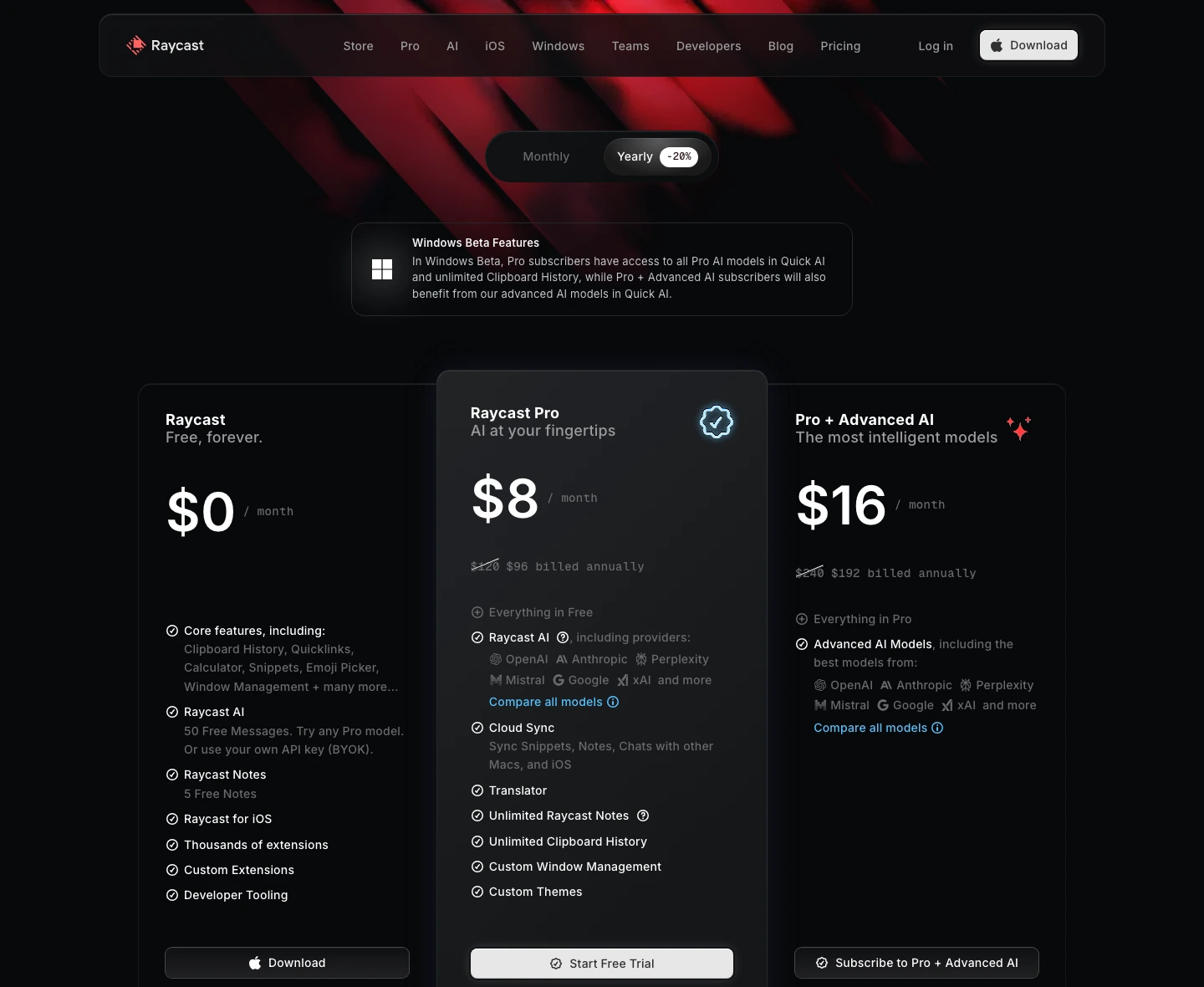
Raycast wins the default slot because it turns "I need a launcher" into "I have a command center" faster than the other two. The official pricing page lists the free tier with core features including Clipboard History, Quicklinks, Calculator, Snippets, Window Management, Raycast AI messages, Raycast Notes, thousands of extensions, custom extensions, and developer tooling.
The annual pricing page rendered Raycast Pro at $8 per month, with Pro + Advanced AI at $16 per month. Monthly pricing rendered $10 and $20. That makes Raycast easy to trial and expensive only if you decide the Pro layer is worth keeping.
The reason Raycast beats Alfred for new users is not raw power. It is discovery. Raycast's official manual says extensions are the building blocks of the product and that the Store includes thousands more beyond the built-in set. That matters because most buyers do not want to design a workflow graph before they can search Slack, control Spotify, open a Notion page, or kill a process.
That is also the danger. Raycast can make a launcher feel like a subscription platform. If you are going to stay on the free tier, great. If you mainly want AI, sync, unlimited notes, or advanced models, calculate the yearly bill before the interface wins you over.
Raycast gives new users a polished command palette and extension-store workflow before they need to become workflow builders.
Skip it if you want one-time pricing, local-first workflow ownership, or a launcher that does not tempt you into a subscription.
Raycast ranks first because the free core tier and extension discovery make it the fastest useful default for most buyers.
- Free tier includes enough core launcher, clipboard, snippet, window, AI-message, notes, extension, and developer-tooling value to test seriously
- Extension Store discovery lowers setup burden for normal users
- Pro pricing is clear: $8/month annually or $10 monthly, with Advanced AI as a higher tier
- Best fit when you want one search surface for apps, commands, extensions, and everyday Mac utilities
- Subscription value depends on whether you actually use Pro, sync, notes, or AI every day
- Alfred still gives stronger one-time ownership for custom workflows
- BetterTouchTool goes deeper when keyboard launching is only part of a larger automation system
- No installed-app speed, extension compatibility, sync, or AI quality test was performed here
2. Alfred: best one-time launcher ownership
Alfred is the pick when you want the launcher to feel like yours. The official Powerpack page frames workflows as the way to automate repetitive tasks, connect objects like building blocks, trigger workflows through hotkeys or keywords, and use script filters or JSON to present results in-line. That is a different philosophy from Raycast's app-store-style extension discovery.
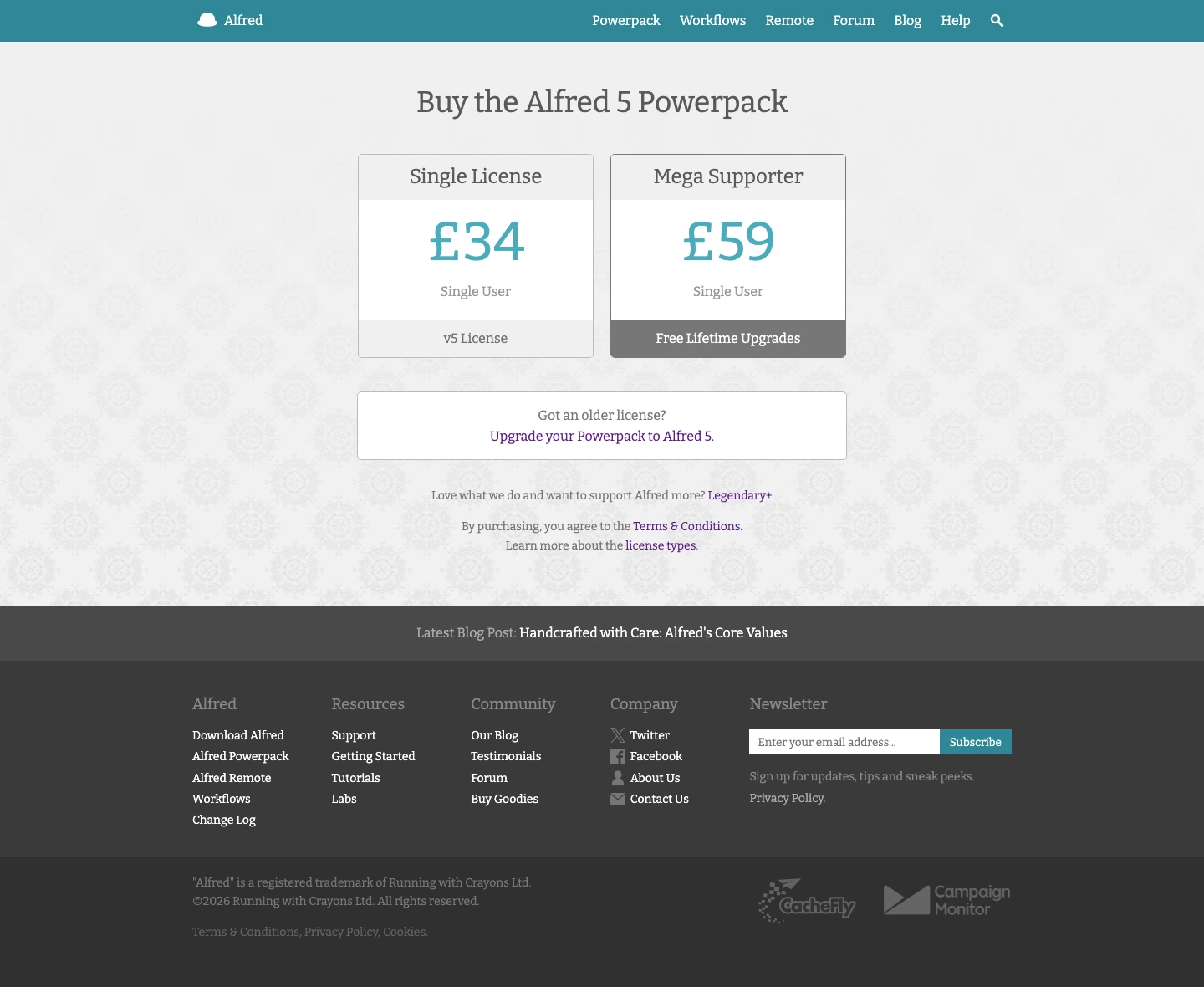
The official shop rendered Alfred 5 Powerpack at GBP34 for the Single License and GBP59 for Mega Supporter with free lifetime upgrades. No monthly subscription. No AI model bill sitting beside the launcher.
That one-time price is Alfred's moat. If you are the kind of Mac user who keeps shortcuts for years, Alfred can be a better long-term purchase than Raycast Pro. The product is also calmer. You are buying a launcher and workflow system, not a growing AI subscription surface.
The tradeoff is friction. Alfred rewards people who know what they want to build. Raycast rewards people who want to search a store and install something that already exists. Neither model is morally better. One favors ownership, the other favors convenience.
Alfred keeps the best long-term ownership story: one-time Powerpack pricing and a deep workflow model for people who like building their own command surface.
Skip it if you want polished extension discovery and a modern default setup more than local workflow control.
Alfred stays close because its Powerpack workflow depth and one-time pricing are hard to beat for committed Mac users.
- Powerpack pricing is one-time: GBP34 Single License or GBP59 Mega Supporter in the official shop
- Workflows, clipboard history, snippets, file actions, hotkeys, keywords, scripts, and JSON outputs fit serious Mac automation
- Better long-term fit if you do not want a launcher subscription
- Strongest choice for users who already have Alfred muscle memory and custom workflows
- More setup judgment than Raycast for a new user starting from zero
- Community workflows are powerful but less frictionless than a polished extension store
- Does not solve the broader gesture/window/action automation problem like BetterTouchTool
- No local workflow import, script audit, or speed benchmark was performed here
3. BetterTouchTool: best automation brain with a launcher
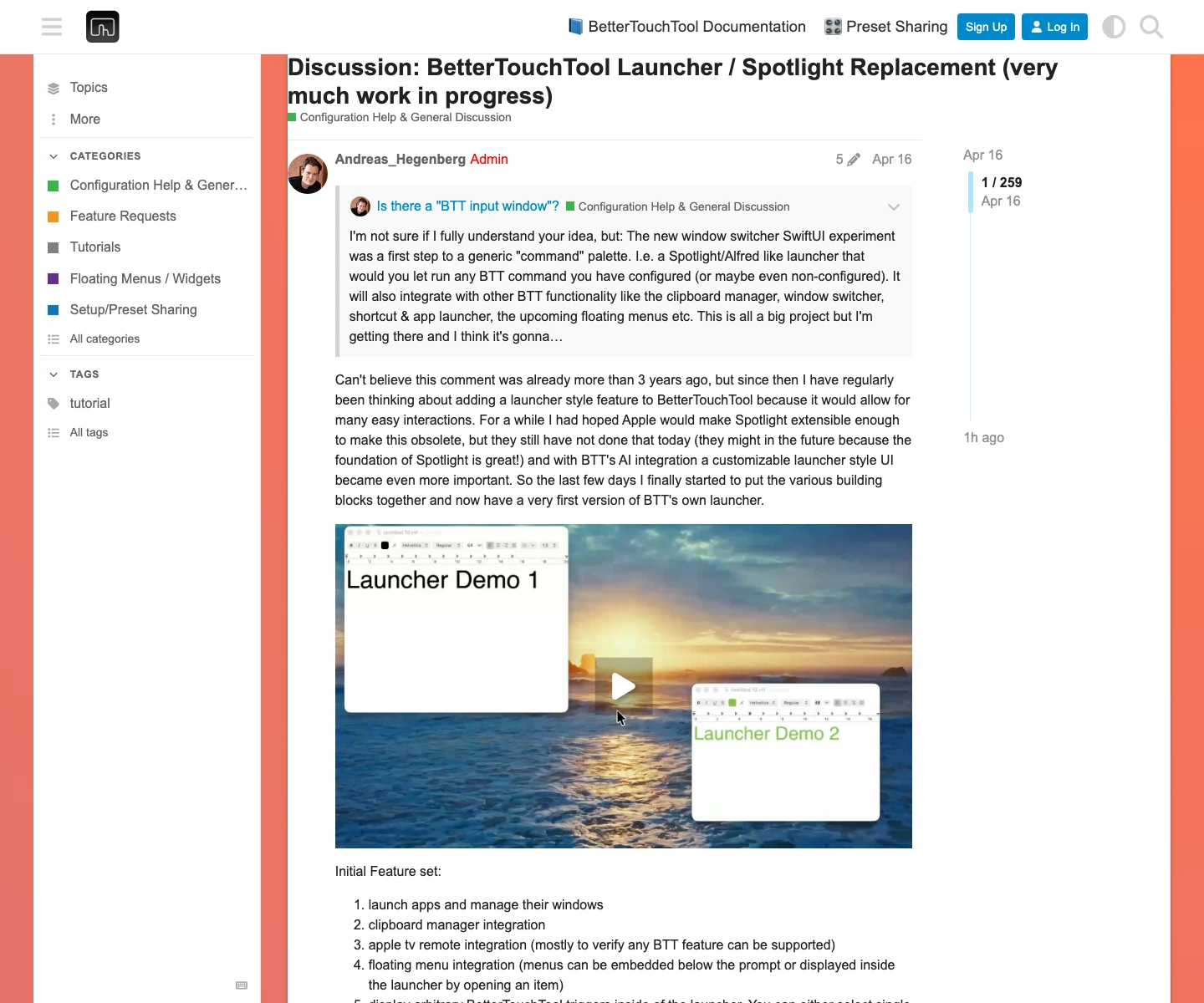
BetterTouchTool is not just a launcher competitor. That is why it ranks third as a default launcher and first as the automation-brain pick. The official launcher docs now describe a Spotlight-style command window built into BetterTouchTool that can access apps, files, BTT triggers, clipboard, calendar, and more. The docs also say it requires macOS 13 or newer and BetterTouchTool 6.440 or newer.
The reason it loses the default recommendation is the same reason it is valuable: depth creates risk for the wrong buyer. If you only need faster app search, BetterTouchTool is overkill. If you need one hotkey that can search your own triggers, run actions, touch clipboard history, and drive window behavior, the extra setup is the point.
The launcher can reuse configured BTT triggers, search apps, windows, files, actions, triggers, and calendar events from one field, use clipboard history, show calendar and reminders, include speech dictation, browse files, and expose plugins and AI chat surfaces. That is much more than app launch. It is a search box over an automation system.
The official buy page rendered Standard License at $15 and Lifetime License at $25, while warning that exact price depends on country, currency, and taxes. Standard gets updates for two years and can keep using the last version from that period. Lifetime gets updates while BetterTouchTool exists.
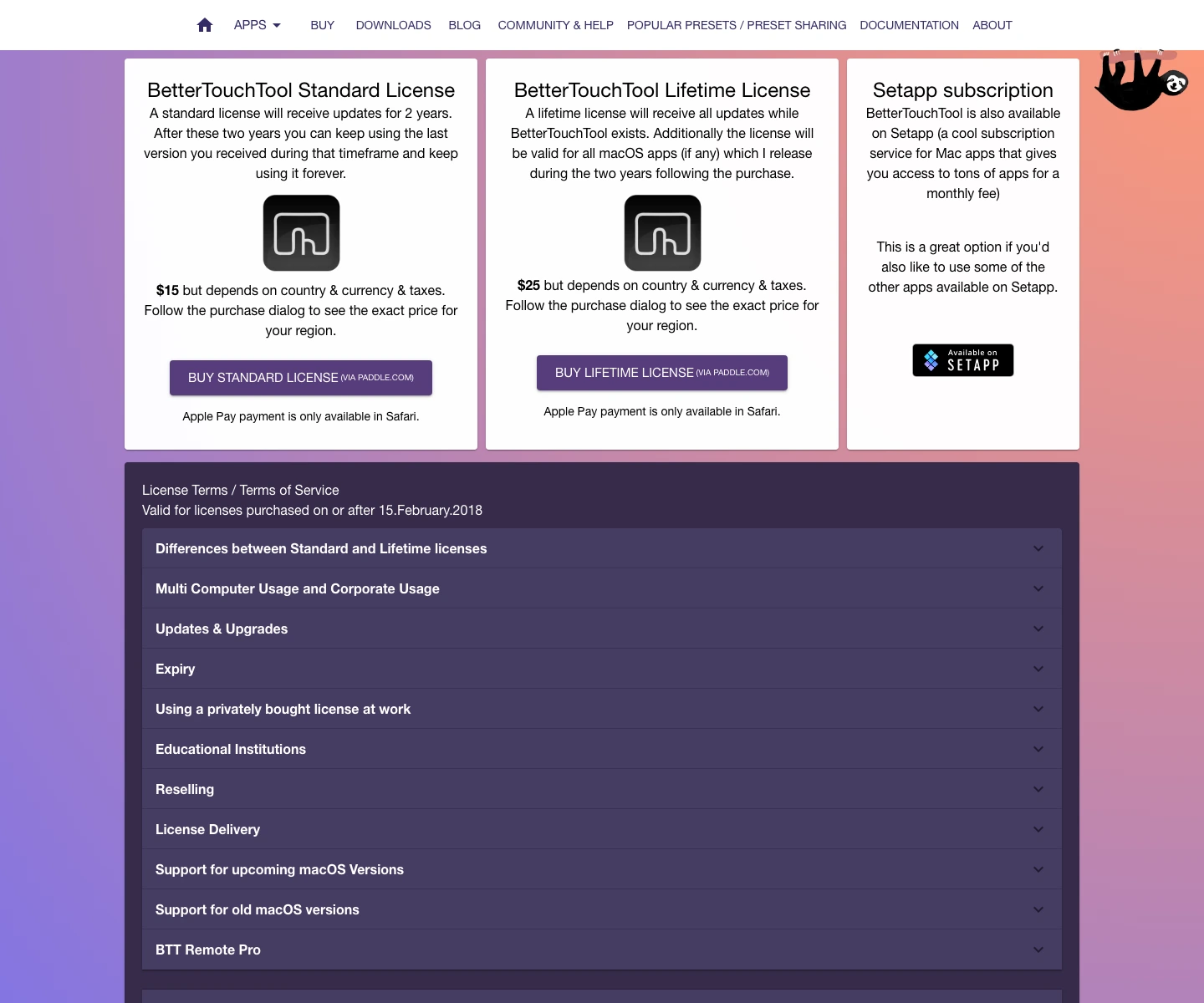
That price is almost absurd next to software subscriptions. But cheap is not the same as easy. BetterTouchTool is the best pick if you already want gestures, shortcuts, window management, clipboard automation, scripts, custom triggers, and now a launcher on top. It is the wrong first pick if all you wanted was to open apps faster.
BetterTouchTool turns the launcher into a searchable surface for your configured triggers, clipboard tools, window controls, scripts, and automation rules.
Skip it if you want the simplest launcher replacement and do not plan to maintain automation triggers.
BetterTouchTool ranks third for default launcher buyers because its depth is also its burden, but it wins when automation is the actual job.
- Lowest paid sticker price in this comparison: $15 Standard and $25 Lifetime in the official render
- Launcher can surface BTT triggers, apps, windows, files, actions, clipboard, calendar, plugins, and AI surfaces
- Best fit if your Mac setup already depends on gestures, hotkeys, window actions, and scripts
- Lifetime license path is unusually clear for buyers who dislike subscriptions
- Too much tool if the buyer only wants app launch, quick search, and basic snippets
- Launcher direction is newer and should not be treated as a mature Raycast/Alfred replacement for every workflow yet
- Automation rules can become maintenance debt if you do not keep them simple
- No local BTT preset, trigger, or Launcher workflow was built or tested here
How to choose the right Mac launcher
Pick Raycast if your current pain is discovery. You know there are faster ways to open apps, search tools, paste snippets, manage windows, run small commands, and ask AI from the keyboard, but you do not want to build each path manually. Raycast gives you the cleanest on-ramp.
Pick Alfred if your current pain is ownership. You want the launcher to stay stable, local, scriptable, and paid once. The Powerpack makes the most sense when you will build workflows, keep snippets, browse clipboard history, and tie scripts together over years.
Pick BetterTouchTool if your current pain is control. You are not only launching apps. You are remapping inputs, controlling windows, wiring triggers, managing clipboard flows, and turning odd Mac behaviors into predictable shortcuts. The launcher is a doorway into that system.
One sentence version: Raycast is the better default, Alfred is the better owned workflow, and BetterTouchTool is the better automation engine.
Final verdict: Raycast first, Alfred if you know why, BetterTouchTool if launch is not enough
For a new Mac user, I would start with Raycast free before buying anything. It gives enough command-palette value to prove whether you actually need a launcher beyond Spotlight. If the free tier becomes daily infrastructure and Pro features matter, the $8/month annual plan is easy to evaluate. The risk is paying for Pro before the habit exists.
If your reaction to that sentence is "I do not want another subscription," buy Alfred Powerpack instead. The GBP34 license is the cleanest long-term launcher purchase here. It asks more from you up front, but that is the point. The wrong buyer for Alfred is someone who wants the product to hand them ready-made commands with no tinkering.
If your reaction is "I need my Mac to obey weird rules," buy BetterTouchTool. Just do it with honest expectations. It is not the easiest launcher. It is the most interesting automation surface. The tradeoff is maintenance: every clever trigger is another small rule you own later.
Avoid the category entirely if Spotlight already solves the job. Buying a launcher because a power user thread made your setup feel behind is the quiet failure mode here. The right purchase is the one that removes a repeated friction point, not the one with the most impressive automation ceiling.
Raycast vs Alfred vs BetterTouchTool FAQ
Ready to check Raycast?
Use the verified route if the trade-offs still fit. If not, jump back to the summary and compare the alternatives.
Crypto and productivity editor focused on cost, custody risk, setup friction, exports, fees, and workflow drag. Prioritizes verifiable numbers and clear skip criteria over hype.
Lucas starts with total operating cost, then ranks tools by setup and recurring friction, custody or export, reversibility, and whether the decision still makes sense when the exit path is included.
Related Articles

Hey Noah vs Lindy vs Fyxer: Best AI Executive Assistant
AI executive assistants compared by action authority, reversibility, workflow fit, cost predictability, context reach, and trust readiness
Compare Hey Noah, Lindy, and Fyxer by approvals, email sending, scheduling, calls, integrations, security, and current entry prices.
Paste vs Maccy vs Raycast: Which Mac Clipboard Manager Fits?
Mac clipboard managers compared by local history, Apple-device sync, privacy posture, launcher fit, setup burden, and subscription value
Paste, Maccy, and Raycast compared by clipboard history, Apple-device sync, local storage, privacy posture, pricing, and workflow fit.