

The old $10 Copilot versus $20 Cursor debate no longer explains the coding-agent market. The real decision starts when an agent can read a repository, plan across files, call tools, review its own work, and keep running long after autocomplete would have stopped. That changes both the workflow and the bill.
Cursor is my default pick when the editor and agent should be one product. GitHub Copilot is the better value when the team wants to keep its current IDE and GitHub controls. Claude Code makes sense for Claude-first terminal work. Devin Desktop is the narrower Windsurf-to-Devin path, not the low-friction default.
This page owns the credit, quota, and cost-risk decision. Our separate GitHub Copilot vs Cursor comparison is now focused on a simpler question: keep your current IDE or switch to an AI-native editor.
I would not start this decision with a model leaderboard. Model access changes quickly, and the same model can feel different when one product controls the editor, another works through an extension, and a third lives in the terminal. Start with the work surface, then ask what happens to the allowance during the longest task you expect to delegate.
That is the split.
A solo developer cleaning up a small project does not need the same plan as a team assigning cloud agents to several repositories. If the job is closer to prompt-to-app building than repository maintenance, the vibe coding tools roundup is a better comparison.
-
#1 CursorBest default for an AI-native editor, agent workflow, cloud agents, MCPs, hooks, and code review
-
#2 GitHub CopilotBest value when IDE coverage and GitHub-native controls matter more than changing editors
-
#3 Claude CodeBest Claude-first terminal path when shared Claude plan limits are acceptable
-
#4 Devin DesktopBest for teams intentionally following the Windsurf and Devin Cloud route
Start with Cursor if an AI-native editor is the goal. Compare GitHub Copilot if migration cost is the bigger risk. Choose Claude Code for a Claude-first terminal workflow, or Devin Desktop when Devin Cloud is part of the plan.
Coding-agent ranking method
The overall score weights Agent Depth at 35%, Cost Predictability at 25%, IDE Fit and Usage Visibility at 15% each, and Team Controls at 10%. That weighting explains why Cursor can rank first without winning every category: this guide values a coherent agent work surface more than broad IDE coverage alone.
The totals are 8.3 for Cursor, 8.2 for Copilot, 7.8 for Claude Code, and 7.5 for Devin Desktop. These are purchase-fit scores, not model benchmarks or promises about code quality.
Agent Depth receives the largest weight because autocomplete is no longer the hard part. The hard part is keeping context across a real task, exposing controls, and fitting the way code already moves through a team. Cost Predictability comes next because an agent that feels expensive to invoke will be underused even when it is technically capable.
IDE Fit prevents the ranking from becoming a feature contest. Copilot gains heavily because it can meet developers in several established clients. Cursor loses points because adopting it is a genuine migration. Claude Code sits between them: it can work beside an existing editor, but its plan boundary is tied to the wider Claude subscription. Devin Desktop gets credit for local and cloud direction, then loses ground for transition and quota friction.
My rule is simple: the winner should still make sense after the impressive first demo wears off.
Claude Code vs Cursor vs GitHub Copilot vs Devin Desktop
| Feature | Cursor | GitHub Copilot | Claude Code | Devin Desktop |
|---|---|---|---|---|
| Best job | AI-native IDE agent work | Existing IDE coverage and GitHub-native teams | Claude-first terminal and IDE coding | Windsurf/Devin local plus cloud-agent route |
| Verified entry price | Hobby free; Individual Pro $20/mo | Free; Pro $10/mo; Pro+ $39/mo; Max $100/mo | Claude Pro $20/mo; Max 5x $100/mo; Max 20x $200/mo | Free; Pro $20/mo; Max $200/mo; Team $80/mo plus full-dev seats |
| Cost-risk trigger | Included model allowance can be exceeded; on-demand use is billed in arrears | Chat and agent work draw from monthly AI credits | Claude and Claude Code share plan limits; paid credits can add API-rate spend | Daily and weekly plan quotas require monitoring |
| Agent surface | Agent, cloud agents, MCPs, skills, hooks, Bugbot | IDE chat, agent mode, cloud agent, code review, GitHub workflows | Terminal, IDE, desktop, web, Slack, and MCP | Devin Desktop, Devin Local, Devin Cloud, premium models, team features |
| IDE fit | Cursor editor, a VS Code-style work surface | VS Code, Visual Studio, JetBrains, Xcode, Eclipse, and more | Works beside existing tools instead of replacing the editor | Best when the Windsurf-to-Devin transition is intentional |
| Skip if | JetBrains, Visual Studio, or Xcode must remain the primary IDE | You want one AI-native editor to orchestrate the entire session | You want a standalone AI-native IDE | You want the most settled product and billing story |
| Action | Compare Cursor | Compare Copilot | Compare Claude Code | Compare Devin Desktop |
The coding-agent cost trap
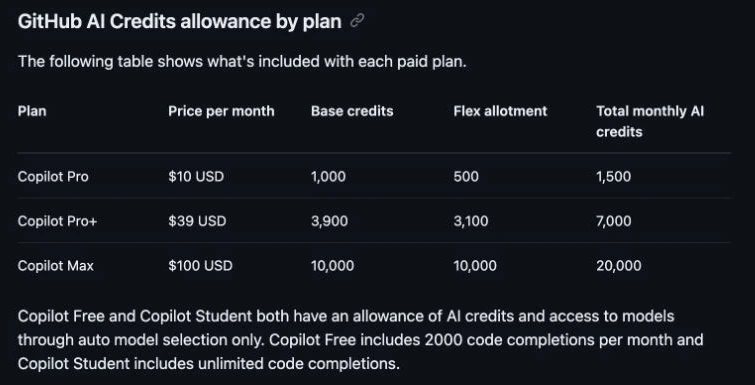
GitHub makes the new math unusually concrete. Copilot Pro costs $10/mo and includes 1,500 monthly AI credits; Pro+ costs $39 with 7,000; Max costs $100 with 20,000. The allowance combines fixed base credits with a variable flex allotment. Code completions and next edit suggestions remain unlimited on paid plans, while chat, CLI, cloud agent, Spaces, Spark, and third-party agents consume credits.
The other three products hide the same risk behind different language. Cursor can continue with on-demand model spend after its included allowance. Claude Code and Claude share plan limits, with paid credits available after the included amount runs out. Devin Desktop publishes plan quotas rather than one simple unlimited-agent promise. The sticker price is only the entry fee; the durable choice is the system you can monitor without interrupting useful work.
The catch is in the split between base and flex credits. Base credits are fixed, while the flex allotment can change as model economics evolve. That makes the published total useful for today's choice, but it is not a lifetime contract. A future change to the flex portion could alter how much work fits inside the same subscription without changing the headline price.
Workload shape matters just as much as plan size. Short explanations and completions are different from a cloud agent reading a large repository, calling tools, and iterating across files. I would therefore compare one normal week, not one perfect prompt. Record which tasks trigger the meter, which model was selected, whether the agent needed repeated correction, and whether the dashboard made the remaining headroom obvious.
Do not buy theoretical capacity.
A small pilot should have a stop condition: no automatic overage, no sensitive repository, and no team-wide rollout until someone can explain the limit model in plain language. That discipline matters more than arguing over a few dollars at checkout.
1. Cursor: best AI-native coding surface
Cursor wins because its product shape matches agent-heavy coding. Individual Pro is $20/mo, and the plan centers Agent, frontier models, MCPs, skills, hooks, cloud agents, and Bugbot. A developer who wants the editor, agent, and review loop in one place can evaluate one coherent product instead of assembling extensions around an existing IDE.
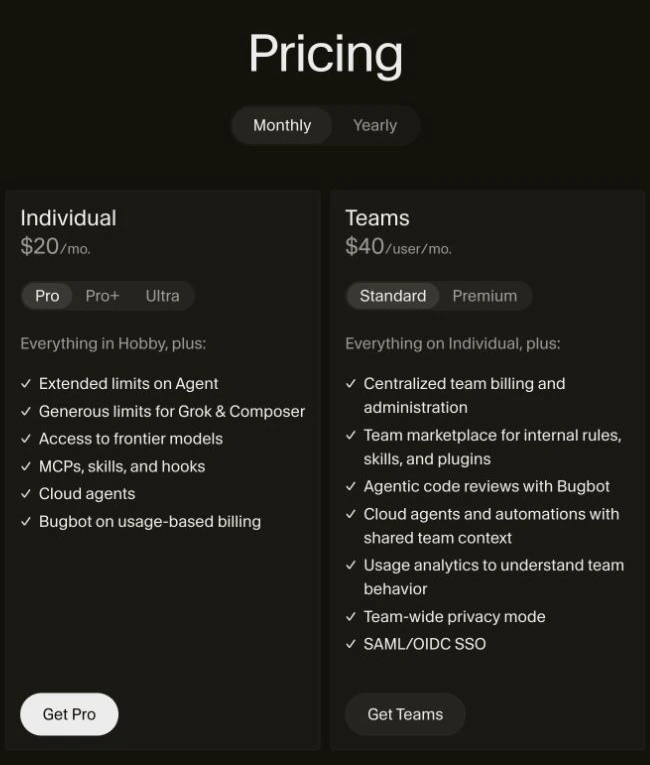
The tradeoff is editor lock-in. A JetBrains, Visual Studio, or Xcode team may spend more organizational energy switching than it saves on the subscription. Cursor also includes a set amount of model allowance rather than making heavy agent work disappear from the bill.
This is where Cursor earns its lead: multi-file changes are already a daily bottleneck and the developer is comfortable in a VS Code-style environment. The trial should recreate the real extension set, debugger, terminal, repository rules, review process, and security boundaries. If the agent loop looks better but the rest of the environment becomes harder to maintain, the migration has not paid for itself.
For a small team, Cursor's coherence is the appeal. One work surface is easier to teach than a patchwork of model choices and extensions. The same coherence can become a constraint when different languages or accessibility needs require different IDEs. That is why Cursor wins this guide narrowly rather than running away with it.
The editor, agent workflow, frontier models, MCPs, hooks, cloud agents, and Bugbot live in one product surface.
Skip it if your team cannot move from JetBrains, Visual Studio, Xcode, or its established editor setup.
The weighted rubric rewards Cursor's agent depth enough to offset editor lock-in and on-demand billing risk.
- Purpose-built work surface for agent-heavy coding
- Cloud agents, MCPs, skills, hooks, and Bugbot are central features
- Clear $20/mo Individual Pro entry point
- Teams plan includes centralized billing, privacy mode, and SSO controls
- Requires adopting the Cursor editor
- On-demand model spend can reduce bill predictability
- Broad IDE teams may need a second product
- The premium is harder to justify for occasional autocomplete
2. GitHub Copilot: best for existing IDEs
Copilot is the safer institutional choice. It works across common IDEs, fits GitHub-native governance, and starts at $10/mo. That makes it easier to pilot without forcing an editor migration.
The June billing shift is the caveat. Monthly paid individual plans now run on AI Credits, so a team must understand which tasks consume the allowance and what happens after it is exhausted.
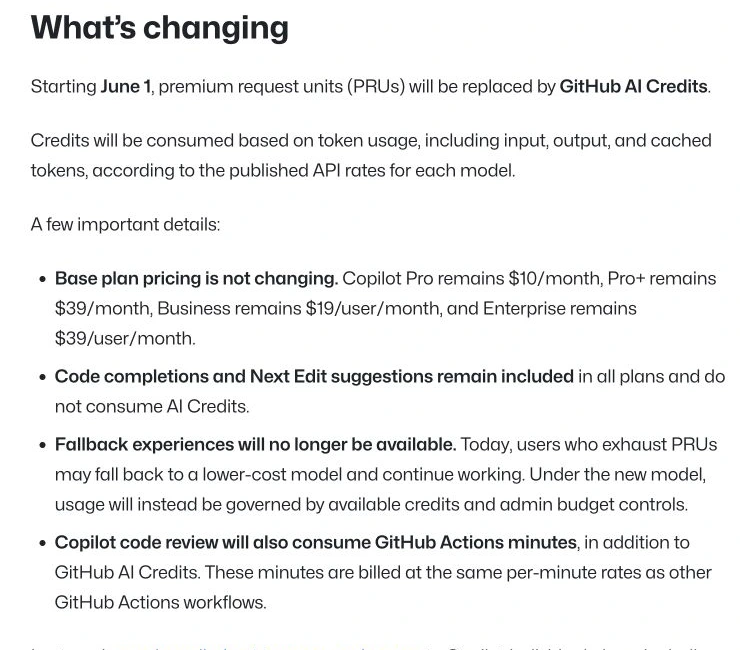
Copilot's strongest argument is operational, not glamorous. A company can keep Visual Studio for one group, JetBrains for another, and VS Code for a third while using one GitHub-centered policy and review story. I would choose that lower-disruption route before asking an organization to change editors merely to make the agent interface feel more unified.
The counterweight is client variation. GitHub explicitly tells users to keep IDEs, clients, and extensions current so model pricing, allowance information, terminology, and alerts display correctly. A serious pilot should therefore include the actual clients used in production, not only the newest VS Code build on one developer's machine.
Copilot is the closest runner-up because it solves a deployment problem Cursor creates.
Copilot combines broad IDE support, GitHub workflow integration, team governance, and the lowest paid entry price in this comparison.
Skip it if the goal is one AI-native editor built around multi-file agent orchestration.
Copilot nearly wins on IDE fit and governance, but the agent-first surface is less unified and AI Credit burn matters for heavier work.
- Lowest paid entry point at $10/mo for Pro
- Works across VS Code, Visual Studio, JetBrains, Xcode, Eclipse, and more
- GitHub-native agent, review, policy, and organization controls
- Public plan table makes individual credit allowances visible
- Chat and agent work consume AI Credits
- A long agent session can cost more than a short chat request
- The experience varies by IDE and client version
- A larger plan or extra budget may be needed for sustained agent work
3. Claude Code: best for Claude-first terminal work
Claude Code is the strongest alternative when the model matters more than the editor. It works from terminal, IDE, desktop, web, and other surfaces without requiring a dedicated editor switch. Anthropic lists Claude Pro at $20/mo, Max 5x at $100, and Max 20x at $200.
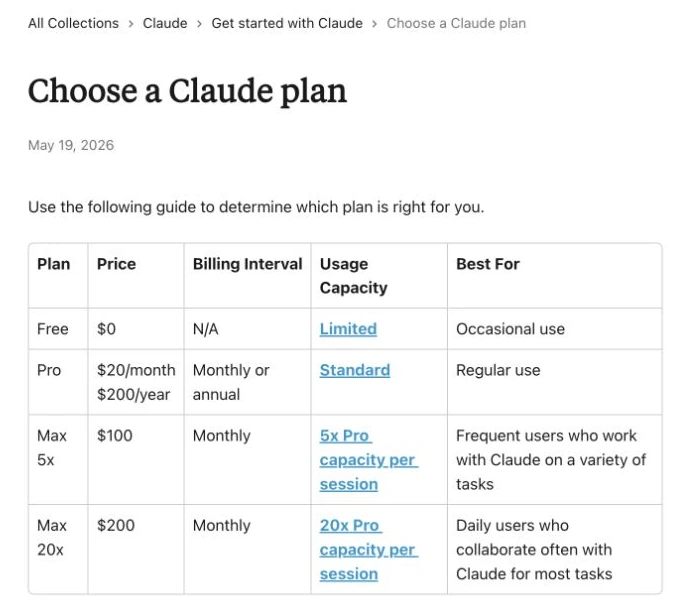
The limitation is shared headroom. Claude and Claude Code draw from the same plan limits, so a heavy coding week can compete with non-coding work. Paid credits can keep the session going, but they turn a fixed subscription into a metered decision.
I would put Claude Code first only when the team has already made a model decision: Claude is trusted for the repositories involved, terminal work is normal, and changing editors would add no value. In that situation, using Claude alongside the existing toolchain can be cleaner than adopting another dedicated IDE.
The wrong reason to choose it is Max-plan abundance. A $100 or $200 tier can buy more headroom, but it does not separate coding from every other Claude task. Teams should decide who owns the shared limit, when paid credits are allowed, and how a coding session stops before it becomes an open-ended expense.
Claude Code works alongside terminal and IDE workflows while keeping Claude as the primary reason to subscribe.
Skip it if you want a standalone AI-native editor or a plan boundary isolated from general Claude work.
Strong agent depth and flexible tool fit are offset by shared Claude limits and the possibility of metered credits after included capacity.
- Terminal-first agent that can work beside existing tools
- Strong fit when Claude is already the preferred model
- Pro and Max plan ladder is publicly documented
- Optional credits can continue work after included limits
- Claude and Claude Code share plan limits
- Paid credits can turn a fixed plan into variable spend
- No standalone AI-native editor is included
- The $100 and $200 Max tiers are expensive for occasional coding
4. Devin Desktop: best for the Windsurf-to-Devin path
Devin Desktop belongs here because Windsurf buyers now face a different product and plan decision. Devin publishes Free, Pro at $20/mo, Max at $200, and a Team plan at $80/mo plus $40/mo per full developer seat.
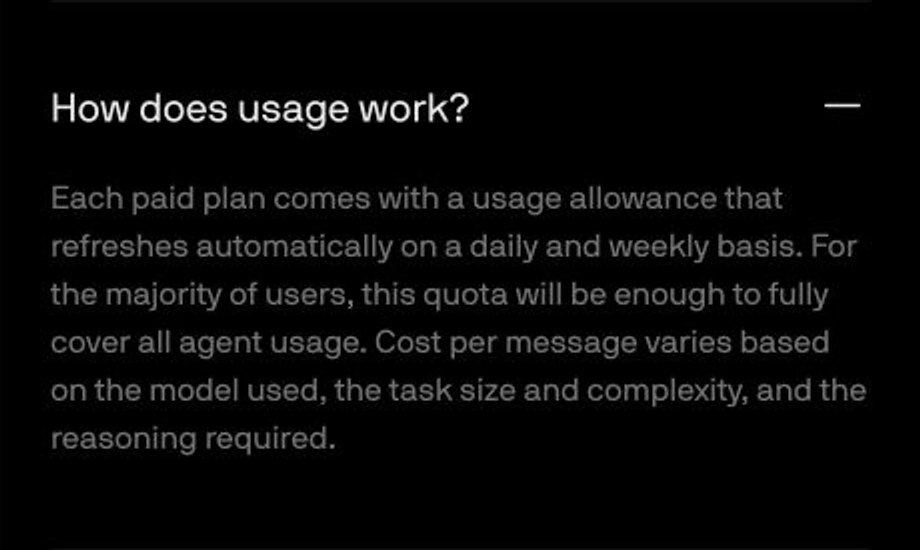
This is a deliberate ecosystem choice. Devin says paid-plan usage allowances refresh daily and weekly, while per-message cost varies by model, task size and complexity, and reasoning. That adds another monitoring layer, and the Windsurf transition creates more uncertainty than a new Copilot or Cursor account. Teams that specifically want Devin Local plus Devin Cloud may accept that complexity; everyone else has a clearer starting point above.
I would not treat the Windsurf name change as a cosmetic footnote. Product continuity, account expectations, plan names, and local-versus-cloud workflows all affect whether a current user feels at home. An existing Windsurf user has a stronger reason to evaluate Devin Desktop than someone starting from zero.
For a fresh purchase, Devin must prove that the local-plus-cloud combination solves a job the first three tools do not. If that proof is missing, the extra quota vocabulary and transition risk are unnecessary complexity.
Devin Desktop connects the former Windsurf path with Devin Local, Devin Cloud, premium models, and team options.
Skip it if you want a settled editor brand, the simplest quota story, or the lowest-risk first pilot.
Devin's local-plus-cloud direction is credible, but the transition and quota model create more decision friction than the top three options.
- Connects Devin Desktop, Devin Local, and Devin Cloud
- Free and $20 Pro paths lower the evaluation barrier
- Team plan includes admin and multi-user options
- Relevant continuation path for existing Windsurf users
- The Windsurf-to-Devin transition adds product uncertainty
- Daily and weekly quotas require active monitoring
- Max at $200/mo is difficult to justify without sustained use
- A new user has clearer default choices in Cursor or Copilot
Why Codex is not ranked here
Codex is the obvious omission. OpenAI currently includes it across eligible subscription plans, with limits and credit options varying by plan, and positions it across the app, editor, and terminal. That makes Codex a broader subscription decision rather than a clean fifth entry in this standalone editor and coding-agent cost ladder. Teams building directly on metered models should instead compare GPT-5.6 and Claude Sonnet 5 API routing.
If you already have one of those plans, evaluate the included Codex access before buying another coding tool. Codex should become a full ranked entry only after a separate evidence pass applies the same cost, agent, IDE, visibility, and team-control rubric.
I left Codex outside the score table because ranking it without the same current plan, credit, team, and work-surface evidence would create false precision. That omission is a scope decision, not a claim that Codex is weaker. For someone already on an eligible OpenAI plan, it may be the first option to evaluate because the incremental purchase can be zero.
How to choose the right coding agent
Choose Cursor when multi-file agent work is the daily job and switching to its editor is acceptable. Choose Copilot when IDE continuity, GitHub governance, and a $10 starting point matter more. Choose Claude Code when Claude is already the preferred model and terminal work is central. Choose Devin Desktop only when the Devin ecosystem is an intentional requirement.
Then run a narrow pilot on one real but non-sensitive repository. Watch the allowance dashboard, note where the agent hesitates or needs correction, and compare the disruption of changing tools against the subscription itself. Do not standardize an agent because its demo looked impressive.
I would use four gates before rollout. First, confirm the tool fits the team's actual IDEs and repository permissions. Second, set a budget or disable overage until the allowance pattern is understood. Third, assign one repetitive task and one messy multi-file task so the pilot is not biased toward a polished demo. Fourth, review the resulting diff, commands, and handoff as carefully as work from a new teammate.
The deciding signal is hesitation. If developers stop asking useful questions because every turn feels metered, the plan is too constrained or the product is being used for the wrong job. If they avoid the tool because switching environments is annoying, the workflow fit is wrong even when the agent is capable.
Keep the first decision reversible. One repository, a short evaluation window, named owners, and a written exit condition are enough. Buying four subscriptions at once only makes it harder to learn which surface created the value.
Final verdict on coding-agent costs
Cursor wins 8.3 to Copilot's 8.2. Its agent-first editor earns the lead, but it is not the universal choice. Copilot is the smarter default for teams that cannot justify an editor migration, while Claude Code and Devin Desktop solve narrower ecosystem problems.
I would pay for Cursor when the agent workflow is worth changing the editor. I would choose Copilot everywhere that sentence is not clearly true.
The most expensive mistake is not choosing the wrong sticker price. It is paying for an agent whose limits make you hesitate before assigning the next useful task.
Frequently Asked Questions
Ready to check Cursor?
Use the verified route if the trade-offs still fit. If not, jump back to the summary and compare the alternatives.
AI tools editor focused on public docs, changelogs, API limits, free-tier constraints, and developer community feedback. Turns fast-moving AI claims into buyer-focused recommendations without implying undocumented hands-on testing.
Anthony starts with the workload behind the demo, then ranks AI tools by documented model access, limits, implementation clarity, failure behavior, and the cost of an acceptable result.
Related Articles

Bardeen vs Zapier Agents vs Lindy: Best AI Coworker
AI coworkers compared by starting context, agent authority, usage economics, approval boundaries, and offboarding clarity
Compare Bardeen, Zapier Agents, and Lindy by workflow fit, approvals, credits, integrations, browser permissions, and cancellation terms.

GPT-5.6 vs Claude Sonnet 5 API: Which Tier Fits?
Production API model routing guide
GPT-5.6 Sol, Terra, and Luna compared with Claude Sonnet 5 on API price, long context, tokenization, migration risk, tools, and workload fit.