
The AI dictation market finally got interesting because the choice is not just "speech to text" anymore. It is cloud polish, local privacy, file transcription, or open-source control.
My default pick is Wispr Flow if you need one polished voice layer across desktop and mobile. It is the cleanest buyer fit for people who want to dictate into Slack, Gmail, docs, mobile apps, and random text boxes without becoming their own Whisper admin.
That recommendation has a caveat the landing pages usually underplay: Wispr Flow is still cloud dictation. If your work includes confidential code, client notes, legal drafts, healthcare content, unreleased product plans, or anything you would not paste into a hosted AI tool, compare Superwhisper and MacWhisper first. If you are technical, keep Whisper.cpp in the decision because "free" can be real when you can own the setup.
I checked official pricing, privacy and security pages, Superwhisper Pro docs, MacWhisper official pricing copy, Whisper.cpp GitHub material, current Google SERP competitors, and concrete Reddit question patterns from the past few weeks. I did not install these apps, record audio, run accuracy tests, upload files, configure local models, complete checkout, or test support. Treat this as a buyer-fit guide, not a microphone benchmark.
If your voice input is mostly meeting capture, start with our AI meeting assistants guide. If dictated text becomes articles, emails, scripts, or prompts, pair this with our free AI writing tools guide. Developers using long spoken prompts for coding agents should also read our vibe coding tools comparison.
-
#1 Wispr FlowBest polished cross-platform dictation: Mac, Windows, iPhone, Android, AI cleanup, Privacy Mode, and team controls
-
#2 SuperwhisperBest power-user dictation: local voice models, custom modes, one license across devices, and lifetime option
-
#3 MacWhisperBest Mac transcription value: local files, YouTube, batch transcription, speaker features, and one-time Pro pricing
-
#4 Whisper.cppBest technical local control: free MIT-licensed Whisper inference if you can handle the setup burden
If your job is voice typing everywhere, start with Wispr Flow . If your job is private Mac dictation with real knobs, compare Superwhisper . If your job is transcribing files instead of speaking into apps, check MacWhisper . If your job is total local control, study Whisper.cpp before you pay anyone.
Wispr Flow vs Superwhisper vs MacWhisper comparison
| Feature | Wispr Flow | Superwhisper | MacWhisper | Whisper.cpp |
|---|---|---|---|---|
| Best job | Polished voice typing across work apps and mobile | Power-user dictation with local models and custom modes | Local Mac transcription for audio files, meetings, and videos | Developer-owned local speech recognition stack |
| Model path | Cloud transcription with Privacy Mode controls | Local and cloud voice models, depending on mode | Local by default, optional cloud add-ons in Pro | Local inference of Whisper ASR models |
| Official price checked | Basic free with weekly caps; Pro EUR15 monthly or EUR12 annual; Enterprise contact sales | $8.49/mo; $84.99/yr; $249.99 once | Free; Pro EUR64 per license with lifetime updates | MIT-licensed open source |
| Platform fit | Mac, Windows, iPhone, Android | Mac, Windows, iPhone, iPad under one license | Mac-first; separate iPhone/iPad app exists | Technical setups across supported hardware |
| Privacy caveat | Privacy Mode can discard content, but transcription is still cloud-side | Cloud modes and custom provider choices change the data path | Great for local files, less natural as cross-platform voice typing | Privacy is only as good as your wrapper and workflow |
| Skip if | You need local-only processing by default | You want the simplest mobile-first dictation layer | You need dictation into every app on Windows and mobile | You want a normal consumer app |
| Action | Compare Wispr Flow | Compare Superwhisper | Compare MacWhisper | View Whisper.cpp |
How I ranked these AI dictation tools
The scoring is not an accuracy benchmark. It is a buyer decision rubric: Voice Flow, Privacy Fit, Platform Reach, Setup Load, and Value Clarity.
Voice Flow asks whether the tool helps you speak into actual work instead of creating another transcript cleanup chore. Privacy Fit asks what leaves the device and whether the product makes that easy to understand. Platform Reach asks whether the tool follows you across devices. Setup Load punishes anything that turns dictation into a weekend project. Value Clarity asks whether the pricing shape matches how often you will talk.
That order matters. Most people comparing these tools are not hunting for the highest theoretical Whisper score. They are trying to stop typing without leaking work material, paying for the wrong workflow, or buying a beautiful app that only solves half the job.
The cloud-vs-local trap matters more than raw accuracy now
Modern dictation tools are all standing on similar speech-recognition progress. The useful split is architecture.
A cloud-first tool can clean up your speech, format it for context, sync across devices, and ship new model behavior without asking you to manage downloads. That is why Wispr Flow feels like the mainstream option. It also means your voice passes through someone else's infrastructure.
A local-first tool can keep audio closer to your machine and remove a lot of vendor-risk anxiety. That is why Superwhisper, MacWhisper, and Whisper.cpp belong in the same decision. The tradeoff is friction: model choices, hardware limits, battery cost, settings, and a higher chance that the app feels like a workshop instead of a finished appliance.
Public Reddit threads from this month were useful as question patterns, not sentiment. People were comparing Wispr Flow's subscription against one-time local tools, asking whether Superwhisper's mode system justifies the learning curve, and separating MacWhisper's file-transcription job from real-time dictation. That is the exact buyer split this article uses.
The bill changes once dictation becomes a habit
The first week with a dictation app can feel fake. You are excited, you speak into everything, and any usable paragraph feels like proof that typing is over. The better test is month three. Are you still using it in email, notes, Slack, docs, prompts, and tickets? Or did it turn into another menu bar icon you only remember when the renewal email arrives?
That is why I would not compare Wispr Flow, Superwhisper, and MacWhisper by sticker price alone. Wispr Flow's subscription buys you mobile coverage, cross-platform polish, privacy controls, and less setup. Superwhisper's lifetime price only makes sense if you will actually use its local models and modes for a long time. MacWhisper's one-time price is excellent if you have recorded files waiting for transcription, but it is not cheap if it misses the everyday dictation job and you buy another tool anyway.
The practical move is boring: choose the architecture first, then choose the bill. If cloud processing is acceptable and you need every device, Wispr Flow's bill is easier to justify. If sensitive speech is common and you are willing to tune the setup, start local. If you mostly transcribe files, do not pay for a live dictation workflow just because the marketing sounds faster.
Also write down the failure condition before you pay. For Wispr Flow, it might be "I stop dictating on mobile." For Superwhisper, it might be "I never touch custom modes." For MacWhisper, it might be "I have no audio backlog." A voice tool should remove friction, not create a tiny subscription referendum every month.
1. Wispr Flow: best polished cross-platform dictation
Wispr Flow wins the default slot because it solves the job most buyers actually mean when they say "AI dictation": hold a shortcut, speak naturally, get cleaned-up text in the app where you were already working.
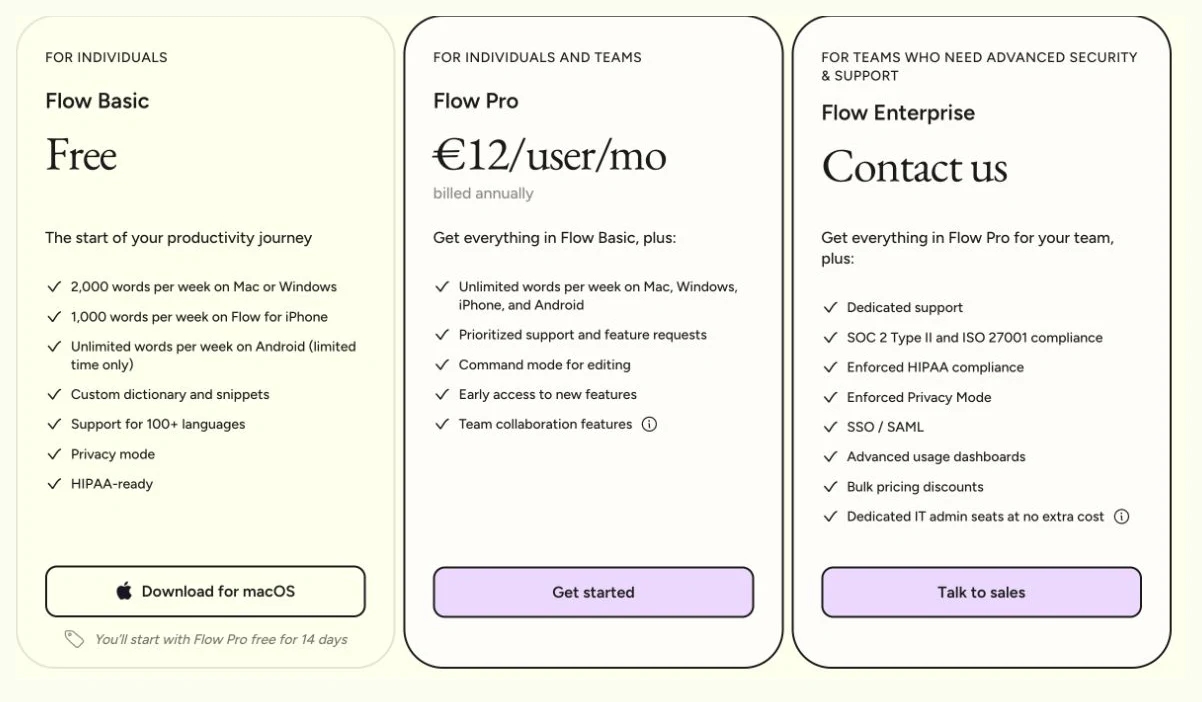
The public pricing page currently lists Flow Basic as free, Flow Pro at EUR15 per user per month on monthly billing or EUR12 billed annually, and Flow Enterprise as Contact us. Basic includes 2,000 words per week on Mac or Windows, 1,000 on iPhone, and temporarily unlimited words on Android. Pro removes those word limits across all four platforms and adds Command Mode, priority support, early access, and team features. For Enterprise, I use the public contact-sales state because that is what a buyer can verify before checkout.
The privacy story is better than most cloud dictation tools, but it is not the same as local processing. Wispr Flow's privacy page says Privacy Mode provides zero data retention and that dictation data is not stored or used for model training when enabled. Its docs also say Privacy Mode applies across Mac, Windows, iOS, and Android, and that HIPAA BAA/ZDR behavior can lock the mode on. Good. But the same public copy is clear that transcription happens in the cloud.
That is the whole Wispr decision. You pay for polish, cross-platform reach, and low setup load. You accept a cloud path. I would be comfortable recommending it to a founder, writer, student, or operator dictating normal work. I would slow down for lawyers, healthcare users, finance teams, or engineers speaking proprietary code into the tool all day. Those buyers should compare local routes before they let convenience win.
Wispr Flow is the least fussy way to get AI-cleaned dictation across Mac, Windows, iPhone, and Android.
Skip it if local-only processing is non-negotiable or if your privacy policy forbids cloud transcription.
Wispr Flow ranks first for mainstream buyers because platform reach and workflow polish beat local setup control for most non-regulated daily dictation use.
- Mac, Windows, iPhone, and Android support gives it the broadest normal-user platform story here
- Official Basic plan is useful for trialing light dictation before paying
- Pro removes weekly word limits and adds Command Mode plus team features
- Privacy Mode and HIPAA-ready language are visible in official docs
- Cloud transcription is still the core architecture
- Annual Pro becomes a real subscription commitment if dictation does not stick
- Privacy Mode needs to be understood before sensitive work goes through it
- No live dictation accuracy, latency, support, or cancellation workflow was tested here
2. Superwhisper: best power-user dictation app
Superwhisper is the tool I would compare first if privacy and control matter but you still want a real app instead of a GitHub weekend. Its Pro docs describe one license across Mac, Windows, iPhone, and iPad, with Pro unlocking local voice models, custom modes, AI-powered modes, custom vocabulary, speaker separation, and priority support.
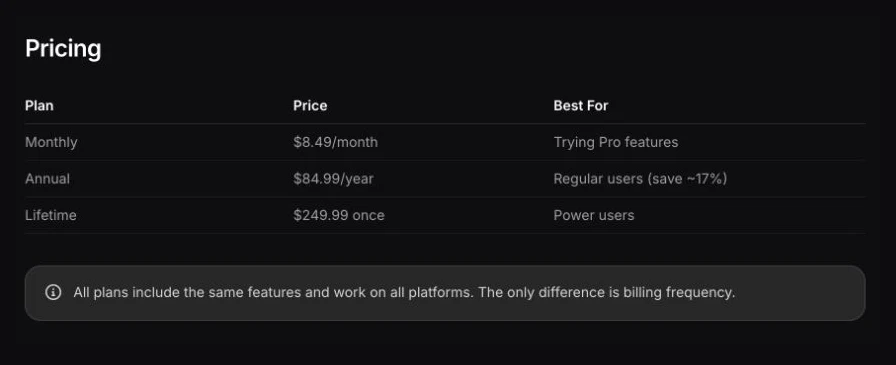
The pricing is unusually clear in the official docs: $8.49 per month, $84.99 per year, or $249.99 once. That lifetime option changes the math. If you know dictation will become a daily habit, Superwhisper can beat Wispr Flow's subscription curve over time. If you are only curious, monthly is the safer start.
The catch is complexity. Superwhisper's strength is the same reason it can annoy normal users: modes, local models, cloud model choices, BYOK paths, enterprise controls, and app-specific behavior. That is ideal for someone who wants one mode for emails, one for code comments, one for meeting notes, and one for raw transcription. It is overkill if you just want to say a sentence into iMessage.
I like the architecture more than the mainstream pitch because it gives buyers more escape hatches. You can lean local. You can use cloud models. You can bring your own provider account. You can buy lifetime. But each of those choices asks you to understand what you are doing. If you do not want that responsibility, Wispr Flow is the calmer purchase.
The mode system and local/cloud model flexibility make Superwhisper feel more like a dictation workbench than a simple voice keyboard.
Skip it if settings-heavy software makes you slower or if you mainly need mobile polish.
Superwhisper ranks second because its privacy/control ceiling is higher than Wispr Flow, but the setup burden is also higher for mainstream buyers.
- Official docs show local voice models and custom modes on Pro
- Monthly, annual, and lifetime pricing are clearly listed
- One license covers Mac, Windows, iPhone, and iPad personal devices
- Better fit than Wispr Flow when local processing and BYOK options matter
- Mode and model choices add real setup load
- Cloud modes can change the data path, so privacy depends on configuration
- Lifetime pricing only makes sense if dictation becomes a durable workflow
- No app install, local-model configuration, latency, or accuracy benchmark was performed here
3. MacWhisper: best Mac transcription value
MacWhisper belongs in this comparison because a lot of people search for dictation when they actually need transcription. Those are different jobs.
If you want to drop in a meeting recording, podcast, lecture, YouTube link, voice memo, or interview file and get a transcript, MacWhisper is the better shape. Its official page says the free version handles local transcription with smaller Whisper models, while MacWhisper Pro unlocks larger models, batch transcription, YouTube transcription, speaker recognition, AI integrations, watch folders, real-time captions, custom exports, and meeting recording. On July 11, the official page listed Pro at EUR64 per license as a one-time purchase with lifetime updates.
The tradeoff is that MacWhisper is not the same kind of system-wide voice layer as Wispr Flow. It can support dictation features, but its center of gravity is file transcription and Mac-native workflow. If you live on a Mac and your backlog is recorded material, that is a feature, not a flaw. If you need to dictate into Android, Windows, iPhone, and browser forms all day, it is the wrong default.
I also would not pretend the local story removes every decision. MacWhisper Pro can connect to cloud AI services and integrations. That can be useful. It also means privacy depends on the exact feature you use. For sensitive audio, stay in local workflows unless you have a reason to send material elsewhere.
MacWhisper is the cleanest value pick when the job is local Mac transcription of files, meetings, videos, and long audio.
Skip it if your main job is cross-platform real-time dictation into any app.
MacWhisper ranks third because it is excellent for transcription value but less natural as the universal dictation layer most buyers are comparing.
- Official page shows free local transcription and a one-time Pro upgrade
- Strong fit for audio files, meetings, interviews, YouTube, and batch work
- Local-first Mac workflow is easier to reason about than cloud-only dictation
- Much cleaner long-term cost story for Mac transcription buyers
- Mac-first product, not a full cross-platform dictation layer
- Less useful if you need to speak into every app on mobile and Windows
- Optional cloud integrations change the privacy model when used
- Official page was accessible in web search but local Playwright DNS could not capture a screenshot
4. Whisper.cpp: best if you can own the stack
Whisper.cpp is not a consumer dictation app. That is exactly why it belongs here.
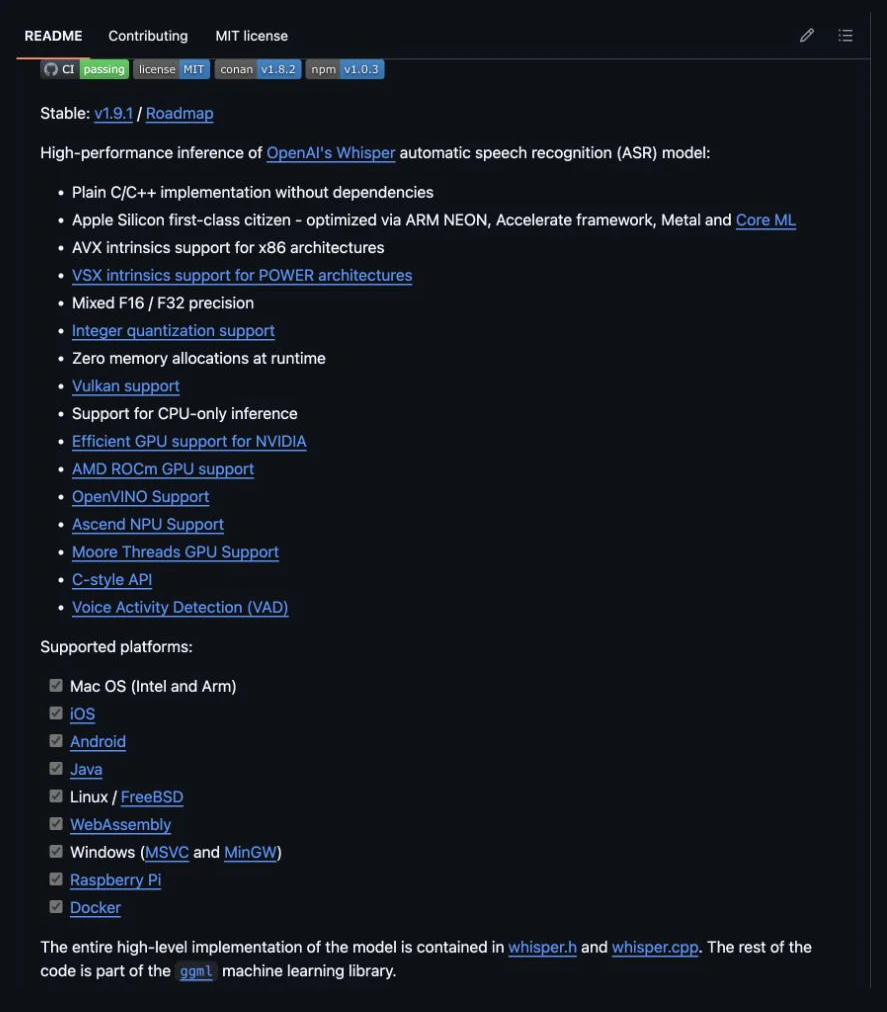
The GitHub repository describes a high-performance C/C++ implementation for local inference of OpenAI's Whisper automatic speech recognition models. It lists an MIT license, Apple Silicon optimization, CPU-only support, GPU support paths, and a large open-source footprint. If you want maximum local control, this is closer to the engine room than the app store.
The upside is obvious: no monthly subscription, no black-box app vendor, no forced cloud model, and no waiting for a product manager to expose the setting you need. The downside is also obvious: you own the setup, wrapper, model selection, hardware tradeoff, updates, and workflow polish.
For most buyers, Whisper.cpp is a control sample. It tells you what the paid apps are charging for: shortcuts, cleanup, app integration, mobile support, sync, UX, error handling, and support. For developers, researchers, accessibility hackers, and privacy-first teams, it can be more than a benchmark. It can be the right answer.
Whisper.cpp makes the real tradeoff visible: free local inference is possible, but product polish is the expensive part.
Skip it if you want a normal app with support, mobile UX, and one-click setup.
Whisper.cpp ranks fourth for normal buyers because the setup load is high, but it remains the strongest control option for technical local workflows.
- MIT-licensed open-source engine with local inference control
- Strong Apple Silicon and hardware-optimization story in the official README
- No subscription or vendor lock-in if you can maintain the workflow
- Best fit for technical teams that need auditable local speech processing
- Not a finished consumer dictation product
- Requires technical setup, model management, and workflow wrapping
- No built-in cross-platform mobile dictation experience
- No live local build, microphone workflow, or accuracy benchmark was performed here
How I would choose
Choose Wispr Flow if dictation needs to follow you across devices and apps. It is the best default for normal voice typing because it makes the fewest demands on the buyer.
Choose Superwhisper if you want a serious dictation workbench. It is the best middle path when you care about local models, custom modes, and long-term cost, but still want a product instead of a repo.
Choose MacWhisper if you mostly transcribe files on a Mac. It is not the broadest dictation layer. It is the cleanest value pick for recorded material.
Choose Whisper.cpp if you are technical enough to make the engine useful. If you need local control more than app polish, paying a subscription may be the wrong starting point.
My bias is simple: do not pay cloud-subscription money until you know voice input is a daily habit. Start with the tool that matches your privacy requirement first. Then optimize for polish.
Final verdict
For most Get Daily Toolbox readers, Wispr Flow is the best first comparison. It is polished, cross-platform, and built around speaking into real work instead of managing transcripts afterward. That matters.
But the privacy line is real. Superwhisper is the better pick when you want more local control without building your own stack. MacWhisper is the better pick when the job is file transcription on a Mac. Whisper.cpp is the better pick when the buyer has technical skill and local control beats product polish.
The wrong buyer risk is simple: a privacy-sensitive team buys Wispr Flow for convenience and later realizes cloud transcription was the tradeoff they meant to avoid. A normal writer buys Superwhisper lifetime and never learns the modes. A MacWhisper buyer expects universal dictation and gets a transcription-first workflow. Those are not small preference differences. They are purchase failures.
The wrong move is buying the most popular dictation app before naming the job. Voice typing, file transcription, private local speech, and open-source ASR are four different purchases.
Frequently Asked Questions
Ready to check Wispr Flow?
Use the verified route if the trade-offs still fit. If not, jump back to the summary and compare the alternatives.
AI tools editor focused on public docs, changelogs, API limits, free-tier constraints, and developer community feedback. Turns fast-moving AI claims into buyer-focused recommendations without implying undocumented hands-on testing.
Anthony starts with the workload behind the demo, then ranks AI tools by documented model access, limits, implementation clarity, failure behavior, and the cost of an acceptable result.
Related Articles

Bardeen vs Zapier Agents vs Lindy: Best AI Coworker
AI coworkers compared by starting context, agent authority, usage economics, approval boundaries, and offboarding clarity
Compare Bardeen, Zapier Agents, and Lindy by workflow fit, approvals, credits, integrations, browser permissions, and cancellation terms.

GPT-5.6 vs Claude Sonnet 5 API: Which Tier Fits?
Production API model routing guide
GPT-5.6 Sol, Terra, and Luna compared with Claude Sonnet 5 on API price, long context, tokenization, migration risk, tools, and workload fit.