
The paid antivirus question is usually asked too late. Someone runs a free Malwarebytes scan after a scare, Windows Defender looks calm, and the next question is obvious: do you actually need to pay for Bitdefender, Norton, or Malwarebytes Premium?
My answer is narrow: Bitdefender Total Security is the paid antivirus suite I would compare first for most households because the current public evidence lines up cleanly: strong independent Windows lab scores, a lower first-year price than Norton Deluxe, five-device coverage, and fewer bundle distractions than the identity-heavy Norton path. Norton 360 Deluxe is the stronger family bundle when parental controls, cloud backup, dark web monitoring, and a VPN all matter. Malwarebytes Premium is the right specialist when the buyer mainly wants a second opinion against scams, bad downloads, phishing pages, and cleanup-adjacent threats.
This is an evidence-led buying guide, not a hands-on malware lab. I checked official plan pages, current pricing, renewal language, independent AV-TEST and AV-Comparatives results, current SERP competitors, a concrete Reddit antivirus question, and the public screenshots below. I did not install the suites, run malware samples, test support, cancel a subscription, or measure system impact.
If the problem is broader account security, do not solve it with antivirus alone. Pair this decision with a password manager, the right passkey storage setup, and, for high-risk accounts, a hardware security key. If the worry is hostile Wi-Fi rather than malware, our VPN guide is the cleaner starting point; the NordVPN review also explains why a VPN security bundle is still not the same thing as paid antivirus. For sensitive prompts rather than device threats, the separate Venice AI vs Proton Lumo vs Duck.ai comparison follows the provider and saved-history path.
-
#1 Bitdefender Total SecurityBest paid default: five-device suite, strong lab evidence, password manager, and cleaner first-year value
-
#2 Norton 360 DeluxeBest family bundle: five devices, VPN, parental controls, dark web monitoring, cloud backup, and explicit renewal caveat
-
#3 Malwarebytes Premium SecurityBest second-opinion specialist: web, scam, malware, ransomware, exploit, and cleanup-adjacent protection
If I were paying today, I would compare Bitdefender first. I would move to Norton 360 Deluxe when the household actually needs the bundle. I would choose Malwarebytes Premium when the job is extra scam and malware cleanup defense beside an existing security setup.
The real Malwarebytes vs Bitdefender vs Norton question: prevention or cleanup?
Free scanners are useful. They are also easy to overvalue. Malwarebytes says its Free product is a cleanup tool for attacks that have already damaged a device, while Premium runs automatically to stop attacks before damage. That one distinction should control the whole purchase.
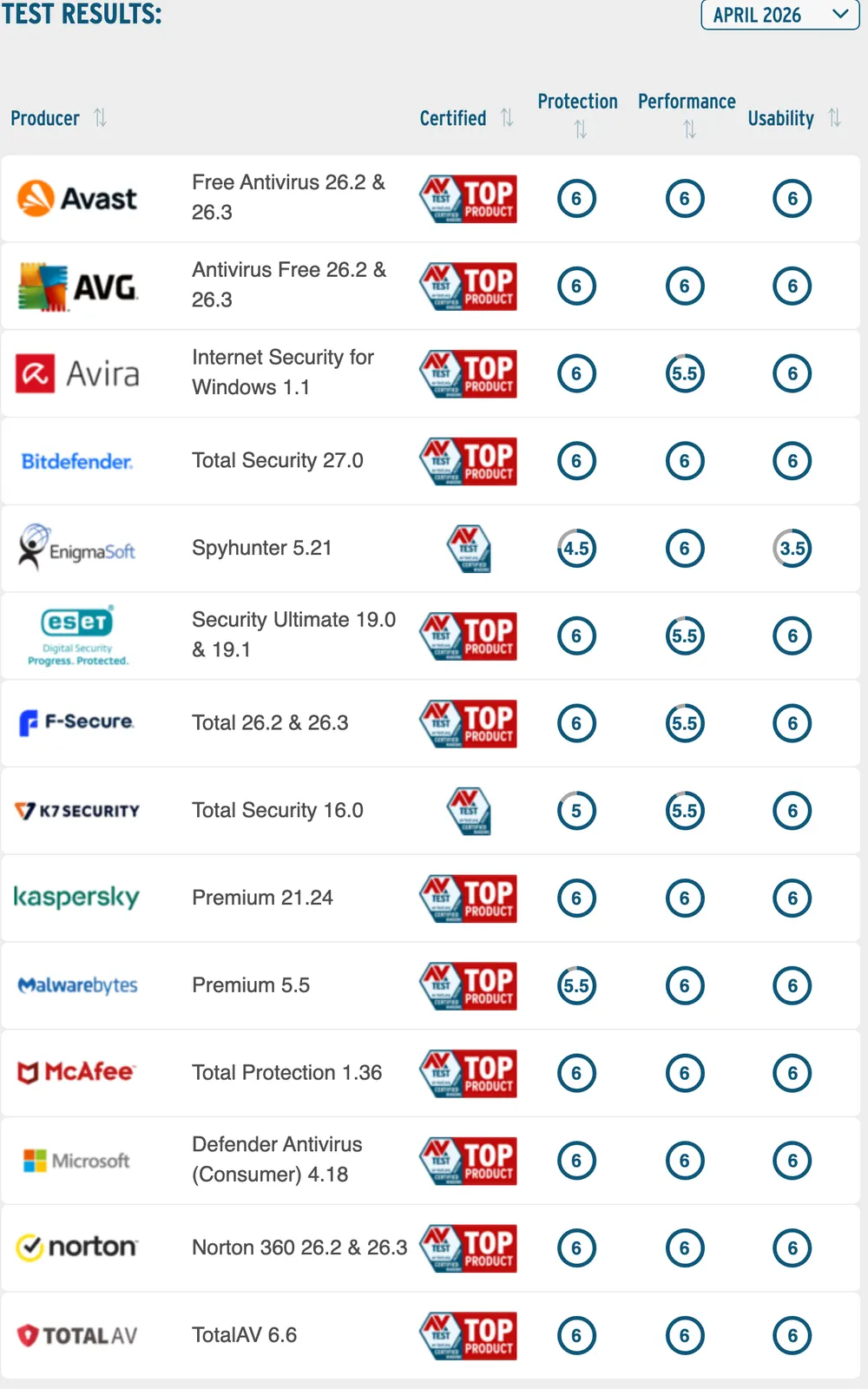
Microsoft Defender is not the punchline here. AV-TEST's April 2026 Windows 11 home-user table gave Microsoft Defender Consumer 6/6/6 across protection, performance, and usability, the same visible score line as Bitdefender and Norton. That makes the paid decision less about "free is unsafe" and more about whether you need the paid suite layers: phishing and malicious URL blocking, ransomware behavior defense, VPN, device coverage, backup, parental controls, identity monitoring, support, and renewal management.
The counter-intuitive part is that a careful Windows user may not need to pay. If Defender is enabled, the browser is updated, the user does not install random downloads, and there is already a password manager and sensible backup routine, I would not shame that setup. The paid suite makes more sense when the risk is less disciplined: parents, shared PCs, Android phones, scam-prone browsing, kids, travel Wi-Fi, or a household that wants one renewal instead of four separate security tools.
What the lab evidence can and cannot prove
Independent lab tables are useful because they keep the comparison from becoming a pricing-page rewrite. They are not a substitute for your own device reality. AV-TEST's Windows home-user results tell us whether a product performed well in that lab's current Windows protection, performance, and usability tests. They do not tell us whether your family will understand the alerts, whether a browser extension will be installed correctly, whether renewal reminders will be ignored, or whether the suite will quietly duplicate a VPN and password manager you already pay for.
That is why I treated the AV-TEST rows as a qualification gate, not the whole ranking. Bitdefender and Norton both clear that public evidence bar cleanly. Malwarebytes is still credible, but the visible April 2026 row gives it a narrower job in this guide. Microsoft Defender clearing the same public score line is the pressure test for every paid recommendation here. If a paid suite cannot explain what it adds beyond Defender, a discount is not enough.
AV-Comparatives adds a different kind of sanity check. In the March 2026 malware protection test, Bitdefender had fewer false alarms than Norton, and Norton had fewer than Malwarebytes. False alarms are not the same as missed malware, but they matter for normal users because a noisy product trains people to click past warnings. A household suite should protect without turning every download or installer into a drama.
How I ranked paid antivirus suites against Defender and Malwarebytes Free
I weighted five criteria: independent protection evidence, real-time scope, bundle restraint, renewal clarity, and buyer fit. Protection evidence mattered most because this category can become theater quickly. Real-time scope came next because the actual question is prevention, not whether a scanner can clean up afterward.
Bundle restraint mattered more than a feature count. A suite with VPN, backup, identity monitoring, password manager, and parental controls can be a good deal when the household needs those things. It can also be a messy renewal trap when half the tools are duplicates. Renewal clarity mattered because every discounted first-year antivirus price is only half the story.
The scoring also penalized vague fit. "Best antivirus" is too broad to be useful when the real reader might be a single Windows laptop user, a parent managing five devices, or someone cleaning up after a malicious-download scare. Bitdefender wins the default slot because the paid-antivirus job stays clean. Norton stays close because the family bundle is legitimate. Malwarebytes ranks third because it is strongest as a specialist layer beside an existing baseline, not because cleanup is unimportant.
| Feature | Bitdefender Total Security | Norton 360 Deluxe | Malwarebytes Premium |
|---|---|---|---|
| Best fit | Default paid suite for most multi-device buyers | Family bundle with backup, VPN, and parental controls | Second-opinion scanner plus scam/web protection specialist |
| Starting price checked | $59.99 first year for Individual Total Security, plus tax | $49.99 first year; $124.99/year renewal price shown | Standard starts from $59.99/year on the pricing page |
| Real-time scope | 24/7 real-time AI-powered protection for up to 5 Windows/Mac/Android/iOS devices | Antivirus, malware, ransomware, hacking, scam, and VPN layers for 5 devices | Web, malware/PUP, ransomware, exploit, and brute-force protection vary by plan/platform |
| Independent evidence | AV-TEST April 2026 showed 6/6/6 for Total Security 27.0 | AV-TEST April 2026 showed 6/6/6 for Norton 360 | AV-TEST April 2026 showed 5.5/6/6 for Malwarebytes Premium 5.5 |
| Bundle extras | Password manager; higher tiers add VPN and scam protection | 50 GB cloud backup, VPN, dark web monitoring, Privacy Monitor, parental controls | Browser Guard, support, VPN on Plus, identity tools on Ultimate |
| Main caveat | VPN and identity extras push buyers toward pricier tiers | Renewal jump is the buying risk | Not the cleanest default paid suite if you want broad family tooling |
| Action | Compare Bitdefender | Compare Norton | Compare Malwarebytes |
1. Bitdefender Total Security: best paid antivirus default
Bitdefender wins because it is the least dramatic paid answer. The official individual plan page showed Total Security at $59.99 for the first year, plus applicable sales tax, with 24/7 real-time protection for up to five Windows, Mac, Android, and iOS devices. AV-TEST's April 2026 Windows table gave Bitdefender Total Security 27.0 a 6/6/6 row.
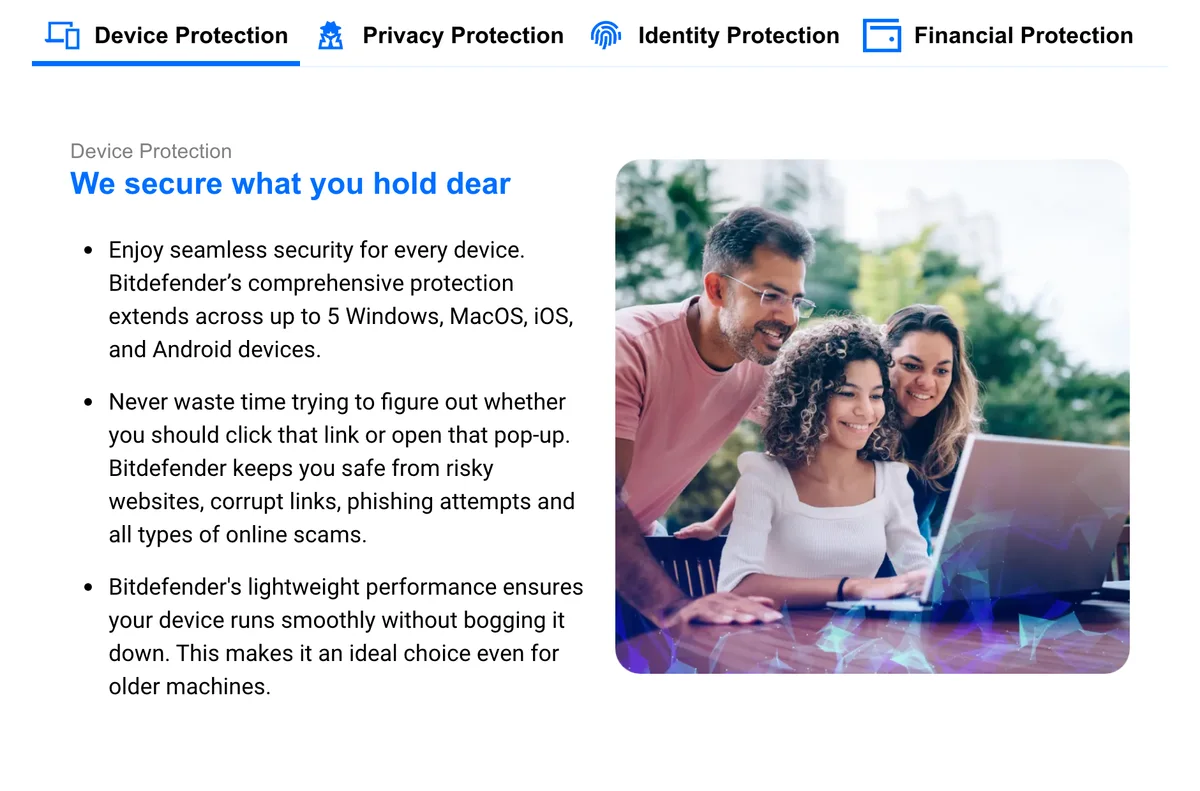
The reason I prefer it over Norton for a default buyer is restraint. Total Security is still a suite, but the visible card does not force the recommendation through identity insurance, cloud backup, or a heavier family-security story. If you need unlimited VPN traffic and scam protection, Bitdefender Premium Security is the more natural comparison. If you just want paid antivirus coverage across the normal device mix, Total Security is easier to explain.
That does not make Bitdefender the privacy answer. A paid antivirus suite runs deep on the device by design, and the public page cannot prove support quality, cancellation friction, or how noisy the app feels after install. It wins here because the verified public evidence supports the broadest paid default, not because it removes every security tradeoff.
Bitdefender combines strong independent Windows evidence with a cleaner five-device paid-suite pitch than the heavier Norton bundle.
Skip it if you specifically need Norton's cloud backup, parental controls, or identity-monitoring bundle.
Bitdefender ranks first because the public lab evidence, five-device coverage, and restrained suite scope make it the least regrettable paid default.
- AV-TEST April 2026 shows a 6/6/6 row for Bitdefender Total Security 27.0
- Official card lists up to five Windows, Mac, Android, and iOS devices
- Lower-friction suite story than identity-heavy bundles
- 30-day money-back guarantee is visible on the plan card
- First-year discount still requires renewal awareness
- VPN and scam-protection extras push buyers toward higher tiers
- No hands-on install, scan, support, or cancellation test was performed here
- Deep device security software is not a substitute for passwords, passkeys, and backups
2. Norton 360 Deluxe: best bundle when the household needs the extras
Norton 360 Deluxe is the paid suite I would pick for a household that actually wants the bundle. The official product page showed $49.99 for the first year, five PCs/Macs/tablets/phones, VPN, dark web monitoring, Privacy Monitor, parental controls, password manager, 50 GB cloud backup, and a renewal price of $124.99/year.
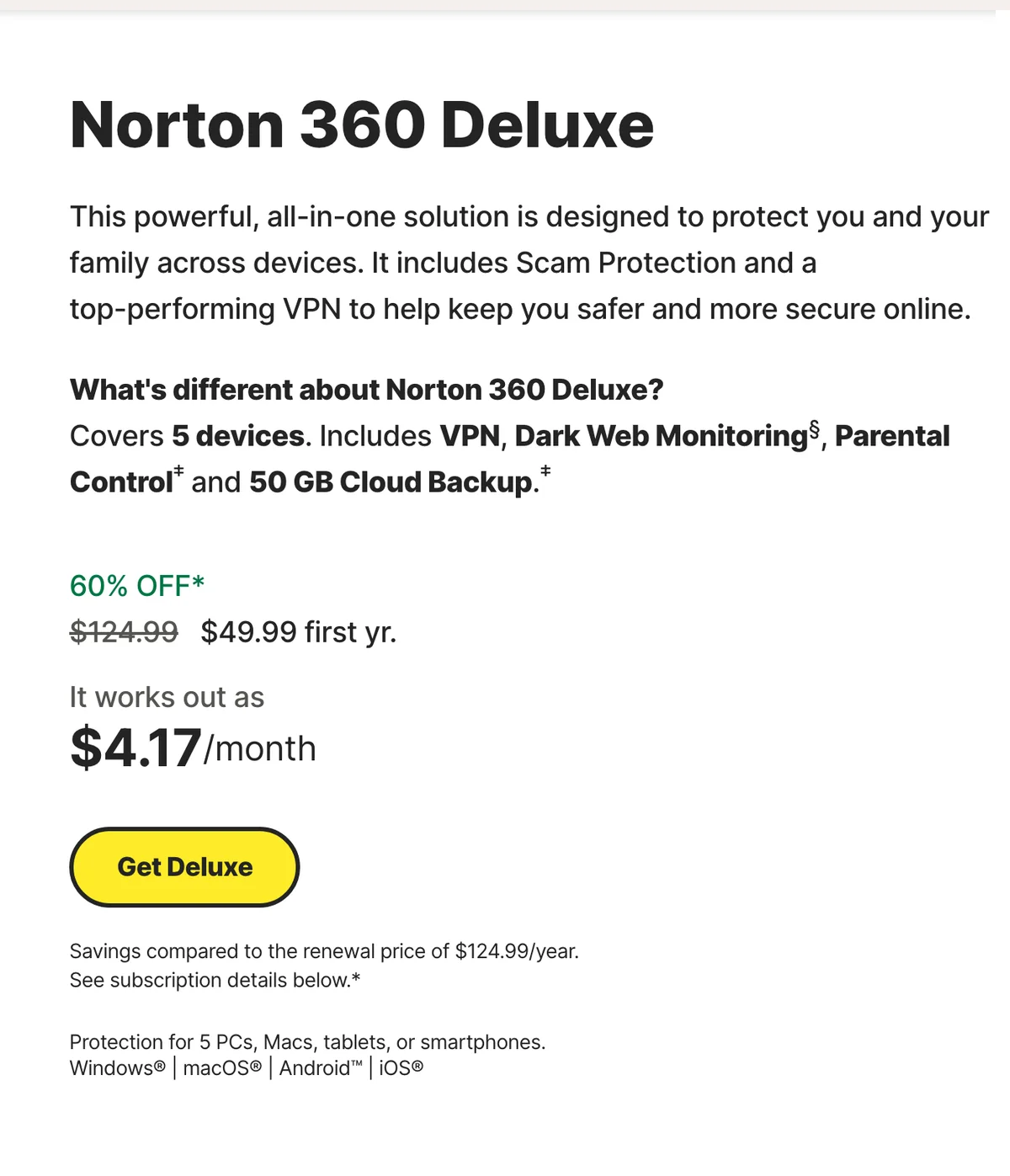
That bundle can be the right answer. A parent who wants malware protection, VPN, dark web alerts, password manager, parental controls, and backup under one account has a different problem from a single Windows user who already has good defaults. Norton fits the first buyer better than Bitdefender.
The renewal jump is why it does not rank first. A discounted first year can be easy to justify, but the second year is where antivirus regret usually starts. If the household will actually use the extras, Norton Deluxe is defensible. If not, you are paying to collect dashboard tiles.
The useful Norton checkout test is simple: name the three bundle extras you will use in week one. If the answer is parental controls, VPN, and cloud backup, Norton looks much better. If the answer is "maybe dark web alerts someday," slow down. Identity monitoring and Privacy Monitor can be useful, but they are not the same as malware prevention, and they are not a reason to ignore the renewal math.
Norton Deluxe bundles antivirus with VPN, parental controls, dark web monitoring, cloud backup, Privacy Monitor, and five-device coverage.
Skip it if you only need antivirus and will not use the bundle extras after the first-year discount.
Norton comes close because the suite is useful for families, but the visible renewal jump and heavier bundle keep it behind Bitdefender as the default.
- AV-TEST April 2026 shows a 6/6/6 row for Norton 360
- Five-device Deluxe plan includes VPN, parental controls, Privacy Monitor, and dark web monitoring
- 50 GB cloud backup is useful for Windows ransomware recovery planning
- Better fit than Bitdefender when family controls and bundle consolidation matter
- Official page shows $49.99 first year versus $124.99/year renewal price
- Bundle value drops if you already pay for a VPN, password manager, or backup tool
- LifeLock identity features sit outside the basic Deluxe value case
- No support, cancellation, malware-sample, or backup-restore test was performed here
3. Malwarebytes Premium: best specialist beside an existing baseline
Malwarebytes is the most misunderstood tool in this comparison. Its Free product is useful because a cleanup scanner is useful. That does not make it a full prevention layer. Malwarebytes Premium is the paid version to compare when the buyer wants extra protection against phishing pages, malicious URLs, ransomware behavior, exploit attempts, brute-force attempts, and suspicious downloads.
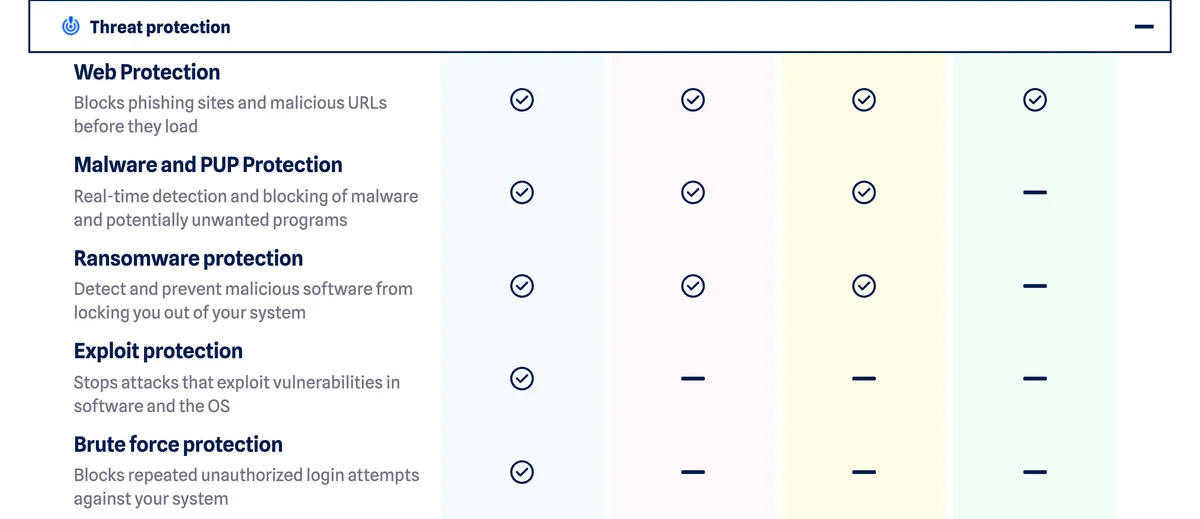
I would not rank Malwarebytes first for a normal paid-suite buyer because the public lab story is less clean. AV-TEST's April 2026 table showed Malwarebytes Premium 5.5 with 5.5 for protection and 6 for performance and usability. AV-Comparatives' March 2026 malware protection test also put Malwarebytes behind Norton and Bitdefender on false alarms. That does not make Malwarebytes bad. It makes the recommendation more specific.
Use Malwarebytes when you want a second-opinion security layer, scam-site defense, or cleanup-oriented brand. Choose Bitdefender or Norton when you want the main paid suite to own the household security subscription.
The cleanest Malwarebytes buyer is someone who already trusts Defender or another primary baseline but wants extra web and scam friction. That buyer cares about malicious links, suspicious downloads, PUPs, exploit attempts, and the comfort of a brand known for cleanup. The wrong Malwarebytes buyer is a family expecting one broad dashboard for backup, parental controls, VPN, identity monitoring, and renewal management. That is not the promise I would buy it for.
Malwarebytes is clearest when used as the paid prevention upgrade from a free cleanup scanner, not as the broadest family suite.
Skip it as your default paid suite if you want the strongest family bundle, cloud backup, or the cleanest independent lab score line.
Malwarebytes ranks third because its specialist threat and cleanup story is useful, but the paid-suite evidence is narrower than Bitdefender or Norton.
- Official FAQ separates Free cleanup from Premium real-time prevention
- Paid page documents web, malware/PUP, ransomware, exploit, and brute-force protection rows
- Good fit as a second-opinion layer for scam and malicious-download risk
- 60-day money-back guarantee appears on the pricing page
- AV-TEST April 2026 shows 5.5 for protection rather than a clean 6/6/6 row
- Less compelling as a full family bundle than Norton Deluxe
- Pricing cards can be harder to compare because device counts and tiers vary
- No direct install, scan, remediation, or support test was performed here
Also considered: McAfee, Avast, ESET, and Microsoft Defender
McAfee belongs on many antivirus shortlists, especially for households that want broad device coverage, but this page intentionally stayed with the selected three-way buyer question. Avast and AVG had strong AV-TEST rows, too, yet their free-versus-paid story would turn this into a different article about free antivirus ecosystems. ESET is credible for buyers who want a lighter, more configurable security product.
Microsoft Defender is the baseline, not a ranked affiliate pick. The point is not to pretend paid antivirus is mandatory. The point is to know when the paid suite solves a real prevention, bundle, or household-management problem that Defender plus good habits does not fully cover.
McAfee, Avast, ESET, and Defender also show why category claims need boundaries. A lab score can put several products in the acceptable set at once. The buyer still has to decide whether the paid product is a suite, a specialist, a family dashboard, or a free baseline. This guide does not argue that only three antivirus products matter. It argues that this specific three-way comparison is the clearest answer for readers already deciding between Malwarebytes, Bitdefender, Norton, and the free Microsoft baseline.
If the suite's included backup does not cover your computers or file collection, compare a dedicated service separately. Our Backblaze vs IDrive guide focuses on retained deleted files, device count and renewal cost, not malware detection.
How to choose paid antivirus without buying duplicate security tools
Start with the failure you cannot tolerate. If the failure is a shared family PC clicking scam links, choose the paid suite with the clearest web and family controls. If the failure is ransomware recovery, ask whether you also have backups. If the failure is identity theft, antivirus is only one part of the answer; read our identity theft protection comparison before paying for a bundle because an identity monitor is not the same thing as device protection.
Then subtract what you already own. If you already use a paid VPN, a strong password manager, cloud backup, and parental controls, Norton's bundle loses some value. If you have none of those, Norton becomes more attractive. Bitdefender is the cleaner default when you want the antivirus suite itself to do the job. Malwarebytes is the cleaner add-on when you mostly want scam and cleanup-adjacent protection beside Defender.
Finally, check the second-year price before checkout. First-year antivirus discounts are normal. They are not wrong by themselves. They become a problem when the buyer compares only the promo price and forgets the renewal, taxes, device count, and features they will actually use.
Malwarebytes vs Bitdefender vs Norton FAQ
Final verdict: Bitdefender is the paid default, Norton is the bundle, Malwarebytes is the specialist
I would start with Bitdefender Total Security if the question is simply "which paid antivirus suite should I compare first?" It has strong public lab evidence, a sane five-device card, and a cleaner default story than most bundles.
I would choose Norton 360 Deluxe when the household will actually use the extras. The bundle is not fake. VPN, parental controls, cloud backup, Privacy Monitor, and dark web monitoring can be useful. The warning is the renewal price, not the product category.
I would choose Malwarebytes Premium when the buyer wants the paid upgrade from cleanup scanner to real-time scam, web, ransomware, exploit, and malware protection. I would not use it as the default recommendation for a family that wants one broad security subscription.
The uncomfortable answer is that some readers should pay nothing. Defender plus careful habits can be a defensible baseline. Paid antivirus earns its place when it prevents a realistic household failure, not when a pricing card scares you into another renewal.
Best paid default if you want a current antivirus suite without buying the heaviest identity bundle. Norton is the better family bundle; Malwarebytes is the specialist add-on.
Compare BitdefenderReady to check Bitdefender Total Security?
Use the verified route if the trade-offs still fit. If not, jump back to the summary and compare the alternatives.
Security and privacy editor focused on evidence-led buying guides. Reads official documentation, audit notes, privacy policies, recovery limits, and support pages before turning security claims into practical recommendations.
Sarah starts by locating the evidence boundary, then ranks security and privacy tools by audit and policy scope, recovery design, trust boundaries, residual risk, and what a cautious buyer can verify.
Related Articles

Cloaked vs Incogni: Do You Need Both?
Decide whether existing broker cleanup, future sign-up aliases, or a documented gap justifies one privacy subscription or both
Cloaked vs Incogni compared by aliases, broker removal, verified annual prices, and the extra value of paying for one service or both.

Backblaze vs IDrive: Choose by What You Need to Recover
For one active Mac or Windows PC with a growing file collection; choose IDrive for several personal computers or retained locally deleted files
Backblaze vs IDrive compared by deleted-file retention, device limits, private keys and current annual prices. Choose backup for the recovery you need.