
The passkey question is no longer "do passkeys matter?" They do. The more useful question is where the private half of that login should live when you need it on a phone, a laptop, a browser, and a future device you have not bought yet.
My short answer: Bitwarden is the best default passkey manager if you care about price, portability, and a clear export path. 1Password is the better polished paid option if you already trust its vault model and want a smoother family or business experience. Proton Pass is the best free privacy-stack option, especially if you already use Proton Mail, Proton VPN, or Proton Drive.
This is not a hands-on passkey migration test. I did not create live passkeys, export a vault, import credentials into another provider, buy a paid plan, or test support. I reviewed official support docs, pricing pages, rendered evidence screenshots, FIDO credential-exchange material, current SERP competitors, GDT operator data, affiliate click signals, and concrete Reddit setup questions. Treat the scores as buyer-fit judgments, not cryptographic lab results.
If you still need the broader credential stack, start with our password manager comparison. If you are deciding whether high-value accounts should use hardware-bound passkeys instead, read our security key guide and the focused YubiKey vs Google Titan comparison. If you still have sites that only support TOTP, our authenticator app guide covers that fallback layer.
-
#1 BitwardenBest default: free tier, $19.80/year Premium, passkeys in JSON exports, and strong portability discipline
-
#2 1PasswordBest polished paid pick: excellent cross-device experience, but passkey export has a real caveat
-
#3 Proton PassBest free privacy-stack pick: passkeys on all plans, with paid pricing localized by region
If I were starting from scratch today, I would compare Bitwarden first. I would pick 1Password when polished sharing, recovery, and family/business UX matter more than the cheapest plan. I would use Proton Pass when the reader already wants the Proton ecosystem and a free passkey-capable vault.
The real decision is lock-in, not biometrics
Passkeys are sold as a face scan or fingerprint. That is only the visible moment. The buyer decision is less glamorous: which provider stores the private credential, how it syncs, what happens after a phone dies, and whether you can leave without rebuilding every login one site at a time.
That is why the best passkey manager is not automatically the one with the prettiest prompt. A passkey vault needs four things: reliable autofill, clear account recovery, export or migration clarity, and enough security around the vault itself that syncing credentials does not turn into one giant single point of failure.
FIDO's credential-exchange work explains why this is becoming a real category question. The alliance describes a need for more secure import and export between credential providers because old CSV-style migration is weak and inconsistent. That is the future shape of this market. Until every provider supports clean secure credential exchange, buyers should assume passkey portability is uneven.
Reddit is useful here only as friction evidence. A current r/Bitwarden thread asked why a passkey did not sync between phone and PC, and replies immediately got into whether the passkey landed in Windows, the browser, or the Bitwarden vault. That is the buyer problem in one sentence: if you cannot tell where the passkey went, you do not really have a recovery plan.
This is also where broad password-manager rankings can mislead people. A normal review might say a product "supports passkeys" and move on. That is too shallow. A passkey is not a note field. It is the credential that may replace the password for an account you depend on. If it is saved in the wrong place, the lock-in only becomes obvious later, usually during a phone replacement, browser reset, laptop migration, or family emergency.
How I ranked 1Password, Bitwarden, and Proton Pass
I weighted five criteria: passkey storage clarity, export and migration, vault security, device support, and price clarity. I gave less weight to generic password-manager features because those are covered in the broader guide. This page is narrower: if the next important login asks where to save a passkey, which vault should you trust?
That framing changes the ranking. 1Password is still the smoothest paid product. Proton Pass is unusually generous on the free tier. But Bitwarden gets the default recommendation because its passkey export story is clearer, the entry point is hard to beat, and the tradeoffs are visible instead of hidden behind polish.
I also treated platform storage as a separate decision. Apple Passwords, Google Password Manager, Windows Hello, Chrome, Safari, and Edge can all become passkey providers depending on the device and browser. That is convenient until the buyer also uses a third-party vault. The dangerous setup is not "Apple bad" or "Google bad." The dangerous setup is saving some passkeys to iCloud, some to Chrome, some to Windows, and some to a password manager with no written inventory.
For most readers, one primary vault is cleaner. It does not need to be perfect. It needs to be the place you intentionally choose, the place you can explain to another trusted person, and the place you know how to leave if the provider changes terms, export support, or product direction.
| Feature | Bitwarden | 1Password | Proton Pass |
|---|---|---|---|
| Best fit | Default passkey vault for portability-minded buyers | Polished paid passkey and password manager experience | Free privacy-stack passkey vault |
| Official price checked | Free; Premium $1.65/mo billed $19.80/yr | $3.99/mo annual list; $2.99/mo first-year promo visible | Free plan confirmed; paid prices vary by region and billing term |
| Passkey storage | Browser, iOS, and Android passkey storage with platform caveats | Create, use, and share passkeys across 1Password devices | Proton says passkeys are supported on all devices and plans |
| Export/migration signal | Official help says passkeys are included in JSON exports | Passkey export limited to iOS and Android at time checked | Proton says passkeys can be stored, shared, and exported |
| Main caveat | Less polished than 1Password and still subject to OS/browser passkey quirks | Portability caveat matters if you plan to switch vaults later | Newer password-manager track record and public pricing render issue |
| Best next move | Use if you want a low-cost vault with a clearer leaving path | Use if UX, family sharing, and paid support outweigh portability concerns | Use if you already want Proton and need a free passkey-capable vault |
| Action | Compare Bitwarden | Compare 1Password | Compare Proton Pass |
1. Bitwarden: best default if portability matters
Bitwarden wins this comparison because the boring details line up. Its pricing page showed a free path, plus Premium at $1.65 per month billed annually at $19.80. Its passkey help page says saved passkeys can be accessed from any Bitwarden app, and the export section says passkeys are included in JSON exports and can be imported into a Bitwarden account.
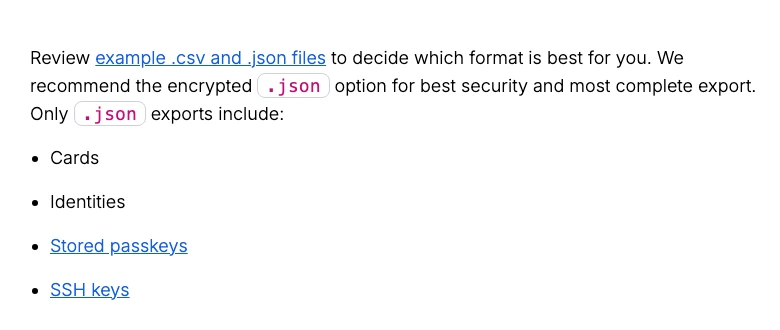
That is the kind of sentence I want to see in a passkey article. Passkeys are supposed to reduce login risk, not trap a buyer inside a mystery box. Export does not make migration effortless. It does make the risk more legible.
The low barrier matters more than it looks. A passkey manager is not a one-account tool. Once it becomes the default, it touches email, banking, shopping, developer accounts, and every random SaaS login that adds passkey support over the next year. At $19.80, Premium makes it easier to say yes to the right features without talking yourself into a premium vault before you understand your own setup.
The caveat is that Bitwarden is still dealing with the same platform mess as everyone else. Its docs call out iOS and Android setup paths, and Android restrictions around third-party passkey providers. That is not a Bitwarden-only failure. It is the current passkey market showing its plumbing.
Bitwarden is the wrong pick if you mostly want hand-holding, family polish, and a cleaner day-one interface. It can feel more technical than 1Password. But if the buyer asks, "what happens if I switch later?" Bitwarden has the best answer in this three-way comparison.
My caution is to avoid making Bitwarden sound magically portable. An exported JSON file is still sensitive. It needs careful handling, local deletion after migration, and a real understanding of what the destination tool can import. Bitwarden wins because it exposes more of the path, not because migration becomes risk-free.
Bitwarden combines a strong free tier, very low Premium pricing, and the clearest official export signal for stored passkeys.
Skip it if you want the smoothest family/business UX and do not mind paying more for 1Password polish.
Bitwarden wins because passkey portability and price clarity matter more than UI polish for this specific buying decision.
- Free tier and $19.80/year Premium pricing keep the first move cheap
- Official docs say passkeys are included in JSON exports
- Open-source posture and long password-manager track record support trust
- Good default for buyers who dislike provider lock-in
- Less polished onboarding than 1Password
- OS and browser passkey behavior can still confuse normal buyers
- One-passkey-per-login-item details can require cleanup
2. 1Password: best paid experience, with a portability caveat
1Password is the product I would choose for many families and small teams. The official page showed Individual at a $3.99 per month annual list price, with a limited first-year $2.99 per month promotion visible for new annual customers. Families showed a $5.99 annual list price and a $4.49 first-year promotion. Those discounts make the first invoice look better than the renewal, so compare the crossed-out price as well as the headline.
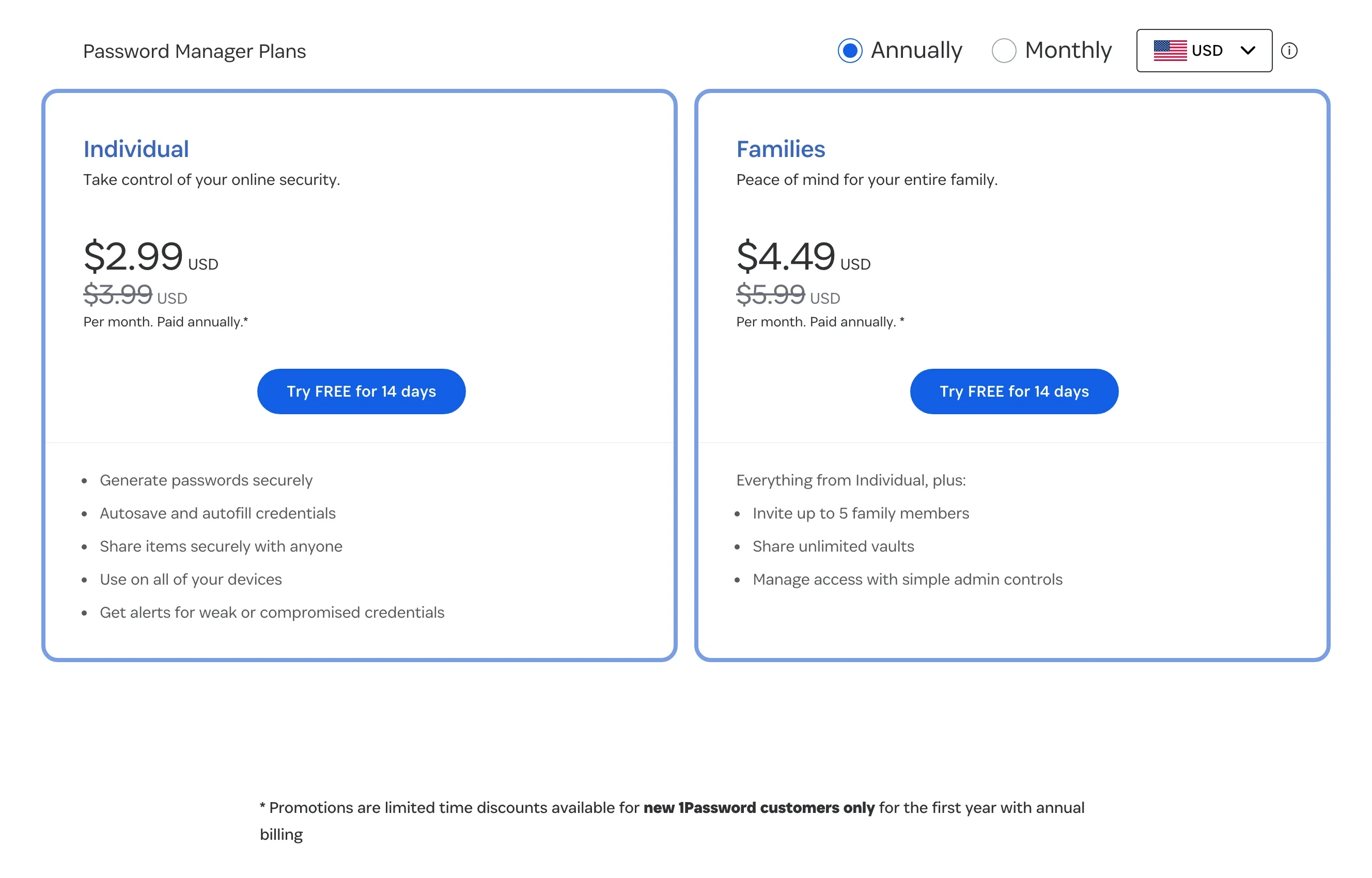
For passkeys specifically, 1Password's pitch is strong: create, use, and share passkeys from the same vault as the rest of your credentials. That is exactly what normal buyers want. One app, one sign-in habit, one familiar recovery model.
The portability caveat is real. 1Password's support page said passkeys can only be exported from 1Password for iOS and Android at the time checked. It also tells desktop-app export users to create new passkeys on each website and save them elsewhere. That does not make 1Password a bad choice. It means switching later can be more work than the marketing story implies.
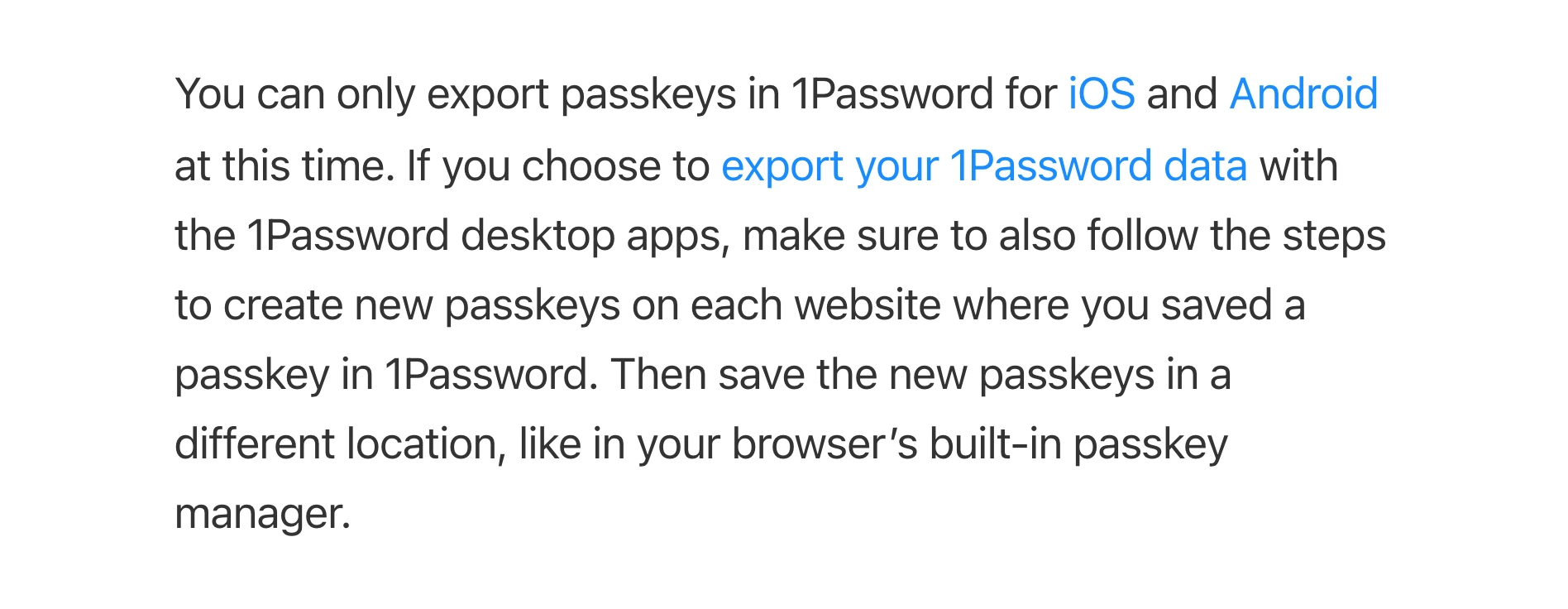
That is why 1Password lands second here. If the buyer optimizes for daily feel, it may be first. If the buyer optimizes for passkey storage decisions over the next few years, I want the export caveat front and center.
There is a fair counterargument. Many buyers never switch password managers. They want the product that makes secure behavior more likely every day, and 1Password is very good at that. The family plan, recovery flow, sharing model, and Watchtower habit can be worth more than theoretical exit flexibility if the household would otherwise drift back to weak passwords and SMS codes.
That is why I would not tell an existing happy 1Password user to leave just because Bitwarden ranks first here. The smarter move is to audit where new passkeys are being saved, write down the export limitation, and use hardware keys for the handful of accounts where a synced vault is too much concentration risk.
1Password has the cleanest paid experience and strong recovery/sharing ergonomics, but its passkey export caveat matters for switchers.
Skip it if your main criterion is lowest cost or the clearest cross-provider passkey migration path.
1Password scores high for polish and vault trust, but loses the default slot because passkey export is less straightforward than Bitwarden.
- Very polished browser, mobile, family, and business experience
- Strong paid-account recovery and sharing features
- Clear official passkey creation and sign-in support
- Good choice when the buyer already trusts the 1Password vault model
- No permanent free tier after the trial
- Passkey export was limited to iOS and Android in the official support page checked
- First-year promotions can make the visible price look cleaner than renewal reality
3. Proton Pass: best free privacy-stack choice
Proton Pass is the most interesting free option. Proton's passkey page says passkeys are supported on any browser and in its apps, can be stored, shared, and exported, and are available in all plans. Its plan explainer says Proton Free includes unlimited logins, notes, and devices, plus passkeys supported on all devices.
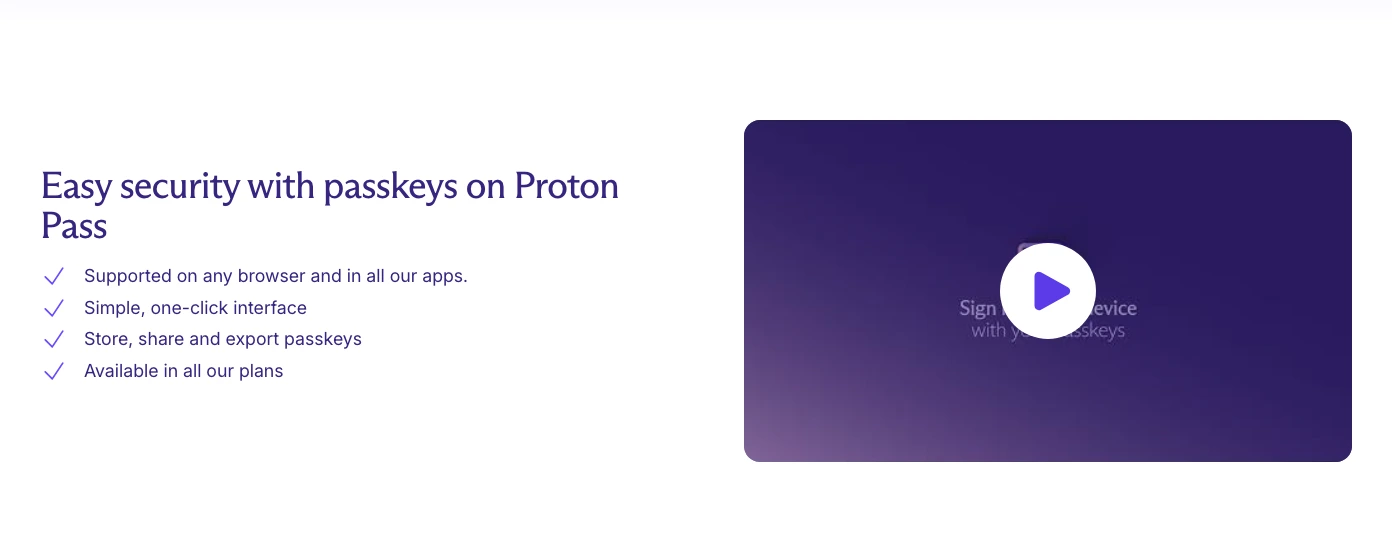
The reason Proton does not rank higher is not passkey ambition. It is maturity and regional price comparability. Proton Pass is younger than 1Password and Bitwarden as a standalone password-manager product. Its public page now renders paid prices, but localizes them by region and billing term; the July 29 Croatia/EU render showed Pass Plus at €2.99 per month on annual billing. The free-plan passkey claim is the stable comparison point, while paid buyers should check the price shown for their own region.
Proton Pass makes the most sense when the buyer already wants the Proton account perimeter: Proton Mail, Proton VPN, Proton Drive, aliases, and privacy-first defaults. In that context, adding a free passkey vault is coherent. If the buyer only wants the strongest standalone password manager today, Bitwarden and 1Password have the longer track record.
The other Proton advantage is mental simplicity for privacy-focused users. If the same person already trusts Proton with email, aliases, a VPN, and cloud storage, adding passkeys to that account can reduce app sprawl. The risk is concentration. If too much of your privacy stack lives behind one Proton account, the account recovery plan needs to be clean, documented, and protected with stronger authentication.
I would not buy Proton Pass Plus from one localized screenshot alone. The free-plan evidence is strong enough to rank Proton as a free passkey-capable option. Paid buyers should verify their own currency, billing term, tax, and renewal total before comparing Proton's value against Bitwarden Premium or 1Password Individual.
Proton makes passkeys available on the free plan and fits readers who already want a Proton-centered privacy stack.
Skip it if you want the longest standalone password-manager track record or one globally comparable paid price.
Proton Pass is strong for free passkey access and ecosystem fit, but the younger product history and region-dependent paid pricing keep it third.
- Passkeys are available in all plans according to Proton
- Good fit for Proton Mail, Proton VPN, and alias users
- Free plan is unusually useful for a privacy-first password manager
- Proton says passkeys can be stored, shared, and exported
- Standalone password-manager track record is younger than 1Password and Bitwarden
- Paid pricing is localized, so the observed EUR offer is not a universal comparison
- Some device and platform caveats still apply to passkeys generally
When a password manager is the wrong place
A synced passkey vault is the right default for many everyday accounts. It is not automatically the right place for every account. Email, password manager login, domain registrar, GitHub admin, cloud admin, brokerage, and crypto exchange access deserve a stricter discussion.
For those accounts, a hardware security key can be the better answer because it keeps the credential device-bound and forces a more disciplined backup-key setup. The cost is friction: you need at least two keys, clean recovery codes, and a plan for travel, phone replacement, and emergency access.
My rule is simple. Store normal passkeys in a password manager so you actually use them. Put the highest-risk accounts on hardware keys when the service supports it and the recovery plan is documented. Do not split credentials randomly across Apple, Google, Windows, a browser profile, Bitwarden, and a hardware key unless you can explain where each critical passkey lives.
The strongest setup is boring. One password manager for most accounts. Hardware keys for the few accounts that can reset everything else. Recovery codes saved somewhere you can reach when the phone is gone. A short note that says which accounts use which method.
How I would choose without getting locked in
Do not let the browser choose for you.
I would not save passkeys wherever the browser prompt happens to point first. That is how buyers end up with one passkey in iCloud, another in Chrome, another in Windows, and another in a password manager. Everything works until the day you change devices and cannot tell which provider owns the credential.
Write the storage location down.
I would not choose a passkey manager only because it has a free plan. Free is useful, especially for Bitwarden and Proton Pass, but the free plan still needs to match your recovery model. If the account can reset your email, domain registrar, crypto exchange, or password manager, the storage decision should be stricter than "this prompt appeared first."
Test recovery before you need it.
I would not store recovery codes only inside the same vault that depends on the passkeys you are protecting. That sounds obvious, but it is one of the easiest mistakes to make when a password manager becomes the center of everything. Recovery material needs its own plan: printed and locked away, stored in a separate encrypted location, or split through a family/emergency workflow that still works when the primary phone is gone.
I would not migrate passkeys in a hurry. Before moving from one provider to another, check whether the source exports passkeys, whether the destination imports them, and whether the important sites let you create a second passkey before deleting the first. A clean migration is deliberate. A panic migration is how you lose access.
Verdict: where I would store passkeys
I would store most passkeys in Bitwarden if I were optimizing for portability, price, and a clean future exit. It is not the prettiest experience. It is the one with the best answer to the question that matters most after passkeys spread: can I move without rebuilding everything?
I would choose 1Password if the household or team needs a smoother paid product and is comfortable staying inside that vault for years. The daily experience is excellent. Just make the export caveat part of the decision before the vault fills with passkeys.
I would choose Proton Pass if the buyer wants a free, Proton-centered privacy stack and does not need the oldest standalone password-manager track record. The free passkey support is genuinely useful. I would still verify the paid price in the buyer's own currency before treating Pass Plus as a directly comparable paid recommendation.
For high-value accounts, I would not make this a password-manager-only decision. Use a hardware key where lockout risk is manageable and the account is important enough to justify the discipline. Convenience is allowed. Confusion is not.
Frequently Asked Questions
Ready to check Bitwarden?
Use the verified route if the trade-offs still fit. If not, jump back to the summary and compare the alternatives.
Security and privacy editor focused on evidence-led buying guides. Reads official documentation, audit notes, privacy policies, recovery limits, and support pages before turning security claims into practical recommendations.
Sarah starts by locating the evidence boundary, then ranks security and privacy tools by audit and policy scope, recovery design, trust boundaries, residual risk, and what a cautious buyer can verify.
Related Articles

Venice AI vs Proton Lumo vs Duck.ai: Which Private AI Chat Fits?
Private AI chat decision guide
Venice AI, Proton Lumo, and Duck.ai compared by privacy architecture, saved-history protection, provider exposure, plan limits, model access, and price.
Malwarebytes vs Bitdefender vs Norton
Paid antivirus decision guide
Malwarebytes, Bitdefender, Norton, and Microsoft Defender compared by paid antivirus value, real-time protection, renewal risk, bundle scope, and lab evidence.