
The risk in buying computer backup is assuming the saved copy will outlive the original. With Backblaze Computer Backup, a deleted folder's recoverability depends on version history and the continued maintenance of the backup. With IDrive, the company says backed-up files remain after local deletion unless you remove them from the account or run Archive Cleanup. Those policies lead to different recommendations, even before the first subscription payment.
For someone protecting one main Mac or Windows PC, Backblaze is my default choice: automatic file selection and no storage quota make the backup easier to budget. IDrive Personal is the stronger alternative for one person with several computers, or someone who specifically needs retained copies of locally deleted files. Its shared storage allowance and cleanup settings require more attention.
This comparison covers the consumer computer-backup products, not Backblaze B2 or IDrive e2 object storage. It is based on official pricing, the public IDrive order summary, retention documentation, and encryption policies checked on September 30, 2026. No account was created, no files were uploaded or restored, and no recovery speed, support outcome, or security implementation was tested.
-
#1 BackblazeFor one main computer with a growing local file collection
-
#2 IDrive PersonalFor one user backing up several computers within a shared allowance
Backblaze vs IDrive: what happens after you delete a file?
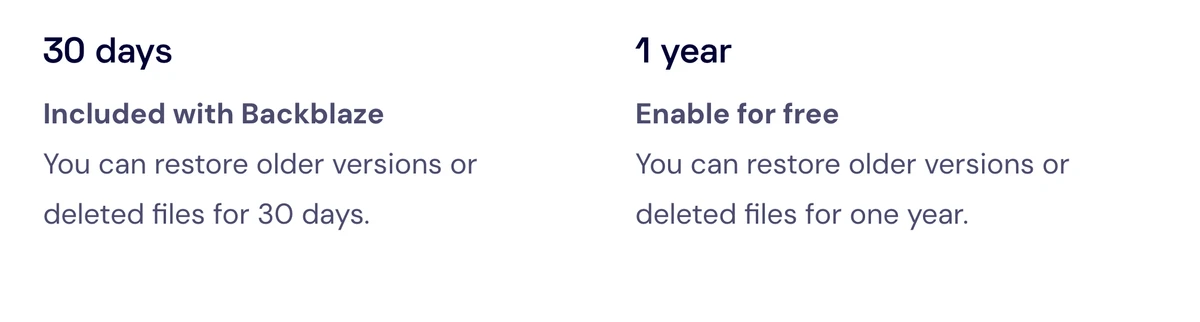
Backblaze's version-history page says accounts come with 30 days of history, with the option to enable one year free. Its supported-data documentation explicitly warns against uploading an external drive and then deleting its contents to create extra storage space. Check the actual retention setting before relying on it; the availability of a free year is not proof that your computer already has it enabled.
That warning matters most when you are running out of disk space. Backup can preserve a recoverable copy for a period, but it does not automatically turn the provider into a permanent archive. Someone deleting finished client projects needs a retention decision, not just a completed upload.
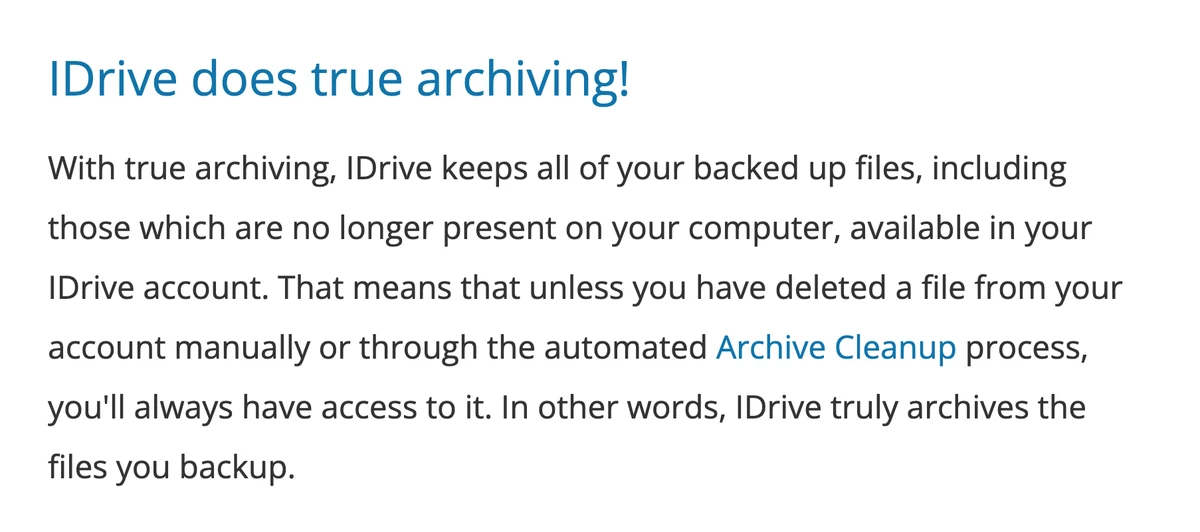
IDrive's True Archiving documentation takes a different position: local deletion alone does not remove the cloud copy. The exceptions are consequential. Manual deletion and automated Archive Cleanup can remove backed-up files. I would check that cleanup policy before treating an IDrive account as the only surviving copy of a project.
Neither policy makes a paid account a substitute for a second recoverable copy. Retention, account access, and the encryption key all have to work at the same time. For file sharing and encrypted collaboration rather than whole-computer protection, our encrypted cloud storage guide covers a different purchase.
Backblaze and IDrive Personal compared
| Feature | Backblaze | IDrive Personal |
|---|---|---|
| Recommended starting point | One main Mac or Windows PC | One user with several computers |
| Storage model | Unlimited data on the covered computer; exclusions apply | 5TB shared allowance on the entry Personal plan |
| Annual price checked | $99 per computer | $83.92 first year; $119.88 standard renewal |
| Deleted local files | Retention follows version-history settings | Kept unless deleted from the account or by Archive Cleanup |
| Encryption-key warning | A lost optional passphrase prevents recovery | IDrive says a lost private key cannot be recovered |
| Wrong purchase if | You need NAS backup, an OS image, or permanent offloading | You need a quota-free plan or separate household users |
| Action | See pricing | See pricing |
How the backup recommendations are scored
The default reader has one primary computer and wants an offsite copy of personal and work files. Recovery Clarity carries 35% of the score, Coverage Fit 25%, Cost Predictability 20%, and Key Control 20%. Both products use the same criteria. These are editorial fit scores from the documented policies, not measured restore success rates.
Backblaze receives more credit for removing a storage-cap decision from that specific setup. IDrive gains coverage points for multiple computers and its archiving policy, but loses cost predictability because the introductory discount ends and overuse can be billed. Change the scenario to several computers, and the recommendation can change without pretending that one product became more reliable.
Backblaze: a clearer bill for one main computer
The price does not rise with a growing collection of supported files on the covered computer.
Skip Personal Backup for NAS storage, a bootable system image, or files you intend to remove locally and keep indefinitely.
It ranks first for a single-computer file backup because the flat storage model reduces maintenance; retention settings and excluded data still need checking.
- Unlimited supported data on the covered computer
- Automatically selects user data for backup
- One-year version history can be enabled free
- Optional passphrase adds control over the stored backup key
- Each additional computer adds another subscription
- Network drives and NAS are excluded from Computer Backup
- Operating system and application files are excluded by default
- Deleted-file recovery depends on retention and ongoing backup maintenance
Backblaze's default scope reduces the risk of forgetting a working folder. Its documentation says it selects user data across local user profiles instead of requiring you to remember each important folder. Connected hard drives can also be included. That is a meaningful advantage when your files keep moving between working folders and an external drive.
But the phrase unlimited does not mean everything is covered. The supported-data page excludes network-mounted drives and NAS, and describes exclusions for the operating system, application files, and several other categories. Some file-type exclusions can be changed; some directory exclusions cannot. A completed file backup should not be read as proof that you can recreate a bootable computer from it.
Check the exclusion list against the actual files you would struggle to replace. In particular, a computer with locally stored email or files held open by another application may need attention to skipped-file reports. Backblaze's documentation warns that locked files can be skipped until another backup attempt. Automatic backup still needs occasional verification.
The remaining concern is time away from the computer. Backblaze says the software needs to keep running to maintain its remote copy; its supported-data page warns that a backup may be removed and the account may be subject to cancellation if the computer does not contact the service for six months. I would not buy this as a way to upload an old machine, put it in a cupboard, and forget it.
IDrive Personal: more devices, more responsibility for capacity
One Personal plan can cover several computers, while local deletion does not automatically erase the cloud copy.
Skip Personal if separate users need their own accounts or if you do not want to monitor a shared storage allowance.
Its broader device coverage is valuable, but storage overuse, cleanup settings, and the renewal step make it less predictable for the one-computer default.
- Multiple computers covered for one Personal user
- Local deletion alone does not erase archived cloud files
- Optional private key is documented for transfer and storage modes
- A free 10GB Basic account offers a small evaluation path
- The Personal storage allowance is shared, not unlimited
- The introductory discount ends at renewal
- Personal overuse may cost $0.25 per GB per month
- Archive Cleanup can remove copies that no longer exist locally
IDrive makes more sense when the laptop is only part of the problem. Its published device coverage includes PCs, Macs, Linux, iPhones, iPads, and Android devices, subject to the selected plan. The important qualification on Personal is one user. Multiple computers do not turn it into a multi-user household plan; IDrive lists Team separately.
The archiving policy is a genuine reason to choose it over Backblaze. A file does not have to stay on the original computer merely to avoid automatic removal from the backup account. But that advantage also explains why capacity needs watching: retained data can continue occupying space after the local drive has been tidied.
There is a difference between more supported products and more included services. IDrive's pricing page lists server backup and cloud-application backup as add-ons. Do not assume that a Personal computer-backup subscription also includes an independent backup of your entire Microsoft 365 or Google Workspace account. Read the price for the actual workload.
If your existing antivirus subscription advertises backup, first compare its included scope with the files and devices you need protected. Our Malwarebytes, Bitdefender, and Norton comparison covers the security-suite purchase; a bundle label alone does not settle this dedicated-backup decision.
Compare the annual bill, then count computers
Backblaze lists $99 per year per computer, or $9 on monthly billing. Two computers on annual subscriptions therefore cost $198 a year. That calculation assumes two separately licensed computers at the current public annual rate; it does not include taxes or additional paid retention.
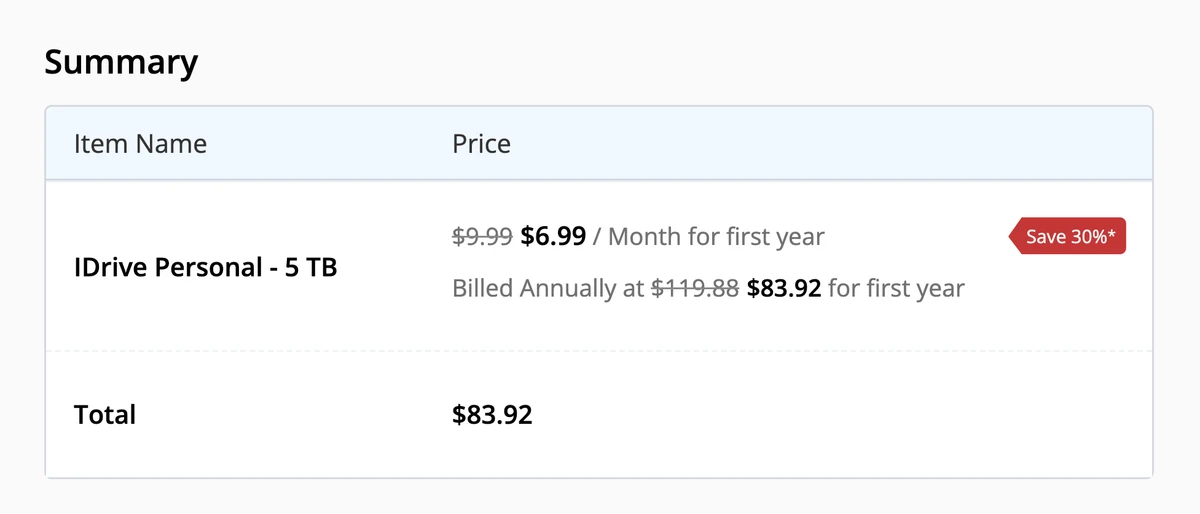
IDrive's yearly pricing view presents Personal 5TB as $6.99 per month for the promotional period, against a $9.99 monthly-equivalent standard rate. The public signup summary gives the more useful figures: $83.92 billed for the first year and $119.88 standard annual billing. The introductory offer is for eligible new signups. Use the actual order summary, not twelve times a rounded display number.
For one computer, Backblaze's annual rate is below IDrive's standard 5TB renewal. For two computers belonging to the same person, IDrive can be cheaper at renewal if all the selected backup data fits within 5TB. Neither comparison says anything about measured reliability; it is a subscription calculation.
The overuse rate deserves more attention than a small introductory saving. IDrive says Personal overuse may be charged at $0.25 per GB per month. An illustrative 100GB overage at that rate would be $25 for a month. That is not a measured bill or a promise that every account will incur the charge, but it shows why choosing a plan right at your current data size leaves little room for growth.
Backblaze's Forever history is a separate budgeting question. The official page currently contains inconsistent figures: its introductory text says $0.006 per GB per month, while later sections show $0.00695 for files older than a year. I would confirm the account's actual upgrade price before buying that option. The comparison here uses the free one-year setting, not an assumed Forever total.
Private encryption keys can become the recovery failure
Backblaze's technical explanation distinguishes the default, provider-managed backup key from an optional passphrase. With a passphrase, Backblaze still stores the backup key but encrypts it using that passphrase. Its documentation says it uses the passphrase when you supply it, including during restoration, then discards it. This is more specific than saying the provider can never participate in decryption.
IDrive says an optional private key can be created during signup, is not stored on its servers, and is needed to decrypt restored data. That is a vendor-documented boundary, not an independent audit result. I have not inspected either client's network traffic or verified the implementation.
Both approaches leave you with a practical obligation: keep the recovery secret somewhere that survives losing the computer. A password stored only inside the encrypted backup cannot help unlock that backup. Our password manager guide is relevant to storing credentials, but your recovery plan also needs a way to regain access to that manager.
I would choose a private-key option only after arranging that recovery path. More control is useful when it matches the risk you are trying to reduce; losing the only key is not an improvement in data protection.
How to choose before starting the first upload
Write down the folders and drives you actually need to recover, the number of computers, and whether files will remain on them. That short inventory settles more than a long feature comparison. For one active Mac or Windows PC whose supported files stay locally available, begin with Backblaze and verify the one-year history setting.
For several computers owned by one person, total their selected data and leave headroom before choosing an IDrive capacity. If local deletion is part of your workflow, inspect Archive Cleanup as carefully as the backup schedule. If you need independent users, a NAS-first setup, or complete machine recovery, do not force this consumer comparison to answer a different question.
Before trusting either service, run your own restore exercise with harmless sample files. Check that you can sign in from another device, retrieve an older version, and open the returned file. This is recommended due diligence, not a test performed for this review. Keep the previous backup available until the new route has proved usable for your own setup.
Backblaze vs IDrive FAQ
The verdict: buy for the recovery you will actually need
I would choose Backblaze for the one-computer scenario because it removes the storage-quota problem without requiring a larger plan each time a supported file collection grows. That recommendation depends on leaving the source data available, checking exclusions, and setting retention deliberately.
The strongest case against it is IDrive's retained cloud copy after local deletion, combined with multiple-computer coverage. That is enough to make IDrive Personal the better purchase for some people. It is also why I would not rank the products by introductory price alone. The policy governing the file you deleted six months ago may matter far more than the saving at signup.
The decision to avoid is buying either product on the assumption that unlimited means permanent, or that a private key guarantees easy recovery. Choose the documented retention policy you can maintain, budget the renewal, and verify the restore path before the original disappears.
The default for one active computer; choose IDrive when multi-computer coverage or retained deleted files matters more.
See pricingReady to check Backblaze?
Use the verified route if the trade-offs still fit. If not, jump back to the summary and compare the alternatives.
Security and privacy editor focused on evidence-led buying guides. Reads official documentation, audit notes, privacy policies, recovery limits, and support pages before turning security claims into practical recommendations.
Sarah starts by locating the evidence boundary, then ranks security and privacy tools by audit and policy scope, recovery design, trust boundaries, residual risk, and what a cautious buyer can verify.
Related Articles

Cloaked vs Incogni: Do You Need Both?
Decide whether existing broker cleanup, future sign-up aliases, or a documented gap justifies one privacy subscription or both
Cloaked vs Incogni compared by aliases, broker removal, verified annual prices, and the extra value of paying for one service or both.

Venice AI vs Proton Lumo vs Duck.ai: Which Private AI Chat Fits?
Private AI chat decision guide
Venice AI, Proton Lumo, and Duck.ai compared by privacy architecture, saved-history protection, provider exposure, plan limits, model access, and price.