

Gamma vs Canva vs Beautiful.ai is not one normal "AI presentation maker" decision. It is three different ideas about what a deck is supposed to be.
My default pick is Gamma for fast business drafts and link-first presentations. Canva is the better choice when presentations are only one design format in a larger content workflow. Beautiful.ai is the one I would put in front of a sales or enablement team that needs brand-controlled slides from non-designers.
The mistake is pretending all three are fighting over the same buyer.
Gamma is a web-native deck builder. Canva is a design suite that also makes presentations. Beautiful.ai is a slide system with guardrails. If the buyer does not name the actual deck workflow first, the pricing comparison becomes noise.
This is an evidence-led comparison. I checked official Gamma subscription documentation, the rendered Canva pricing page, the official Beautiful.ai pricing page, current competitor pages, GDT operator data, affiliate click data, and active commercial routes. I did not create accounts, generate decks, upload files, configure brand kits, export PPTX files, start a paid trial, or test cancellation.
If you are choosing the broader category first, start with our AI presentation makers roundup. If slides will feed a video workflow, pair this with the AI video generators guide. If the bottleneck is still images and visual assets, our AI image generators comparison is the upstream decision; if that shortlist has narrowed to Adobe Firefly, Midjourney, and Ideogram, use the commercial image-generator breakdown before choosing the deck workflow.
-
#1 GammaBest default for fast drafts: web-native cards, AI credits, link sharing, analytics, and low layout friction
-
#2 CanvaBest design-suite pick: templates, stock assets, brand kits, Magic tools, print/social/video/presentation output
-
#3 Beautiful.aiBest guardrails pick: Smart Slides, locked brand structure, team libraries, analytics, and repeatable sales decks
If a solo operator needs a deck draft today, I would start with Gamma . If the team already lives in templates, brand assets, thumbnails, ads, and one-off visuals, I would compare Canva . If sales decks keep drifting off-brand across a team, Beautiful.ai is the cleaner shortlist.
The deck shape matters more than the AI label
Most competing pages compare AI generation, templates, export options, and price. That helps, but it misses the deeper choice.
Gamma wants the deck to behave like a polished web document. You prompt, paste, import, or outline, then share cards as a link. That is excellent for internal updates, async narratives, pitch drafts, and documents that are mostly read on screens.
Canva wants the deck to be one format inside a wider creative system. The same buyer may need a slide, LinkedIn graphic, video thumbnail, one-pager, PDF, and quick brand asset in the same afternoon. Canva wins when the presentation is not the only deliverable.
Beautiful.ai wants the deck to stay inside design rules. Smart Slides, brand controls, libraries, analytics, and team workflows matter when many non-designers are making decks that need to look like the same company made them.
That is why "best AI deck maker" is too blunt. A founder building a quick investor narrative, a marketer creating ten asset types, and a sales leader trying to stop off-brand slides are not shopping for the same product.
Gamma vs Canva vs Beautiful.ai comparison
| Feature | Gamma | Canva | Beautiful.ai |
|---|---|---|---|
| Best job | Fast web-native deck drafts | All-purpose design workflow | Brand-controlled business slides |
| Starting price verified | Free; Plus $10 monthly or $96 annually in official subscription matrix | Free; paid pricing varies by location and billing information | $12/mo Pro billed annually; $40/mo/user Team annual; $45 monthly option |
| Core shape | Cards, documents, websites, link sharing | Templates, canvas editor, media library, brand assets | Smart Slides, libraries, brand guardrails |
| AI meter | Credits, card limits, image/model tiers | Shared AI allowance by plan | Unlimited AI content generation listed on Pro |
| Export fit | Better as a link; exports need review | Broadest format coverage | Traditional slide workflow |
| Best buyer | Solo operator or team that wants a fast first draft | Team that creates more than slide decks | Sales, enablement, and business teams |
| Skip if | Pixel-level slide control is the job | You only want AI to make deck structure | You hate constrained slide layouts |
| Action | Try Gamma | Try Canva | Try Beautiful.ai |
How I ranked the deck decision
The rubric uses five buyer-fit criteria: Draft Speed, Design Control, Brand Guardrails, Export Fit, and Value Clarity. Draft Speed asks how quickly a buyer can get a credible first deck. Design Control asks whether the buyer can shape the final look. Brand Guardrails asks whether the tool prevents messy slides at scale. Export Fit asks whether the output matches the audience. Value Clarity asks whether the pricing page lets a buyer model the bill.
This favors Gamma for the default reader because the likely searcher wants a decision between AI deck tools, not a full design department. Canva and Beautiful.ai stay close because they solve real jobs that Gamma does not solve as cleanly.
Wrong question: which one has more AI features?
Better question: what kind of deck failure keeps happening?
Pricing reality: three different meters
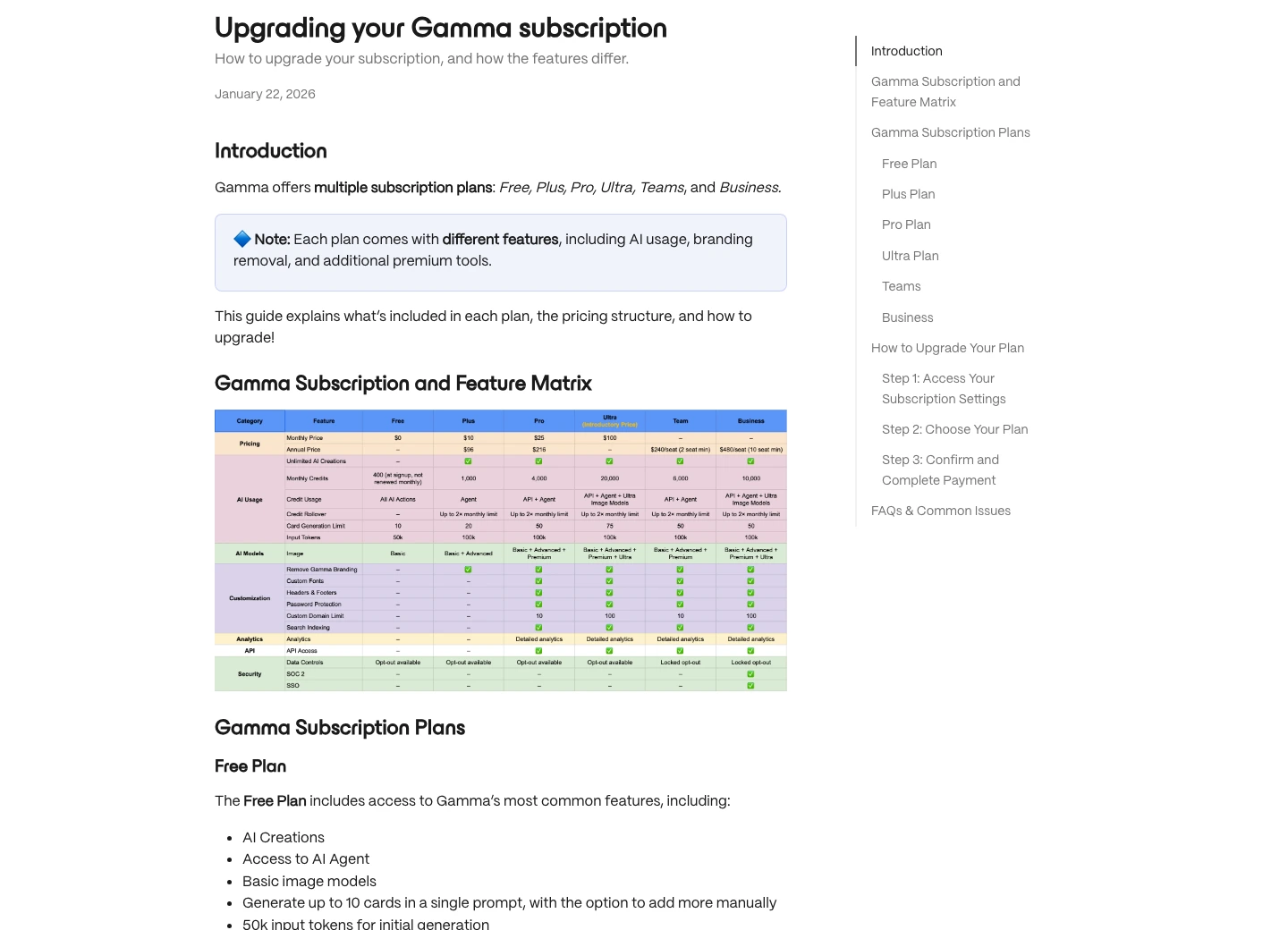
Gamma's official subscription matrix showed Free, Plus, Pro, Ultra, Teams, and Business. In the rendered matrix, Plus appeared at $10 monthly or $96 annually, and the Plus plan included 1,000 monthly credits, removed Gamma branding, advanced image models, and up to 20 cards in a single prompt. Pro added 4,000 monthly credits, API access, custom fonts, password protection, analytics, and up to 50 cards in a single prompt.
Canva has a free plan, while Canva Pro and other paid-plan pricing varies by location and billing information on the official page. The useful detail is the bundle: paid plans combine presentation tools with templates, media, brand controls, resize, background removal, social assets, video, and other design workflows.
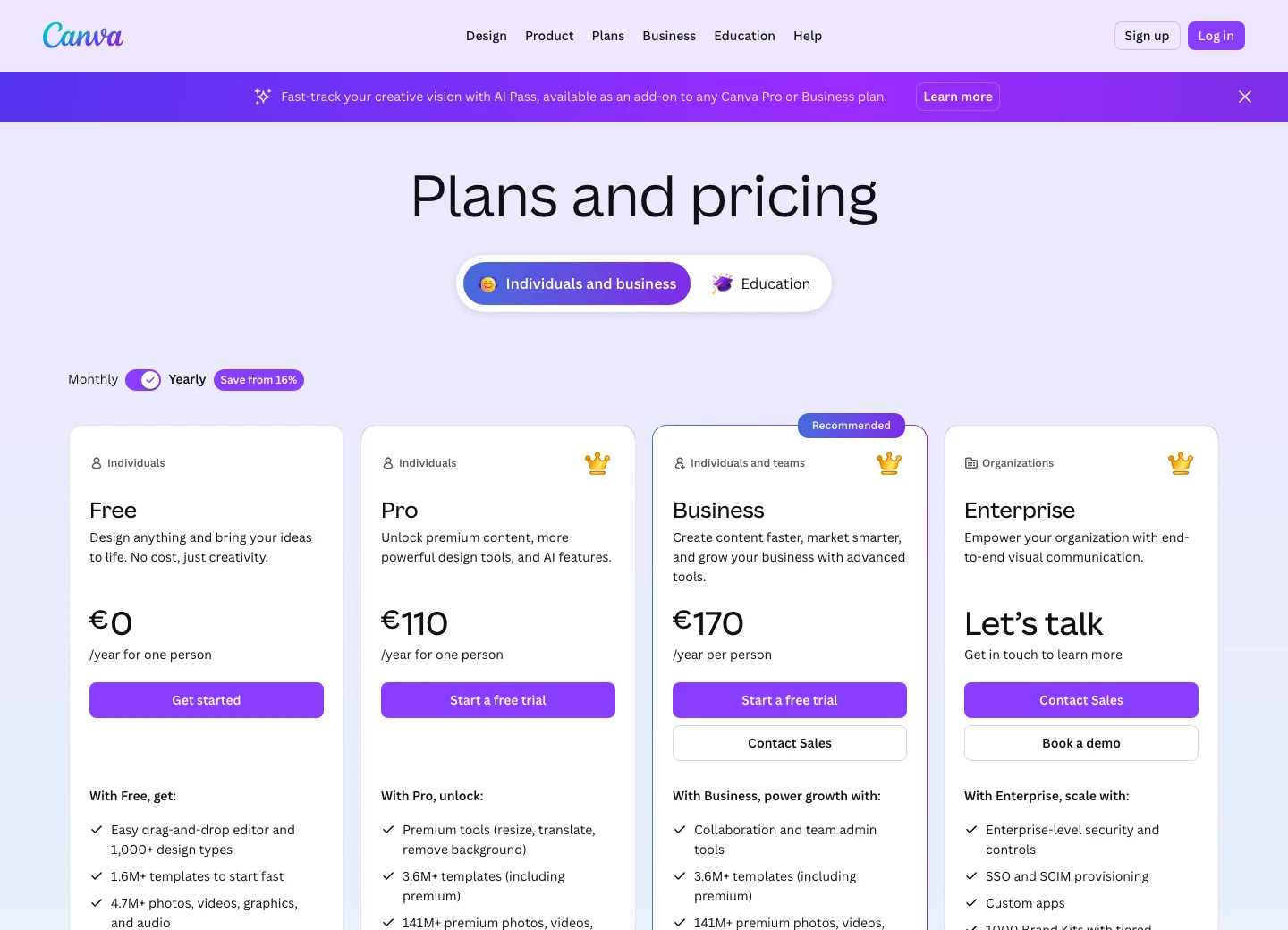
Evidence note: this is a May 2026 localized capture retained for plan-structure context, not current universal price proof.
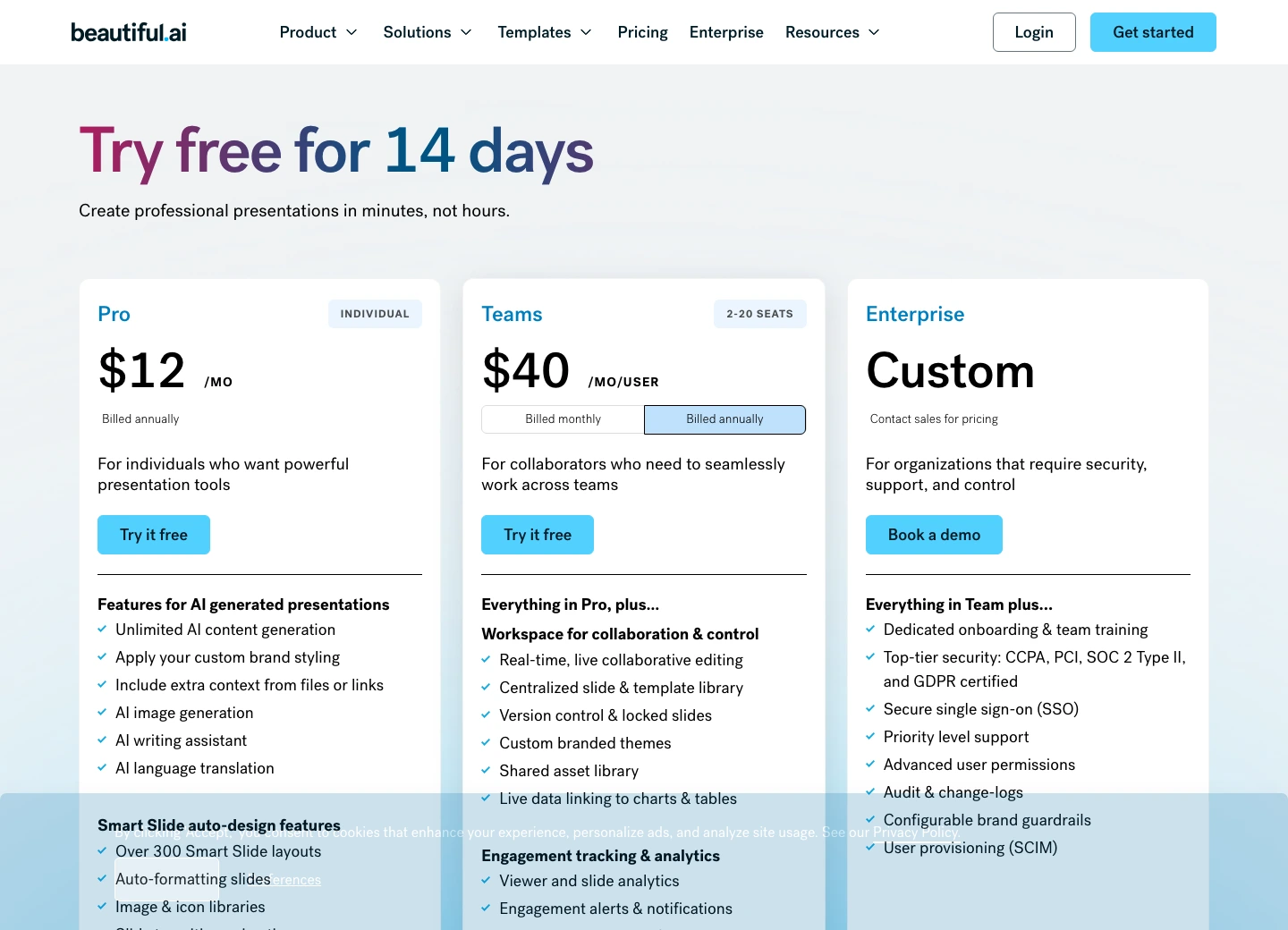
Beautiful.ai is the most traditional paid presentation buy here. The pricing page showed Pro at $12 per month billed annually, Team at $40 per month per user on annual billing, Enterprise custom, and a $45 monthly option for one-time projects. It also showed a 14-day free trial and Pro features such as unlimited AI content generation, custom brand styling, file/link context, AI image generation, AI writing assistance, translation, Smart Slides, and 300+ Smart Slide layouts.
1. Gamma: best default for fast link-first deck drafts
Gamma wins the default recommendation because the common pain is blank-slide inertia. The buyer has notes, an outline, a rough idea, or a document, and needs something presentable before the meeting moves on.
Gamma's strength is not that it makes every final deck perfect. It is that it gets the first structured version out of the buyer's head quickly. Cards, link sharing, analytics, documents, websites, and AI-first creation all point toward one job: turn messy material into a screen-native narrative.
Use Gamma when the deck will mostly be read as a link, shared async, used for internal updates, or converted from existing notes. Skip it when the audience demands a traditional PowerPoint file with strict layout control, or when brand governance matters more than speed.
Gamma has the cleanest center of gravity for a buyer who wants AI to turn an outline into a shareable presentation without first choosing templates and moving objects around.
Teams that need pixel-level slide control, strict PowerPoint compatibility, or a governed sales-deck library before draft speed.
Gamma ranks first for the likely buyer because draft speed and link-first sharing are the main job. Its ceiling drops when the buyer needs traditional slide control.
- Best fit here for fast first drafts, internal updates, link-first narratives, and web-native decks
- Official subscription matrix showed Plus at $10 monthly or $96 annually, with 1,000 monthly credits and branding removal
- Pro adds stronger customization, analytics, API access, and up to 50 cards in a single prompt
- Lower design-decision burden than Canva for people who want the AI to structure the deck
- More flexible narrative format than Beautiful.ai when a standard 16:9 slide is not required
- Not the best choice when pixel-level design control is the actual job
- Traditional PowerPoint handoff can require review because web-native cards do not behave like ordinary slides
- Credit and card limits still matter for frequent generation workflows
- Evidence-led review only; no Gamma account, prompt, upload, export, or analytics workflow was tested
2. Canva: best when presentations are only one output
Canva is not merely competing with Gamma on AI deck generation. It is competing on workflow gravity.
If a marketing team already builds social posts, PDFs, thumbnails, event graphics, videos, print material, and internal presentations in Canva, adding presentations to the same workspace makes sense. The buyer is not just buying deck AI. They are buying a large template/media ecosystem with brand assets and broad export paths.
That is why Canva ranks second, not third. For pure AI-first presentation generation, Gamma is cleaner. For all-purpose content operations, Canva may be the better purchase even if the deck workflow is less specialized.
The tradeoff is cost and clutter. If the only failure is "I need a first draft faster," Canva can become overkill because the buyer is paying attention to a whole design workspace instead of fixing the deck problem. The wrong buyer will open Canva, browse templates, tweak assets, and quietly lose the hour Gamma was supposed to save.
Canva wins when the team needs presentations, brand kits, templates, stock assets, social content, videos, print pieces, and quick design output in one workspace.
Buyers who only want an AI-first deck builder and do not need a broader design suite.
Canva loses the default deck-only pick to Gamma, but scores highest for design control and multi-format workflow breadth.
- Best fit here for teams that create multiple visual formats, not just decks
- Free plan available; paid pricing is localized by location and billing information
- Pro includes premium tools, 3.6M+ templates, 141M+ premium media assets, Brand Kits, and 100GB storage in the rendered page
- Broad export and asset workflow is stronger than Gamma for teams already living in Canva
- More manual design control than Gamma or Beautiful.ai
- Presentation-specific AI is not as focused as Gamma for fast narrative drafting
- Template-heavy output can feel familiar unless someone spends time customizing it
- AI allowance and AI Pass language need checking before heavy AI use because the meter is shared by plan
- Evidence-led review only; no Canva account, design, Magic Design flow, Brand Kit, export, or paid plan was tested
3. Beautiful.ai: best for governed business slides
Beautiful.ai is the tool I would take seriously when the problem is not blank-slide inertia. The problem is slide drift.
Sales teams, enablement teams, consultants, and operators often need many people to create decks that still look governed. Beautiful.ai's Smart Slides and brand controls are designed for that. The product is less about expressive freedom and more about keeping non-designers inside layouts that do not collapse.
That is a real advantage. It is also the reason some buyers will dislike it. Guardrails help when consistency matters. They feel restrictive when the buyer wants a canvas.
Beautiful.ai turns design constraints into the product: Smart Slides, brand styling, shared libraries, collaboration controls, analytics, and repeatable business-deck structure.
Solo creators who want a free tier, full visual freedom, or a quick web-native narrative instead of a constrained slide system.
Beautiful.ai ranks third for the broad buyer, but first for teams where brand guardrails and repeatable slide quality matter more than creative flexibility.
- Strongest guardrails here for repeatable business slides and non-designer teams
- Official pricing showed Pro at $12 per month billed annually and Team at $40 per month per user on annual billing
- The pricing page also showed a $45 monthly option for ad hoc projects
- Pro lists unlimited AI content generation, brand styling, file/link context, AI images, writing assistance, translation, Smart Slides, and 300+ layouts
- Enterprise section highlights SSO, SCIM, audit/change logs, advanced permissions, and security/compliance language
- No permanent free tier was visible on the pricing page; the main entry is a 14-day trial
- The $12 price is annual billing, while the month-to-month project option is much higher
- Design guardrails can feel like a constraint if the buyer wants Canva-style freedom
- Evidence-led review only; no Beautiful.ai account, Smart Slide, Brand Kit, export, trial, or cancellation workflow was tested
How I would choose
Start with the deck failure.
If the failure is "we cannot get from notes to a decent deck fast enough," pick Gamma. It is the cleanest default for first-draft speed and link-first delivery.
If the failure is "we make decks, posts, PDFs, videos, and thumbnails in the same week," pick Canva. The all-purpose design suite matters more than a narrow AI presentation feature.
If the failure is "our team keeps making off-brand slides," pick Beautiful.ai. The guardrails are the point. They are not a side feature.
My practical rule: do not buy presentation software one workflow ahead. A founder does not need a governed slide library just to rough out a pitch. A marketing team should not pay for a narrow deck tool when Canva already covers the asset system. A sales team should not give every rep a blank canvas and hope brand discipline appears.
What competing comparisons miss
The SERP is full of Gamma vs Canva pages and broader AI presentation maker roundups. The useful ones call out the speed-versus-control tradeoff. The weaker ones flatten the category into a feature grid.
The missing layer is governance.
Gamma can be the best first draft and still be wrong for a sales organization. Canva can be the best design suite and still be too broad for a buyer who only wants AI deck structure. Beautiful.ai can be less flexible and still be the correct answer when the team keeps breaking slide quality.
That is why this comparison treats export, branding, and workflow shape as first-class criteria. A deck is not just a file. It is a handoff: to a viewer, a client, a sales rep, a designer, a manager, or a future version of the same team.
Two buyer friction signals I did not over-read
I checked public Reddit threads only as buyer-friction clues, not as ratings. That matters. A loud thread can tell you what people are worried about. It cannot tell you what a product is worth, what the average customer thinks, or whether a tool performs well in a workflow I did not run.
The useful signal from a public r/SaaS thread comparing Beautiful.ai, Gamma, and Tome was not "Reddit likes X." It was the way buyers separated the jobs. Beautiful.ai came up around consistency and design-system control. Gamma came up around structure and AI content help. That is exactly the split this article uses: speed and structure are not the same thing as governed slides.
A separate r/contentcreation thread asked whether any AI presentation maker produces usable work instead of another generic deck. That is the blank-slide problem in plain language. The buyer is not asking for a longer feature list. They are asking, "Will this save me from starting over?" Gamma is the strongest answer to that version of the problem. Canva and Beautiful.ai can still be better answers when the buyer's real pain is asset breadth or brand drift.
So I kept the community read narrow. No sentiment score. No fake consensus. No "users say" shortcut. Just two concrete signs that buyers are sorting the category by workflow failure, even when they do not use that language.
What I would not do
I would not buy Beautiful.ai just because a Gamma draft still needs cleanup. That is buying governance when the problem may only be editing. Try to prove the team actually needs locked layouts, libraries, analytics, and shared controls before moving from a fast draft tool to a governed slide system.
I would not buy Canva Pro only for AI presentation generation if the buyer has no use for the rest of Canva. The value is the bundle: templates, media, brand kits, resize, background removal, social assets, PDFs, video, and a shared design workspace. If those do not matter, Canva's breadth turns into clutter.
I would not treat Gamma's link-first workflow as a universal PowerPoint replacement. It can be the best answer for async decks and internal narratives, then the wrong answer five minutes later when procurement asks for a clean editable .pptx. That is not a contradiction. It is the handoff changing underneath the buyer.
And I would not put confidential board material, private sales data, unreleased product plans, or customer information into any cloud AI presentation tool until the paid plan, data policy, admin settings, and company rules are clear. This comparison is about workflow fit. It is not permission to paste sensitive material into a free-tier prompt box.
Final verdict
Gamma is my default pick for this comparison because most buyers searching these three tools want a faster path from rough material to presentable deck. The official subscription matrix is readable, the free plan gives a real way to inspect the workflow, and the link-first format fits modern async work.
Canva is the better choice when presentations are one part of a wider design system. If the team already creates graphics, videos, posts, PDFs, and brand assets there, do not over-specialize too early.
Beautiful.ai is the pick when repeatable business slides matter more than creative freedom. Sales and enablement teams should look at it before handing every rep a blank canvas.
The wrong-buyer risk is simple: Gamma can fail when the handoff has to be a strict PowerPoint file, Canva can fail when breadth becomes clutter, and Beautiful.ai can fail when guardrails feel like a penalty instead of a safety rail.
Gamma is the best default for fast AI-first presentation drafts. Canva is better for broad design operations. Beautiful.ai is better for governed business slides.
Try GammaGamma vs Canva vs Beautiful.ai FAQ
Ready to check Gamma?
Use the verified route if the trade-offs still fit. If not, jump back to the summary and compare the alternatives.
Crypto and productivity editor focused on cost, custody risk, setup friction, exports, fees, and workflow drag. Prioritizes verifiable numbers and clear skip criteria over hype.
Lucas starts with total operating cost, then ranks tools by setup and recurring friction, custody or export, reversibility, and whether the decision still makes sense when the exit path is included.
Related Articles

Hey Noah vs Lindy vs Fyxer: Best AI Executive Assistant
AI executive assistants compared by action authority, reversibility, workflow fit, cost predictability, context reach, and trust readiness
Compare Hey Noah, Lindy, and Fyxer by approvals, email sending, scheduling, calls, integrations, security, and current entry prices.

Paste vs Maccy vs Raycast: Which Mac Clipboard Manager Fits?
Mac clipboard managers compared by local history, Apple-device sync, privacy posture, launcher fit, setup burden, and subscription value
Paste, Maccy, and Raycast compared by clipboard history, Apple-device sync, local storage, privacy posture, pricing, and workflow fit.