

Gemini Notebook, formerly NotebookLM, is the best AI note-taking app for research. Reflect is the better daily notebook. Obsidian is the better long-term home when owning portable files matters more than having AI ready on day one.
Those are three different jobs. Treating them as one is how buyers end up paying for a team workspace when they wanted a writing tool, or installing a local knowledge system when they needed answers from a pile of PDFs by Friday.
This is an evidence-led comparison. I checked official pricing pages, public plan limits, privacy or ownership claims, and five fresh evidence screenshots on August 26, 2026. I did not create new accounts, import private notes, test mobile apps, benchmark answer quality, measure transcription accuracy, contact support, or run cancellation and export workflows.
If your decision is specifically Notion versus Obsidian, use the head-to-head comparison. If notes are only one piece of a larger operating system, compare the project management tools before buying more notebook features.
-
#1 Gemini NotebookBest for source-heavy research, with cited answers and a generous standard limit
-
#2 ReflectBest daily personal notebook when calm writing and end-to-end encryption matter
-
#3 ObsidianBest for local files, model choice, and a clean exit from the vendor
Start with Gemini Notebook for research, Reflect for daily thinking, or Obsidian when local ownership is the deciding factor.
How I ranked the six note-taking apps
The shared score gives 30% to Workflow Fit, 25% to Retrieval and AI, 20% to Ownership and Exit, 15% to Privacy, and 10% to Value. Workflow Fit asks whether the product is naturally suited to its intended job rather than whether it has the longest feature list. Retrieval and AI rewards useful grounding, recall, and automation with clear public limits.
Ownership and Exit covers local files, portable formats, and the burden of leaving. Privacy rewards stronger architecture or explicit public controls, while Value compares the useful plan rather than the cheapest number on the page. The score is buyer fit, not a laboratory benchmark.
The strongest countercase to Gemini Notebook is simple: it is not a comfortable place for loose daily writing. Reflect nearly wins because it fits that habit better. Obsidian has the best ownership model but loses default-buyer points because its AI path depends on setup, plugins, and sometimes separate model costs.
AI note-taking app comparison
| Feature | Gemini Notebook | Reflect | Obsidian | Notion | Mem | ClickUp |
|---|---|---|---|---|---|---|
| Starting path | Free standard access | 14-day trial | Free without limits | Free | Free with monthly limits | Free core workspace |
| Useful paid reference | Higher limits through eligible Google plans | $10/mo billed annually | Sync $4/mo; Publish $8/mo annually | Business €19.50/member/mo in checked EU view | Plus $9; Pro $29 | Everything AI $28/user/mo |
| Research grounding | Cited answers from added sources | Note search and AI, not source-first | Plugin-dependent | Workspace search and agent tools | AI recall across notes | Workspace and enterprise search |
| Daily capture | Weak fit | Excellent fit | Good after setup | Good but workspace-heavy | Good for AI-first users | Overbuilt for personal notes |
| Ownership model | Cloud workspace | Cloud notebook | Local Markdown files | Cloud workspace | Cloud notebook | Cloud work platform |
| Privacy signal | Google account and service controls | End-to-end encryption listed | No telemetry; encrypted Sync | Cloud-first controls | Vendor security controls | Enterprise controls vary by plan |
| Best job | Research and synthesis | Daily personal notes | Control and portability | Shared team knowledge | Automatic recall | Meeting notes into tasks |
| Action | Check Gemini Notebook | Check Reflect | Check Obsidian | Check Notion | Check Mem | Check ClickUp |
Four buying traps hidden by the word “notes”
The first trap is confusing research with capture. Gemini Notebook becomes useful after you assemble source material. Reflect becomes useful the moment you need to record a thought. One asks for a bounded evidence set; the other tries to stay out of the way. Buying the research winner for daily journaling creates friction, while buying a frictionless journal for source-heavy analysis leaves the hardest retrieval problem unsolved.
The second is comparing the base workspace with the useful AI workflow. Notion and ClickUp both have free entry points, but that is not the same as getting the AI experience described in their paid cards. Notion puts the main team AI features in Business on the checked view. ClickUp puts unlimited AI Notetaker in Everything AI; our ClickUp vs Notion comparison covers the broader workspace choice. Write down the plan that contains the job you need, multiply it by the real seat count, and only then compare it with a $10 personal notebook or a free local app.
The third is calling local software free without pricing your own maintenance. Obsidian does not charge for the core app, but a polished AI system may require paid model access, optional Sync, plugin selection, and occasional repair. That can still be the best deal here. The honest comparison is not “free versus subscription.” It is vendor convenience versus your time, control, and willingness to keep the system working.
The fourth is treating limits as footnotes. Mem now prices capacity across notes, messages, projects, routines, connections, and Voice Mode. Gemini Notebook documents daily generations and chat queries by tier. ClickUp uses Super Credits alongside named unlimited features. A limit is part of the product's operating model: it tells you what the company expects a normal workflow to consume and where the next bill or interruption may appear.
The safest buying test is a two-column page. On the left, list what enters the system each week: quick thoughts, meeting recordings, PDFs, team documents, or project updates. On the right, list what must leave: cited answers, an exportable archive, shared decisions, assigned tasks, or a daily writing habit. The best option is the one that connects those columns with the least hidden labor and the clearest long-term cost.
1. Gemini Notebook: best for source-heavy research
Google now calls the product Gemini Notebook, though the NotebookLM name still appears in older links and habits. The product's strength is unchanged: add PDFs, documents, transcripts, or links, then ask questions that stay tied to those sources.
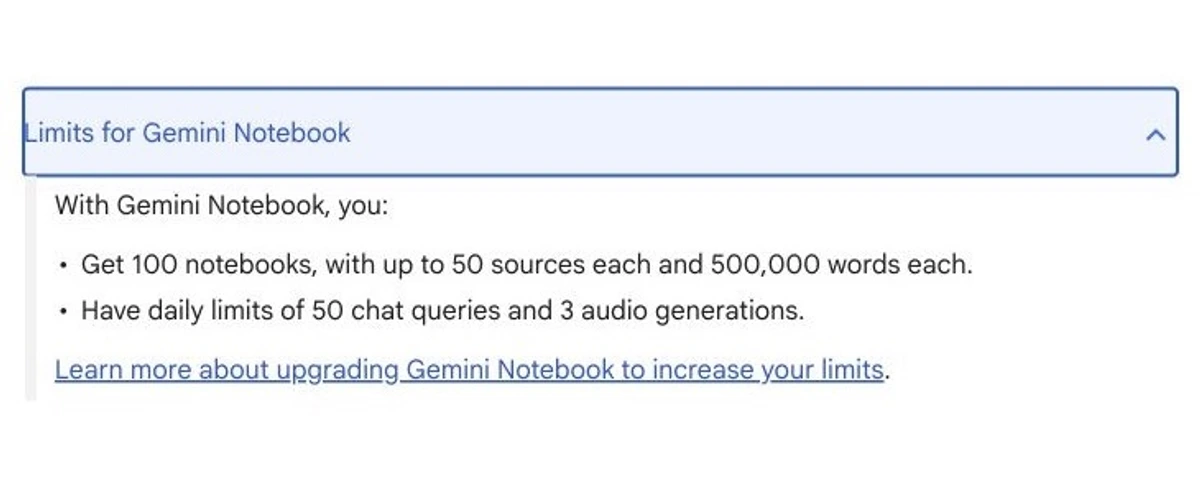
The current official help page lists 100 notebooks on standard access, up to 50 sources in each notebook, up to 500,000 words in each source, 50 chat queries per day, and three audio generations per day. Google's upgrade table now separates Standard, Plus, Pro, and Ultra limit tiers, so the old claim that one $19.99 plan simply gives five times everything is no longer accurate.
Gemini Notebook wins because its citations let a reader move from an answer back to the supplied material instead of treating a fluent paragraph as proof. That makes it a research desk rather than a general notes inbox. It is a poor fit for shopping lists and quick personal capture, but the best fit here when the job begins with a source pile.
Answers stay connected to supplied sources, with citations that make the result easier to audit.
Skip it if most notes are loose daily thoughts rather than material collected for a research question.
Gemini Notebook ranks first because its source-grounded retrieval and generous standard limits outweigh a weak daily-capture flow.
- Standard access lists 100 notebooks and 50 sources per notebook
- Answers include citations back to the supplied material
- Audio and video generation limits are documented by tier
- Free access is sufficient for many individual research projects
- Poor fit for loose daily capture and journaling
- The workspace is cloud-based rather than local-first
- Paid capacity spans several Google plan tiers instead of one simple upgrade
- No answer-quality or private-data workflow was benchmarked in this refresh
2. Reflect: best daily personal notebook
Reflect is the cleaner daily-writing choice because it does not make a reader design a database or maintain a plugin stack before capturing a thought. Its official page keeps the commercial model unusually simple.
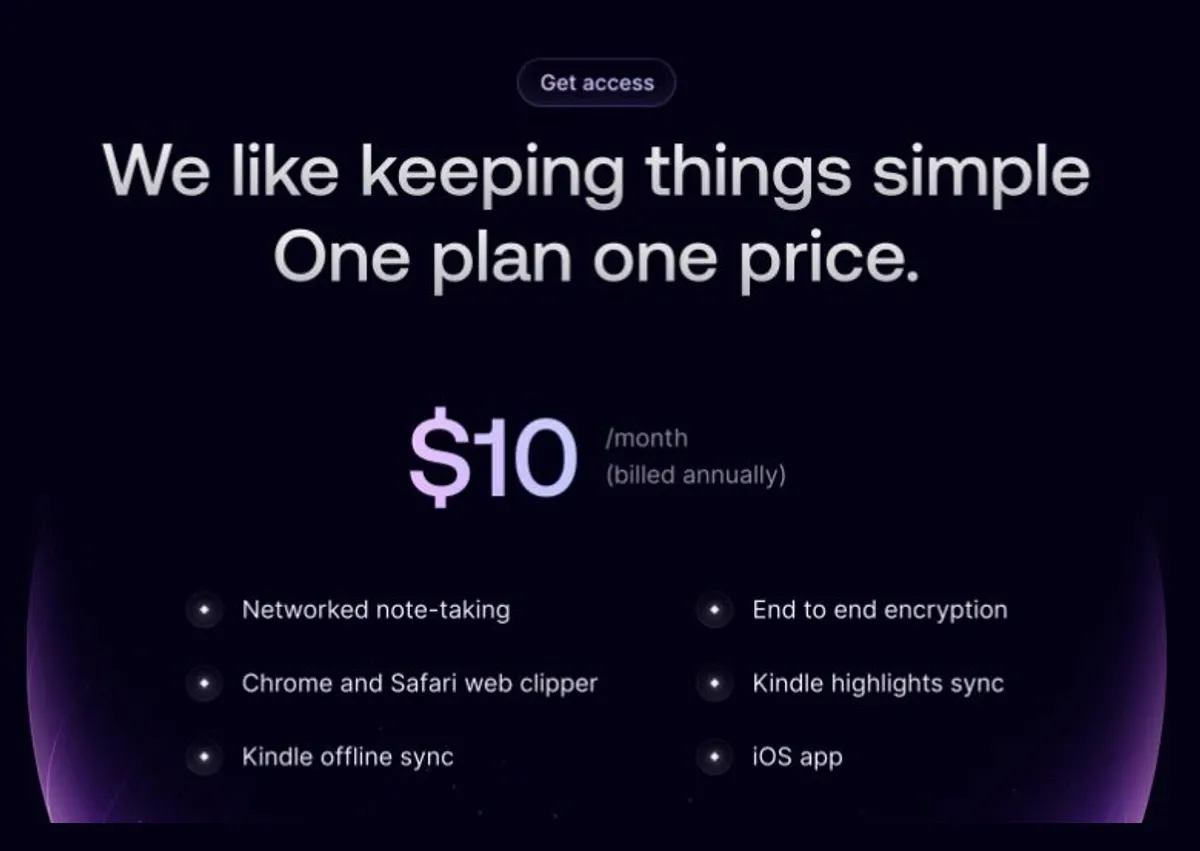
The current public offer is one plan at $10 per month billed annually after a 14-day trial. The same frame lists networked note-taking, Chrome and Safari clipping, Kindle sync, iOS, and end-to-end encryption. The prior $15 monthly alternative is no longer shown on the checked page, so it has been removed from this guide.
The tradeoff is equally clear: there is no permanent free plan and little reason to choose it for a shared company wiki. Reflect earns second place because daily writing, recall, and privacy signals are unusually well aligned for one person.
The writing-first workflow and simple public price make the product easy to understand before the trial starts.
Skip Reflect if you need a permanent free tier, Android, or a team knowledge base.
Reflect ranks second because it has the strongest daily workflow and privacy signal, but no permanent free plan and less ownership than Obsidian.
- One public plan at $10 per month billed annually
- End-to-end encryption is listed alongside the core workflow
- Clipper, Kindle sync, voice, and note recall suit daily knowledge work
- Fourteen-day trial gives a defined evaluation window
- No permanent free plan
- Limited fit for shared team knowledge
- Cloud notebook rather than a local file system
- No authenticated export, support, or cancellation workflow was tested here
3. Obsidian: best for ownership and a clean exit
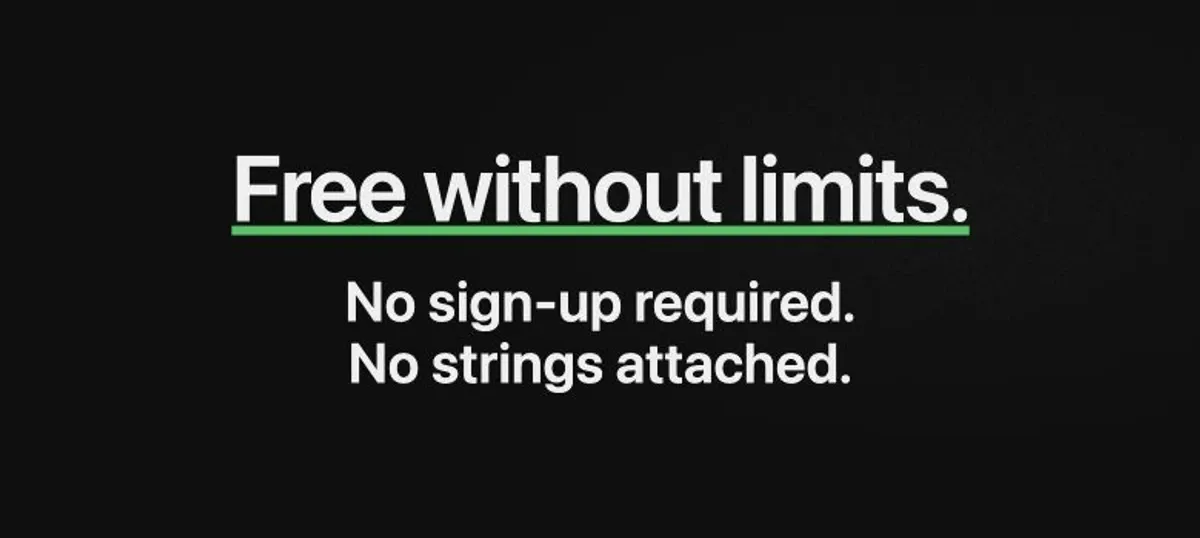
Obsidian's official pricing page still leads with “Free without limits” and says no sign-up is required. Notes remain local files, the company says the app collects no telemetry, and optional Sync uses end-to-end encryption.
The paid services remain optional: Sync is $4 per user per month and Publish is $8 per site per month when billed annually. Catalyst is a $25 one-time support license, while Commercial is $50 per user each year. Obsidian is the best fit for buyers who value durable local files. The tradeoff is that AI comes from plugins and the model path you choose, creating freedom and maintenance at the same time.
Local Markdown files make the ownership and exit story stronger than any cloud-first option in this comparison.
Skip it if choosing plugins, model access, sync, and maintenance sounds like unpaid infrastructure work.
Obsidian leads on ownership and privacy but ranks third because retrieval and AI require more setup than the two products above it.
- Core app is free without limits and does not require sign-up
- Notes stay in portable local Markdown files
- Optional Sync starts at $4 per user per month on annual billing
- Plugin and model choice create the highest customization ceiling here
- AI quality and cost depend on plugins and model setup
- Collaboration is less direct than Notion or ClickUp
- A large plugin stack becomes maintenance work
- No plugin security or private-vault workflow was audited in this refresh
4. Notion: best when the team workspace is the product
The Notion page opened in an EU-localized yearly view on August 26. It showed Free at €0, Plus at €9.50 per member per month, Business at €19.50, and Enterprise with custom pricing. Currency, taxes, and the final checkout can vary by region.
Free and Plus now show trial access to Notion AI. Business includes Notion Agent, AI Meeting Notes, and Enterprise Search, while Custom Agents use a separate credit model at $10 per 1,000 monthly Notion credits. That makes Business the more useful AI reference for a team, not the entry card.
Notion ranks above Mem because a team that already works in its documents and databases gains more from one shared context. It ranks below the personal note tools because the cloud workspace, per-member billing, and AI plan boundary are unnecessary overhead for a solo notebook.
Documents, databases, meetings, search, and agent workflows can share one team context.
Skip Notion if the job is simply private daily notes or local file ownership.
Notion ranks fourth because its team workflow is strong, while per-member AI cost and a cloud-first ownership model weaken solo value.
- Strong shared docs, databases, search, and meeting context
- Business includes the main AI workspace features in the checked view
- Free and Plus provide a lower-risk way to evaluate the ordinary workspace
- Clear fit for teams that already use Notion as their knowledge base
- Free and Plus show only trial access to Notion AI
- Business is charged per member and the checked price was region-specific
- Cloud-first ownership is weaker than local Markdown
- Custom Agents introduce a separate credit cost
5. Mem: useful AI recall with a newly limited plan ladder
Mem's pricing changed materially. The official page now shows Free, Mem Plus at $9 per month, Mem Pro at $29, and Mem Pro 2x at $49. Each step raises monthly notes, messages, task tracking, open projects, and Voice Mode capacity; Pro also adds a custom routine and one connection.
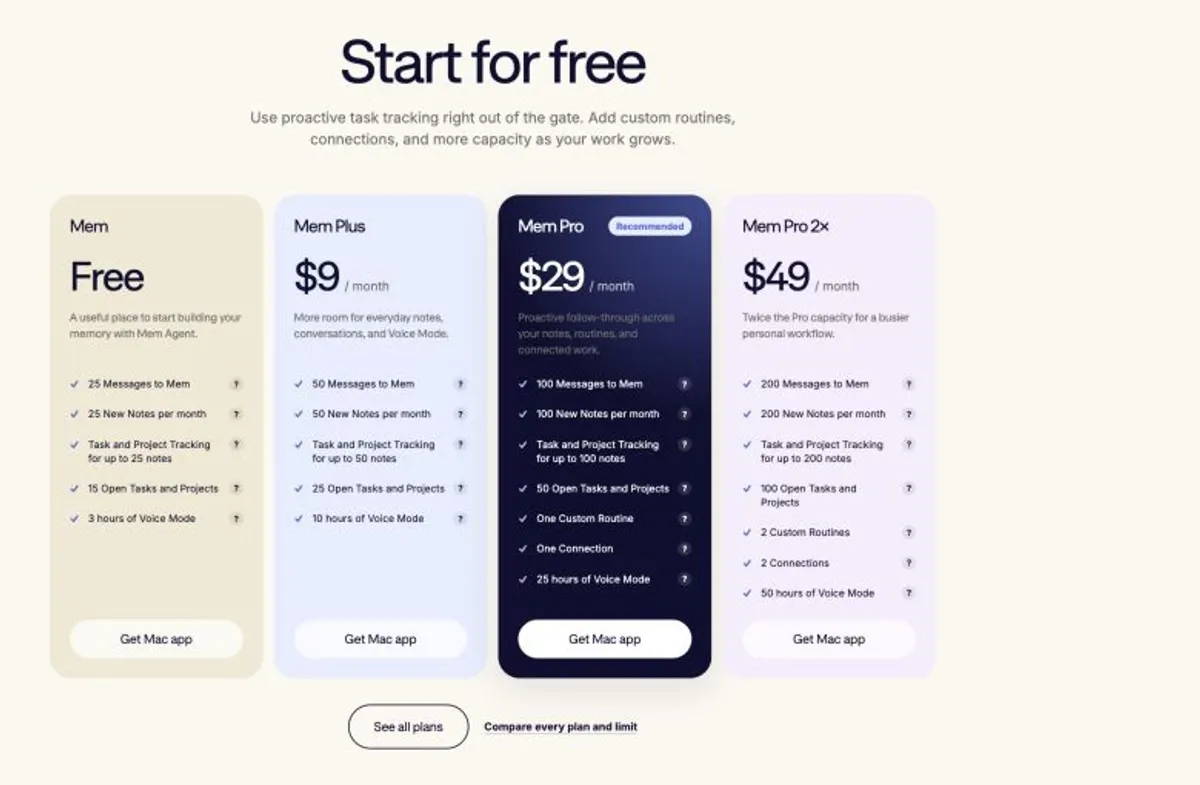
The old $8.33 annual Pro claim and “unlimited notes” language no longer describe the public offer. The reason to choose Mem is automatic recall rather than folders, but the capacity ladder creates a value question that was not present in the earlier article.
The product organizes the commercial ladder around AI recall, notes, projects, routines, and connections rather than manual folders.
Skip Mem if predictable unlimited capacity, local files, Android, or explicit manual organization are requirements.
Mem ranks fifth because its AI-first recall remains useful, but the new capacity limits and cloud ownership weaken value and exit quality.
- Free path allows a limited evaluation without payment
- AI recall and proactive tracking are central to the product
- Four plan levels make higher capacity available without an enterprise quote
- Pro introduces routines and connections for a more automated workflow
- The old inexpensive unlimited Pro offer is gone
- Monthly notes, messages, projects, and Voice Mode are capped by plan
- Cloud ownership is weaker than Obsidian local files
- No authenticated app, export, or support workflow was tested in this refresh
6. ClickUp: best when meeting notes must become tasks
ClickUp is a work platform first. That is a weakness for personal capture and an advantage when a transcript, summary, or action item must immediately enter an assigned project workflow.
The official yearly view lists Free, Brain AI at $9 per user per month with 1,500 monthly Super Credits per user, and Everything AI at $28 with 5,000 credits and unlimited AI Notetaker. Additional credits are $0.001 each, presented as $10 for 10,000. The earlier standalone $12 Notetaker claim is no longer on the checked pricing page.
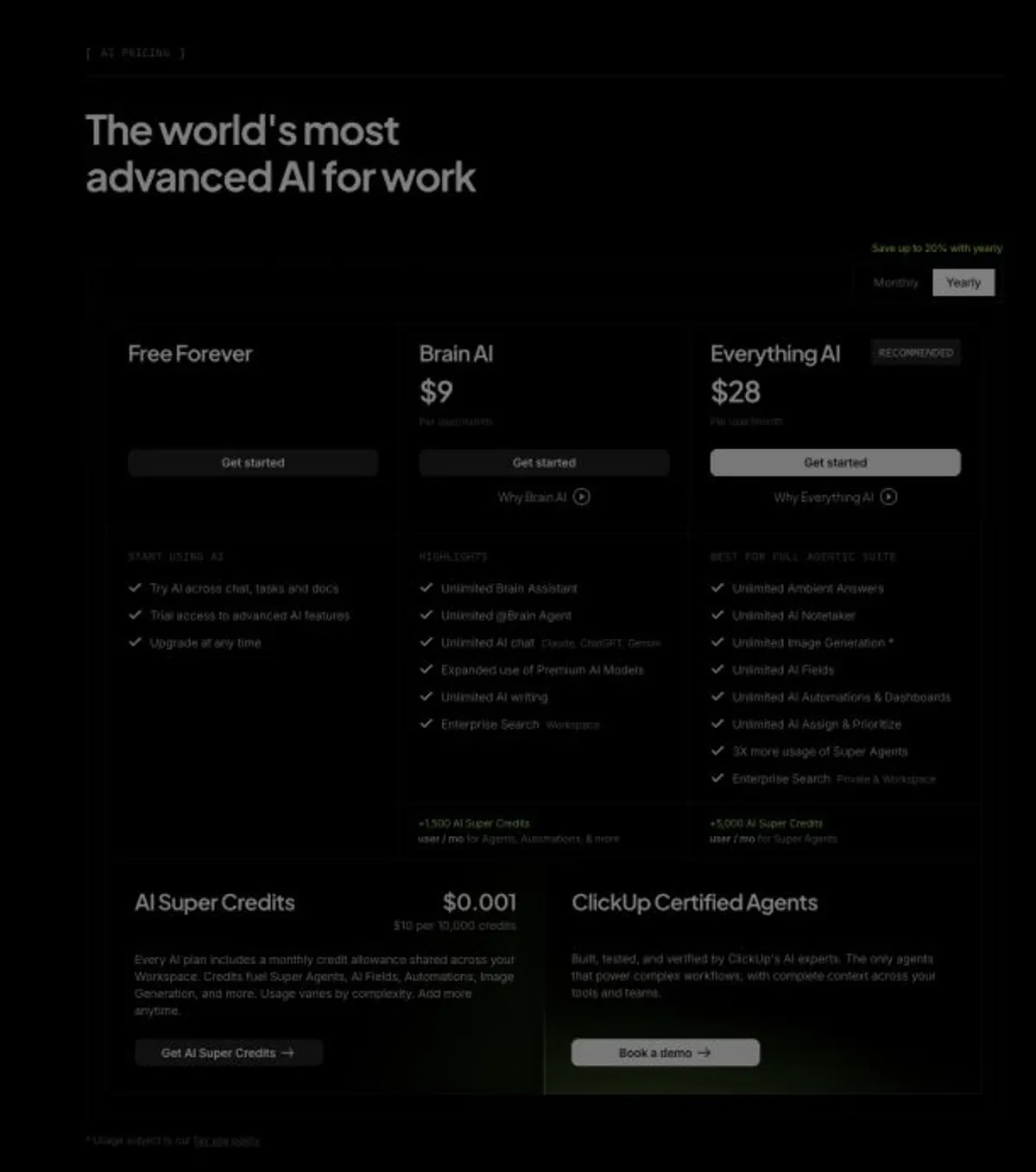
Choose ClickUp because the meeting-to-task handoff is the point. Skip it when you want a quiet personal notebook. Its sixth-place score reflects category fit, not a claim that the broader platform is weak.
Unlimited AI Notetaker sits inside a broader workflow that can turn meeting output into assigned work.
Skip ClickUp if you want a calm personal notebook without project, seat, and AI-credit overhead.
ClickUp ranks sixth because its team workflow is credible, but the $28 per-user AI tier and platform density are a poor default for personal notes.
- Everything AI includes unlimited AI Notetaker
- Meeting output can feed documents, tasks, and team workflows
- AI plan prices and credit allowances are visible together
- Free core workspace provides a lower-risk way to inspect the platform
- Useful AI note workflow costs $28 per user per month in the checked view
- A shared credit system adds another usage boundary
- The interface and operating model are excessive for personal notes
- No authenticated meeting, calendar, export, or admin workflow was tested here
Also considered
Apple Notes and Google Keep remain sensible capture tools, but neither owns the source-grounded research decision covered here. Dedicated meeting assistants such as Fathom and Otter serve transcription-first buyers; compare them in the AI meeting assistants roundup. Capacities and Craft are also credible writing systems, but their current evidence was not part of this six-product refresh.
A practical evaluation before you pay
Give a candidate one normal work cycle, not an artificial demo. Use material you are allowed to upload. For a research notebook, add a small but representative source pack with one document that disagrees with the others. Ask for a summary, then follow every important citation back to its source. The useful question is not whether the answer sounds polished. It is whether you can verify it quickly and notice when the evidence is mixed.
For a daily notebook, capture notes at the times you already work: on desktop, between meetings, and on your phone if mobile matters. Search for one fact several days later without remembering the exact wording. Check whether the app helps you return to the original context or merely produces a plausible summary. A fast capture path with weak retrieval becomes an archive; clever retrieval with awkward capture becomes a tool you stop feeding.
For Obsidian or another ownership-first system, inspect the files outside the app. Open a note in a plain editor, locate attachments, and write down which features disappear without plugins. Then price optional Sync and any model access you expect to use. The point is not to prove that local software is always safer or cheaper. It is to see which parts of the workflow belong to durable files and which belong to a stack you must maintain.
For Notion or ClickUp, calculate the whole team, not one seat. Confirm which plan contains the AI feature, who receives credits or limits, what administrators must enable, and whether meeting capture requires calendar or system permissions. Run one real handoff from note to decision or assigned task. If the team still copies the result into another system, the all-in-one advantage may be smaller than the pricing table suggests.
Finally, define the exit before importing years of work. Even without running a full migration during a short trial, you can ask what formats are available, how attachments are handled, and which links or metadata are vendor-specific. That answer should influence the purchase now, not after the notebook has become institutional memory.
Which one should you choose?
My default recommendation is Gemini Notebook when notes begin with sources. I would choose Reflect when the daily writing habit is the product, and Obsidian when local ownership and a clean exit matter more than convenience.
Choose Notion only when shared workspace context justifies per-member AI pricing. Choose Mem when automatic recall is worth living within its current capacity ladder. Choose ClickUp when meeting notes are valuable mainly because they become assigned work.
Frequently Asked Questions
The verdict
Gemini Notebook wins for the default research buyer because cited, source-grounded retrieval solves a harder problem than adding another chat box to ordinary notes. Reflect is the better notebook to keep open all day. Obsidian is the safer long-term home for readers who will accept setup work in exchange for file ownership.
The expensive mistake is buying Notion or ClickUp as a personal notebook because the base workspace looks cheap. The quieter mistake is choosing Obsidian for theoretical control and then never maintaining the system. Match the product to the job you perform every week, not the feature list you admire once.
Ready to check Gemini Notebook?
Use the verified route if the trade-offs still fit. If not, jump back to the summary and compare the alternatives.
Crypto and productivity editor focused on cost, custody risk, setup friction, exports, fees, and workflow drag. Prioritizes verifiable numbers and clear skip criteria over hype.
Lucas starts with total operating cost, then ranks tools by setup and recurring friction, custody or export, reversibility, and whether the decision still makes sense when the exit path is included.
Related Articles

Hey Noah vs Lindy vs Fyxer: Best AI Executive Assistant
AI executive assistants compared by action authority, reversibility, workflow fit, cost predictability, context reach, and trust readiness
Compare Hey Noah, Lindy, and Fyxer by approvals, email sending, scheduling, calls, integrations, security, and current entry prices.

Paste vs Maccy vs Raycast: Which Mac Clipboard Manager Fits?
Mac clipboard managers compared by local history, Apple-device sync, privacy posture, launcher fit, setup burden, and subscription value
Paste, Maccy, and Raycast compared by clipboard history, Apple-device sync, local storage, privacy posture, pricing, and workflow fit.