

ClickUp vs Notion is not really a feature checklist. It is a buyer decision about where work breaks first, and picking the wrong default can turn a workspace into another process problem.
If tasks keep sliding, owners are vague, and deadlines need more pressure than another pretty wiki can provide, ClickUp is the better default. If the team keeps losing decisions, briefs, notes, SOPs, and project context, Notion is the cleaner starting point.
That sounds obvious. It is also the mistake most teams make backwards.
This is an evidence-led comparison. I checked official pricing, public product pages, current GDT operator/SEO/affiliate reports, rendered evidence screenshots, competitor SERPs, and concrete Reddit question patterns. I did not create accounts, migrate a workspace, import a task database, buy AI add-ons, benchmark mobile apps, or test support and cancellation.
If you are still deciding the wider category, start with our project management tools roundup. If the question is really private notes versus a shared workspace, the older Notion vs Obsidian comparison is the better read. For teams choosing where meeting notes become tasks, the AI note-taking apps guide gives the broader context.
-
#1 ClickUpBest when execution is breaking: tasks, owners, dependencies, time tracking, and reporting
-
#2 NotionBest when knowledge is breaking: docs, wiki, databases, briefs, and shared context
-
#3 Split stackBest only when ClickUp owns tasks and Notion owns durable knowledge, with no duplicate task list
If the team needs one safe starting point, try ClickUp when the work has clear owners and deadlines. Try Notion when the work is mostly writing, planning, briefs, wikis, and lightweight project tracking.
ClickUp vs Notion scoring criteria
The rubric uses five buyer-fit criteria: Execution Depth, Knowledge Base, Setup Burden, Team Control, and Value Clarity. Execution Depth covers tasks, dependencies, time tracking, workload visibility, automations, and reporting. Knowledge Base covers docs, wikis, databases, page structure, and whether a team can find the thinking behind the task. Setup Burden asks how much system design the buyer has to do before the tool becomes useful.
Team Control matters because both tools can become a shared mess. Permissions, owners, activity, private spaces, guests, and admin controls matter more once more than five people are involved. Value Clarity asks whether the pricing makes sense for the job instead of just looking cheap on the first plan.
The counterintuitive part: I do not think the most flexible workspace is always the better workspace. Flexibility is a debt if nobody owns the system.
That is where Notion loses some teams. It lets you build almost anything, including three slightly different ways to track the same work. ClickUp has the opposite flaw: the structure is there immediately, but the product can feel like walking into a control room when all you wanted was a clean project note.
The public community pattern is the same kind of warning, not a vote count. Threads in r/clickup and r/Notion keep circling the same question: should ClickUp own task and project management while Notion owns writing and knowledge? I am not treating those threads as representative sentiment. They are useful because they show the buyer confusion in plain language.
The ClickUp vs Notion buying mistake
The expensive mistake is picking the tool that flatters the team. Operators like ClickUp because it makes work look governed. Writers and founders like Notion because it makes messy thinking look organized. Both reactions can be useful. Both can also hide the real failure.
A docs-heavy team can buy ClickUp and spend the first month turning every discussion into a task nobody wanted. A delivery team can buy Notion and spend the first month debating database properties instead of shipping the work. Neither tool is wrong in that story. The buyer picked the wrong bottleneck.
Start with the thing people complain about when the week goes badly. If the complaint is "I did not know who owned this," "we missed the dependency," or "nobody can see workload," ClickUp fits the shape of the problem. If the complaint is "where is the brief," "why did we decide that," or "the process lives in someone's head," Notion fits better.
That is the fork.
The strongest signal is what happens after a project slips. If the team needs a postmortem, templates, and better written context, pick Notion. If the team needs owners, due dates, blocked-task visibility, recurring work, and reporting, pick ClickUp.
ClickUp vs Notion comparison table
| Feature | ClickUp | Notion |
|---|---|---|
| Best job | Task execution, owner accountability, project views, reporting, and operations control | Docs, wikis, databases, briefs, project context, and flexible team knowledge |
| Official annual pricing checked | Free Forever; Unlimited $7/user/mo; Business $12/user/mo | Free; Plus $10/member/mo; Business $20/member/mo |
| Execution depth | Tasks, views, dependencies, automations, time tracking, goals, portfolios, dashboards | Projects, databases, dependencies, views, forms, automations, and charts |
| Knowledge base | Docs and wikis are useful, but they sit behind the work-management system | Pages, databases, docs, wikis, and project context are the natural center |
| AI cost signal | Brain AI showed $9/user/mo; Everything AI showed $28/user/mo | Custom Agents showed $10 per 1,000 monthly Notion credits |
| Main risk | Complexity and setup sprawl if a small team only needed docs | Too much system design before project accountability is clear |
| Skip if | Your bottleneck is writing, decisions, and knowledge structure | You need strict task ownership, workload control, and native time tracking |
| Action | Try ClickUp | Try Notion |
1. ClickUp: tasks first, docs attached
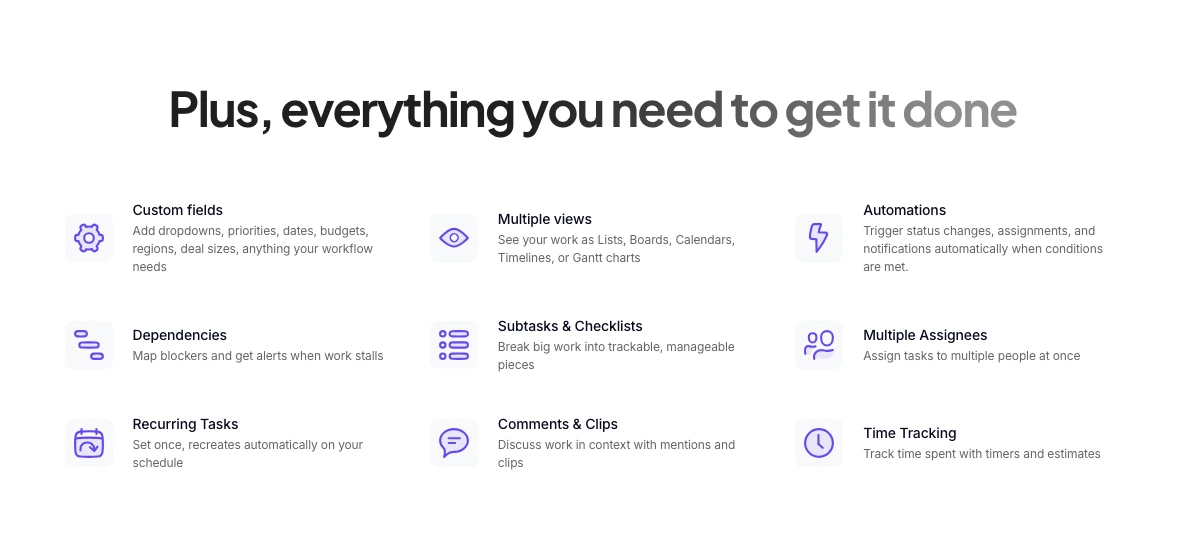
ClickUp wins the default slot when the buyer needs execution pressure. The official task page frames tasks as connected to docs, chat, goals, dashboards, and more. The same page lists custom fields, multiple views, automations, dependencies, subtasks, multiple assignees, recurring tasks, comments, clips, and time tracking. That is not a lightweight wiki pretending to run projects. It is a project machine that also wants your docs.
The official pricing page showed Free Forever with unlimited tasks, collaborative docs, Kanban boards, sprint management, calendar view, and 24/7 support. Unlimited showed $7 per user/month billed yearly with unlimited spaces, folders, forms, Gantt charts, integrations, storage, custom fields, native time tracking, goals, portfolio management, resource management, ClickUp Chat, and Email in ClickUp. Business showed $12 per user/month billed yearly with unlimited dashboards, timeline views, webhooks, 5K automations per month, mind mapping, custom exporting, sprint points, reporting, portfolio workload management, Google SSO, and more.
That $7 plan is why ClickUp is annoying to compete with. It includes enough project muscle that Notion has to win on simplicity and knowledge quality, not raw operational depth.
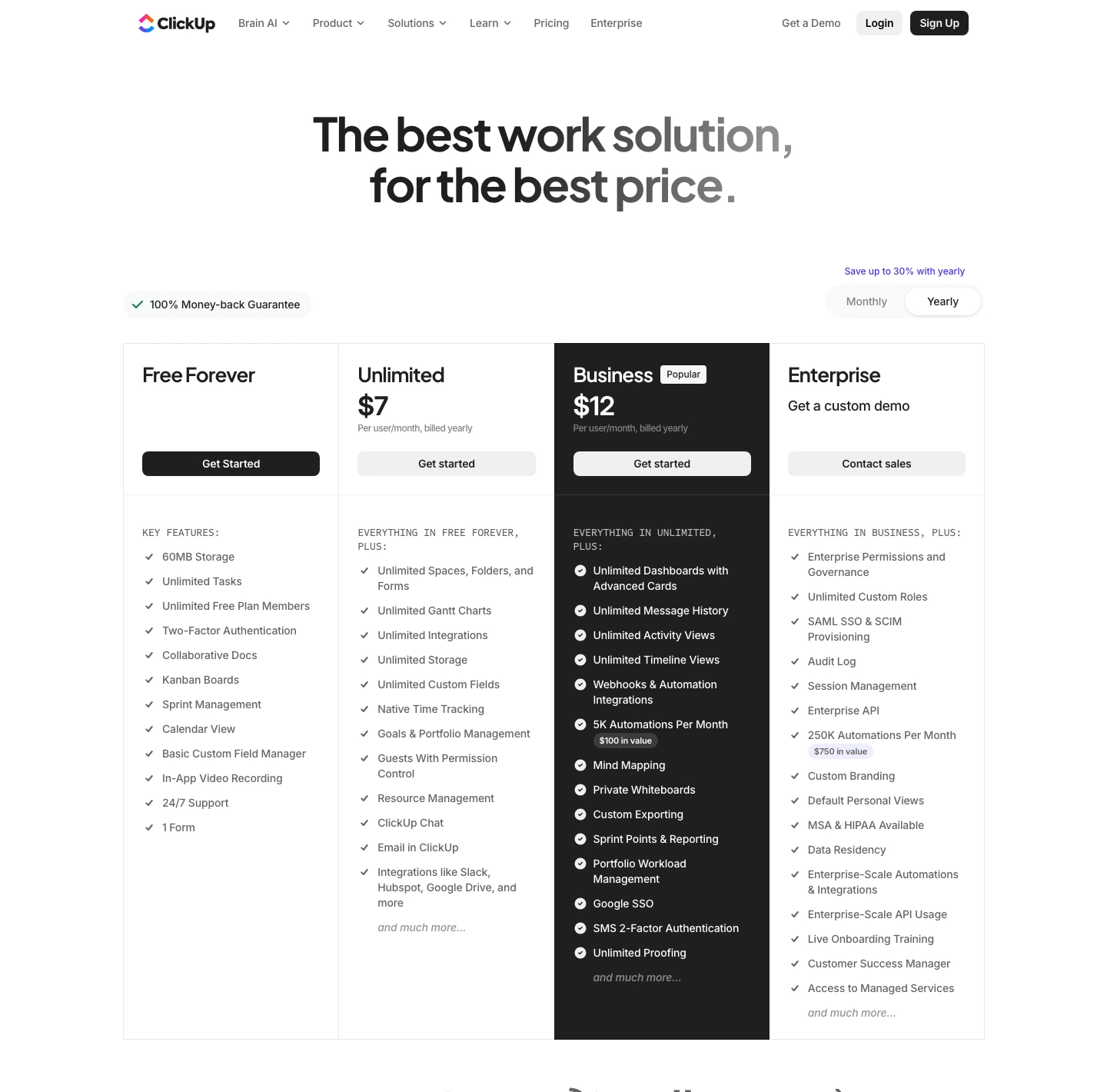
ClickUp puts tasks, views, dependencies, time tracking, dashboards, goals, and docs in one execution system.
Skip it if the team mostly needs a calm wiki or content database and does not want to maintain a work-management system.
ClickUp ranks first because it solves accountability and project control more directly, even though that same depth creates more setup burden.
- Stronger native project-management stack: tasks, views, dependencies, time tracking, dashboards, goals, and portfolios
- Free and $7 annual Unlimited tiers cover more execution features than many teams expect
- Business tier adds workload, sprint, SSO, dashboard, automation, and export controls that matter as teams grow
- Docs live near tasks, so action items and project context do not have to drift into separate tools
- Can feel heavy if the real job is writing, wiki structure, or lightweight planning
- AI is a separate cost signal: Brain AI showed $9/user/month and Everything AI showed $28/user/month
- More places to configure work means more places for a team to build a messy system
- Not as calm as Notion for long-form docs, internal handbooks, and reusable knowledge pages
The task-depth screenshot matters more than the pricing screenshot. It shows the actual difference: custom fields, multiple views, automations, dependencies, subtasks, recurring tasks, comments, and time tracking are first-class ClickUp concepts. Notion can approximate many of these with databases and templates. ClickUp makes them the default grammar.
2. Notion: docs first, projects attached
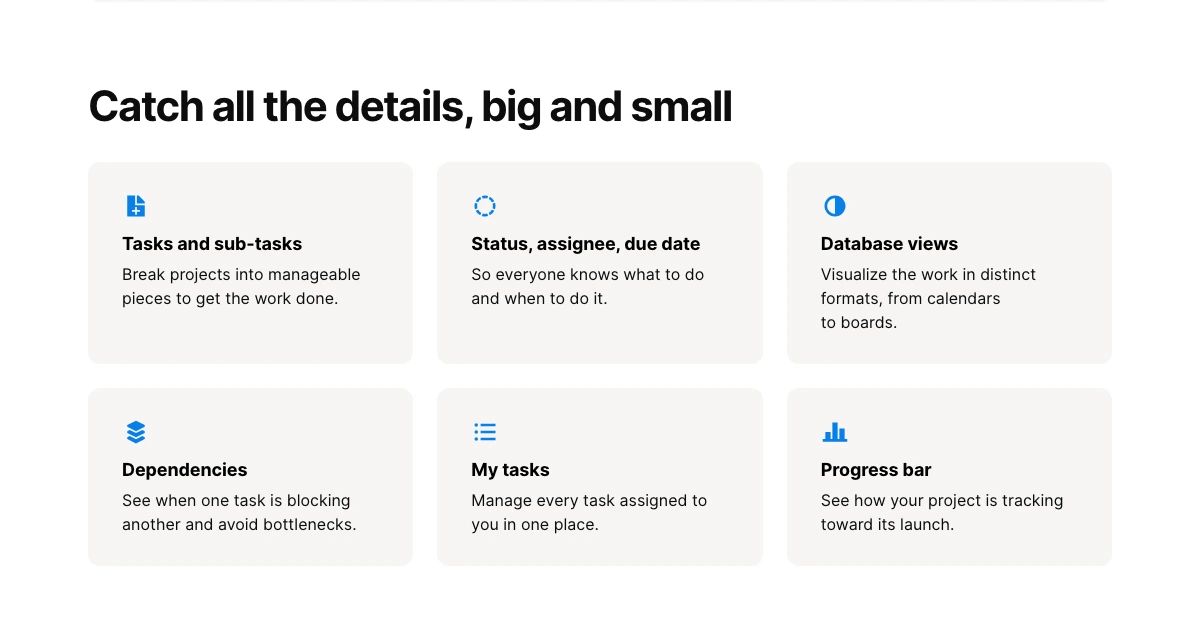
Notion wins when the mess is knowledge, not execution. Its projects page talks about capturing details in databases, timeline views, charts, custom priorities and statuses, workflow automations, filtered views, forms, task layouts, granular permissions, tasks and subtasks, dependencies, My Tasks, and progress bars. That is a serious project feature set. It is just coming from a different center of gravity.
Notion starts with the page. That is why it feels so good for briefs, research, content calendars, SOPs, lightweight CRMs, client portals, and project hubs where the task list is only one layer of the work. A product team writing PRDs next to sprint plans may prefer that. A content team that needs briefs, drafts, calendars, assets, and approvals in one place may prefer that too.
The official pricing page, switched to USD and yearly billing, showed Free at $0, Plus at $10 per member/month, Business at $20 per member/month, and Enterprise custom pricing. Plus included custom forms, custom sites, unlimited charts, unlimited collaborative blocks, unlimited file uploads, and basic connections. Business added Notion Agent, AI Meeting Notes, Enterprise Search, SAML SSO, granular database permissions, private teamspaces, domain verification, and premium connections.
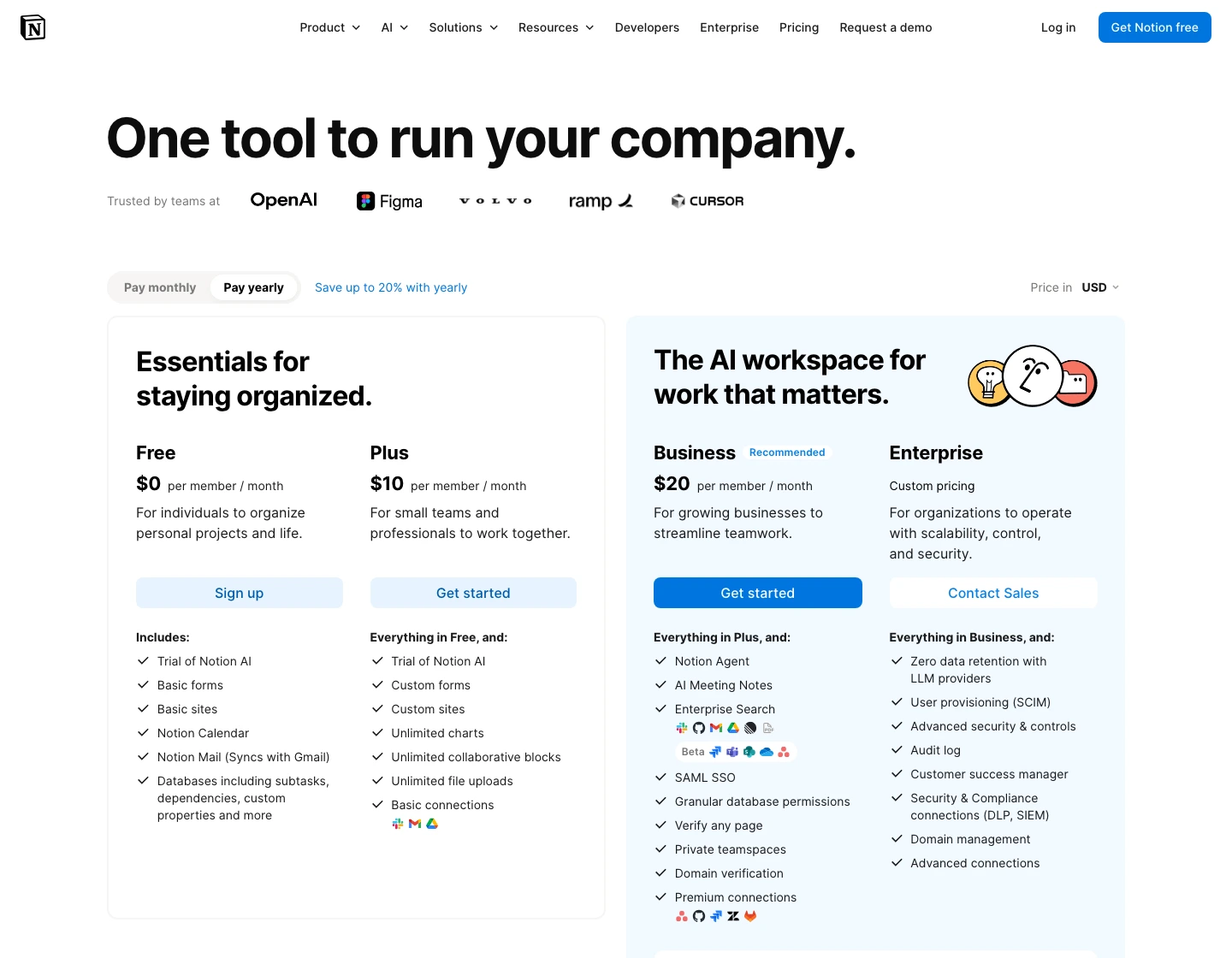
Notion makes docs, databases, wiki pages, project context, and lightweight workflows feel like one workspace instead of separate apps.
Skip it if the team needs strict operational controls such as native time tracking, workload reporting, and deep task accountability.
Notion stays close because it is better for knowledge-heavy teams, but it loses the default execution pick to ClickUp's native task and reporting stack.
- Cleaner docs, wikis, databases, and shared knowledge structure than ClickUp for many teams
- Projects page shows timelines, charts, dependencies, filtered views, forms, permissions, and My Tasks
- Plus at $10 annual is easy to understand for docs-heavy teams that do not need the Business AI layer
- Business adds Notion Agent, AI Meeting Notes, Enterprise Search, SAML SSO, private teamspaces, and premium connections
- Project management power depends on how well your team designs and maintains databases
- Business is a bigger jump at $20/member/month yearly if the buyer mainly wanted docs
- Native time tracking and workload-style operational reporting are not the core value prop
- Easy to create duplicate task systems if nobody owns the workspace architecture
Notion's project page is more capable than the old "pretty docs app" stereotype suggests. The refreshed project screenshot shows tasks and subtasks, status and assignee fields, database views, dependencies, My Tasks, and a progress bar as public project primitives. That is enough for many small teams.
But enough is not the same as best. If project ownership is already weak, Notion can make the problem look designed rather than solved.
Pricing and AI caveats before you choose
The base-plan comparison is simple enough: ClickUp Unlimited showed $7 per user/month on annual billing, ClickUp Business showed $12, Notion Plus showed $10 per member/month after switching the official page to USD, and Notion Business showed $20. If all you need is a paid team workspace, ClickUp is the cheaper execution-heavy bet.
AI makes the comparison less clean. ClickUp's pricing page showed Brain AI at $9 per user/month and Everything AI at $28 per user/month. Notion's pricing page showed Custom Agents free to try and then $10 per 1,000 monthly Notion credits, while Business included Notion Agent, AI Meeting Notes, and Enterprise Search in the rendered plan cards. That does not mean one AI system is better. It means the cheapest base plan is not the full AI workflow price.
Do not buy either tool because the AI line item sounds impressive. Buy the workspace first. If the workspace is wrong, the AI features just make the wrong system faster.
For a five-person team, the annual difference between ClickUp Unlimited and Notion Plus is visible but not decisive. The bigger cost is migration, training, cleanup, template design, and the first month of confused habits. A team that already thinks in tasks may get value from ClickUp faster. A team that already thinks in briefs and pages may get value from Notion faster.
Do not overfit the spreadsheet.
That is why I do not love generic "which is cheaper" answers here. Cheap execution control is valuable only if execution control is the missing piece. Cheap documentation is valuable only if people will actually write and maintain the docs.
3. Split stack: ClickUp for execution, Notion for knowledge
The best answer for some teams is boring: use both, but keep a hard boundary. ClickUp owns tasks, owners, deadlines, dependencies, time tracking, dashboards, and reporting. Notion owns SOPs, briefs, research, meeting notes, client context, and durable decisions.
Do not put the same task list in both.
That is the trap. A team starts with Notion for everything, then adds ClickUp because deadlines are slipping. Instead of moving execution into ClickUp, they mirror task databases in both tools. Now nobody knows which status is real. The subscription cost is not the expensive part. The expensive part is arguing with your own system.
Split stacks work when links are directional. A ClickUp task can point to the Notion brief. A Notion project page can point to the ClickUp list. But ownership belongs in one place. If you cannot enforce that rule, pick one tool and accept its weaknesses.
A low-risk pilot plan
Before paying annually, run a narrow pilot that does not require heroic discipline. Pick one real project, one owner, one deadline, one reusable brief, and one reporting need. Do not migrate the whole company. Do not rebuild the intranet. Do not invite every stakeholder on day one.
In ClickUp, the pilot should prove whether tasks become easier to own. Create the work breakdown, owners, dates, dependencies, a simple view, and one dashboard or status report. If the team still has to ask where the real status lives, ClickUp did not solve the problem yet. That may be a setup issue, but it is still a real issue.
In Notion, the pilot should prove whether context becomes easier to preserve. Create the project home, decision log, brief, meeting notes, linked task database, and final handoff page. If the team keeps asking in Slack for links, decisions, or latest docs, Notion did not solve the problem yet.
One useful test is deletion anxiety. After two weeks, ask what would hurt more to lose: the task system or the project knowledge base. If losing tasks would break execution, ClickUp should probably be the source of truth. If losing docs would erase the team's memory, Notion should probably be the source of truth.
Simple. Annoyingly effective.
How to choose between ClickUp and Notion
Choose ClickUp if deadlines, owners, recurring work, task routing, dependencies, or visibility are already painful. This is the better fit for agencies, ops teams, product teams, implementation teams, support operations, and managers who need to see work move without rebuilding every workflow from scratch.
Choose Notion if the team's problem is context. This is the better fit for content teams, founders, agencies with heavy client docs, product teams writing PRDs, and small teams that need a shared brain more than a command center.
Choose neither as the only answer if the real bottleneck is calendar realism. In that case, compare our best time blocking apps guide before replacing your workspace. Neither ClickUp nor Notion magically creates focus time when every meeting stays on the calendar.
One more counterintuitive take: Notion is often the better tool for a less mature team, but ClickUp is often the better tool for a more mature process. Notion gives a team room to discover how work should look. ClickUp gives a team more ways to enforce what it already knows.
ClickUp vs Notion FAQ
Final verdict: ClickUp vs Notion in 2026
My default recommendation is ClickUp if this is a commercial operations decision. It has the stronger execution stack, better native project controls, and a cheaper annual entry point for serious project management. Notion is still the tool I would rather write in. That matters. The risk is choosing the nicer writing surface when the buyer's real problem is accountability.
Pick Notion when the work starts as knowledge. Pick ClickUp when the work has to ship.
ClickUp is the stronger default for teams that need task ownership, dependencies, time tracking, views, dashboards, and reporting. Notion is the better docs-first workspace when knowledge structure is the real bottleneck.
See pricingReady to check ClickUp?
Use the verified route if the trade-offs still fit. If not, jump back to the summary and compare the alternatives.
Crypto and productivity editor focused on cost, custody risk, setup friction, exports, fees, and workflow drag. Prioritizes verifiable numbers and clear skip criteria over hype.
Lucas starts with total operating cost, then ranks tools by setup and recurring friction, custody or export, reversibility, and whether the decision still makes sense when the exit path is included.
Related Articles

Hey Noah vs Lindy vs Fyxer: Best AI Executive Assistant
AI executive assistants compared by action authority, reversibility, workflow fit, cost predictability, context reach, and trust readiness
Compare Hey Noah, Lindy, and Fyxer by approvals, email sending, scheduling, calls, integrations, security, and current entry prices.

Paste vs Maccy vs Raycast: Which Mac Clipboard Manager Fits?
Mac clipboard managers compared by local history, Apple-device sync, privacy posture, launcher fit, setup burden, and subscription value
Paste, Maccy, and Raycast compared by clipboard history, Apple-device sync, local storage, privacy posture, pricing, and workflow fit.